Basic Fixes
- Check internet connection: The speed of the internet connection should be optimal to watch content of the highest quality on Prime Video.
- Force quit and restart: Click the Apple logo > Force Quit > choose Prime Video > Force Quit.
- Update or reinstall the Prime Video app: Installing the latest version of the app will remove any bugs causing the issue.
Fix 1: Check Your Billing Status
You should first check your billing status with Amazon when the Prime Video app stops working. There is a chance that your annual subscription renewal didn’t go through. So, check the billing details and payment method. Follow these steps.
Step 1: Open the Prime Video site in the browser of your choice and sign in with your Amazon account.
Step 2: Click on your profile name at the top right and choose Accounts & Settings. You might have to sign in to your Amazon account once again.

Step 3: Look for the Prime Membership section to spot your billing info.
Step 4: If the subscription fee cannot be deducted, click on Edit on Amazon to check billing details. The Amazon web page will open to show your billing details.

Step 5: Click on View your Payment Method.

Step 6: Click on Edit Payment.
Step 7: You can add a new payment method or edit your previously selected payment details.

Fix 2: Check if Device Limit Has Exceeded
Users can stream up to three titles simultaneously on three different devices using the same Amazon Prime account. So, if the Prime Video app is not working on your Mac, check if your friends or family members are streaming the same title. If you want to control device access for your Amazon account, follow these steps.
Step 1: Sign in to Prime Video > Profile icon > Accounts & Settings.
Step 2: Click on Your Devices from the top menu.
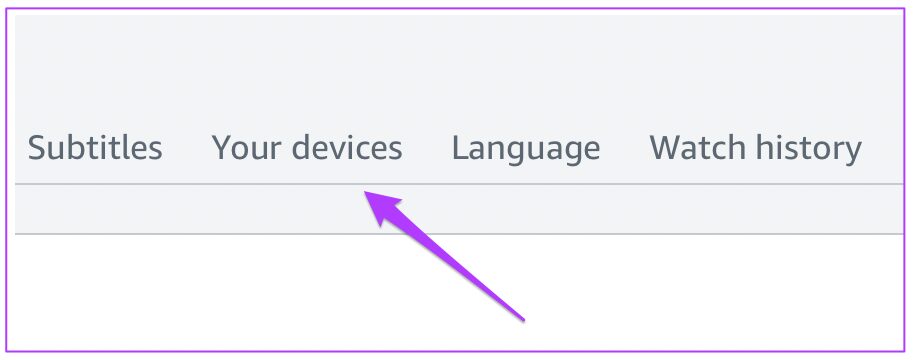
You will see the list of all the devices currently using your Amazon Prime account. Here’s how to register a device if you want to.
Step 3: Select the device you wish to deregister.
Step 4: Click on the Deregister button alongside the device name.

Step 5: Click on the Are you sure? button to confirm your choice.
Fix 3: Disable Low Power Mode and Low Data Mode
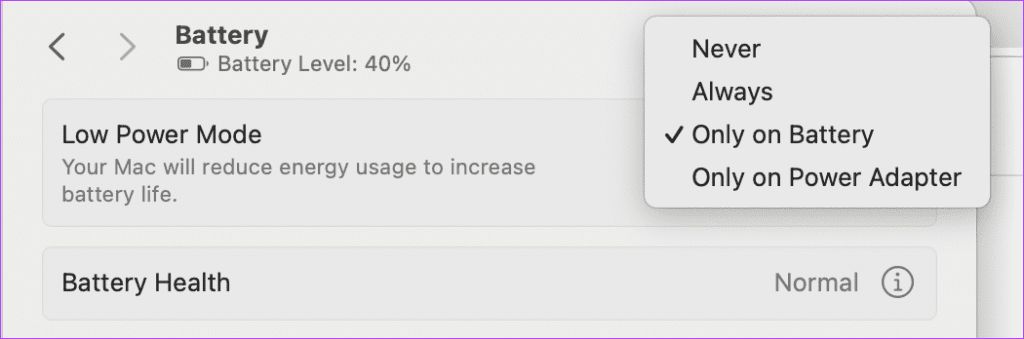
Both these features are meant to prevent battery and internet usage, respectively. This further affects the functioning of apps like Prime Video on your Mac, so we suggest disabling both of these features.
Step 1: Open Settings > Battery > disable Low Power Mode.
Step 2: Go back to Wi-Fi > Details > disable Low Data Mode.

Tip: Learn how to turn off subtitles on Prime Video
Was this helpful?
Last updated on 16 August, 2024
Read Next
 5 Ways to Fix Video Unavailable in Amazon Prime Video
Basic Fixes Check network connection: Playing Prime without any problems requires an optimum internet speed.
5 Ways to Fix Video Unavailable in Amazon Prime Video
Basic Fixes Check network connection: Playing Prime without any problems requires an optimum internet speed.
 4 Fixes for Amazon Prime Video App Not Working on Windows 11
Basic Fixes: Check device limit: You can use Prime Video to stream content on up to three devices using your account.
4 Fixes for Amazon Prime Video App Not Working on Windows 11
Basic Fixes: Check device limit: You can use Prime Video to stream content on up to three devices using your account.
 5 Ways to Fix Amazon Prime Video Not Working on Apple TV
Basic Fixes Check Amazon Prime subscription status: You can visit your Amazon account on a desktop browser to check your subscription status.
5 Ways to Fix Amazon Prime Video Not Working on Apple TV
Basic Fixes Check Amazon Prime subscription status: You can visit your Amazon account on a desktop browser to check your subscription status.
 3 Ways to Fix Amazon Prime Video Not Working on iPhone and iPad
Basic Fixes: Check your internet connection: The app may not load properly if you access Prime Video on a sketchy internet connection.
3 Ways to Fix Amazon Prime Video Not Working on iPhone and iPad
Basic Fixes: Check your internet connection: The app may not load properly if you access Prime Video on a sketchy internet connection.
 5 Ways to Fix Amazon Prime Video Doesn’t Play in HD on Browser
Basic Fixes Check network connection: Playing Prime Video in high definition or the best resolution requires an optimum internet speed.
5 Ways to Fix Amazon Prime Video Doesn’t Play in HD on Browser
Basic Fixes Check network connection: Playing Prime Video in high definition or the best resolution requires an optimum internet speed.
 3 Fixes for Black Screen With Sound in Amazon Prime Video on Mac
Basic Fixes Use Safari to play HDR content: The Safari browser on Mac supports 4K Ultra HD playback in Dolby Vision HDR for streaming platforms.
3 Fixes for Black Screen With Sound in Amazon Prime Video on Mac
Basic Fixes Use Safari to play HDR content: The Safari browser on Mac supports 4K Ultra HD playback in Dolby Vision HDR for streaming platforms.
 Amazon Prime Video – How to Fix Error Code 5004 or 5005
What Does Amazon Prime Video Error 5004 or 5005 Mean?
Amazon Prime Video – How to Fix Error Code 5004 or 5005
What Does Amazon Prime Video Error 5004 or 5005 Mean?
 4 Ways to Fix Amazon Prime Video Not Downloading Movies on iPhone
Basic Fixes Restart Prime Video: If there's any bug preventing you from downloading content, restarting your iPhone and the Prime Video app will help.
4 Ways to Fix Amazon Prime Video Not Downloading Movies on iPhone
Basic Fixes Restart Prime Video: If there's any bug preventing you from downloading content, restarting your iPhone and the Prime Video app will help.
The article above may contain affiliate links which help support Guiding Tech. The content remains unbiased and authentic and will never affect our editorial integrity.