Basic Fixes
- Check if your TV and streaming title supports Atmos: Both should provide the support of playing content mixed in this audio format.
- Plug HDMI to eARC port: The eARC or Enhanced Return Channel port helps in supporting a Dolby Atmos output if you have a home theatre setup.
- Update the streaming app: Install the latest version of your streaming app.
- Update tvOS version: Open Settings > System > Update Software > Software Update.
Fix 1: Enable Dolby Atmos
After checking your TV, you’ll need to check if Dolby Atmos has been enabled on your Apple TV 4K. While the feature comes enabled by default out of the box, here’s how you can check and manually enable Dolby Atmos.
Open Settings > Video and Audio > Audio Format > Enable Dolby Atmos.
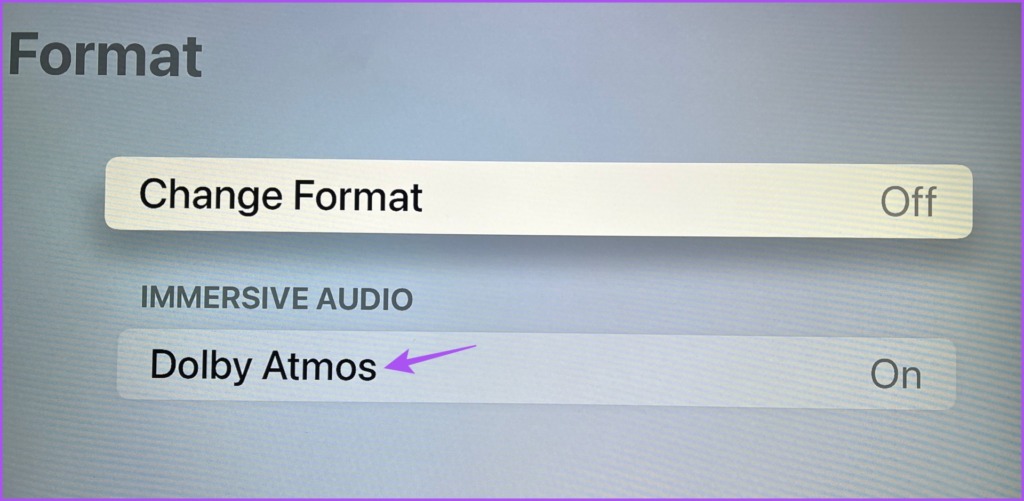
We also suggest keeping Audio Mode to Auto for selecting the best audio output on your TV.

Fix 2: Check Your Output Source
Whether you rely on TV speakers, external speakers, or a soundbar doesn’t matter. You need to check the Output Source on your Apple TV 4K. If the correct output source is not selected, you will not enjoy the desired Dolby Atmos audio experience.
Open Settings > Video and Audio > Audio Output > Check the output source.

You can select the audio output of your choice. Also, ensure that the Temporary Audio Output device is not selected.
Fix 3: Reset Apple TV
If none of the solutions work, restore the setting of your Apple TV 4K to default.
Open Settings > System > Reset.

We have also compiled a list of the best settings for your Apple TV 4K to enjoy the streaming device at your home thoroughly. Also, you can read our post if Dolby Vision is not working on your Apple TV 4K.
Was this helpful?
Last updated on 25 July, 2024
Read Next
 How to Enable Dolby Atmos on iPhone, iPad, and Mac
Apple Devices That Support Dolby Atmos Before we begin, it is important to know whether your current iPhone, iPad, or Mac supports Spatial Audio with Dolby Atmos.
How to Enable Dolby Atmos on iPhone, iPad, and Mac
Apple Devices That Support Dolby Atmos Before we begin, it is important to know whether your current iPhone, iPad, or Mac supports Spatial Audio with Dolby Atmos.
 3 Fixes for Dolby Vision Not Working on Amazon Fire TV Stick 4K
Basic Fixes Use HDMI 2.1 cable: This cable supports higher frame rates, improved bandwidth, and eARC (Audio Return Channel).
3 Fixes for Dolby Vision Not Working on Amazon Fire TV Stick 4K
Basic Fixes Use HDMI 2.1 cable: This cable supports higher frame rates, improved bandwidth, and eARC (Audio Return Channel).
 Dolby TrueHD vs DTS HD Master Audio: What’s the Difference
Dolby TrueHD and DTS HD Master Audio are two audio formats and you may find their support in popular Blu-ray players, AV receivers, and top-of-the-line soundbars.
Dolby TrueHD vs DTS HD Master Audio: What’s the Difference
Dolby TrueHD and DTS HD Master Audio are two audio formats and you may find their support in popular Blu-ray players, AV receivers, and top-of-the-line soundbars.
 2 Fixes for Apple TV Remote App Not Working on iPhone
Basic Fixes Restart your router: A simple restarting of your internet router can fix the issue once you reconnect to your network.
2 Fixes for Apple TV Remote App Not Working on iPhone
Basic Fixes Restart your router: A simple restarting of your internet router can fix the issue once you reconnect to your network.
 2 Fixes for Spotify Not Working on Apple TV
Basic Fixes Check your internet connection: If Spotify is not opening or loading on your Apple TV, check your internet connection.
2 Fixes for Spotify Not Working on Apple TV
Basic Fixes Check your internet connection: If Spotify is not opening or loading on your Apple TV, check your internet connection.
 3 Fixes for AirPlay Not Working on Apple TV
Basic Fixes Use the same Apple account and Wi-Fi network: AirPlay will only work between your Apple devices if you have the same Apple account and connected to the same
3 Fixes for AirPlay Not Working on Apple TV
Basic Fixes Use the same Apple account and Wi-Fi network: AirPlay will only work between your Apple devices if you have the same Apple account and connected to the same
 2 Fixes for FaceTime Not Working on Apple TV 4K
Basic Fixes Check model number: To use this feature, you must have the Apple TV 4K (2nd generation or later) connected to your TV.
2 Fixes for FaceTime Not Working on Apple TV 4K
Basic Fixes Check model number: To use this feature, you must have the Apple TV 4K (2nd generation or later) connected to your TV.
 4 Fixes for Subtitles Not Working on Crunchyroll
Basic Fixes The subtitles may not be available: It is possible that a title on Crunchyroll has still not received the subtitles of your choice.
4 Fixes for Subtitles Not Working on Crunchyroll
Basic Fixes The subtitles may not be available: It is possible that a title on Crunchyroll has still not received the subtitles of your choice.
The article above may contain affiliate links which help support Guiding Tech. The content remains unbiased and authentic and will never affect our editorial integrity.