

How to Start Secret Chat on Telegram
First, let’s see how you can start a Secret Chat in Telegram on Android and iOS.
Step 1: Open the Telegram app on your phone. Tap the compose button in the bottom right corner and choose the New Secret Chat option.
Step 2: Select any person from your contact list to begin Secret Chat.



Alternatively, you can also start a Secret Chat from any of your existing conversations. To do this, open the chat with the person with whom you wish to start the Secret Chat and tap the contact name at the top. Tap the three-dot menu in the top right corner and choose the Start Secret Chat option. Lastly, click on Start when prompted.

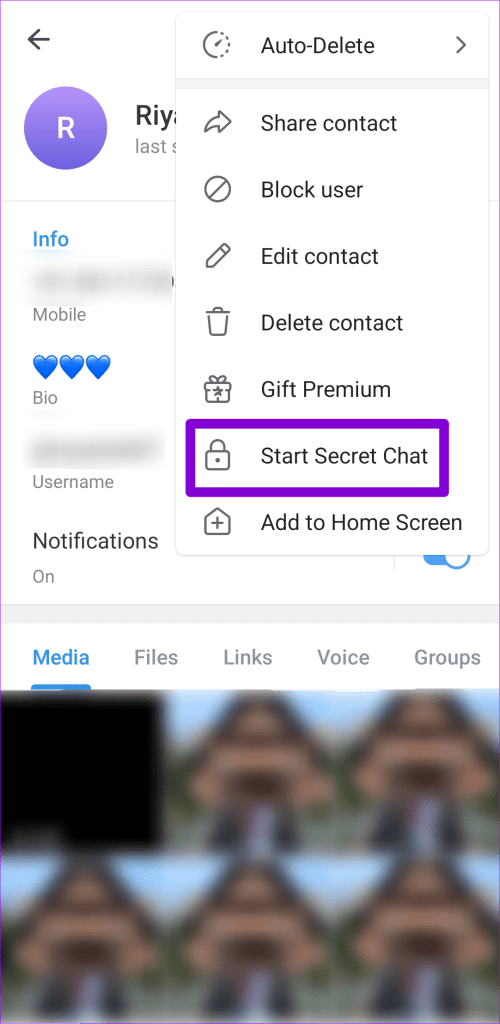
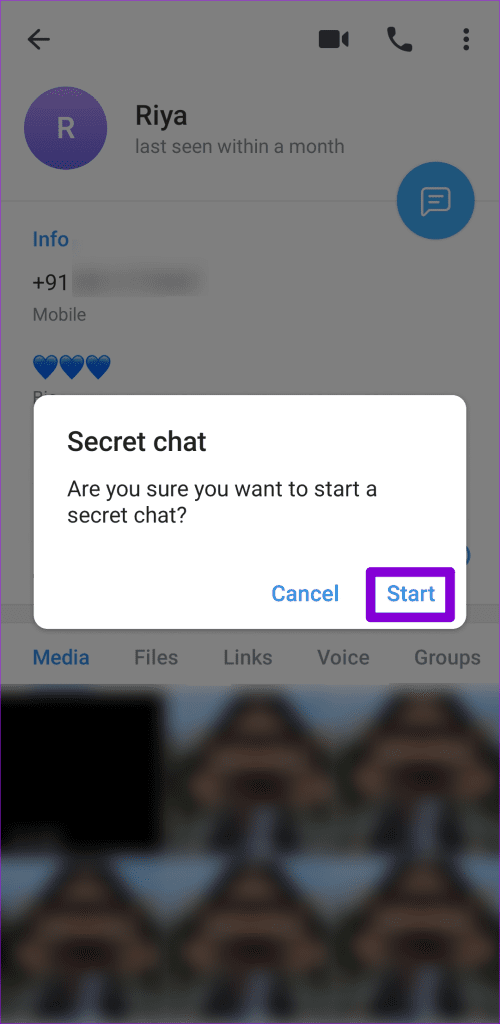
And that’s it. You’ve now started your Secret Chat with that person.
How to Send Self-Destructive Messages in Telegram’s Secret Chat
Telegram also allows you to send self-destructive messages in your Secret Chat to add an extra layer of security. Simply set a timer, and your messages will disappear from the chat. You can set the timer for anywhere between one second and one week.
To send a self-destructive message in Secret Chat, tap the clock icon in the text box. Select a duration for the self-destructing message and tap Done. If you have an Android, tap the clock icon in the profile picture at the top, set up Self-Destruct Timer, and tap Done.

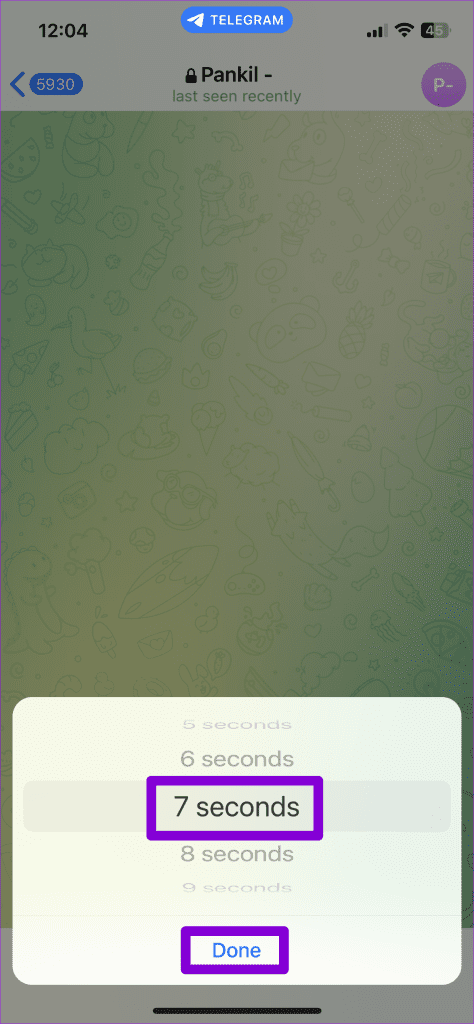
Once you enable this option, Telegram will delete any messages, files, photos, or videos from both the sender’s and recipient’s devices after the set time.
How to End Secret Chat in Telegram
If you no longer need to chat in secrecy and wish to end your Secret Chat, your only option is to delete the entire conversation. Here’s how to do it:
Step 1: Locate your Secret Chat on Telegram. Long press the chat to select it and then tap the trash icon at the top.
Step 2: Tick the checkbox if you want to delete the chat for other person as well. Then, tap Delete Chat to confirm.

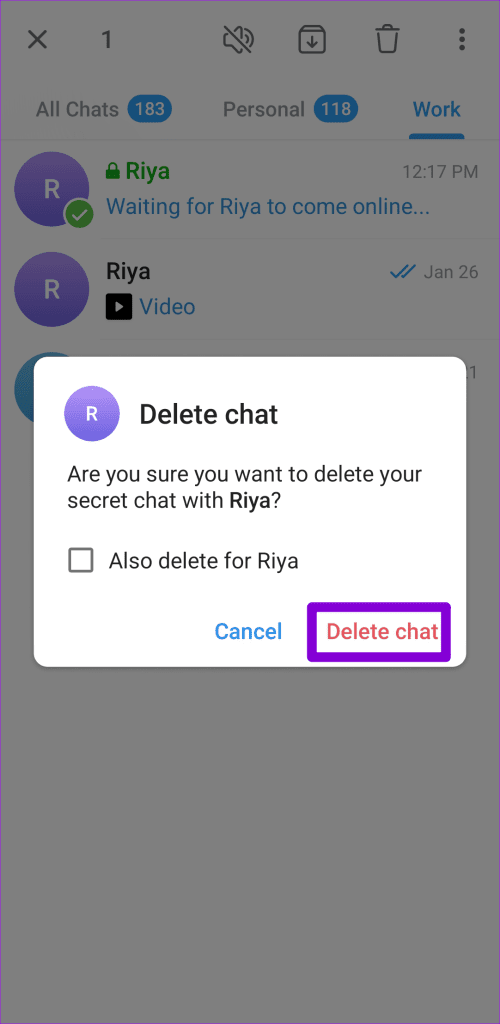
That’s it. Telegram will delete the entire Secret Chat conversation without leaving a trace.
Was this helpful?
Last updated on 03 August, 2024
1 Comment
Leave a Reply
Read Next
 Instagram’s Secret Sharing: Unraveling the Close Friends Feature
What Is the Close Friends List on Instagram?
Instagram’s Secret Sharing: Unraveling the Close Friends Feature
What Is the Close Friends List on Instagram?
 How to Start or View Secret Conversations on Messenger
Things to Know Before Using Secret Conversations on Messenger Before we start, let's briefly examine what happens when you start or view a secret conversation on Messenger.
How to Start or View Secret Conversations on Messenger
Things to Know Before Using Secret Conversations on Messenger Before we start, let's briefly examine what happens when you start or view a secret conversation on Messenger.
 How to Create and Manage Chat Folders in Telegram
In most messaging apps, managing chats has to be the most complicated task at hand.
How to Create and Manage Chat Folders in Telegram
In most messaging apps, managing chats has to be the most complicated task at hand.
 How to Video Chat Between Android and iPhone
How to Use FaceTime on Android Devices Android users can be a part of FaceTime conversations by accepting an invitation from iOS users.
How to Video Chat Between Android and iPhone
How to Use FaceTime on Android Devices Android users can be a part of FaceTime conversations by accepting an invitation from iOS users.
 How to Print WhatsApp Chat on iPhone and Android
Note: When exporting chat history, WhatsApp doesn't let you select a specific timeframe.
How to Print WhatsApp Chat on iPhone and Android
Note: When exporting chat history, WhatsApp doesn't let you select a specific timeframe.
 How to Export WhatsApp Chat to PDF on Android or iOS
Are you looking for a way to preserve your WhatsApp conversations in a convenient and shareable format?
How to Export WhatsApp Chat to PDF on Android or iOS
Are you looking for a way to preserve your WhatsApp conversations in a convenient and shareable format?
 3 Fixes for Telegram Not Syncing Contacts
Basic Fixes Switch to Wi-Fi: Contact syncing on Telegram requires faster internet speeds.
3 Fixes for Telegram Not Syncing Contacts
Basic Fixes Switch to Wi-Fi: Contact syncing on Telegram requires faster internet speeds.
 7 Fixes for Telegram Not Working on Wi-Fi on iPhone and Android
Let's look at the detailed solutions to fix Telegram not working on Wi-Fi on iPhone and Android.
7 Fixes for Telegram Not Working on Wi-Fi on iPhone and Android
Let's look at the detailed solutions to fix Telegram not working on Wi-Fi on iPhone and Android.
The article above may contain affiliate links which help support Guiding Tech. The content remains unbiased and authentic and will never affect our editorial integrity.


A member with a secret account has been trying to open a dialogue with me but has been unsuccessful. I have been trying to open a dialogue with him based on thr info he’s given me with no success.