Step 1: Open your Profile on Instagram, and tap on the three-bar menu icon at the top right corner.
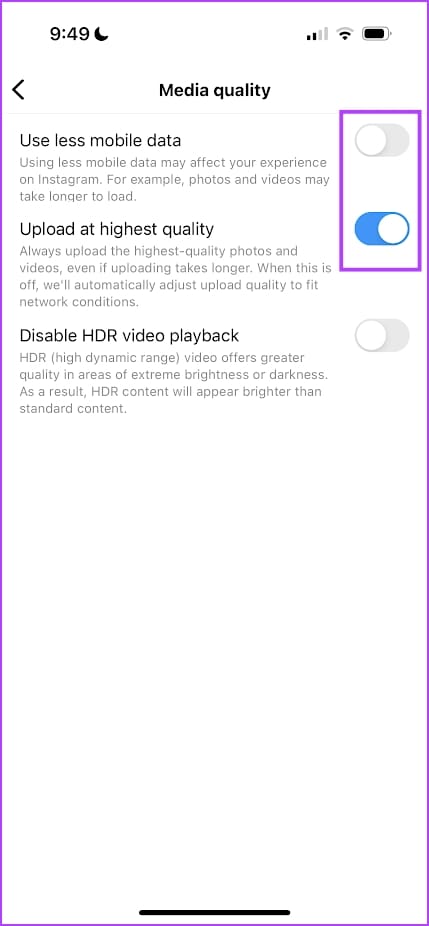
Step 2: Scroll down, select Media Quality, and turn on the toggle for Upload at highest quality.
Alternatively, turn off Use less mobile data to let Instagram prioritize quality over data usage while uploading posts or stories.


Also Read: 4 ways to fix blurry stories on Instagram
Was this helpful?
Thanks for your feedback!
Last updated on 24 July, 2024
Read Next
 How to Send High Quality Videos on WhatsApp (iPhone and Android)
Method 1.
How to Send High Quality Videos on WhatsApp (iPhone and Android)
Method 1.
 How to Send High Quality Photos and Video on Telegram
Send High-Quality Photos and Videos on Telegram on Mobile Let us show you the steps to send photos and videos without losing quality on your iPhone and Android using Telegram.
How to Send High Quality Photos and Video on Telegram
Send High-Quality Photos and Videos on Telegram on Mobile Let us show you the steps to send photos and videos without losing quality on your iPhone and Android using Telegram.
 How to Extract a High-Quality Image From Video on Android
Method 1: Use the Gallery App Some Android devices have an inbuilt feature to extract still images from video.
How to Extract a High-Quality Image From Video on Android
Method 1: Use the Gallery App Some Android devices have an inbuilt feature to extract still images from video.
 How to Record High-Quality Gameplay Videos Using OBS Studio
How to Setup OBS Studio to Recording Game Play Before recording your gameplay, you must set up OBS Studio.
How to Record High-Quality Gameplay Videos Using OBS Studio
How to Setup OBS Studio to Recording Game Play Before recording your gameplay, you must set up OBS Studio.
 Download 7 High-Quality Nothing Phone (2a) Wallpapers in 4K
Since its inception, Nothing has been the talk of the town, with fans buzzing about its innovative design and customizable lights.
Download 7 High-Quality Nothing Phone (2a) Wallpapers in 4K
Since its inception, Nothing has been the talk of the town, with fans buzzing about its innovative design and customizable lights.
 5 Ways to Fix Bad Sound Quality on Spotify Mobile App
Basic Fixes Check Your Spotify Plan: Using a free version of Spotify does not offer the best audio quality.
5 Ways to Fix Bad Sound Quality on Spotify Mobile App
Basic Fixes Check Your Spotify Plan: Using a free version of Spotify does not offer the best audio quality.
 4 Ways to Fix YouTube Quality Unavailable on iOS and Android
Basic Fixes Check Internet Connectivity: Ensure your device is connected to a Wi-Fi network or cellular data with good signal strength and an active plan.
4 Ways to Fix YouTube Quality Unavailable on iOS and Android
Basic Fixes Check Internet Connectivity: Ensure your device is connected to a Wi-Fi network or cellular data with good signal strength and an active plan.
 5 Ways to Fix Netflix Streaming in Low Quality on Android and iPhone
Common Fixes Check internet speed - I recommend at least 5Mbps to stream Netflix in high definition (HD) and a minimum of 25Mbps for Ultra HD and 4K video quality.
5 Ways to Fix Netflix Streaming in Low Quality on Android and iPhone
Common Fixes Check internet speed - I recommend at least 5Mbps to stream Netflix in high definition (HD) and a minimum of 25Mbps for Ultra HD and 4K video quality.
The article above may contain affiliate links which help support Guiding Tech. The content remains unbiased and authentic and will never affect our editorial integrity.