

How to Find Lyrics on YouTube Music on Mobile
Let us start by showing the steps to check real-time lyrics on the YouTube Music app on your iPhone or Android phone. YouTube has simplified the method to easily check song lyrics and hum your favorite tunes while listening to them. The steps remain the same for iPhone and Android phones.
Step 1: Open the YouTube Music app on your iPhone or Android.
Step 2: Start playing a song of your choice and tap the Lyrics tab at the bottom of the playback window.


You will notice a new window on your screen that syncs the audio in real time with the corresponding lyrics. If you have a YouTube Premium subscription, enjoy your songs ad-free.
How to Find Lyrics on YouTube Music on Desktop
It’s good that the option to see song lyrics on YouTube Music is also available for desktop users. If you prefer listening to songs on your Mac or Windows PC, here’s how to check real-time song lyrics.
Step 1: Open YouTube Music on your browser.
Step 2: Sign in to your Google account.
Step 3: Start playing the song of your choice and click the Lyrics tab on the right side.
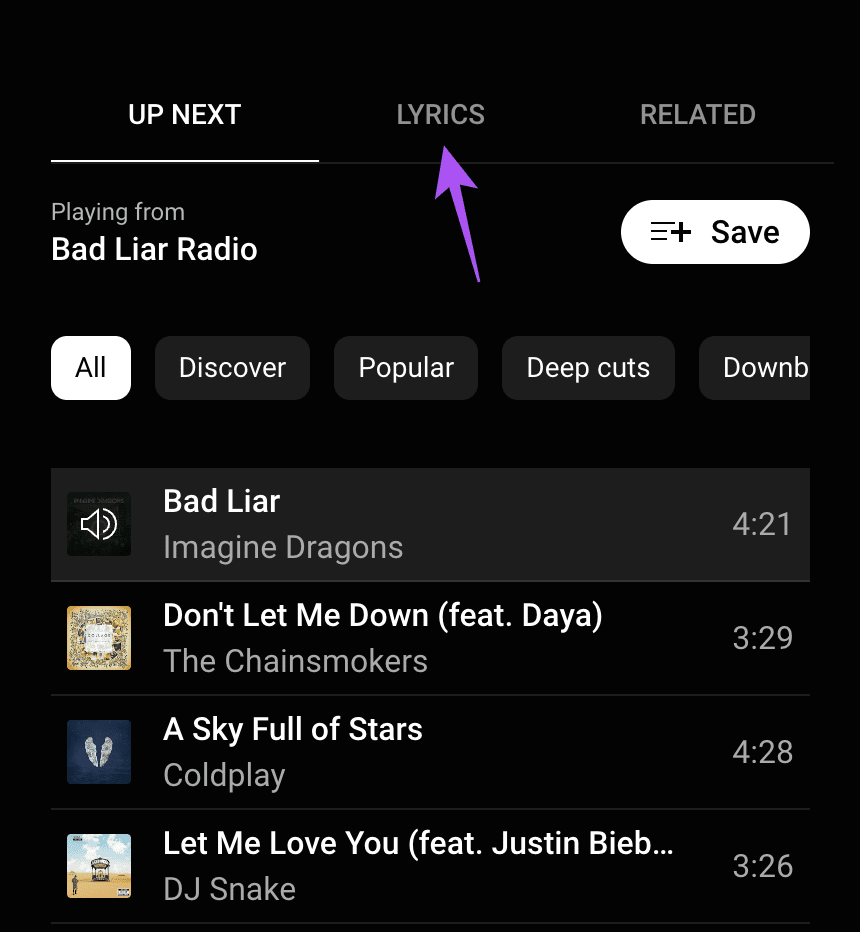
You will see the lyrics of the song. However, the lyrics won’t sync with the audio playback. You will have to scroll them down to sing along.

Tip: Check out our post if YouTube Music is not working in Apple CarPlay
Was this helpful?
Last updated on 28 August, 2024
2 Comments
Leave a Reply
Read Next
 4 Ways to Fix “Song Is Unavailable” Error in YouTube Music App
Try Basic Fixes Try playing other songs or playlists: The availability of songs on YouTube Music can vary depending on your geographical location and YouTube's agreements with music copyright owners.
4 Ways to Fix “Song Is Unavailable” Error in YouTube Music App
Try Basic Fixes Try playing other songs or playlists: The availability of songs on YouTube Music can vary depending on your geographical location and YouTube's agreements with music copyright owners.
 How to Clear Song History on Amazon Prime Music
While Amazon Music allows you to remove music from recently played history, they are still considered from recommendations.
How to Clear Song History on Amazon Prime Music
While Amazon Music allows you to remove music from recently played history, they are still considered from recommendations.
 5 Offline Android Music Player App With Lyrics Support
1.
5 Offline Android Music Player App With Lyrics Support
1.
 4 Ways to Fix ‘This Song Is Not Available in Your Region’ in Apple Music on iPhone
Basic Fixes Check if Apple Music is down: Check the system status of Apple Music on this dashboard and check if you're facing a problem with your Wi-Fi or cellular
4 Ways to Fix ‘This Song Is Not Available in Your Region’ in Apple Music on iPhone
Basic Fixes Check if Apple Music is down: Check the system status of Apple Music on this dashboard and check if you're facing a problem with your Wi-Fi or cellular
 How to View Lyrics on Spotify Mobile, Desktop and TV
How to See Lyrics in Spotify for Desktop or Web Players If lyrics are available for that particular song, you’ll notice a tiny Mic icon in the Now Playing bar
How to View Lyrics on Spotify Mobile, Desktop and TV
How to See Lyrics in Spotify for Desktop or Web Players If lyrics are available for that particular song, you’ll notice a tiny Mic icon in the Now Playing bar
 3 Ways to Fix Lyrics Not Showing on Spotify for Android and iPhone
Basic Fixes Try playing another song: Spotify does not have lyrics for every track in its library.
3 Ways to Fix Lyrics Not Showing on Spotify for Android and iPhone
Basic Fixes Try playing another song: Spotify does not have lyrics for every track in its library.
 How to Find a Song by Humming the Tune on Mobile or Web
Although the market is brimming with music discovery software like Shazam, Beatfind, Musixmatch, etc.
How to Find a Song by Humming the Tune on Mobile or Web
Although the market is brimming with music discovery software like Shazam, Beatfind, Musixmatch, etc.
 How to Loop a Song on Spotify without Manual Intervention
How to Put a Song on Repeat in the Spotify App on a PC Quick Tip: You can use keyboard shortcuts to enable repeat on the desktop player: Ctrl +
How to Loop a Song on Spotify without Manual Intervention
How to Put a Song on Repeat in the Spotify App on a PC Quick Tip: You can use keyboard shortcuts to enable repeat on the desktop player: Ctrl +
The article above may contain affiliate links which help support Guiding Tech. The content remains unbiased and authentic and will never affect our editorial integrity.
How to get lyrics
I only have “Next” and similar ones, how can I solve this problem?