How to Find Saved Drafts on the Facebook Mobile App
When you save a draft on the Facebook app on Android, you will instantly receive a notification (both as a push notification and on the Facebook notification tab), which allows you to open the draft directly. However, things are a little different with the iOS app.
Note: We are considering that you have already saved your post to drafts on Facebook.
On Facebook Android App
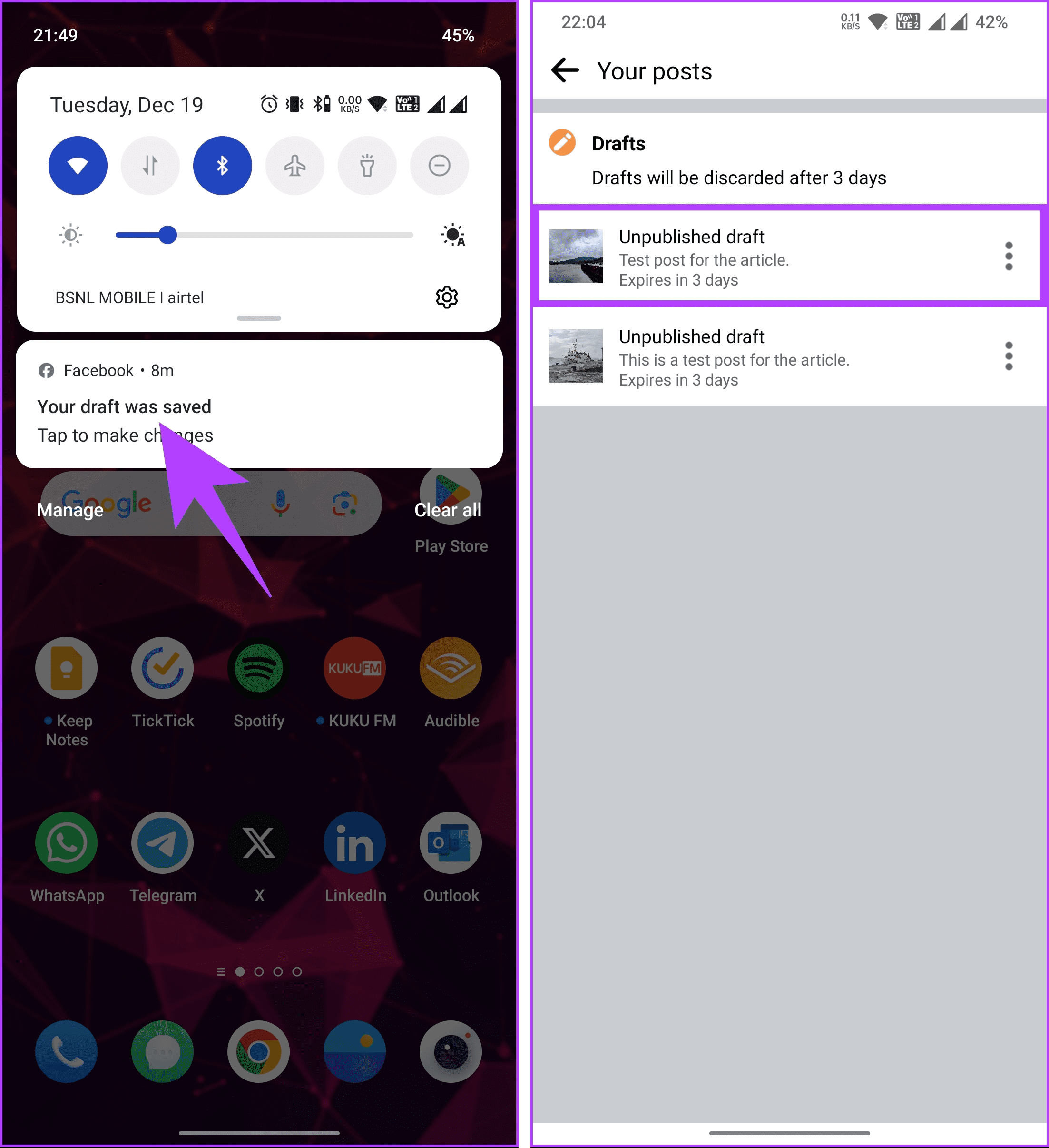
Step 1: Pull down the notification slider from the top. Then, tap on the Facebook draft notification.
Step 2: You will be taken to the draft screen, where you will see a preview of the drafts you saved and the expiration date. Tap on the draft you want to open from the list.
If you want to delete the draft you no longer wish to use, continue with the steps below.
Step 3: Tap on the three-dot icon next to the draft. From the menu, choose Discard draft.
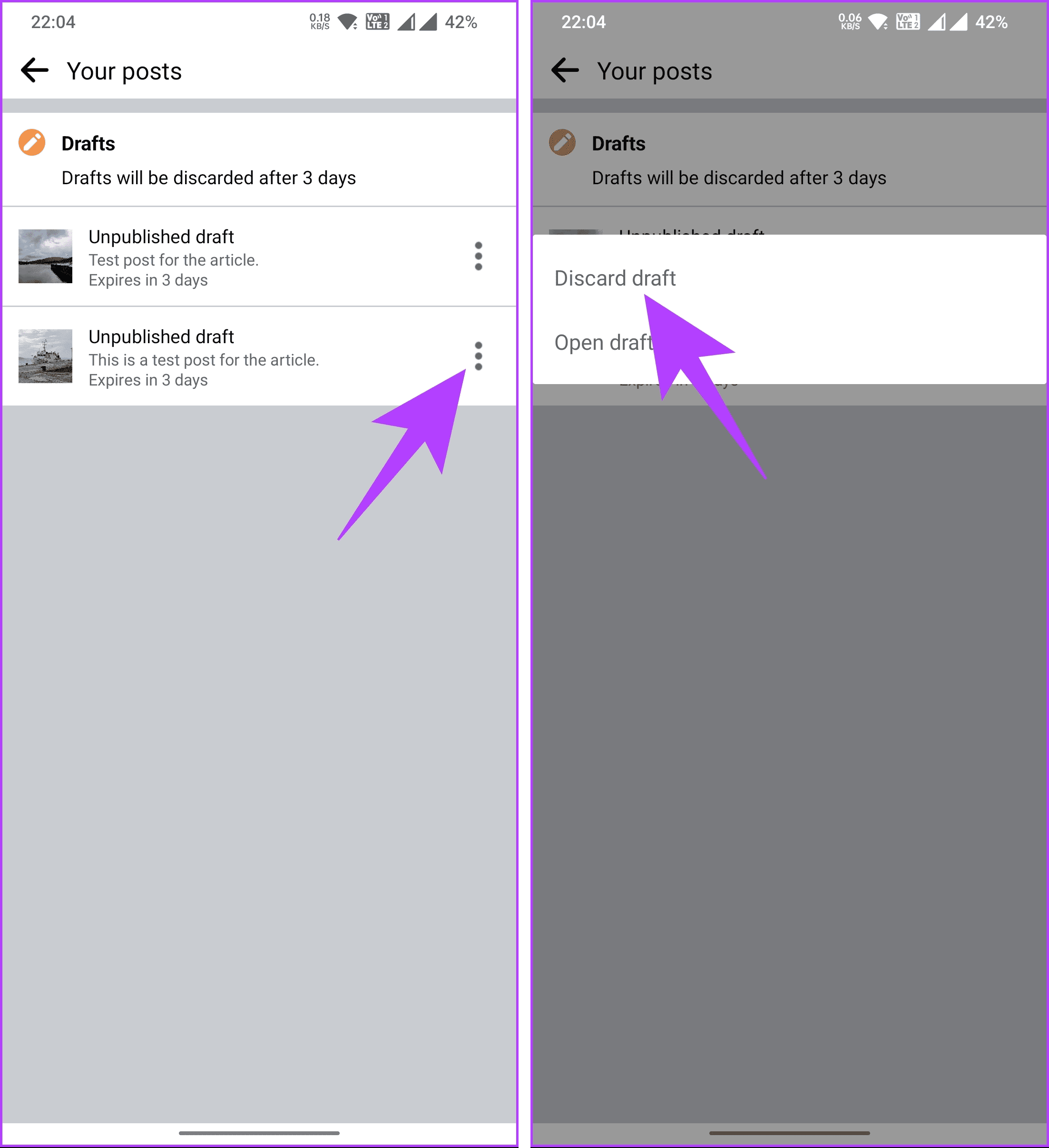
Step 4: In the pop-up menu, select Delete.
Also Read: How to view your sent friend requests on Facebook and Instagram
On Facebook iOS App
Unlike Android, the Facebook iOS app doesn’t send push notifications; instead, you will see a snack bar when you save your post to draft. Follow the below steps to access the draft.
Step 1: Launch the Facebook app on your iPhone. Then, tap the What’s on your mind? text box.

Step 2: You will be taken to the Create post screen, where you may find the text or content you previously wrote or saved as drafts.
The last draft is likely lost if you can’t locate it, and there is no chance of recovering it. If you don’t use the Facebook app to post on Facebook, here’s how to find draft posts on Facebook on the web; keep reading.
Also Read: How to get Facebook birthday notifications on desktop and mobile
How to Get to Facebook Drafts on Desktop
Note: The draft cannot be accessed if the tab where you created the post as a draft was closed, refreshed, or opened as another Facebook tab.
Step 1: Open Facebook in your preferred browser. Then, log in to your account if not already.
Step 2: Underneath the Stories section, click on the text box.
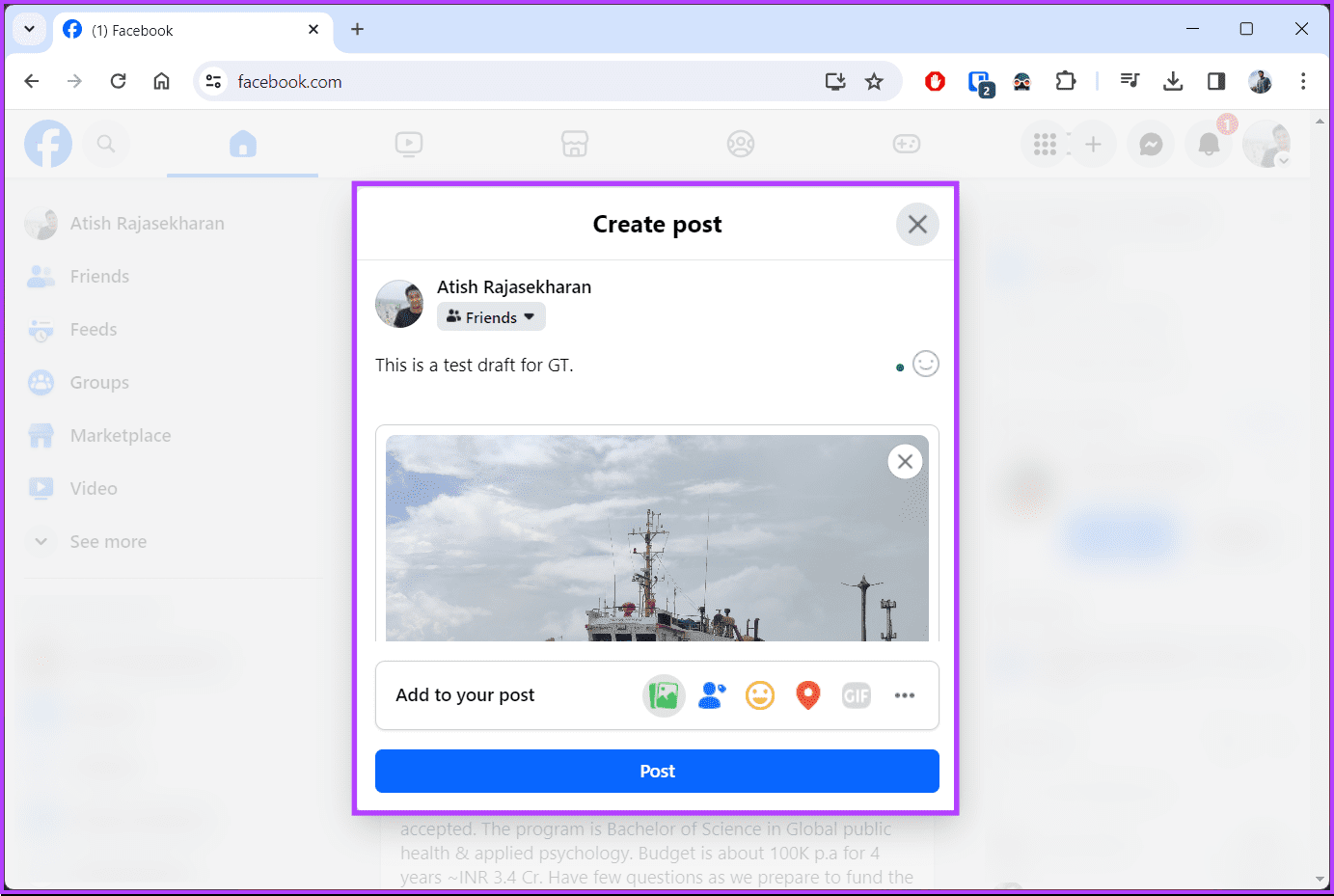
Whenever you click on the text box, if you had previously drafted something and didn’t close the tab, it should open the Create Post modal, where you can see the draft you saved.
FAQs
Drafts are private and not visible to others. They are saved for your convenience and are not published until you choose to do so.
Yes, drafts can include both text and media. Whether writing a status update or creating a post with photos, all elements should be saved in the draft.
If you accidentally close the draft window without saving it, your changes may be lost. Facebook usually prompts you to confirm whether you want to leave the page with unsaved changes, but it’s crucial to be cautious.
Unfortunately, once you delete a draft, it’s usually permanent. Facebook doesn’t have a feature for recovering deleted drafts.
Was this helpful?
Last updated on 20 August, 2024
Read Next
 How to Save, Access, or Delete Drafts on Instagram
How to Use a Draft for Instagram Posts Here's how you can save, access, publish, or delete drafts for posts on the Instagram app.
How to Save, Access, or Delete Drafts on Instagram
How to Use a Draft for Instagram Posts Here's how you can save, access, publish, or delete drafts for posts on the Instagram app.
 4 Ways to Fix Microsoft Outlook Not Saving Drafts on Windows
Try Basic Fixes Use Outlook search to locate the draft: Outlook may sometimes fail to sort your drafts correctly, making it difficult to locate them.
4 Ways to Fix Microsoft Outlook Not Saving Drafts on Windows
Try Basic Fixes Use Outlook search to locate the draft: Outlook may sometimes fail to sort your drafts correctly, making it difficult to locate them.
 How to Leave a Facebook Group on Mobile or Desktop
Facebook is a hub for community connection.
How to Leave a Facebook Group on Mobile or Desktop
Facebook is a hub for community connection.
 How to Find the Email You Used for Facebook on Mobile or Desktop
Can I Find Out What Email I Used for Facebook Without Logging In Unfortunately, you cannot find the email associated with your Facebook account without logging in.
How to Find the Email You Used for Facebook on Mobile or Desktop
Can I Find Out What Email I Used for Facebook Without Logging In Unfortunately, you cannot find the email associated with your Facebook account without logging in.
 How to Hide Reels on Facebook on Desktop or Mobile
How to Remove Reels on Facebook Note: For demonstration, we will go with a desktop.
How to Hide Reels on Facebook on Desktop or Mobile
How to Remove Reels on Facebook Note: For demonstration, we will go with a desktop.
 3 Ways to Fix Facebook “No Data Available” Error on Desktop and Mobile
Try Basic Fixes Check if Facebook is down: Facebook is not immune to occasional server-level hiccups.
3 Ways to Fix Facebook “No Data Available” Error on Desktop and Mobile
Try Basic Fixes Check if Facebook is down: Facebook is not immune to occasional server-level hiccups.
 How to Get Facebook Birthday Notifications on Desktop and Mobile
Facebook is not just about sharing updates and connecting with friends; it's also a platform for celebrating special moments, like birthdays.
How to Get Facebook Birthday Notifications on Desktop and Mobile
Facebook is not just about sharing updates and connecting with friends; it's also a platform for celebrating special moments, like birthdays.
 How to Delete Facebook Watch History on Mobile and Desktop
Delete Entire Facebook Watch History on Mobile For the most part, the majority of folks use their phone to browse through Facebook.
How to Delete Facebook Watch History on Mobile and Desktop
Delete Entire Facebook Watch History on Mobile For the most part, the majority of folks use their phone to browse through Facebook.
The article above may contain affiliate links which help support Guiding Tech. The content remains unbiased and authentic and will never affect our editorial integrity.