

Basic Fixes
- Check TikTok servers: If TikTok servers are down, you may not be able to follow accounts. You can check if the servers are down by visiting Downdetector. In case of an outage, wait for a while and then try following accounts.
- Sign out and sign back in: Sometimes, a simple fix like signing out of the app and signing back in can fix paltry issues like these.
- Use TikTok on the web: Instead of the app, use TikTok on the web to see if you’re able to follow accounts.
Fix 1: TikTok Has Recognized Your Actions as a Bot
Did you like too many videos or shared dozens of comments in a short time? Your quick actions may flag you on TikTok and may label your account as a bot or someone performing suspicious activities. You’ll need to slow down and try after some time.
Fix 2: Your Account Is Shadowbanned
Social media apps come with rules and community guidelines to follow. When you break such rules by posting irrelevant content, the company may shadowban your account temporarily. You must wait for a day or two and let the company lift the ban from your account.
Also Read: How to reset TikTok algorithm
Fix 3: It’s a Private Account
Some TikTok users may lock their profile to keep prying eyes away. When you try to follow such private accounts, the recipient needs to approve it. Until the person approves you, you can’t glance over their TikTok account.
Fix 4: Disable VPN
TikTok has been in the crosshairs of many regions around the world. The Chinese-owned company has had difficult times with regulators and several governments. As a result, TikTok is banned in several countries worldwide.
If you use a VPN network and connect to another region where TikTok is banned, you may face issues with following someone. You need to disable the VPN and try again.
Fix 5: Clear TikTok Cache
TikTok collects cache files in the background to load videos on your home feed quickly. Sometimes, TikTok collects corrupt cache, which often leads to issues like ‘can’t follow someone’. It’s time to clear the TikTok cache and start from scratch.
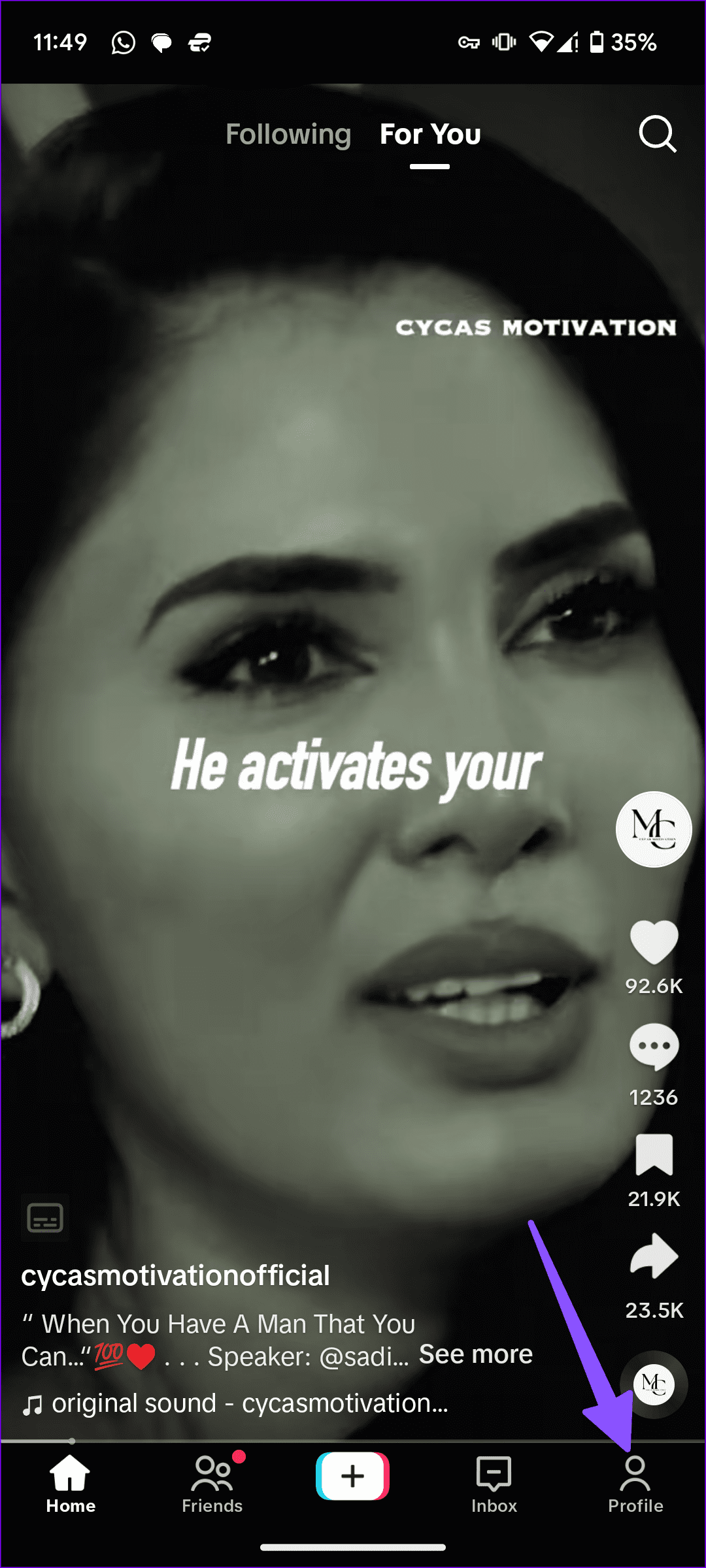
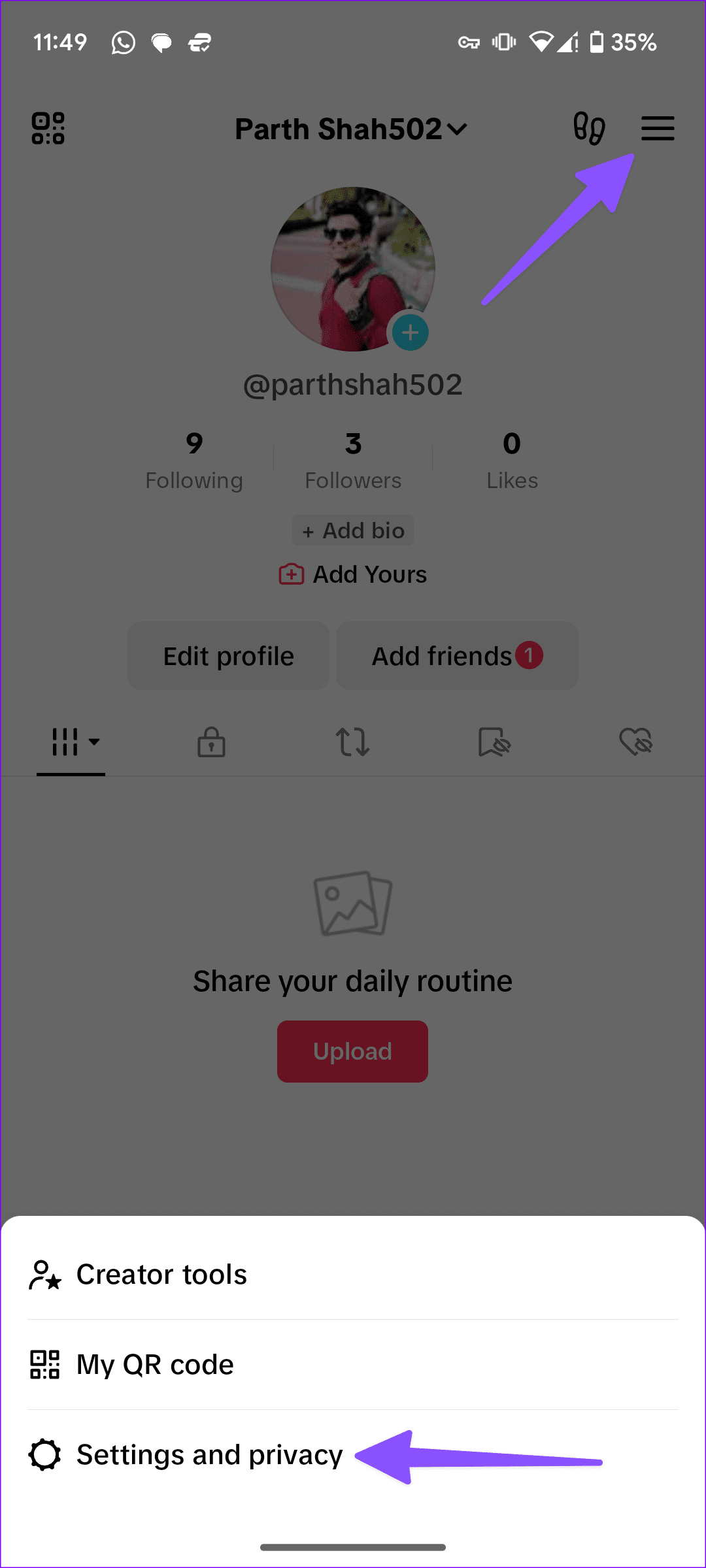
Step 1: Launch TikTok and tap your profile icon at the bottom-right corner. Then tap the hamburger menu at the top-right corner and choose Settings and privacy from the pop-up.
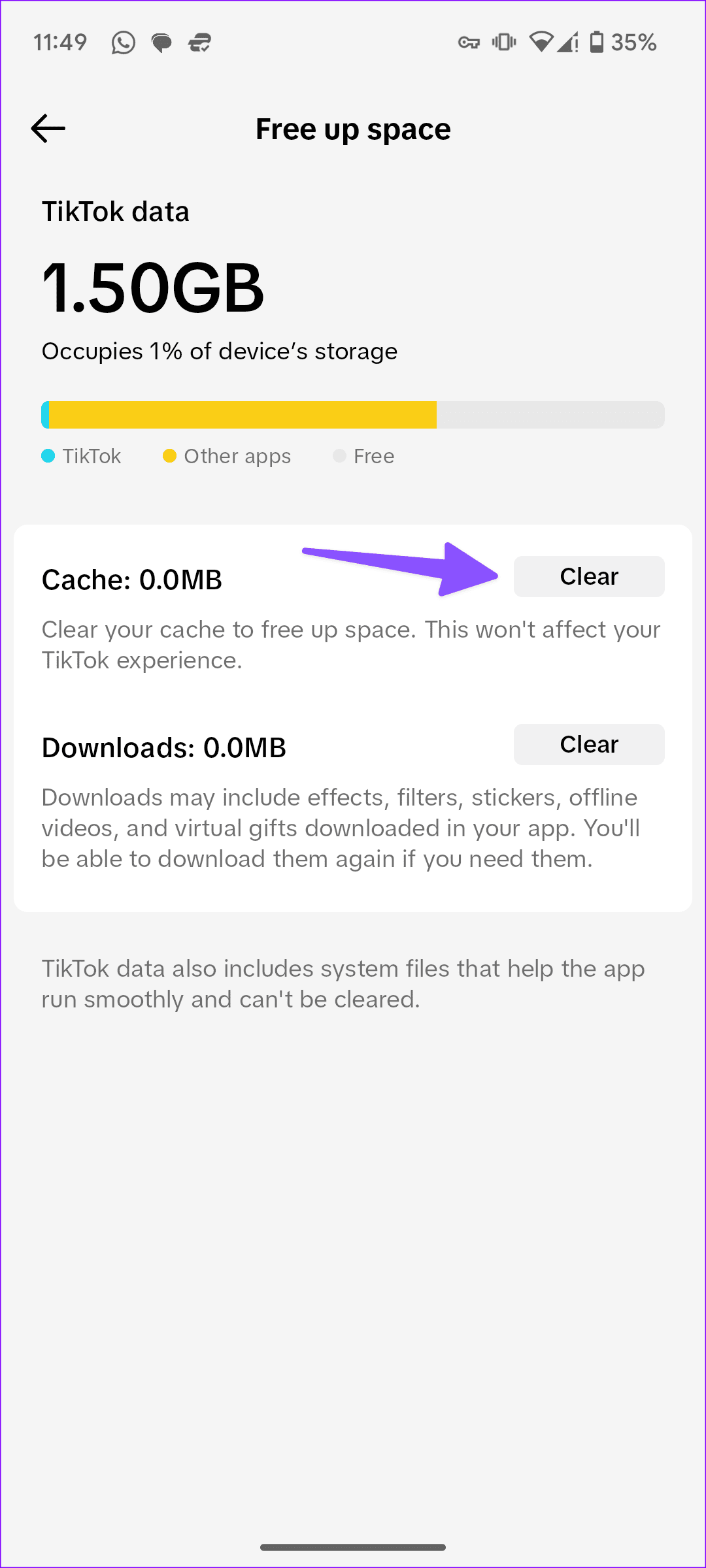
Step 2: Scroll to the Cache & Cellular section and select Free up space. Then tap the Clear button next to Cache from the following menu.

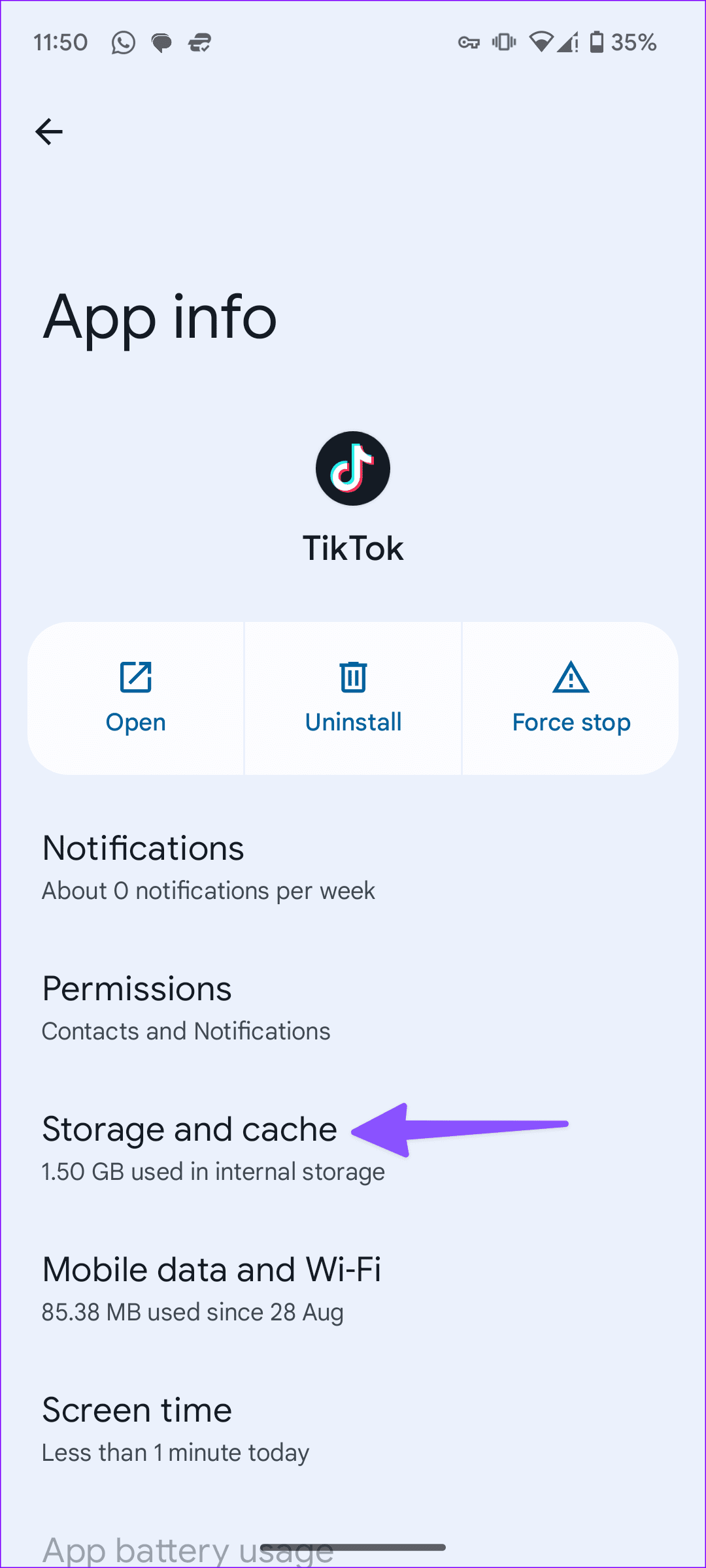
Android users can clear the cache after opening the App Info menu of the TikTok app.
Step 1: Long-press on TikTok and tap the ‘i‘ icon to open the App Info menu.
Step 2: Select Storage and cache and tap Clear cache from the following menu.

Was this helpful?
Last updated on 31 July, 2024
1 Comment
Leave a Reply
Read Next
 Why Can’t I Follow Someone on Instagram
Preliminary Fixes You Have Exceeded Limit: Instagram has limits in place to prevent spam and misuse of its platform.
Why Can’t I Follow Someone on Instagram
Preliminary Fixes You Have Exceeded Limit: Instagram has limits in place to prevent spam and misuse of its platform.
 4 Fixes for Roblox Not Letting Me Log In
Try Basic Fixes Check if Roblox is down: Sometimes, server congestion or other related issues can prevent you from accessing your Roblox account.
4 Fixes for Roblox Not Letting Me Log In
Try Basic Fixes Check if Roblox is down: Sometimes, server congestion or other related issues can prevent you from accessing your Roblox account.
 TikTok vs TikTok Lite: What’s Best for You?
TikTok (previously known as Musical.ly) is one of the massively growing social media apps out there, and it's easy to see why.
TikTok vs TikTok Lite: What’s Best for You?
TikTok (previously known as Musical.ly) is one of the massively growing social media apps out there, and it's easy to see why.
 What Happens When You Block Someone on TikTok
 Blocked accounts can’t see your profile and stories.
What Happens When You Block Someone on TikTok
What Happens When You Block Someone on TikTok Blocked accounts can’t see your profile and stories.
 How to Hide Who You Follow on Instagram
3 Workarounds to Hide Following List on Instagram Let's look at three ways to hide the people or accounts you follow on Instagram.
How to Hide Who You Follow on Instagram
3 Workarounds to Hide Following List on Instagram Let's look at three ways to hide the people or accounts you follow on Instagram.
 How to Turn Off Follow Suggestions on Instagram
Turn Off Follow Suggestion on Instagram On Mobile After understanding how Instagram suggests other accounts to follow, here is a guide on how to disable this feature in the app.
How to Turn Off Follow Suggestions on Instagram
Turn Off Follow Suggestion on Instagram On Mobile After understanding how Instagram suggests other accounts to follow, here is a guide on how to disable this feature in the app.
 Top 9 Ways to Fix ‘No Internet Connection’ Error on TikTok
TikTok continues to enjoy its tremendous run in the social media space.
Top 9 Ways to Fix ‘No Internet Connection’ Error on TikTok
TikTok continues to enjoy its tremendous run in the social media space.
 4 Ways to Fix TikTok Search Not Working
Quick Fixes Check TikTok Servers: If TikTok servers are down, you may run into glitches with the search function.
4 Ways to Fix TikTok Search Not Working
Quick Fixes Check TikTok Servers: If TikTok servers are down, you may run into glitches with the search function.
The article above may contain affiliate links which help support Guiding Tech. The content remains unbiased and authentic and will never affect our editorial integrity.

Can’t follow my friends