Why You Can’t Create an Instagram Account?
Here are some reasons why you’re unable to create a new Instagram account:
- Instagram’s servers are down.
- You’ve exceeded the sign-up limit on your email ID or phone number.
- App or software bugs.
- A bad internet connection.
- A blocked IP address.
Basic Fixes:
- Check Instagram server status: If the Instagram servers are down, they might not register your request and show an error when creating a new account. When this happens, check Instagram’s Server page. If there are outage reports, wait before trying again.
- Close and restart the Instagram app: If you’ve been using the Instagram app and it won’t let you make a new account, there might be issues with the Instagram app itself. To fix this, close and reopen the Instagram app and try again.
- Use a VPN: Instagram has blocked certain IP addresses in some cases. If this happens to you, use a VPN app to change your IP address and resume signing up to Instagram.
- Try using the Instagram website or app: If you’re having issues creating a new account on the Instagram app, switch to a browser on your Windows or Mac device. Similarly, if you face an issue on a web browser, use the Instagram app to create a new account.
- Use a different device: If you’ve been facing Instagram sign-up issues on a particular device, use another device to see if this fixes the problem.
- Check for app updates: If you’ve had the Instagram app installed on your device for a while but didn’t keep up with regular updates, it might be why Instagram won’t let you make a new account. So, check and install the latest app updates before trying again.
Fix 1: Use a Different Email ID or Mobile Number
While Instagram usually has no restrictions on how many accounts you want to create, certain restrictions apply when you’re using the same email ID or mobile number to create multiple accounts. So, try using a different or new email address or mobile number when signing up for Instagram and see if it works.
Fix 2: Add a New Account to an Existing Instagram Account
You can add a new account even if you already have an existing account on Instagram. Using this feature, you can create a new account on Instagram and immediately add it to your accounts list on the Instagram app. Although, at a time, you can only add 5 accounts. Follow the below steps to do it.
Note: Unless updated, the mobile number and email ID for your new account will be automatically fetched from your current signed-in details.
Step 1: Open the Instagram app and tap on your profile icon.
Step 2: Then, tap the hamburger icon. Tap on Settings and privacy.
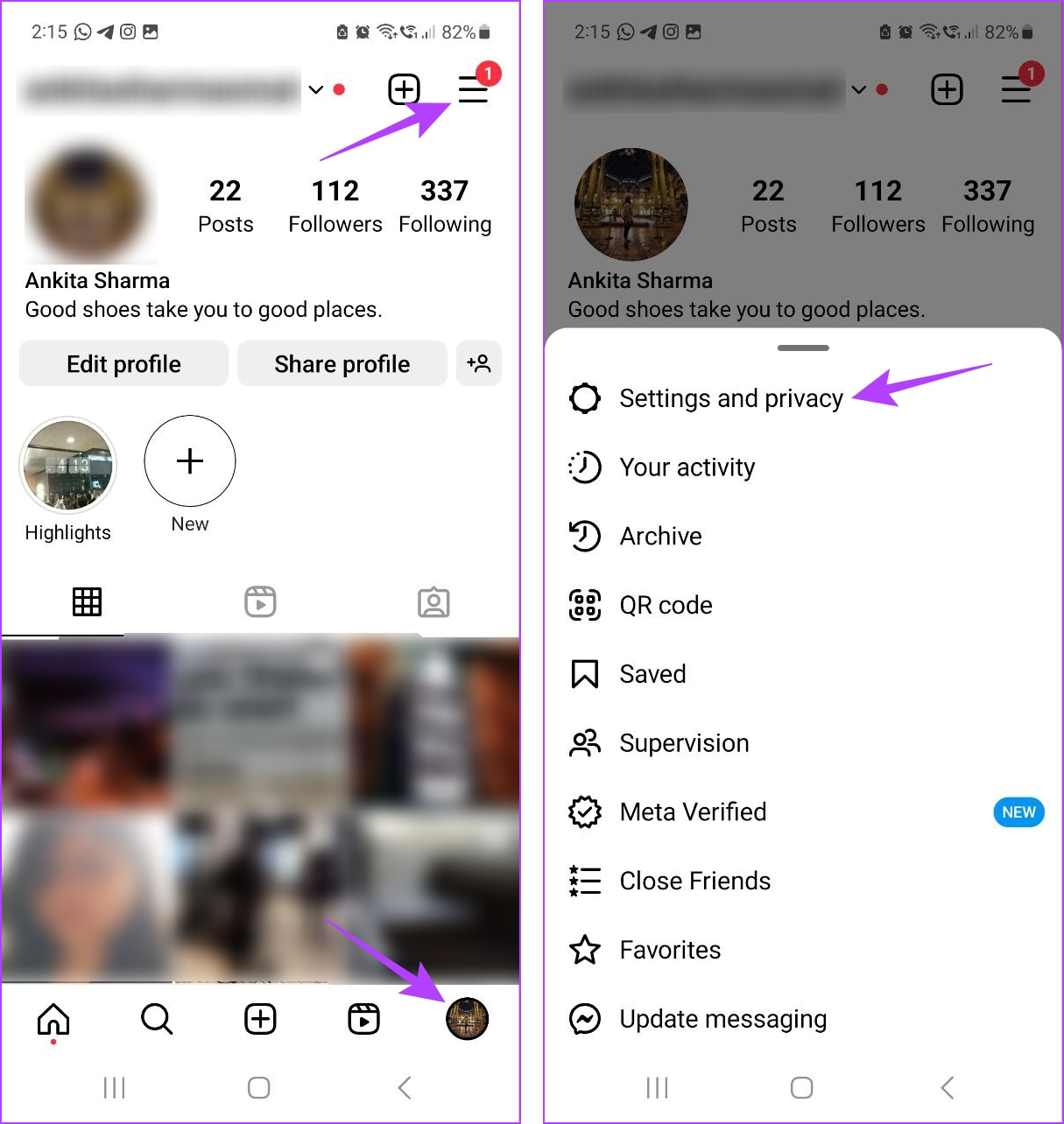
Step 3: Scroll down and tap on Add account. Select Create new account.
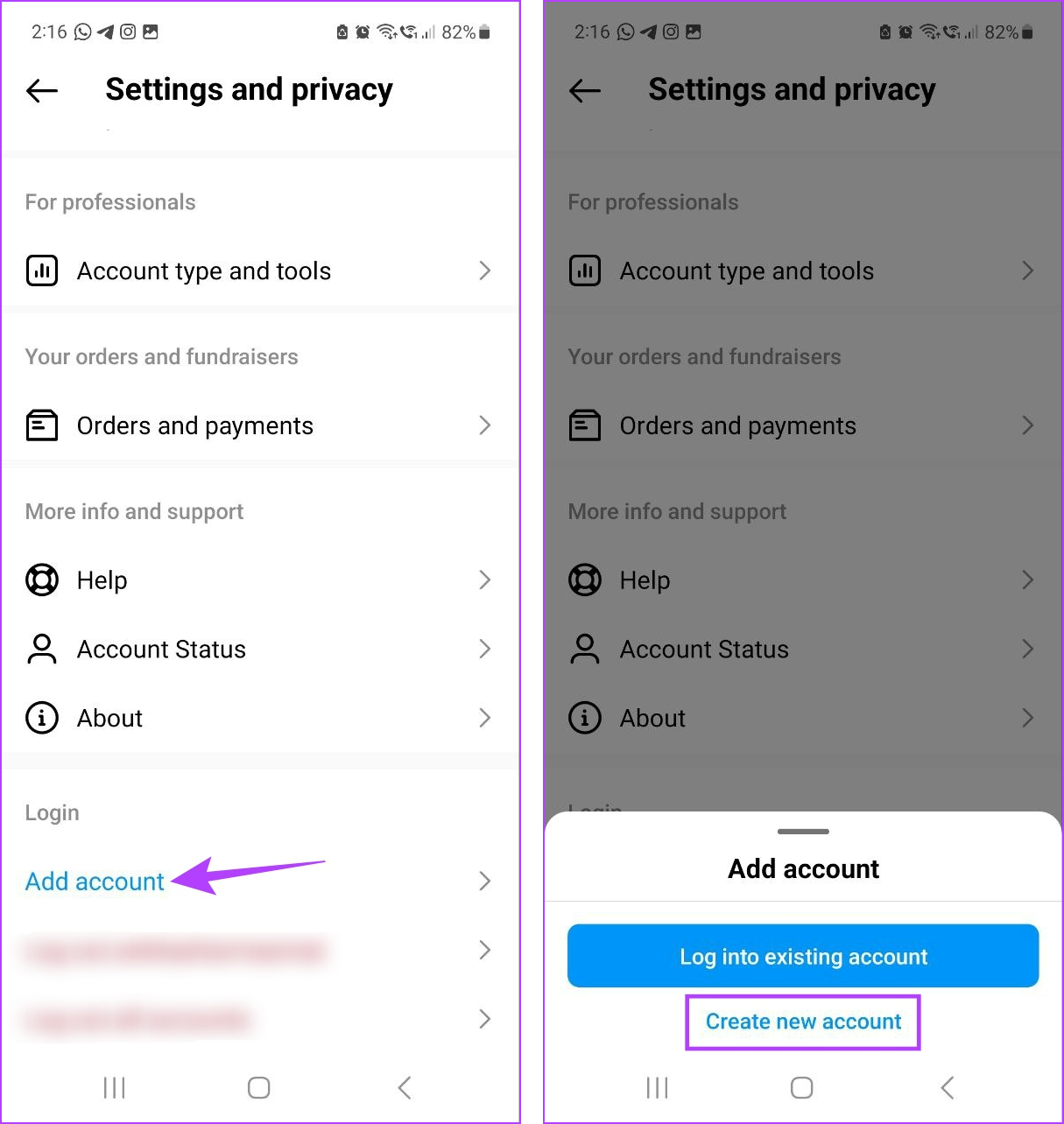
Step 4: Type the desired username and tap on Next. Enter the password and tap on Next.
Step 5: Tap on Complete sign up to finish sign-up.


Once your new account has been created, go into the account settings and update your mobile number and email ID as you want.
Fix 3: Sign up Using Your Facebook Account
Since Instagram and Facebook are owned by Meta, you can use your existing Facebook account to create a new Instagram account. This can help you bypass certain restrictions, causing your Instagram sign-ups to fail. Here’s how.
Step 1: Open Instagram and tap on Continue as.
Step 2: When prompted, enter your new Instagram username and tap on Next.


Follow the on-screen instructions and sign up for Instagram using your Facebook account. If you still cannot sign up, contact Instagram support for further assistance.
FAQ
As mentioned above, you can create up to 5 Instagram accounts per phone number. You can also add up to 5 accounts to the same device and switch between them as required.
Was this helpful?
Last updated on 28 June, 2024
Read Next
 Why Is My Facebook Account Restricted and How to Fix It
What Facebook Account Restriction There are two types of restrictions on Facebook.
Why Is My Facebook Account Restricted and How to Fix It
What Facebook Account Restriction There are two types of restrictions on Facebook.
 Why Is My TikTok Account Suspended
TikTok has taken the social media market by storm.
Why Is My TikTok Account Suspended
TikTok has taken the social media market by storm.
 Why Can’t I Share Instagram Posts to My Story?
Why Can’t I Share Posts to Story on Instagram 1.
Why Can’t I Share Instagram Posts to My Story?
Why Can’t I Share Posts to Story on Instagram 1.
 Why Can’t I Share My Facebook Post to Instagram
Preliminary Checks Before Troubleshooting Is the post private or restricted?
Why Can’t I Share My Facebook Post to Instagram
Preliminary Checks Before Troubleshooting Is the post private or restricted?
 Why Can’t I Follow Someone on Instagram
Preliminary Fixes You Have Exceeded Limit: Instagram has limits in place to prevent spam and misuse of its platform.
Why Can’t I Follow Someone on Instagram
Preliminary Fixes You Have Exceeded Limit: Instagram has limits in place to prevent spam and misuse of its platform.
 Why Are My Instagram Reels Blurry and How to Fix It
Why Do My Instagram Reels Look Blurry?
Why Are My Instagram Reels Blurry and How to Fix It
Why Do My Instagram Reels Look Blurry?
 Why Can’t I Subscribe to a Creator on Instagram
Why You Are Unable to Subscribe to a Creator on Instagram Creator Subscriptions are available for accounts with more than 10,000 followers on Instagram.
Why Can’t I Subscribe to a Creator on Instagram
Why You Are Unable to Subscribe to a Creator on Instagram Creator Subscriptions are available for accounts with more than 10,000 followers on Instagram.
 How to Know if an Instagram Account Is Private or Public
Method 1: By Trying to Share the User’s Post This method will help you determine whether someone’s account is private or public on Instagram if you follow them.
How to Know if an Instagram Account Is Private or Public
Method 1: By Trying to Share the User’s Post This method will help you determine whether someone’s account is private or public on Instagram if you follow them.
The article above may contain affiliate links which help support Guiding Tech. The content remains unbiased and authentic and will never affect our editorial integrity.