What is Archive in WhatsApp
Archive is a chat organization and privacy feature that lets you hide WhatsApp chats from the main list (chats tab). It’s similar to the archive feature in popular apps like Instagram. You can use it to clean the chat list of your WhatsApp and only keep the chats where you regularly participate.
Similarly, you can use it to hide chats from others. It can also be your ignore list since you will not be notified about new messages from archived chats.
Tip: Learn why my WhatsApp messages disappeared.
What Happens When You Archive a Chat on WhatsApp
When you archive a WhatsApp chat, it’s put on mute and it disappears from the main chat list on WhatsApp where the conversations appear. The archived chats go into the archived folder from where you can unarchive them anytime.
It must be noted that archived chats are not deleted. They are just removed from the main WhatsApp screen and kept hidden in the Archived folder. In fact, if you search for the contact, the chat will appear in the search result with an Archived tag next to it.


Confused between mute and archive? Check out our in-depth analysis of WhatsApp mute vs. archive for clarity.
Can You Archive WhatsApp Groups or Individual Messages
You can archive both the individual chat and WhatsApp group chats. However, you need to archive the full chat threads. You cannot archive a single message or a media file in a chat.
Can You Receive Messages from Archived Chats
Yes. You will receive messages even if the chat is archived. You will not receive messages if you block someone. Archiving differs from blocking as it merely hides the chat from the main view and impacts nothing else. But whether you will be notified about them or not depends on your settings as explained in the next section.
Tip: How to stop receiving messages from someone without blocking them.
Do You Get Notifications for Archived Messages on WhatsApp
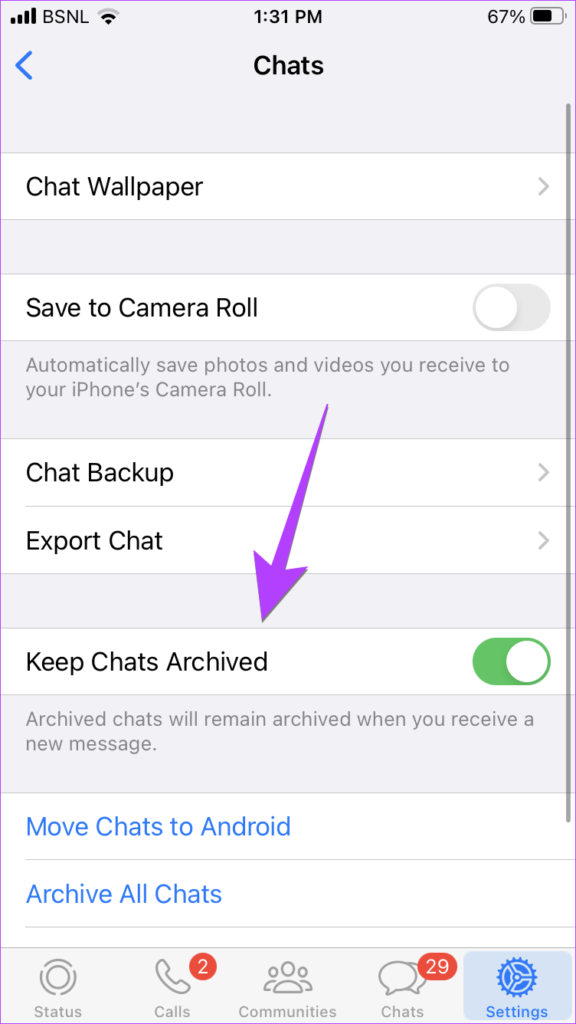
In 2021 when WhatsApp introduced the Keep Chat Archived setting, which is enabled by default now. So, you will not receive notifications for new messages in the archived chats and the chat won’t be unarchived automatically.
That is, archived chats are muted and will remain archived and hidden even if you receive new messages. However, you will be notified if someone mentions or quotes you in the archived chat.
To check or change the Keep Chats Archived setting on Android or iPhone, go to WhatsApp Settings followed by Chats and toggle on the Keep Chats Archived setting.

Does the Other Person Know if You Archive a Chat on WhatsApp
If you archive a chat, WhatsApp doesn’t notify the other person. Even if you delete a chat, the other person won’t know.
Can Archived Chats See WhatsApp Status
Yes, archived chats can see your WhatsApp status.
If You Archive Someone on WhatsApp Can You See Their Status
Yes, their status will show up on your Updates tab as per usual.
Can Archived Chats See Online Status and Last Seen
Archiving a chat doesn’t affect your online status. If you are online, you will be shown as online to the archived chats, unless you hide your online status from them specifically. Similarly, they can see your last seen as well.
Can Archived Chats Call on WhatsApp
Yes, archived chats can call you on WhatsApp and you will be notified about it.
How to Know If Someone Has Archived You on WhatsApp
Not possible, my dear friend. There is no way to know if someone has archived your chat.
Are Archived Chats Backed up
Archived chats are neither backed up on iCloud (iPhone) nor Google Drive (Android)
What Happens When You Unarchive a Chat
When you unarchive a WhatsApp chat, it’s unmuted and taken to the main chat list. You will receive notifications for new messages that arrive in the unarchived chat.
Difference Between Archive and Delete on WhatsApp
The archive feature is only used to hide messages from your main list. You can unarchive the chat and get it back. However, things aren’t the same with delete, which is a permanent step.
Once you delete a thread, there is no direct way to bring it back, but a few workarounds exist. So be careful and choose wisely.
Was this helpful?
Last updated on 27 July, 2024
Read Next
 What Happens When You Archive a Post on Instagram?
What Happens When You Archive Instagram Post?
What Happens When You Archive a Post on Instagram?
What Happens When You Archive Instagram Post?
 What Happens When You Clear Chat on WhatsApp?
Consequences of Clearing Chat on WhatsApp All messages in the cleared chat are deleted from your device, and you can't see the conversation history for that chat.
What Happens When You Clear Chat on WhatsApp?
Consequences of Clearing Chat on WhatsApp All messages in the cleared chat are deleted from your device, and you can't see the conversation history for that chat.
 WhatsApp Mute vs. Archive: Understand the Differences
What Is Mute on WhatsApp Muting someone on WhatsApp stops message notifications from them.
WhatsApp Mute vs. Archive: Understand the Differences
What Is Mute on WhatsApp Muting someone on WhatsApp stops message notifications from them.
 What Happens When You Block Someone on WhatsApp
How To Block Someone on WhatsApp And What Happens After Blocking What Happens When You Block Someone on WhatsApp A series of changes occur when you block someone on WhatsApp,
What Happens When You Block Someone on WhatsApp
How To Block Someone on WhatsApp And What Happens After Blocking What Happens When You Block Someone on WhatsApp A series of changes occur when you block someone on WhatsApp,
 What Happens When You Delete WhatsApp Account
What Happens to Existing Message History and Backup Deleting WhatsApp will clear all the chat records on your phone.
What Happens When You Delete WhatsApp Account
What Happens to Existing Message History and Backup Deleting WhatsApp will clear all the chat records on your phone.
 What Happens When You Uninstall Whatsapp
Chat History When you uninstall WhatsApp, your chat history is not deleted from WhatsApp servers, and you can access it whenever you reinstall the app and retrieve the backup.
What Happens When You Uninstall Whatsapp
Chat History When you uninstall WhatsApp, your chat history is not deleted from WhatsApp servers, and you can access it whenever you reinstall the app and retrieve the backup.
 What Happens to WhatsApp When You Change Phone or SIM Card
What Happens to WhatsApp When You Remove SIM Card?
What Happens to WhatsApp When You Change Phone or SIM Card
What Happens to WhatsApp When You Remove SIM Card?
 What Happens When You Report Someone on WhatsApp and How to Report
What Happens if You Report Someone on WhatsApp Before we move on, let’s first understand what is report in WhatsApp.
What Happens When You Report Someone on WhatsApp and How to Report
What Happens if You Report Someone on WhatsApp Before we move on, let’s first understand what is report in WhatsApp.
The article above may contain affiliate links which help support Guiding Tech. The content remains unbiased and authentic and will never affect our editorial integrity.