What Happens When You Unfollow Someone on Instagram?
When you follow someone, their posts and stories appear in your Instagram feed. Unfollow is its opposite. When you unfollow a person, their posts and stories will stop appearing in your feed.
While blocking is harsh and easily identifiable, unfollowing is a mild way to stop seeing someone on your feed.
Can You See Their Posts and Stories?
Even though the posts and stories from the person whom you unfollowed will not appear in your feed, whether you can still see their posts depends on their private and public accounts.
If you unfollow a private account, you cannot see their posts or stories even if you visit their profile. You must send a follow request to view the posts. Things are different for a public account. You can still see their posts by opening their Instagram profile. You don’t even have to log out.
When You Unfollow Someone on Instagram, Can They See Your Posts?
Unfollowing is a one-way street. So, the other person can still see your posts in the feed and on your profile, even if you unfollow them. They need to unfollow on their end to stop seeing your posts.
What Happens to Messages?
Nothing happens to messages after unfollowing someone. Your past messages will not disappear. Similarly, you can still DM the person and continue chatting with them.
What Happens to Likes and Comments?
Your likes and comments will not disappear if you unfollow someone.
Can You Undo Unfollowing a Person?
No. However, you can easily follow the person again, and they will be notified that you followed them.
Will a Person Be Notified When You Unfollow Them?
No. Thankfully, that will not happen as Instagram doesn’t send a notification when you unfollow someone. However, there are ways to know if someone has unfollowed you.
How to Check if Someone Unfollowed You?
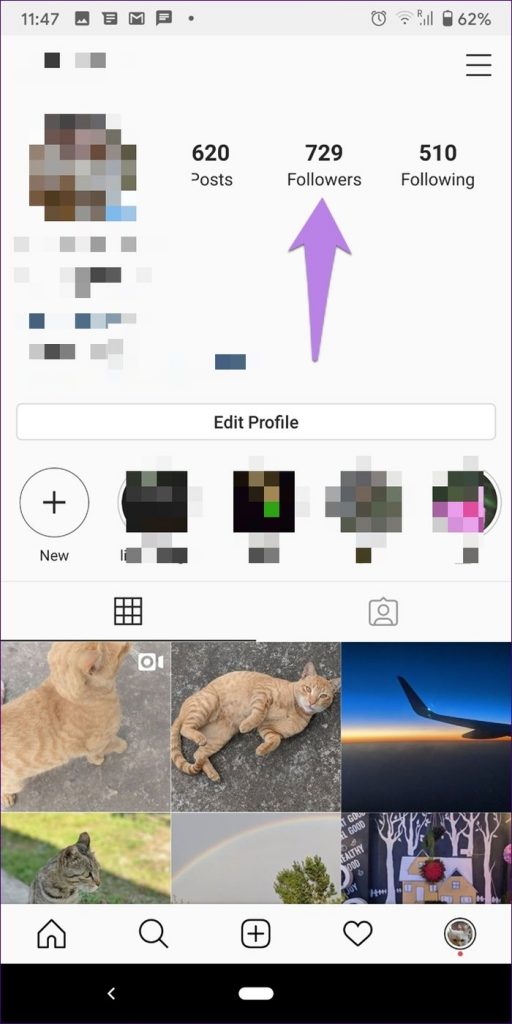
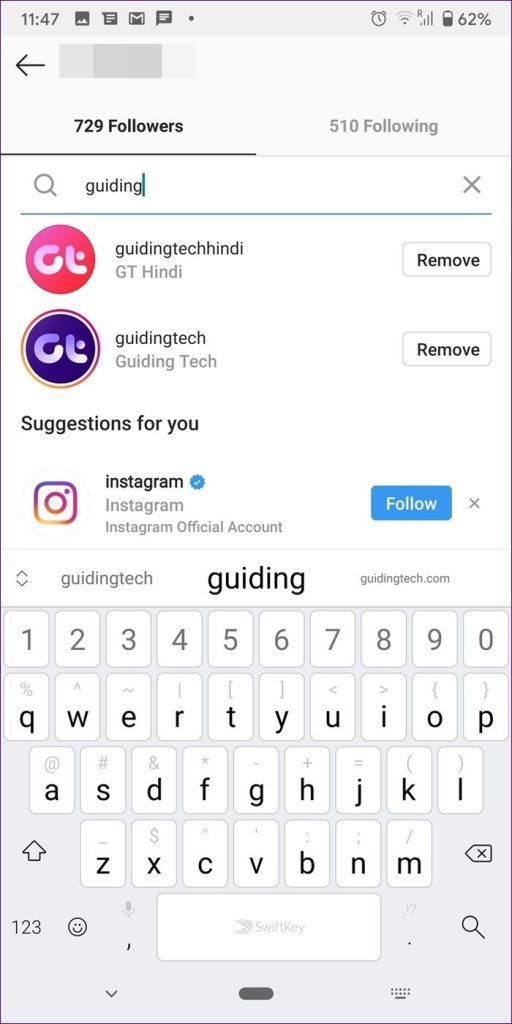
You can do that easily by checking your Followers list. For that, go to your Instagram profile screen and tap Followers. Use the search at the top to find the person who you think might have unfollowed you. If the person follows you, he/she will appear in the list with a Remove button next to them.
How to Make Someone Else Unfollow You
Unfollowing someone will not make them unfollow you. But what if you want someone to unfollow you? You can do that by removing them from your Followers list on Instagram. Find out how to do so and what happens when you remove a follower from our dedicated post on it.
How to Unfollow Someone on Instagram
For that, open their Instagram profile and tap on the Following option. Select Unfollow from the menu.
Note: The method is the same whether the other person follows you or not.
Tip: You can restrict a person on Instagram by following the above steps.
Can You Stop Seeing Someone on Instagram Without Unfollowing Them?
Instagram provides many ways to avoid someone. Those include restrict, block, mute, hide, and unfollow. If the annoying posts or stories are the sole reason to unfollow someone, you don’t need to take such a harsh step.
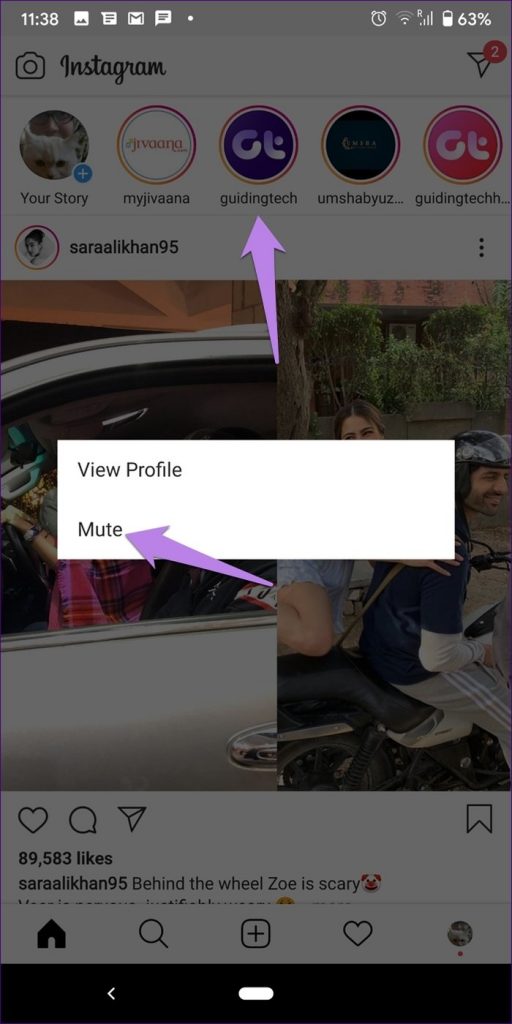
Instagram offers a separate mute option for stories and posts. Muting does a similar job without unfollowing a person. When you mute a person, you will not see their posts or stories on your feed. You must open the person’s profile (both private and public) to view the stories and posts.
To mute posts from someone, tap the three-dot icon next to their post and select Mute. To mute a story, long-tap the story icon and select Mute.

Tip: Find out how mute differs from hide and block on Instagram.
Was this helpful?
Last updated on 20 August, 2024
Read Next
 What Happens When You Unfollow Someone on Facebook
What Does Unfollow Mean on Facebook Unfollow in simple terms means to stop seeing someone’s posts on your newsfeed.
What Happens When You Unfollow Someone on Facebook
What Does Unfollow Mean on Facebook Unfollow in simple terms means to stop seeing someone’s posts on your newsfeed.
 What Happens When You Block Someone on Instagram
What Happens to Profile When You Block Someone Instagram gives two options for ignoring someone, mute and block.
What Happens When You Block Someone on Instagram
What Happens to Profile When You Block Someone Instagram gives two options for ignoring someone, mute and block.
 What Happens When You Restrict Someone on Instagram
Here is the list of things you should know when restricting someone on Instagram.
What Happens When You Restrict Someone on Instagram
Here is the list of things you should know when restricting someone on Instagram.
 What Happens When You Report Someone on Instagram
 Instagram might ban or deactivate the reported account or post.
What Happens When You Report Someone on Instagram
What Happens When You Report Someone on Instagram Instagram might ban or deactivate the reported account or post.
 Facebook Take a Break vs. Unfollow vs. Unfriend: How Do They Differ
What Does Unfriend Mean on Facebook?
Facebook Take a Break vs. Unfollow vs. Unfriend: How Do They Differ
What Does Unfriend Mean on Facebook?
 How to Unfollow on TikTok: 2 Quick Ways
TikTok as a platform is known for its creative content and challenges.
How to Unfollow on TikTok: 2 Quick Ways
TikTok as a platform is known for its creative content and challenges.
 What Happens When You Block Someone on Snapchat
Can You Block Anyone on Snapchat Yes, you can block anyone on Snapchat.
What Happens When You Block Someone on Snapchat
Can You Block Anyone on Snapchat Yes, you can block anyone on Snapchat.
 What Happens When You Block Someone on Discord?
How to Block Someone on Discord From the Desktop Discord for Windows and Mac uses the same user interface.
What Happens When You Block Someone on Discord?
How to Block Someone on Discord From the Desktop Discord for Windows and Mac uses the same user interface.
The article above may contain affiliate links which help support Guiding Tech. The content remains unbiased and authentic and will never affect our editorial integrity.