Try Basic Fixes
- Check if Snapchat is down: Issues with Snapchat’s server can prevent the app from loading or sending snaps. To verify this, check Snapchat’s server status by visiting a website like Downdetector.
- Turn off VPN: Issues with your VPN connection can also cause such anomalies. Try turning off your VPN temporarily to see if that fixes the problem.
- Update the Snapchat app: Snapchat may fail to load snaps due to an outdated or buggy app build. Update the Snapchat app on your Android or iPhone and see if that fixes the issue.
Fix 1: Check App Permissions
If the Snapchat app doesn’t have the necessary permissions to access your phone’s storage or mobile data, it may not work as intended. Hence, allow Snapchat all the permissions it needs.
On Android
Step 1: Long-press the Snapchat app icon and tap the info icon from the menu that pops up. Then, select Permissions.
Step 2: Enable all the permissions one by one.


On iPhone
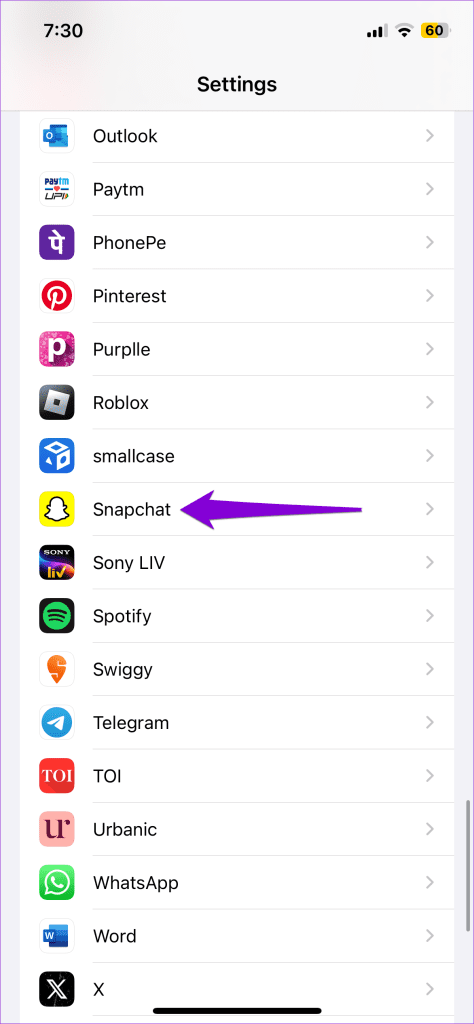
Step 1: Open the Settings app on your iPhone and scroll down to tap on Snapchat.
Step 2: Enable all the permissions from here.

Fix 2: Remove and Re-Add Friends
Is Snapchat failing to load snaps from a particular friend? If so, try removing and re-adding your friend on Snapchat.
Step 1: Open Snapchat and visit your friend’s profile, tap the three-dot menu icon at the top, and select Remove Friend.
Step 2: Select Remove when prompted.


Once removed, add your friend again and check if the issue is resolved.
Fix 3: Clear Snapchat Cache
Snapchat, like most apps, collects cache data as you load stories, download filters, or view Memories. If this data has become corrupted, you’re likely to encounter problems. To fix this, you must clear Snapchat cache data and try again.
Step 1: In the Snapchat app, go to your profile and tap the gear icon at the top right corner.
Step 2: Scroll down to Account Actions and tap on Clear Cache. Choose Continue when prompted.


Was this helpful?
Last updated on 13 May, 2024
Read Next
 3 Ways to Fix Snapchat Not Sending Snaps
Try Basic Fixes Check if Snapchat is down: Snapchat may fail to send snaps if its servers are down.
3 Ways to Fix Snapchat Not Sending Snaps
Try Basic Fixes Check if Snapchat is down: Snapchat may fail to send snaps if its servers are down.
 3 Fixes for Snapchat Won’t Let Me Export Snaps to Phone
https://youtu.be/D3Y6bZgaodI Try Basic Fixes Check if Snapchat is down: Even popular services like Snapchat can experience server outages at times.
3 Fixes for Snapchat Won’t Let Me Export Snaps to Phone
https://youtu.be/D3Y6bZgaodI Try Basic Fixes Check if Snapchat is down: Even popular services like Snapchat can experience server outages at times.
 How to Reopen or Replay Snaps on Snapchat
With Snapchat, you can share and receive Snaps straight to your inbox.
How to Reopen or Replay Snaps on Snapchat
With Snapchat, you can share and receive Snaps straight to your inbox.
 3 Ways to Recover Deleted Snaps on iPhone and Android
Method 1: Recover Deleted Snaps Using Snapchat Memories With Memories, you can recover Snapchat pictures on iOS and Android devices without a computer.
3 Ways to Recover Deleted Snaps on iPhone and Android
Method 1: Recover Deleted Snaps Using Snapchat Memories With Memories, you can recover Snapchat pictures on iOS and Android devices without a computer.
 How to Fix Snapchat Memories Not Loading on Android and iPhone
Try Basic Fixes Check if Snapchat is down: If the internet connection seems to be working, ensure that the Snapchat servers are up and running.
How to Fix Snapchat Memories Not Loading on Android and iPhone
Try Basic Fixes Check if Snapchat is down: If the internet connection seems to be working, ensure that the Snapchat servers are up and running.
 7 Ways to Fix Images Not Loading in Google Chrome
Fix 1: Verify Site Settings To start, verify the content settings in Chrome and ensure websites are allowed to load images on your computer.
7 Ways to Fix Images Not Loading in Google Chrome
Fix 1: Verify Site Settings To start, verify the content settings in Chrome and ensure websites are allowed to load images on your computer.
 5 Ways to Fix WhatsApp Status Not Loading on Android and iPhone
Try Basic Fixes Check if WhatsApp is down: Services like WhatsApp can experience server outages at times.
5 Ways to Fix WhatsApp Status Not Loading on Android and iPhone
Try Basic Fixes Check if WhatsApp is down: Services like WhatsApp can experience server outages at times.
 3 Ways to Fix TikTok App Not Loading on Your Phone
Basic Fixes Check your network connection: Ensure your smartphone has a robust internet connection.
3 Ways to Fix TikTok App Not Loading on Your Phone
Basic Fixes Check your network connection: Ensure your smartphone has a robust internet connection.
The article above may contain affiliate links which help support Guiding Tech. The content remains unbiased and authentic and will never affect our editorial integrity.