

Try Basic Fixes
- Turn off the screen rotation lock: Ensure that the rotation lock is turned off on your iPhone: swipe down from the top right > tap the Rotation Lock button (one that looks like a lock with an arrow circling it).
- Check auto rotation on other apps: If your iPhone won’t change screen orientation even when the rotation lock is off, check if the issue persists. That’s because several apps on iOS are specifically designed to function in portrait or landscape mode.
- Install iOS updates: Software updates can also go wrong at times. If the auto-rotate problem is due to a bug within iOS, installing pending updates should help.
Fix 1: Turn Off Display Zoom
Display Zoom is a nifty setting to enlarge the texts and icons on your device’s screen to improve readability. However, this feature can affect the rotation of the home screen layout on the plus-size iPhones and iPhone Max models. Hence, it’s best to turn it off.
Step 1: Open the Settings app on your iPhone > go to Display & Brightness.
Step 2: Scroll down to tap on Display Zoom > select Default > tap Done at the top right.

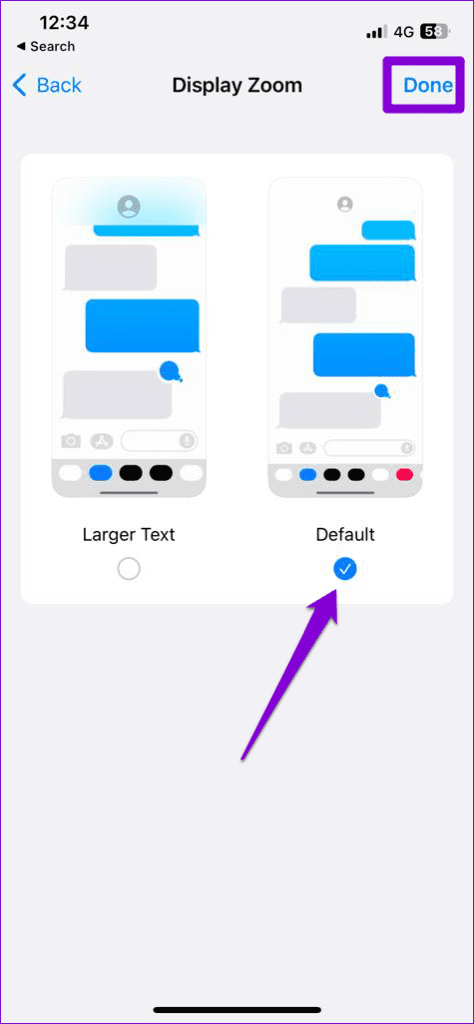
Once you complete the above steps, your iPhone will restart with a new zoom setting. Following that, your iPhone’s screen should rotate as before.
Fix 2: Reset All Settings
If the screen still won’t rotate, resetting your iPhone may be your best option. Doing so will reset all your custom settings to default. Don’t worry; this won’t affect your personal data.
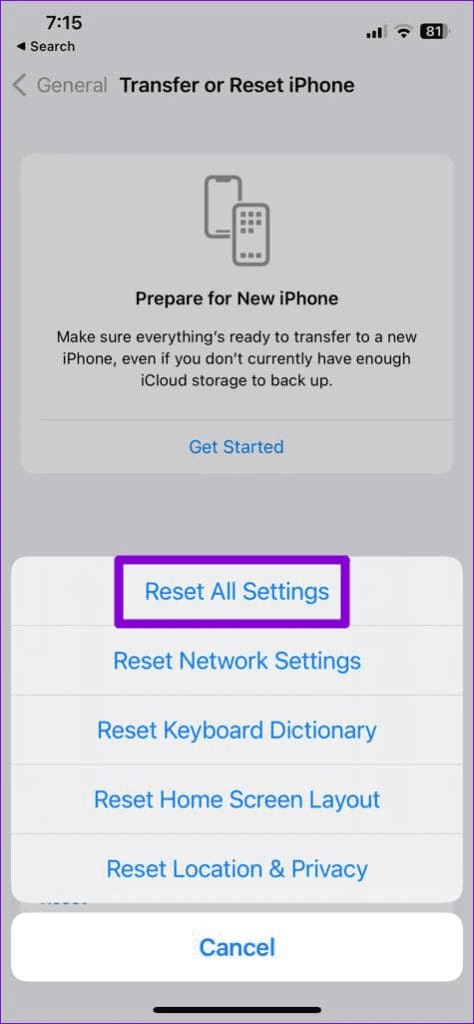
Step 1: Open the Settings menu > navigate to General > Transfer or Reset iPhone.
Step 2: Tap Reset at the bottom > select Reset All Settings.


Was this helpful?
Last updated on 02 August, 2024
Read Next
 4 Ways to Fix Auto Rotate Not Working on Android
Try Basic Fixes Remove your phone’s case: Start by removing your phone’s case and see if that gets the auto-rotate feature to work.
4 Ways to Fix Auto Rotate Not Working on Android
Try Basic Fixes Remove your phone’s case: Start by removing your phone’s case and see if that gets the auto-rotate feature to work.
 8 Ways to Fix iPad Screen Won’t Rotate
You've downloaded a new Netflix series to watch on your 8-hour flight journey.
8 Ways to Fix iPad Screen Won’t Rotate
You've downloaded a new Netflix series to watch on your 8-hour flight journey.
 4 Ways to Rotate Screen in Windows 11
Method 1: Use Screen Rotation Hotkeys You can quickly change screen orientation in Windows 11 with hotkeys without a mouse.
4 Ways to Rotate Screen in Windows 11
Method 1: Use Screen Rotation Hotkeys You can quickly change screen orientation in Windows 11 with hotkeys without a mouse.
 3 Ways to Rotate an Image in Google Docs
Method 1: Rotate an Image Using Rotation Control Google Docs lets you freely rotate a picture using rotational control.
3 Ways to Rotate an Image in Google Docs
Method 1: Rotate an Image Using Rotation Control Google Docs lets you freely rotate a picture using rotational control.
 How to Quickly Rotate an Image on Mobile and Computer
How to Rotate an Image iPhone The Photos app has a built-in powerful editor that helps you rotate an image.
How to Quickly Rotate an Image on Mobile and Computer
How to Rotate an Image iPhone The Photos app has a built-in powerful editor that helps you rotate an image.
 How to Rotate Videos in Windows 11
How to Rotate a Video and View It on Windows Media Player If you wish to rotate a video just for viewing purposes.
How to Rotate Videos in Windows 11
How to Rotate a Video and View It on Windows Media Player If you wish to rotate a video just for viewing purposes.
 3 Ways to Fix Auto Brightness Not Working on iPhone
Try Basic Fixes Remove the screen protector: Your iPhone uses the built-in ambient light sensor to detect your current lighting conditions and adjust the brightness accordingly.
3 Ways to Fix Auto Brightness Not Working on iPhone
Try Basic Fixes Remove the screen protector: Your iPhone uses the built-in ambient light sensor to detect your current lighting conditions and adjust the brightness accordingly.
 5 Ways to Fix Auto-Lock Not Working on iPhone
Try Basic Fixes Disable Low Power Mode: Is the Auto-Lock setting grayed out on your iPhone?
5 Ways to Fix Auto-Lock Not Working on iPhone
Try Basic Fixes Disable Low Power Mode: Is the Auto-Lock setting grayed out on your iPhone?
The article above may contain affiliate links which help support Guiding Tech. The content remains unbiased and authentic and will never affect our editorial integrity.

