Method 1: For Any YouTube Channel
For YouTube channels, it is much easier to sort videos by oldest. YouTube offers three quick filters: Latest, Popular, and Oldest. To find the oldest videos from any YouTube channel, do this:
Step 1: Go to the YouTube channel and click the Videos tab. Over here, you will find the Latest, Popular and Oldest filters.
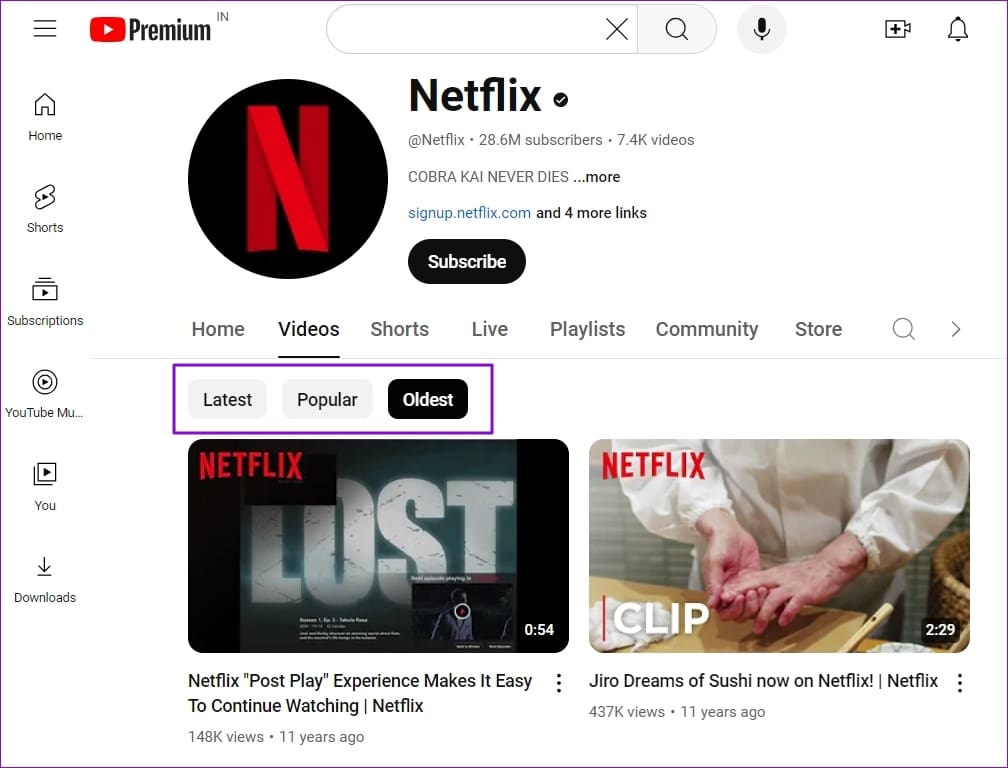
Step 2: Click on the Oldest filter to view the older videos and then scroll through the videos to find what you are looking for.
To find the oldest playlist of any YouTube channel, do this:
Step 1: Go to the YouTube channel and switch to the Playlists tab.
Step 2: Then use the Sort by filter and choose between the Date added (newest) or the Last video added to find a playlist with newly added videos.

Step 3: After doing this, we must scroll to the end to find the old video. While this is not a direct way, it is handy for the Playlists.
Method 2: When Searching on YouTube
You can use an advanced YouTube search with date filters to find videos within a specific time frame.
Step 1: Go to YouTube and click on the search text box.
Step 2: To find videos published before a specific date, use this search function: MySearchTerm before:2014-01-02. Here, MySearchTerm refers to your search query followed by the YYYY-MM-DD date format.

This will help you find videos that were uploaded before 2014. To find videos within a specific time range, use this search function: MySearchTerm after 2017-01-01 before 2020-01-02.
Was this helpful?
Last updated on 24 July, 2024
Read Next
 Play YouTube Videos (and From Other Sites) in KMPlayer
What’s your first choice of media player?
Play YouTube Videos (and From Other Sites) in KMPlayer
What’s your first choice of media player?
 How to Use the Filter and Sort Data Function in Microsoft Excel
Things to Note About Using the Filter and Sort Function The Filter function allows you to extract data from a data set that fits your criteria.
How to Use the Filter and Sort Data Function in Microsoft Excel
Things to Note About Using the Filter and Sort Function The Filter function allows you to extract data from a data set that fits your criteria.
 How to Sort Files in Windows 10 Numerically and By Size
The on-going development of Windows 10 and related products is fascinating.
How to Sort Files in Windows 10 Numerically and By Size
The on-going development of Windows 10 and related products is fascinating.
 5 Ways to Fix YouTube Videos Lagging on Android
Basic Fixes Force stop app: Tap and hold on the YouTube app icon, select App Info, tap on Force Stop, and re-open the app.
5 Ways to Fix YouTube Videos Lagging on Android
Basic Fixes Force stop app: Tap and hold on the YouTube app icon, select App Info, tap on Force Stop, and re-open the app.
 3 Fixes for YouTube Premium Not Downloading Videos Offline
Basic Fixes Check Internet Connectivity: Ensure your device is connected to a Wi-Fi network or cellular data with good signal strength and an active plan.
3 Fixes for YouTube Premium Not Downloading Videos Offline
Basic Fixes Check Internet Connectivity: Ensure your device is connected to a Wi-Fi network or cellular data with good signal strength and an active plan.
 How to Upload Private and Unlisted Videos on YouTube
How to Upload an Unlisted or Private Video on YouTube On Web Browser Step 1: Open YouTube on your web browser.
How to Upload Private and Unlisted Videos on YouTube
How to Upload an Unlisted or Private Video on YouTube On Web Browser Step 1: Open YouTube on your web browser.
 2 Ways to Watch YouTube Videos Not Available in Your Country
Basic Fixes: Clear YouTube Cache: You may not be able to watch a video on YouTube due to corrupt cache files.
2 Ways to Watch YouTube Videos Not Available in Your Country
Basic Fixes: Clear YouTube Cache: You may not be able to watch a video on YouTube due to corrupt cache files.
 3 Ways to See Liked YouTube Videos on PC and Mobile
Method 1: See Shorts and Videos You Have Liked on YouTube Web Step 1: Open YouTube and tap on the You button in the sidebar Step 2: Scroll down to
3 Ways to See Liked YouTube Videos on PC and Mobile
Method 1: See Shorts and Videos You Have Liked on YouTube Web Step 1: Open YouTube and tap on the You button in the sidebar Step 2: Scroll down to
The article above may contain affiliate links which help support Guiding Tech. The content remains unbiased and authentic and will never affect our editorial integrity.