

Note: The changes you make by following this article will be updated across all platforms you’re logged in, including Android, iOS, and the Web. So, follow the steps on any one device or platform.
How to Turn on NSFW on Reddit Using Android
If you are an Android user and want to enable NSFW content on the Reddit Android mobile app, follow the below steps.
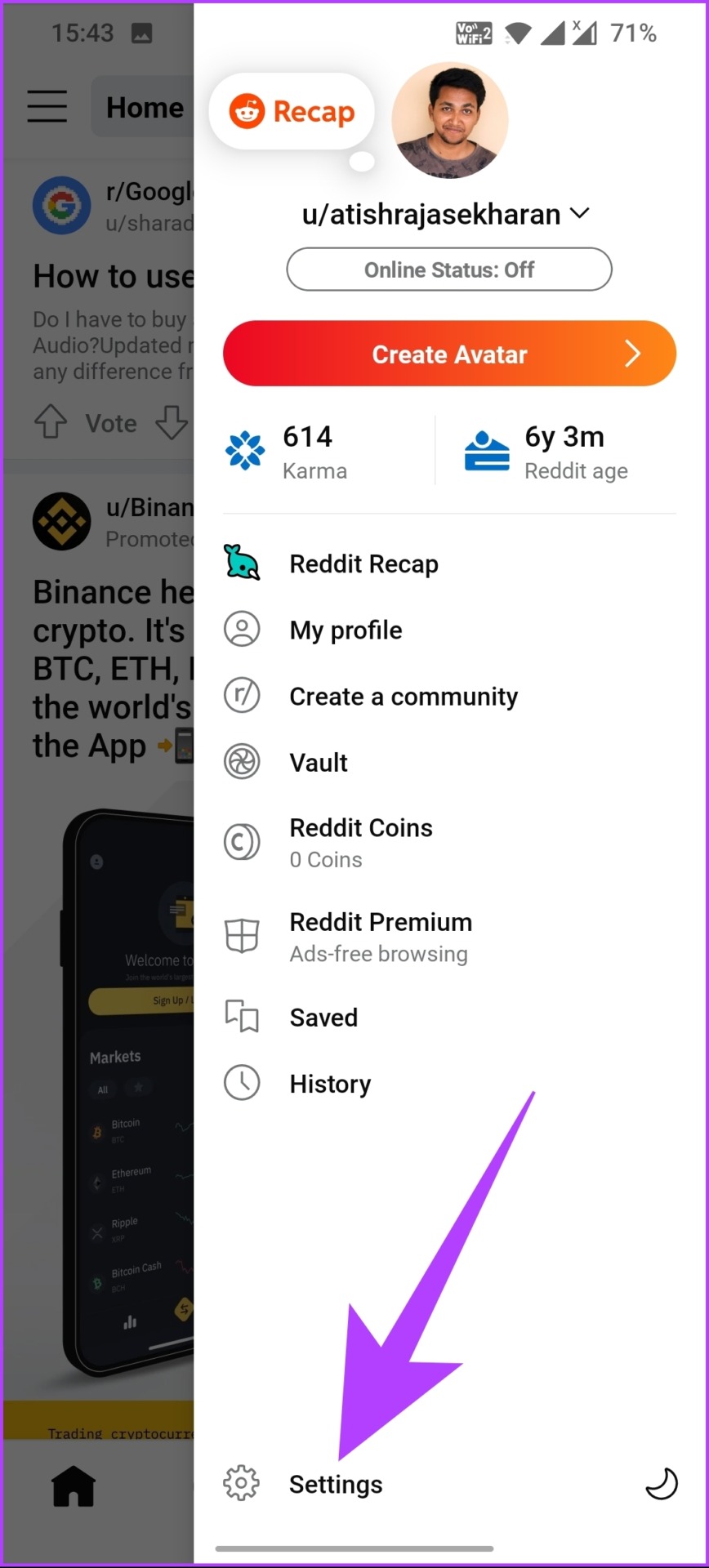
Step 1: Open the Reddit app and tap on your profile icon. Next, select Settings.
Step 2: Scroll down, and under View Options, toggle on Show NSFW content (I’m over 18).
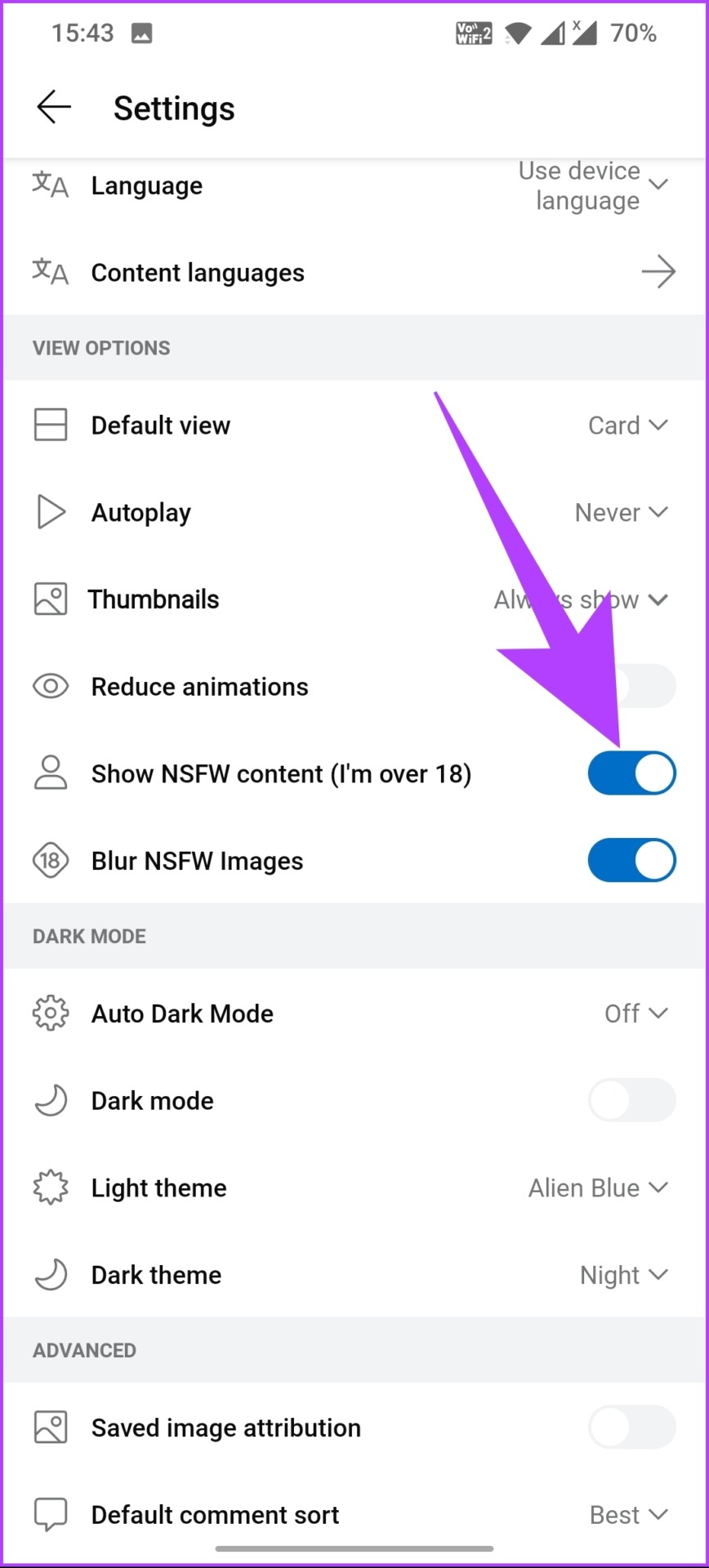
That’s it. You have successfully turned on NSFW content on Reddit.
How to Turn Off NSFW Blur on Reddit on iOS
Unlike Android, you must enable the feature through your iPhone’s settings app or website. Here’s what you need to do.
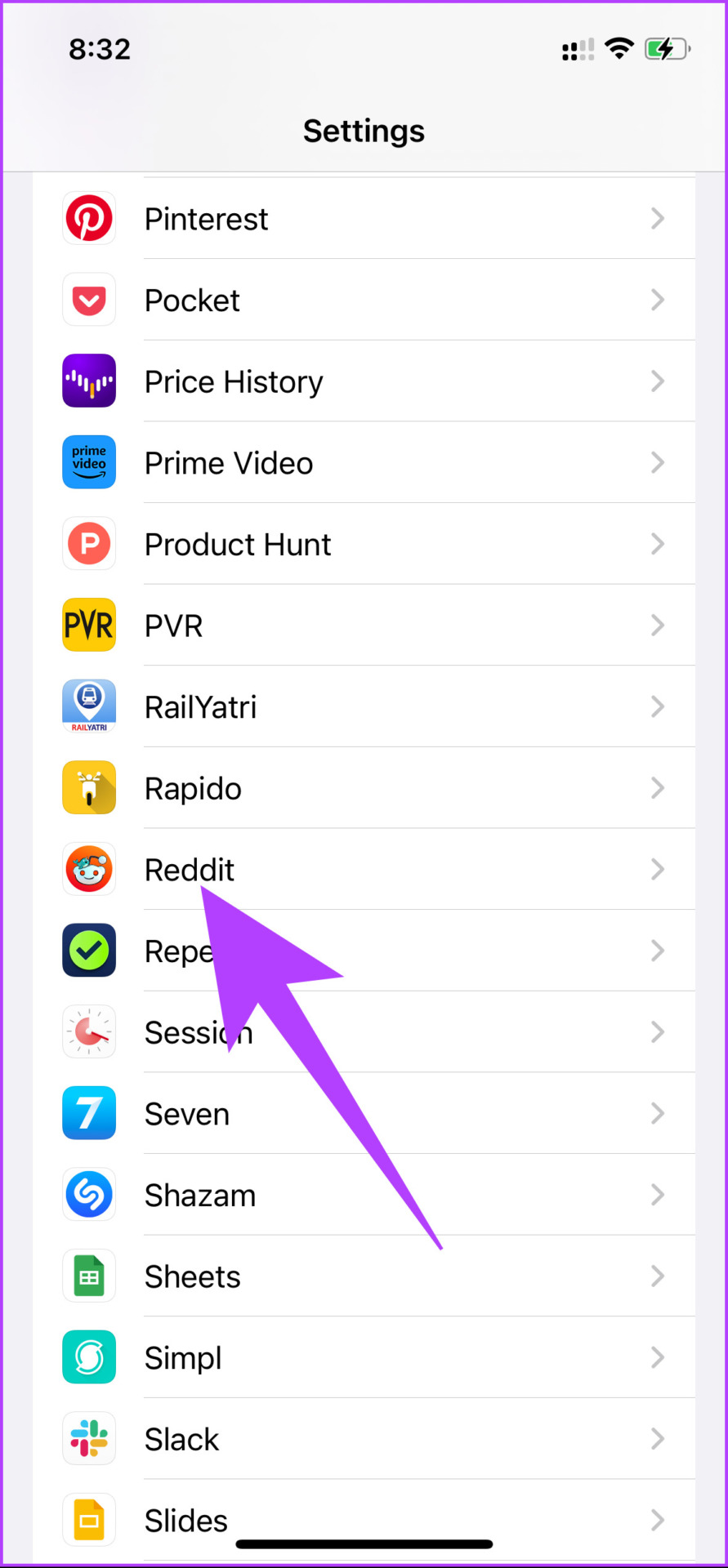
Step 1: Open the iPhone’s Settings app > scroll down and tap on Reddit.
Step 2: Finally, toggle on Show NSFW Content (I’m over 18).
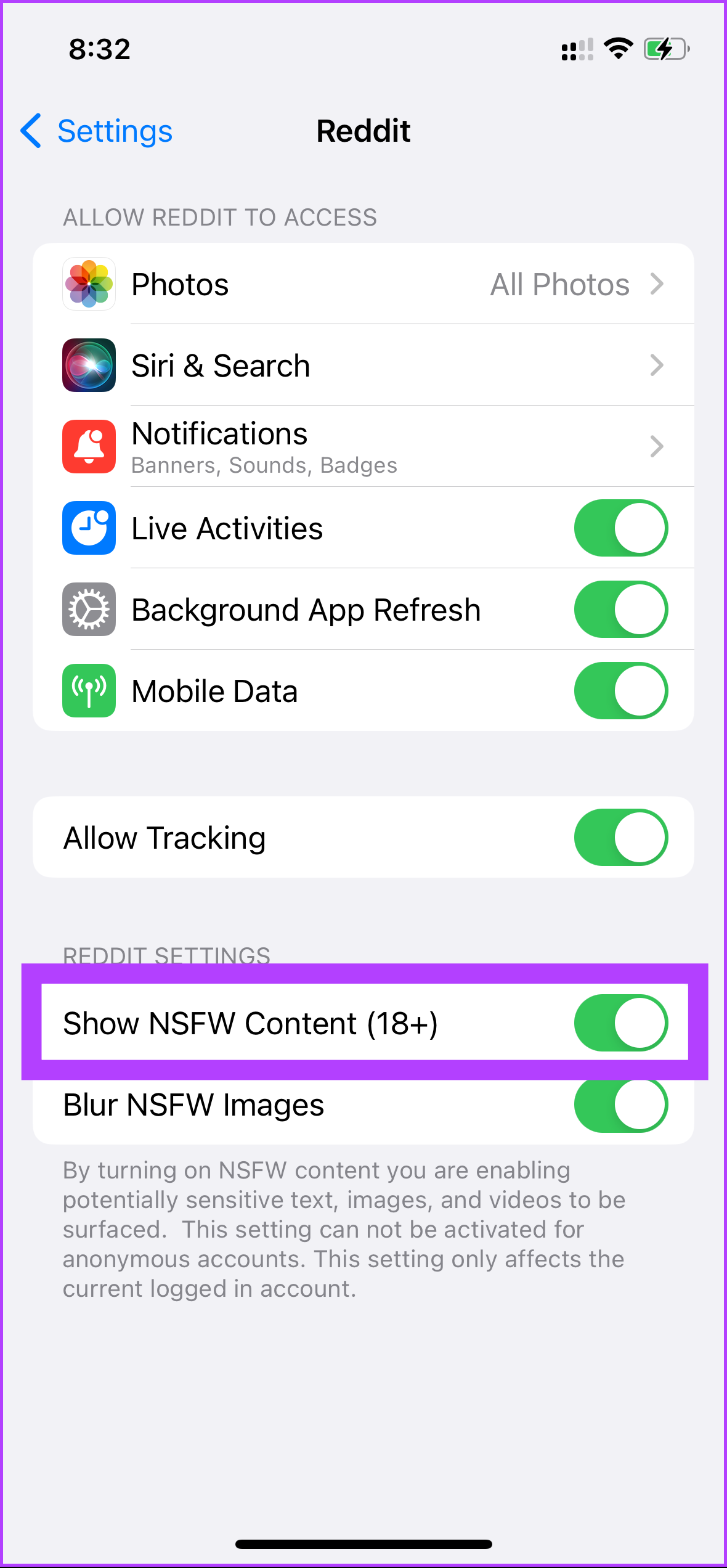
There you go! You have successfully allowed NSFW on the Reddit iOS app. If you don’t want to do it through the Settings app, you can do it through the Reddit web app. Keep reading.
How to Unblur Reddit Posts on the Web
Step 1: Go to Reddit and click on the chevron (arrow) icon next to your profile picture.
Step 2: From the drop-down menu, select User Settings.

Step 3: Go to the Feed Settings section.
Step 4: Under Content Preference, toggle on Adult content.
Tip: Disable Safe browsing mode below Adult Content to prevent NSFW content blurring.
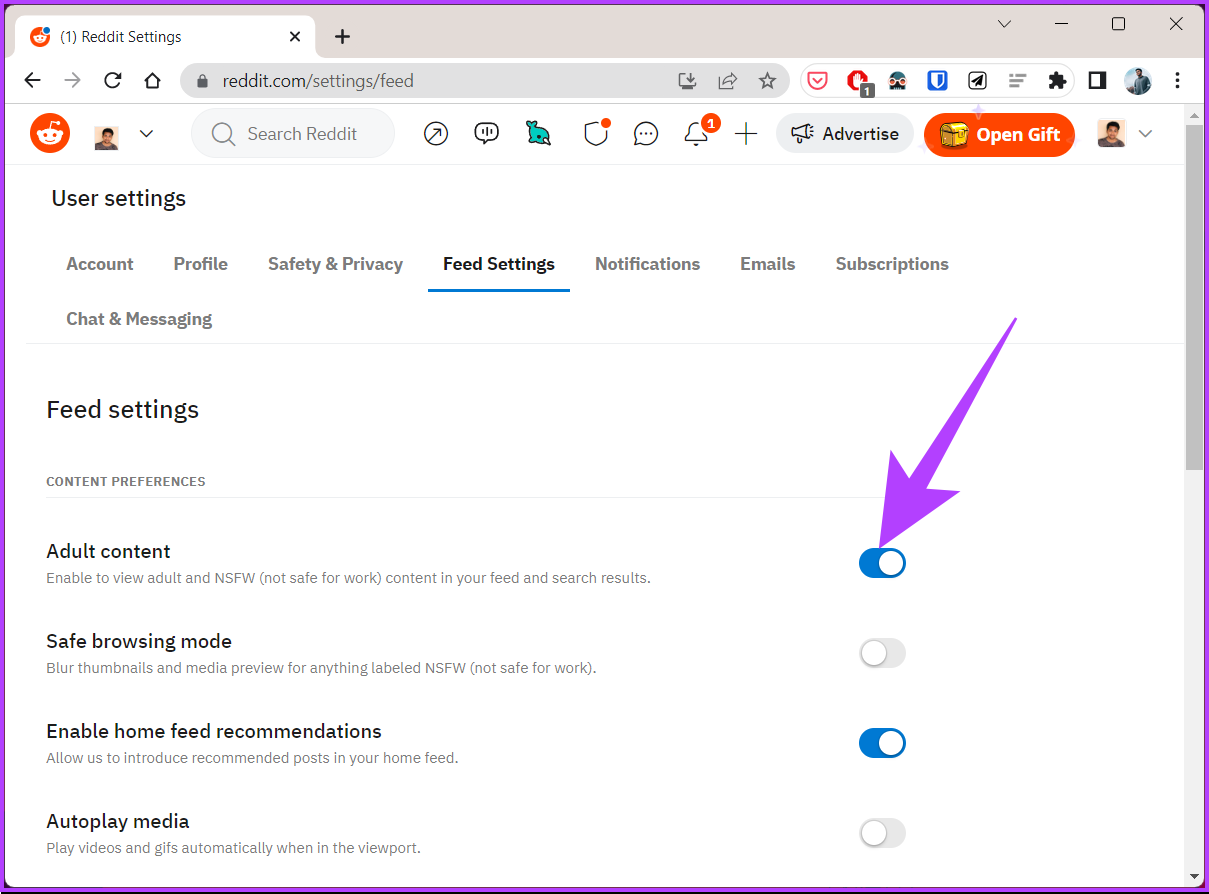
There you go! You have turned off the NSFW blur on Reddit, meaning, after the steps, all the thumbnails and media previews relating to content labeled NSFW will not be blurred anymore.
FAQs
Reddit doesn’t allow posts that promote or glorify illegal activity, spam, personal or confidential information, harassment or bullying, sexual exploitation of minors, or pornography in non-NSFW communities.
Yes, your search terms on Reddit are logged and associated with your account. It allows Reddit to track your search history and recommend content based on your search activity.
Was this helpful?
Last updated on 20 August, 2024
Read Next
 How to Enable or Disable NSFW Channels on Discord
Discord provides the option to change the status of your Discord channel.
How to Enable or Disable NSFW Channels on Discord
Discord provides the option to change the status of your Discord channel.
 How to Delete All Reddit Comments and Posts on Web Browser
How to Permanently Delete Reddit Comments and Posts Individually We'll show you how to delete a Reddit post or a comment individually, then proceed to delete all Reddit posts at
How to Delete All Reddit Comments and Posts on Web Browser
How to Permanently Delete Reddit Comments and Posts Individually We'll show you how to delete a Reddit post or a comment individually, then proceed to delete all Reddit posts at
 3 Ways to Fix Reddit App Not Working on iPhone and Android
Basic Fixes Check Reddit server status: Check the Reddit server status to see if the website is facing any downtime using redditstatus.com.
3 Ways to Fix Reddit App Not Working on iPhone and Android
Basic Fixes Check Reddit server status: Check the Reddit server status to see if the website is facing any downtime using redditstatus.com.
 How to Clear Cache on TikTok on Android, iOS, or Web
TikTok has quickly become one of the most popular social media platforms with millions of users worldwide.
How to Clear Cache on TikTok on Android, iOS, or Web
TikTok has quickly become one of the most popular social media platforms with millions of users worldwide.
 How to Clear Twitter Cache from Android, iOS, or Web
If you are a Twitter user, you may have occasionally noticed the Twitter app freezing, slow loading, repeated content recommendations, or some features not working properly.
How to Clear Twitter Cache from Android, iOS, or Web
If you are a Twitter user, you may have occasionally noticed the Twitter app freezing, slow loading, repeated content recommendations, or some features not working properly.
 4 Ways to Fix No Sound on Reddit Videos in App and Browser
For Windows and Mac Fix 1: Mute and Unmute Videos Open a video on Reddit that plays no sound and hover your mouse at the bottom right of the post.
4 Ways to Fix No Sound on Reddit Videos in App and Browser
For Windows and Mac Fix 1: Mute and Unmute Videos Open a video on Reddit that plays no sound and hover your mouse at the bottom right of the post.
 How to Use Reddit Spoiler Tags on Desktop and Mobile Apps
If you're a Reddit user, you've probably discussed your favorite movies or shows extensively with other users on the platform.
How to Use Reddit Spoiler Tags on Desktop and Mobile Apps
If you're a Reddit user, you've probably discussed your favorite movies or shows extensively with other users on the platform.
 How to Use Text Formatting on Reddit Using Markdown Mode
How to Format Text on Reddit: Basic Text Formatting in Markdown Mode We'll show you how to add emphasis to your text, add a strikethrough, superscript, line breaks, headers, and
How to Use Text Formatting on Reddit Using Markdown Mode
How to Format Text on Reddit: Basic Text Formatting in Markdown Mode We'll show you how to add emphasis to your text, add a strikethrough, superscript, line breaks, headers, and
The article above may contain affiliate links which help support Guiding Tech. The content remains unbiased and authentic and will never affect our editorial integrity.

