


Method 1: Shake Your Phone to Report a Problem on Instagram
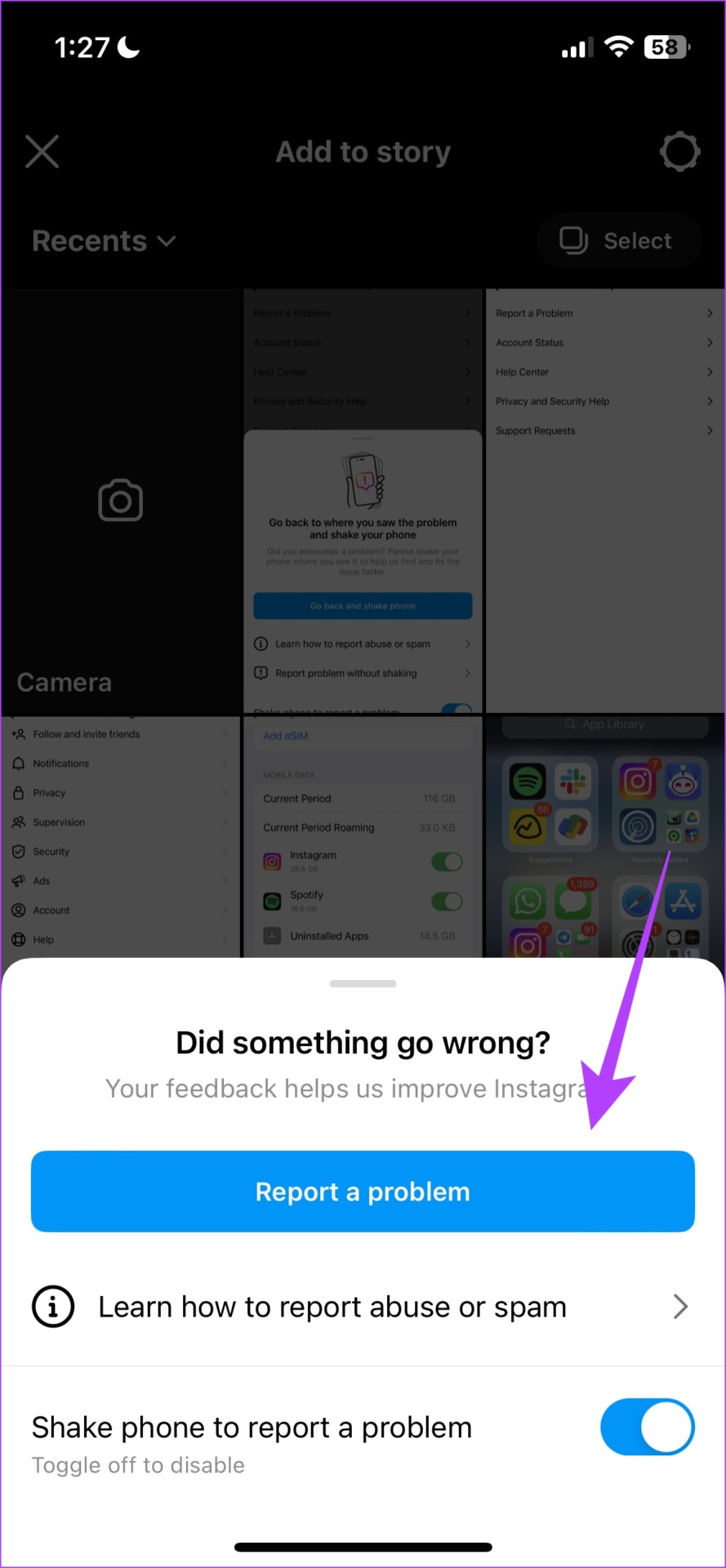
Using this option, you can shake your phone wherever you see a problem on Instagram and report it. This is helpful if you have trouble describing the problem.
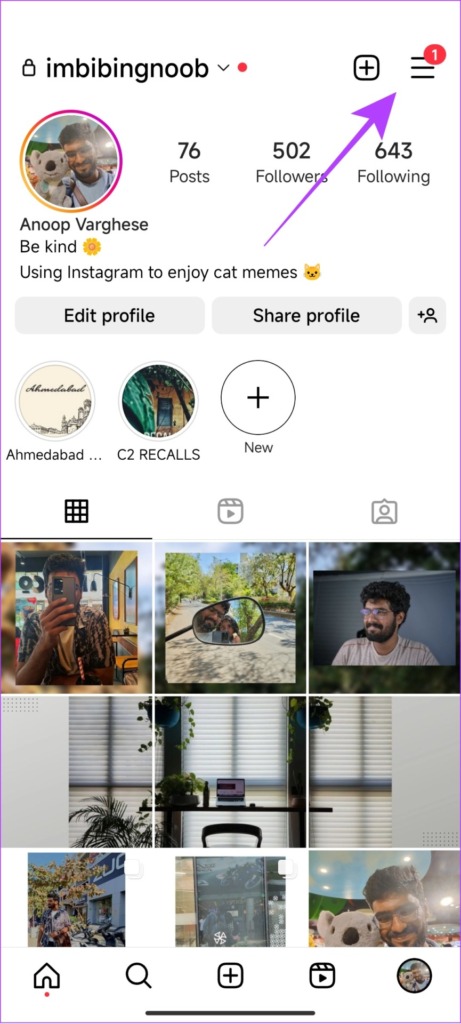
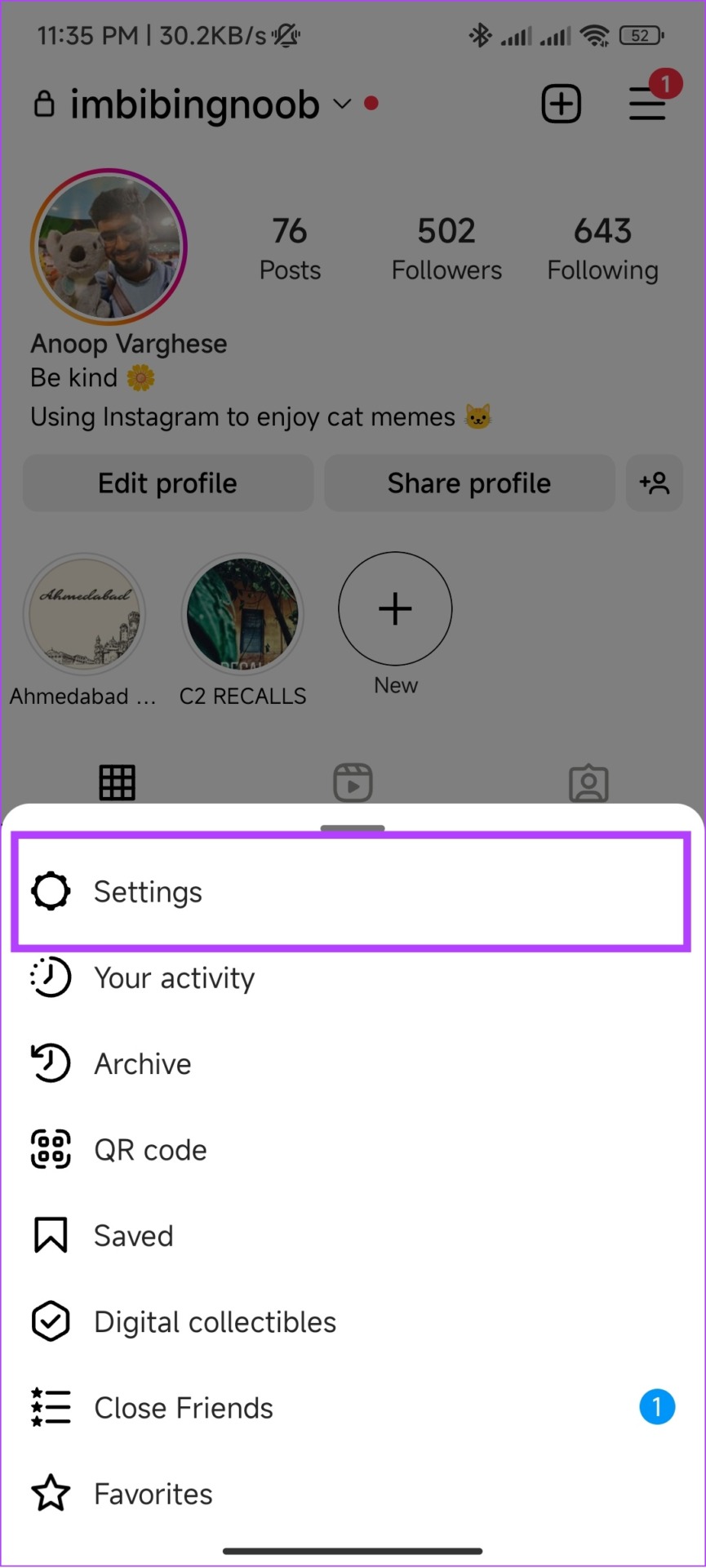
Step 1: In the Instagram app, tap the menu button in the Profile tab. Tap on Settings.
Step 2: Tap on Help > Report a Problem.


Step 3: Turn on Shake phone to report a problem > Go back and shake phone.
Step 4: Shake your phone where the issue is occurring. Now, tap on Report a Problem.
Step 5: Describe the issue. You can upload more images using the Upload option and tap on Send.


Method 2: Report Problem Without Shaking the Device
Step 1: In the Instagram app, tap on the menu button in the Profile tab > Settings.
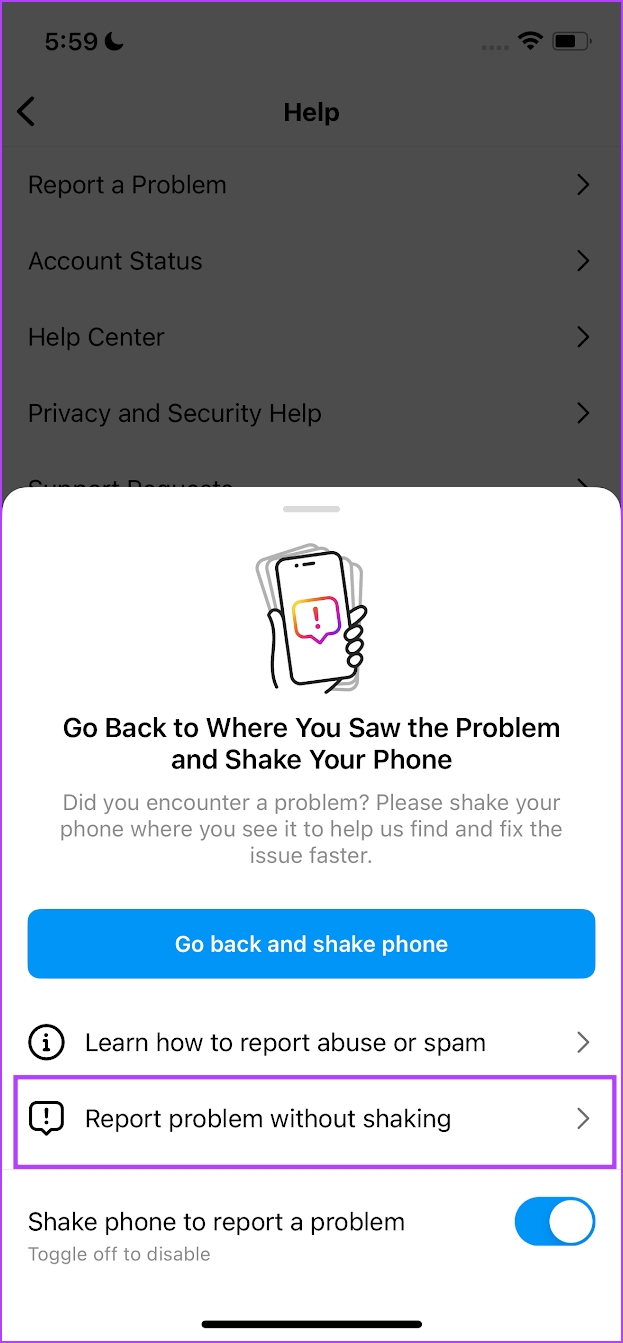
Step 2: Tap on Help > Report a Problem.
Step 3: Select Report a Problem Without Shaking.
Step 4: Tap on Include and continue to add logs to help Instagram understand the problem better.
Step 5: Explain the problem in brief and tap on Send.


Also Read: How to fix the ‘We Limit How Often You Can Do Certain Things on Instagram’ error
Method 3: Report a Problem on Instagram Through Mobile Browser
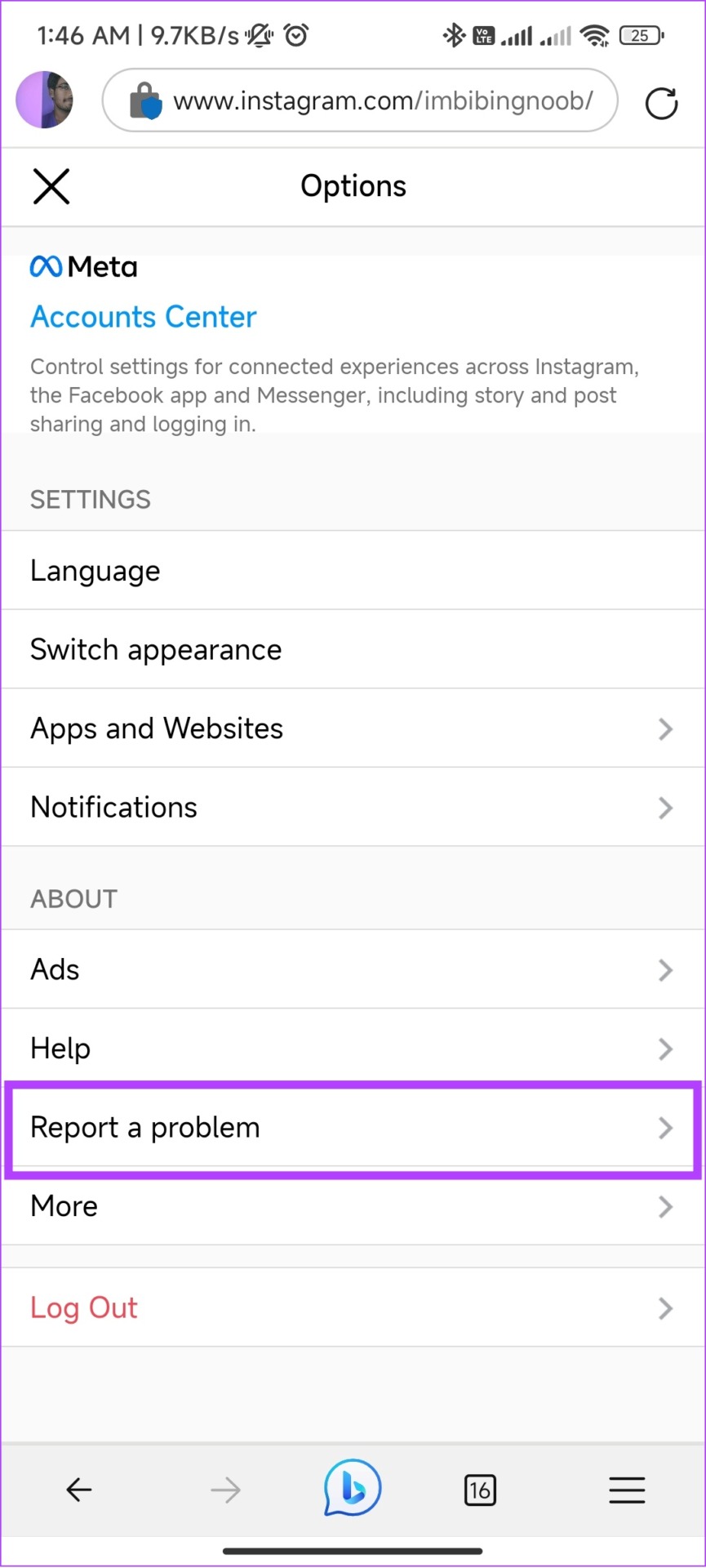
In your profile tab, tap on the settings (gear) icon. Select Report a problem, enter the details, and hit Send report.


Method 4: Report a Problem on Instagram Using a PC
Step 1: Open Instagram on any web browser and click the hamburger menu from the left sidebar.
Note: If you can’t spot it, expand the window.
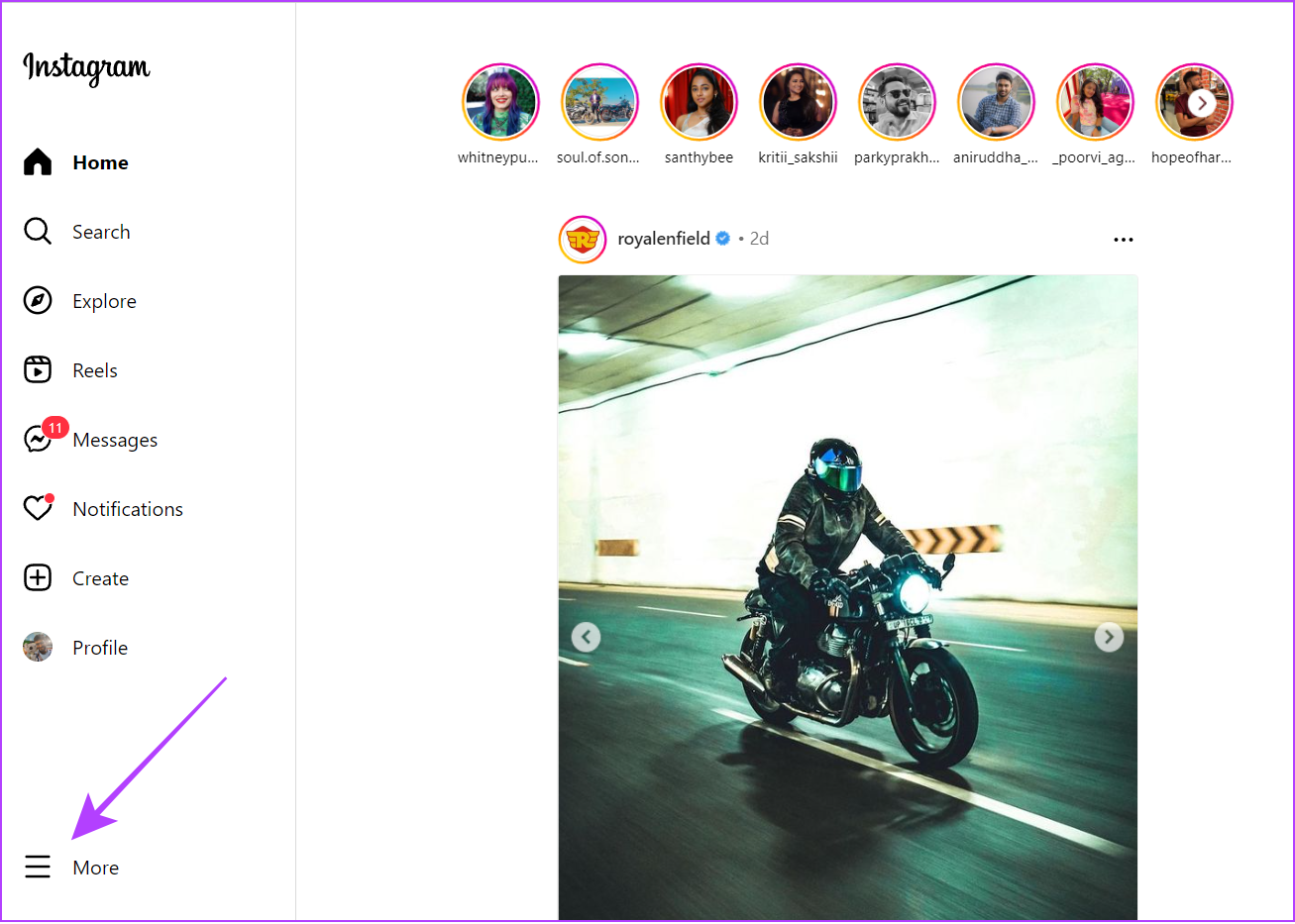
Step 2: Choose Report a problem. Mention the issues, add any files, and hit Send Report.

Method 5: Contact Instagram With Email or Phone Number
Here’s the official email ID and phone number if you prefer contacting Instagram outside of the app.
- Phone number: 650-543-4800 or 650-308-7300.
- E-mail: support@instagram.com
How to Check if Instagram Responds to Your Problem
Here’s how to check the progress on the issue you reported to Instagram.
Step 1: Open the Instagram app > tap profile > tap the hamburger menu.
Step 2: Choose Settings > Help.
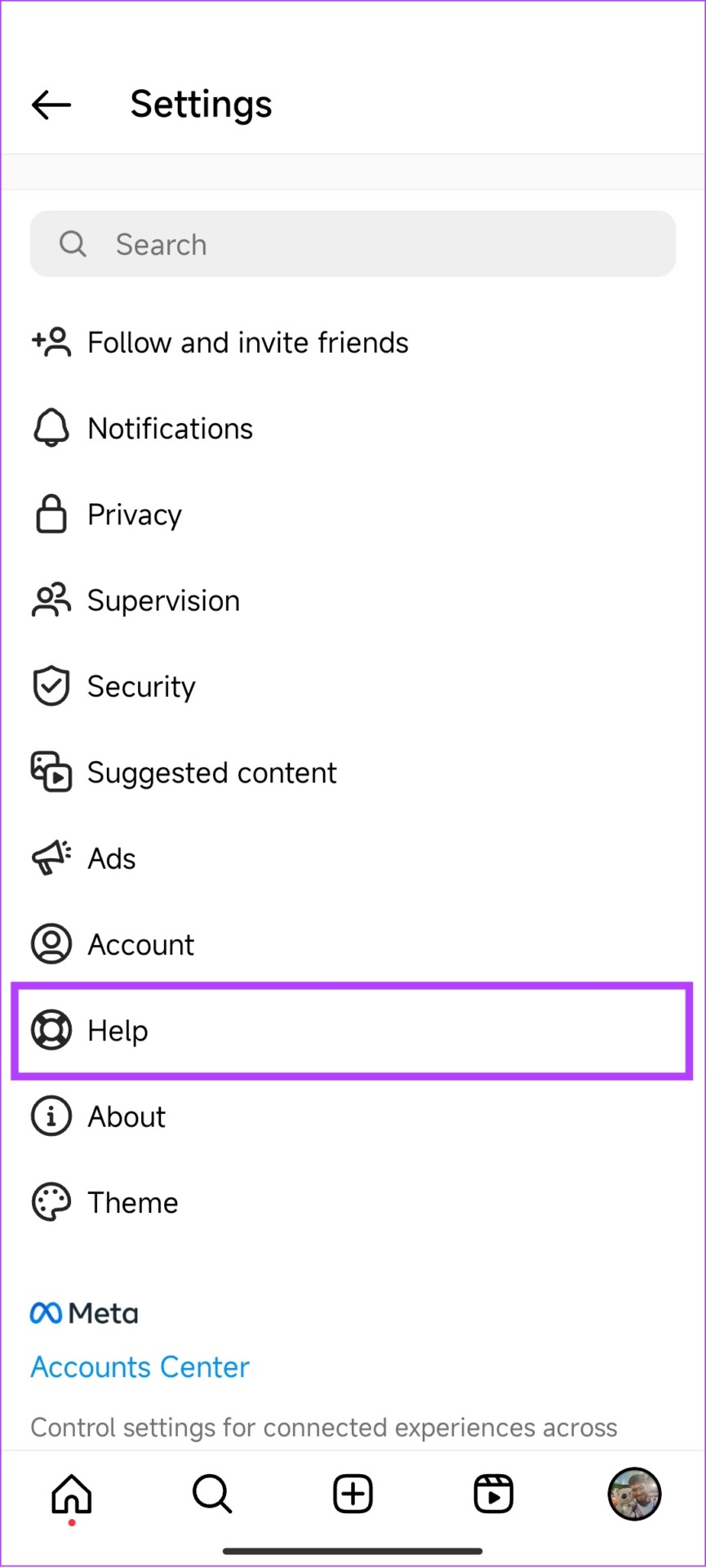
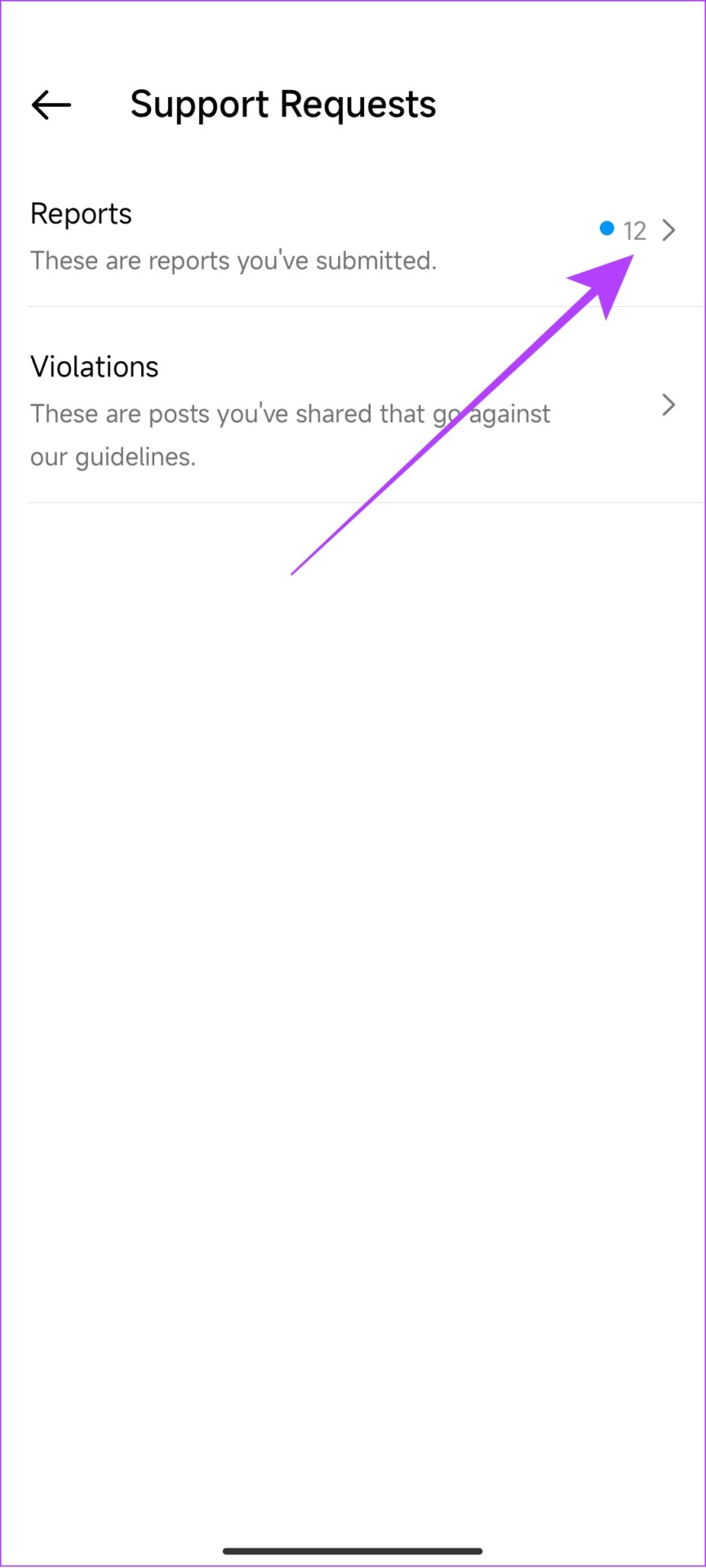
Step 3: Tap Support Requests > Reports.
Here, you can see all the reports you have made including the one for posts and their status.

Also Read: How to fix Instagram story not uploading on iPhone and Android
Was this helpful?
Last updated on 16 July, 2024
3 Comments
Leave a Reply
Read Next
 What Happens When You Report Someone on WhatsApp and How to Report
What Happens if You Report Someone on WhatsApp Before we move on, let’s first understand what is report in WhatsApp.
What Happens When You Report Someone on WhatsApp and How to Report
What Happens if You Report Someone on WhatsApp Before we move on, let’s first understand what is report in WhatsApp.
 What Happens When You Report Someone on Instagram
 Instagram might ban or deactivate the reported account or post.
What Happens When You Report Someone on Instagram
What Happens When You Report Someone on Instagram Instagram might ban or deactivate the reported account or post.
 How to Report Someone on Snapchat and What Happens Next
How to Report Someone on Snapchat The Snapchat app offers an identical interface on the iPhone and Android.
How to Report Someone on Snapchat and What Happens Next
How to Report Someone on Snapchat The Snapchat app offers an identical interface on the iPhone and Android.
 What Happens When You Report Someone on Facebook Messenger
Being the largest social media platform worldwide, Facebook comes with several privacy tools to report harassment, restrict the recipient, and prevent others from peeking at your account.
What Happens When You Report Someone on Facebook Messenger
Being the largest social media platform worldwide, Facebook comes with several privacy tools to report harassment, restrict the recipient, and prevent others from peeking at your account.
 How to Report a Discord Server: A Definitive Guide
If you encounter a Discord server that violates the community guidelines or engages in inappropriate behavior, it's important to know how to take action and report it.
How to Report a Discord Server: A Definitive Guide
If you encounter a Discord server that violates the community guidelines or engages in inappropriate behavior, it's important to know how to take action and report it.
 How to Report and Avoid Scammers on Facebook Marketplace
Facebook Marketplace – the company’s e-commerce platform, has over one billion users.
How to Report and Avoid Scammers on Facebook Marketplace
Facebook Marketplace – the company’s e-commerce platform, has over one billion users.
 5 Ways to Fix Snapchat Support Code C14A Error
What Does Snapchat’s Support Code: C14A Error Indicate?
5 Ways to Fix Snapchat Support Code C14A Error
What Does Snapchat’s Support Code: C14A Error Indicate?
 3 Ways to Add a Contact in Microsoft Outlook
Method 1: Add a Contact From a Received Email The easiest way to add someone to your Outlook address book is to open one of their emails and add the
3 Ways to Add a Contact in Microsoft Outlook
Method 1: Add a Contact From a Received Email The easiest way to add someone to your Outlook address book is to open one of their emails and add the
The article above may contain affiliate links which help support Guiding Tech. The content remains unbiased and authentic and will never affect our editorial integrity.

hi, can you see me here and can let me know how can we proceed further
Hello
I don’t know if you will be able to help me BUT my Instagram was hacked and I have being trying to get in touch with Instagram. I said my Instagram was hacked and they would send me a code to my email address but it never shows up and its being 4 days now and still nothing
Hello
My phone was hacked, and then my social media accounts and email accounts had their passwords, emails and settings changed. I have tried EVERYTHING to get them back, but since everything has changed since I opened the account, I cannot get codes, etc. PLEASE!!! I need someone to get back to me. I am a paying customer of META, and I need this to be resolved.
I hope to hear from someone shortly!
Thank you,
Peter