Basic Fixes
- Force quit and relaunch: If WhatsApp has been running in the background for some time, this will give it a fresh start on your mobile and desktop.
- Update or reinstall WhatsApp: Installing the latest version will remove any bugs or glitches from the app.
Fix 1: Check WhatsApp Group Settings
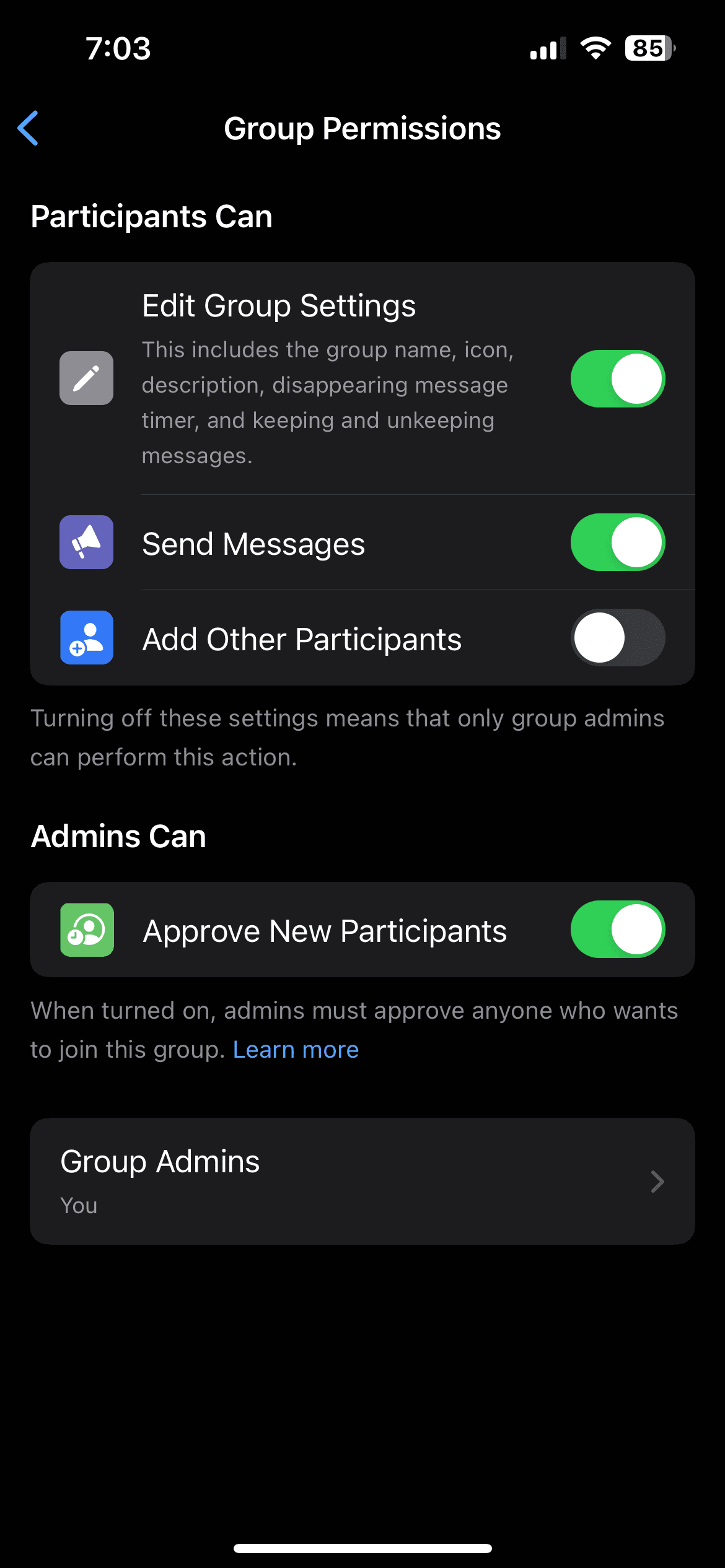
If you can’t conduct a poll in your WhatsApp group, you need to check the group permissions. If you have been added to a WhatsApp group, the group admin may not allow other participants to make changes and then create polls.
On Mobile
Open WhatsApp > go to your group chat > tap the group name > Group Permissions > ensure that you have allowed admin permissions.

On Desktop
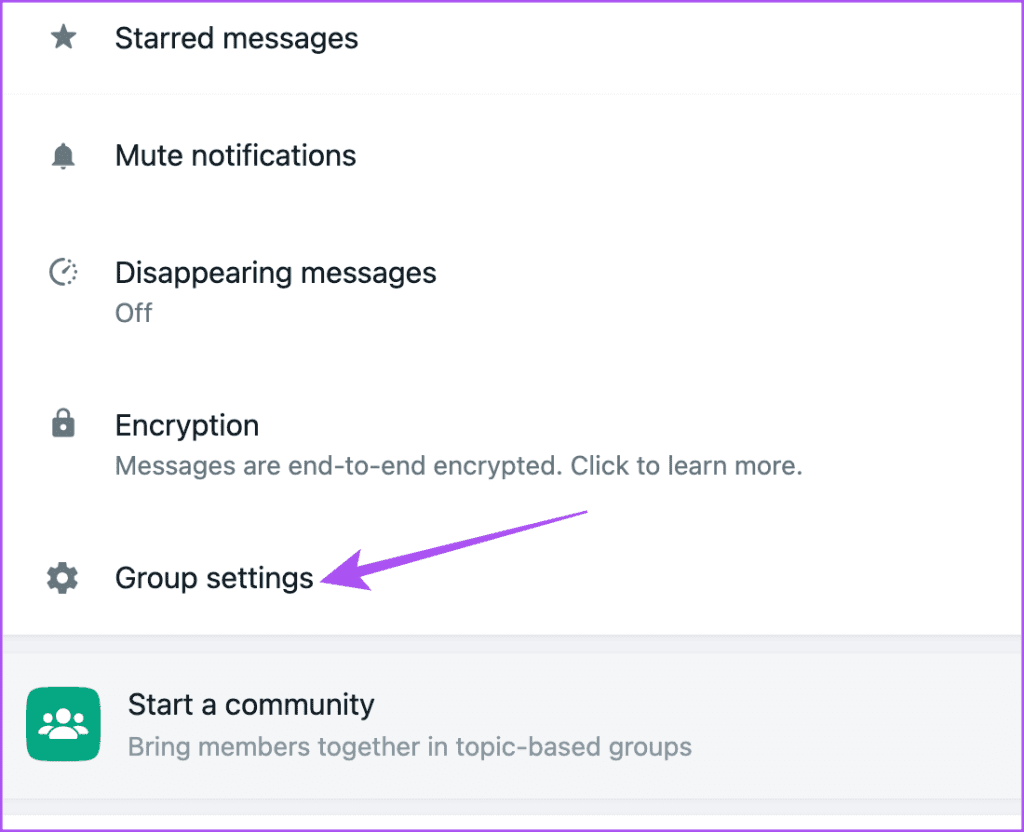
Step 1: Open WhatsApp on your Mac or Windows PC.
Step 2: Open your group chat and click on the group name on the right.
Step 3: Click on Group Settings and ensure that you have allowed admin permissions to your contacts who can share polls.
Fix 2: Allow Multiple Answers in Polls
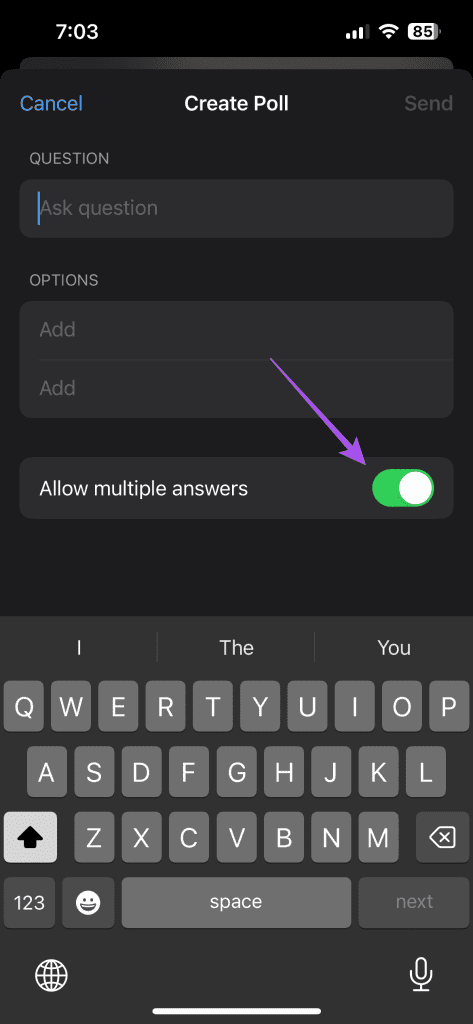
If you want the participants to choose more than one option in the WhatsApp poll, enable this specific option before sending a poll to your group. Here’s how to check whether you have enabled the same.
Open WhatsApp > open the group chat > create a poll > enable Allow Multiple Answers.
Fix 3: Clear WhatsApp Cache on Mobile
Like every app, WhatsApp also stores cache data to improve its responsiveness whenever you use it. The app can cause malfunctioning when its cache gets corrupted over time. So, try clearing the WhatsApp cache on your iPhone or Android phone. You will have to login again to your WhatsApp account. Refer to our post to learn how to clear WhatsApp cache on your mobile.
Tip: Besides polls, WhatsApp has also introduced the option of sending instant video messages to your contacts.
Was this helpful?
Last updated on 08 August, 2024
Read Next
 How to Create and Use Polls in WhatsApp
On Mobile You can create polls in both personal chats and groups.
How to Create and Use Polls in WhatsApp
On Mobile You can create polls in both personal chats and groups.
 How to Fix Polls Not Working in Microsoft Teams for Windows
Try Basic Fixes Close and reopen the Teams app: You can start by closing and reopening the Teams app.
How to Fix Polls Not Working in Microsoft Teams for Windows
Try Basic Fixes Close and reopen the Teams app: You can start by closing and reopening the Teams app.
 3 Fixes for WhatsApp Video Call Not Working on iPhone and Android
Basic Fixes: Check your internet connection: WhatsApp requires an active internet connection to make video calls.
3 Fixes for WhatsApp Video Call Not Working on iPhone and Android
Basic Fixes: Check your internet connection: WhatsApp requires an active internet connection to make video calls.
 6 Fixes for WhatsApp Notifications Not Working On Wear OS App
Ever since Telegram discontinued its Wear OS app, the wearables platform has lacked a functional messaging application.
6 Fixes for WhatsApp Notifications Not Working On Wear OS App
Ever since Telegram discontinued its Wear OS app, the wearables platform has lacked a functional messaging application.
 2 Fixes for Read Receipts Not Working on WhatsApp
Basic Fixes Force quit and relaunch: This will give the app a fresh start and should make the feature work.
2 Fixes for Read Receipts Not Working on WhatsApp
Basic Fixes Force quit and relaunch: This will give the app a fresh start and should make the feature work.
 4 Fixes for Microphone Not Working in WhatsApp on Windows 11
Basic Fixes Check if WhatsApp is down: Go to DownDetector and check the status of WhatsApp servers.
4 Fixes for Microphone Not Working in WhatsApp on Windows 11
Basic Fixes Check if WhatsApp is down: Go to DownDetector and check the status of WhatsApp servers.
 How to Add New Contacts via WhatsApp Web
Use InTouch App to Add New Contacts Using WhatsApp Web InTouchApp is a contacts manager app that lets you add contacts directly via WhatsApp Web.
How to Add New Contacts via WhatsApp Web
Use InTouch App to Add New Contacts Using WhatsApp Web InTouchApp is a contacts manager app that lets you add contacts directly via WhatsApp Web.
 WhatsApp Proxy: How to Use WhatsApp Without Internet
What Is WhatsApp Proxy You may have experienced several times that WhatsApp is not working on Wi-Fi or a mobile data connection.
WhatsApp Proxy: How to Use WhatsApp Without Internet
What Is WhatsApp Proxy You may have experienced several times that WhatsApp is not working on Wi-Fi or a mobile data connection.
The article above may contain affiliate links which help support Guiding Tech. The content remains unbiased and authentic and will never affect our editorial integrity.