


Basic Fixes:
- Log out of unknown devices: You should log out from unknown devices and try again. To do so, tap on Settings > Devices > press the X icon next to unknown devices.
- Check Discord servers: To ensure the services are running normally, visit Discord’s official server status checker. You can also visit Downdetector to confirm the server-side outage.
- Update Discord: You should update Discord to the latest version from the Microsoft Store or the Mac App Store to see if it fixes the issue.
Fix 1. Disable VPN
While a VPN network unlocks region-restricted apps and services, it can lead to issues with your existing apps, including Discord. When you connect to a VPN network, it changes the IP address on your device. When you open Discord, the app may detect a new location due to a revised IP address.
Discord detects such reports and logs you out for privacy reasons. We recommend disabling the VPN before launching Discord on your computer or Mac.
Fix 2. Revoke Third-Party Access on Discord
You can connect your Discord account to third-party apps for a smooth experience. However, Discord may log you out when a third-party app faces security risks. Here’s how to revoke unnecessary third-party access on Discord.
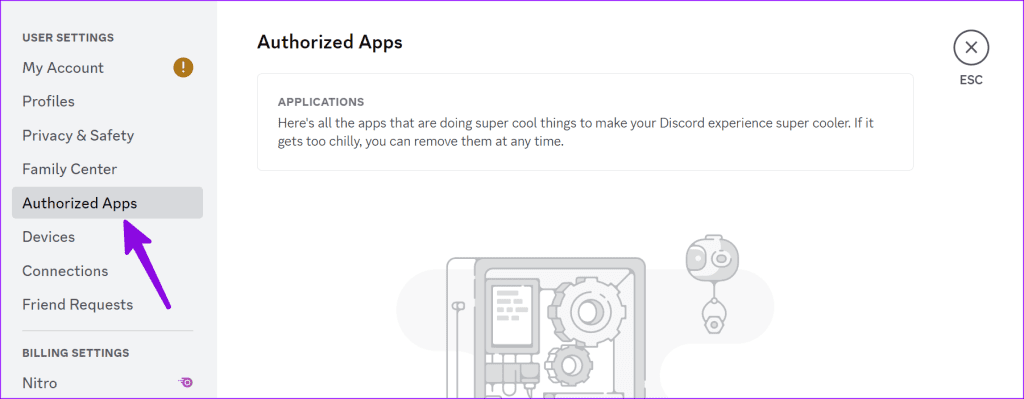
Step 1: Open Discord and click on the Settings gear icon next to your Discord user name.
Step 2: Select Authorized Apps from the left sidebar and remove unnecessary ones from the list.
Was this helpful?
Last updated on 26 July, 2024
1 Comment
Leave a Reply
Read Next
 How to Fix WhatsApp Desktop Keeps Logging Me Out on Windows
Try Basic Fixes Rule out issues with your internet: A slow or patchy internet connection is commonly why WhatsApp Desktop may encounter sync issues and log you out.
How to Fix WhatsApp Desktop Keeps Logging Me Out on Windows
Try Basic Fixes Rule out issues with your internet: A slow or patchy internet connection is commonly why WhatsApp Desktop may encounter sync issues and log you out.
 6 Ways to Fix Chrome Keeps Logging Me Out Issue
Basic Fixes Disable Chrome extensions: Select the vertical three-dot menu at the top right of Google Chrome, and click Extensions > Manage Extensions.
6 Ways to Fix Chrome Keeps Logging Me Out Issue
Basic Fixes Disable Chrome extensions: Select the vertical three-dot menu at the top right of Google Chrome, and click Extensions > Manage Extensions.
 4 Ways to Fix Facebook Keeps Logging You Out
Fix 1: Clear Cache and Cookies Cache and cookies data stored by your browser can sometimes cause problems, such as Facebook logging you out randomly.
4 Ways to Fix Facebook Keeps Logging You Out
Fix 1: Clear Cache and Cookies Cache and cookies data stored by your browser can sometimes cause problems, such as Facebook logging you out randomly.
 5 Things to Try If X (Twitter) Keeps Logging You Out
Try These Things First Disable VPN: If you're using a VPN connection, X may log you out due to unusual or suspicious account activity.
5 Things to Try If X (Twitter) Keeps Logging You Out
Try These Things First Disable VPN: If you're using a VPN connection, X may log you out due to unusual or suspicious account activity.
 3 Fixes for Telegram Keeps Logging Me Out on Mobile and Desktop
Basic Fixes Force quit and relaunch the Telegram app: This will give the app a fresh start on your device.
3 Fixes for Telegram Keeps Logging Me Out on Mobile and Desktop
Basic Fixes Force quit and relaunch the Telegram app: This will give the app a fresh start on your device.
 Why Does Netflix Keep Logging Me Out and 3 Ways to Fix It
Why Netflix Logged You Out Automatically There are a few reasons why Netflix asks for sign-in every time you open the service.
Why Does Netflix Keep Logging Me Out and 3 Ways to Fix It
Why Netflix Logged You Out Automatically There are a few reasons why Netflix asks for sign-in every time you open the service.
 5 Ways to Fix Discord Keeps Crashing on Windows Computer
https://youtu.be/_uU0Ob5vTWM Try Basic Fixes End Discord processes using Task Manager: Press Ctrl + Shift + Esc keys to open Task Manager.
5 Ways to Fix Discord Keeps Crashing on Windows Computer
https://youtu.be/_uU0Ob5vTWM Try Basic Fixes End Discord processes using Task Manager: Press Ctrl + Shift + Esc keys to open Task Manager.
 4 Ways to Fix Discord Keeps Crashing on Android
Try Basic Fixes Free up storage space: A lack of free storage space on your Android can also cause Discord to misbehave and display the "Looks like Discord has crashed
4 Ways to Fix Discord Keeps Crashing on Android
Try Basic Fixes Free up storage space: A lack of free storage space on your Android can also cause Discord to misbehave and display the "Looks like Discord has crashed
The article above may contain affiliate links which help support Guiding Tech. The content remains unbiased and authentic and will never affect our editorial integrity.

Why those this my email those not exist on Discord account