Basic Fixes:
- Restart iPad: A simple reboot may fix glitches like the iPad can’t connect to the App Store. Long-press the power button and use the slider to turn off the iPad. Restart it and check.
- Check App Store servers: Apple offers a dedicated System Status website for checking service status. Visit the System Status website and ensure the App Store shows a green indicator beside it.
- Force close App Store and try again: Open all background apps and force the App Store to close. Then, restart the app and see if the issue is fixed.
- Turn off VPN: An active VPN connection can be the culprit behind the inability to connect to App Store. You should open your preferred VPN app on your iPad and disconnect it.
- Update iPadOS: An outdated iPadOS build may give you problems with the App Store. Apple bundles new App Store updates with the OS build. So, download the latest iPadOS update from the Settings menu.
Fix 1: Sign In Again
Due to an account authentication error, your iPad may fail to connect to the App Store. You should sign out from your Apple account and sign in again. Here’s how.
Step 1: Open Settings and tap on your profile picture.
Step 2: Select Sign Out and confirm your decision.
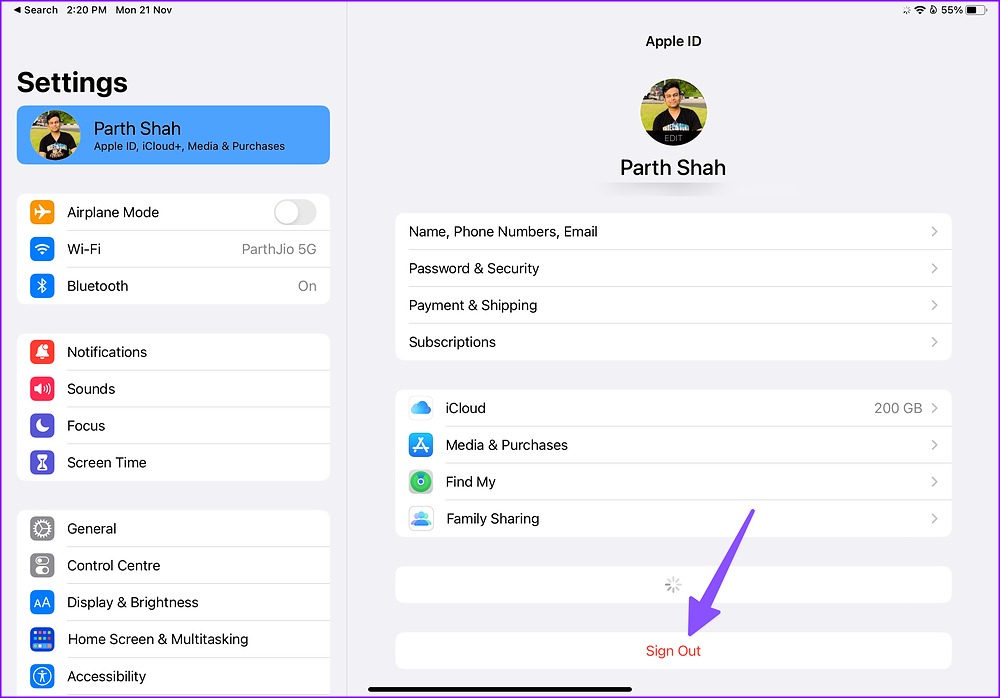
Sign in again with your latest Apple account details. Then, reopen the App Store and see if the issue is fixed.
Fix 2: Check the Date and Time
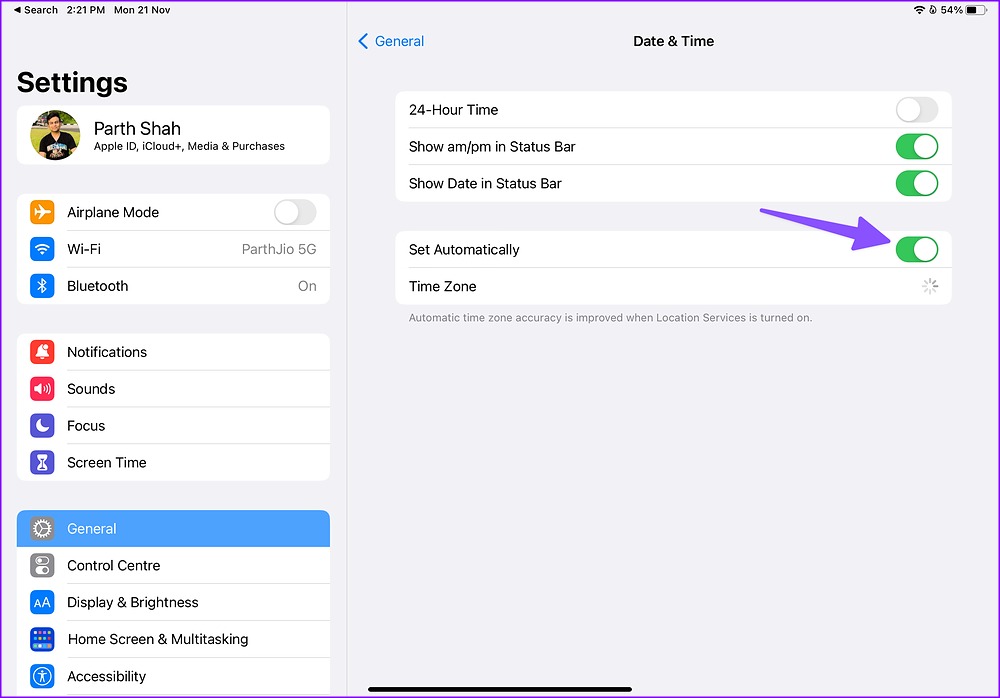
If your iPad has the wrong date and time, it won’t connect to the App Store. You should set the date and time on your iPad to update automatically using the steps below.
Step 1: Open Settings and tap on General. Tap Date & Time.

Step 2: Enable the Set Automatically toggle.
Fix 3: Reset Network Settings on the iPad
A wrong network tweak may prevent the iPad from connecting to the App Store. Reset the network settings on the iPad using the steps below.
Step 1: Open Settings and tap on General. Tap on Transfer or Reset iPad.
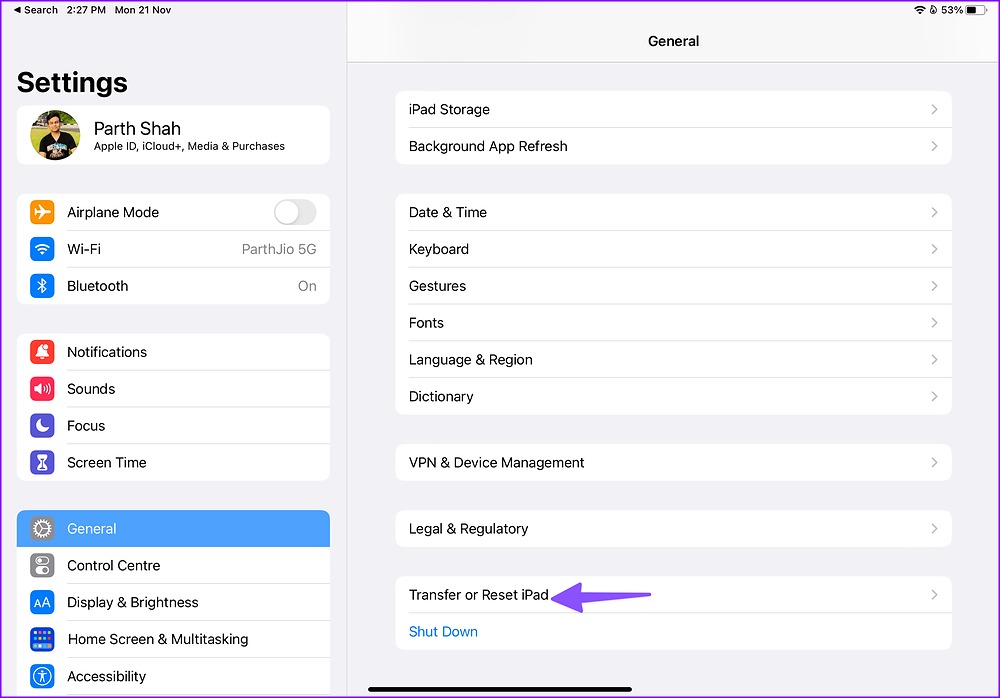
Step 2: Select Reset and tap Reset Network Settings.
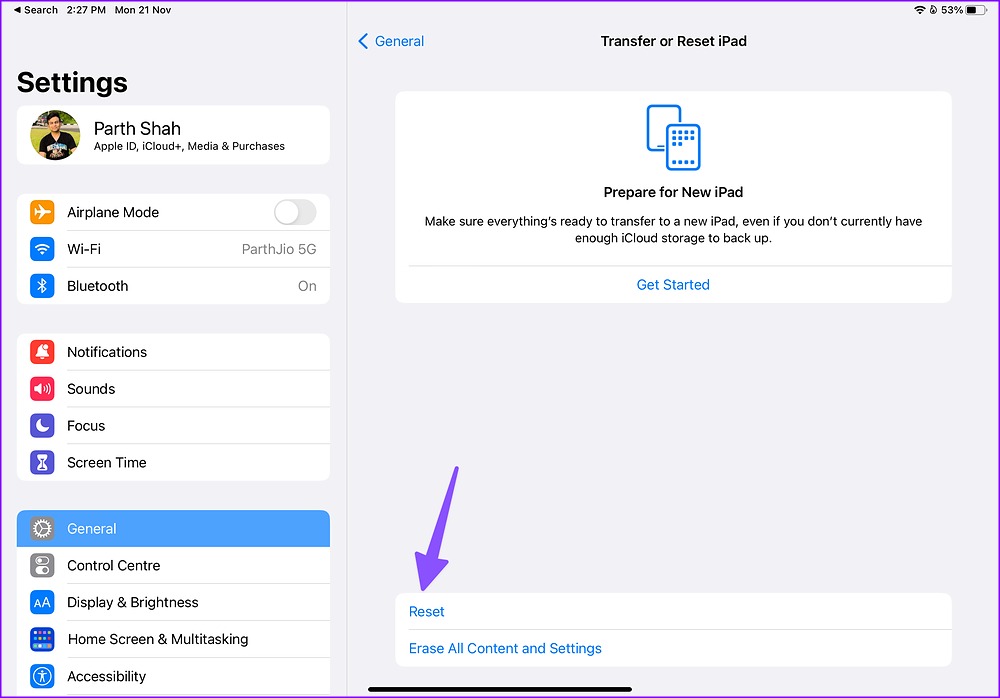
Follow the on-screen instructions to finish the process. Then, open the App Store again on your iPad to see if the issue is fixed.
Was this helpful?
Last updated on 28 June, 2024
Read Next
 4 Ways to Fix “Account Not in This Store” Error in App Store for iPhone
Try Basic Fixes Disable VPN: The 'Account Not In This Store' error may be appearing due to a VPN connection.
4 Ways to Fix “Account Not in This Store” Error in App Store for iPhone
Try Basic Fixes Disable VPN: The 'Account Not In This Store' error may be appearing due to a VPN connection.
 4 Ways to Fix Google Play Store Won’t Connect to the Internet
Try Basic Fixes Toggle airplane mode: Turning airplane mode on and off is an easy way to refresh all the network connections on your Android.
4 Ways to Fix Google Play Store Won’t Connect to the Internet
Try Basic Fixes Toggle airplane mode: Turning airplane mode on and off is an easy way to refresh all the network connections on your Android.
 5 Ways to Fix Apple TV App Not Working on iPhone or iPad
Basic Fixes Check your network connection: Ensure your device is connected to a good internet connection.
5 Ways to Fix Apple TV App Not Working on iPhone or iPad
Basic Fixes Check your network connection: Ensure your device is connected to a good internet connection.
 4 Ways to Fix App Store Search Not Working on iPhone
Try Basic Fixes Check the App Store server status: Sometimes, the App Store can suffer from service outages.
4 Ways to Fix App Store Search Not Working on iPhone
Try Basic Fixes Check the App Store server status: Sometimes, the App Store can suffer from service outages.
 4 Ways to Fix “Verification Required” on App Store
Basic Fixes Check internet connection: Using the App Store to explore the library and download the apps without any problem requires a stable network connection Sign out and sign into
4 Ways to Fix “Verification Required” on App Store
Basic Fixes Check internet connection: Using the App Store to explore the library and download the apps without any problem requires a stable network connection Sign out and sign into
 13 Ways to Connect iPhone to Mac and Smoothen Your Workflow
The iPhone and Mac are both powerful devices individually.
13 Ways to Connect iPhone to Mac and Smoothen Your Workflow
The iPhone and Mac are both powerful devices individually.
 How to Use the Apple Freeform App on iPhone and iPad
Wondering why the Freeform app appeared on your iPhone?
How to Use the Apple Freeform App on iPhone and iPad
Wondering why the Freeform app appeared on your iPhone?
 Top 8 Ways to Fix Apple iPad Not Charging
Apple’s iPad is ideal for consuming media, getting some work done, and taking Google Meet/Zoom calls on the go.
Top 8 Ways to Fix Apple iPad Not Charging
Apple’s iPad is ideal for consuming media, getting some work done, and taking Google Meet/Zoom calls on the go.
The article above may contain affiliate links which help support Guiding Tech. The content remains unbiased and authentic and will never affect our editorial integrity.