

Basic Fixes
- Check Bluetooth device battery levels: In addition to battery levels, you should also check if you have low-latency Bluetooth earphones. Trying out a wired headset while watching on a Desktop or TV can fix the issue.
- Check Internet speed: This is recommended especially while watching content in 4K Ultra HD resolution.
- Force stop and relaunch the streaming app: This will give the app a fresh start on your Firestick.
- Update Fire OS and streaming app version: Installing the latest versions can help you fix the issue.
Fix 1: Turn Off Dolby Digital and Switch to Stereo
Not all content on streaming platforms supports Dolby Digital 5.1 surround sound. You can switch to Stereo which is 2-channel audio.
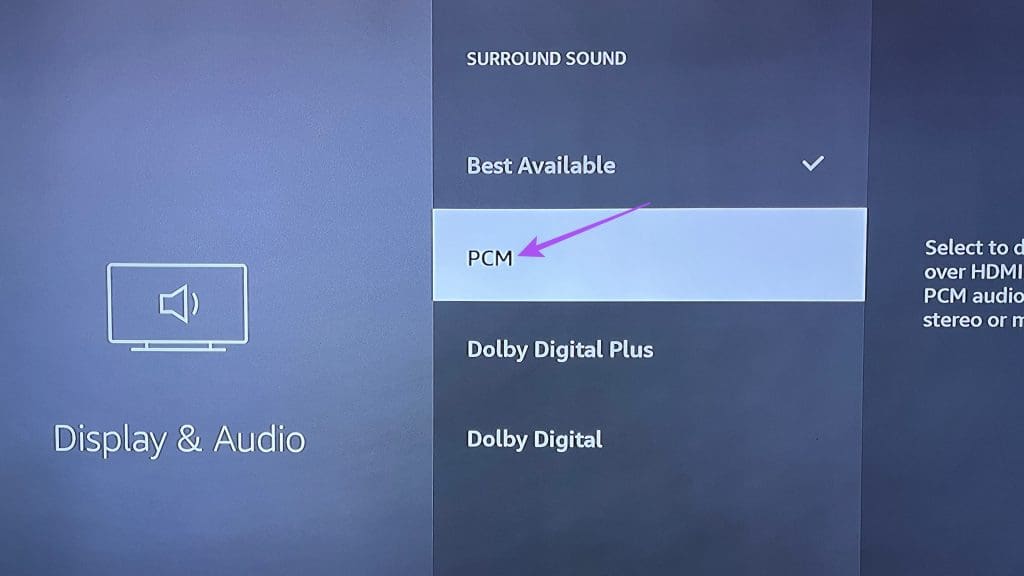
Step 1: Go to Settings on your Fire TV homepage and select Display and Audio.
Step 2: Select Audio and select Surround Sound.
Step 3: Choose PCM to switch to stereo audio from Dolby Digital.
Fix 2: Check Audio Video Sync Tuning
AV Sync Tuning is a built-in tool for the very purpose of syncing audio and video on your Amazon Fire TV Stick.
Step 1. Go to Settings and select Display and Sounds.
Step 2: Select Audio from the list of options and choose AV Sync Tuning.
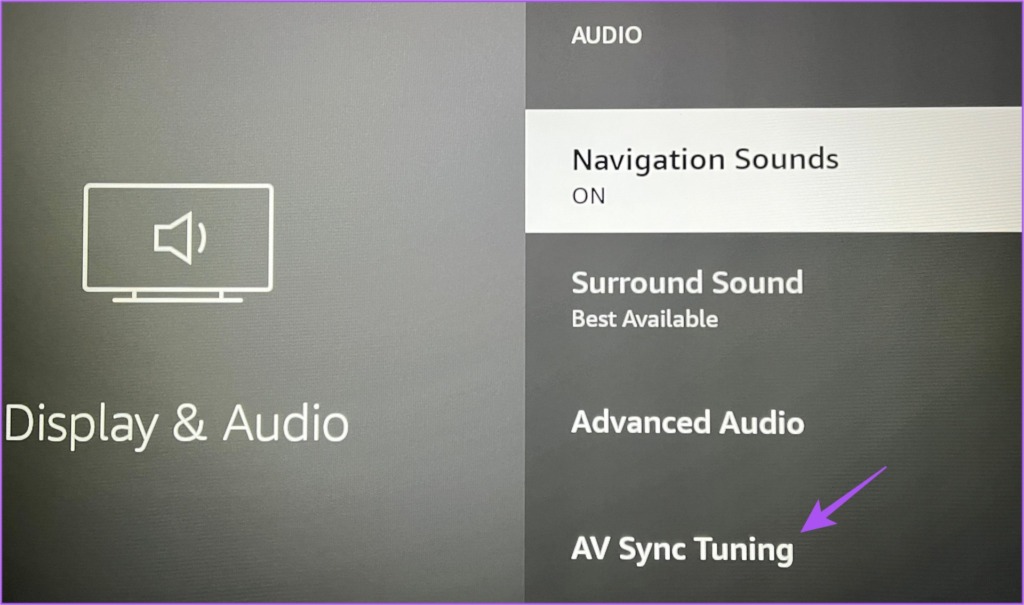
You will now see the AV Sync Tuning screen on your TV. To sync audio and video, every bounce of the on-screen ball should happen simultaneously as the circular flash on the top-left side and a click tone.

Step 3: Press the left and right navigation buttons on your remote to use the slider at the bottom.

Move to the right if the click tone occurs before the flash, or to the left if it occurs after the flash.

Step 4: Go to Apply above the slider to save your preferences once audio and video are synced.

Step 5: Go back to the home screen and open your streaming app to check if this fixed the problem.
Fix 3: Reset Fire TV Stick
This will reset all your in-app preferences. But you will also have to re-install your streaming apps.
Step 1: Go to Settings on your Fire TV home screen.
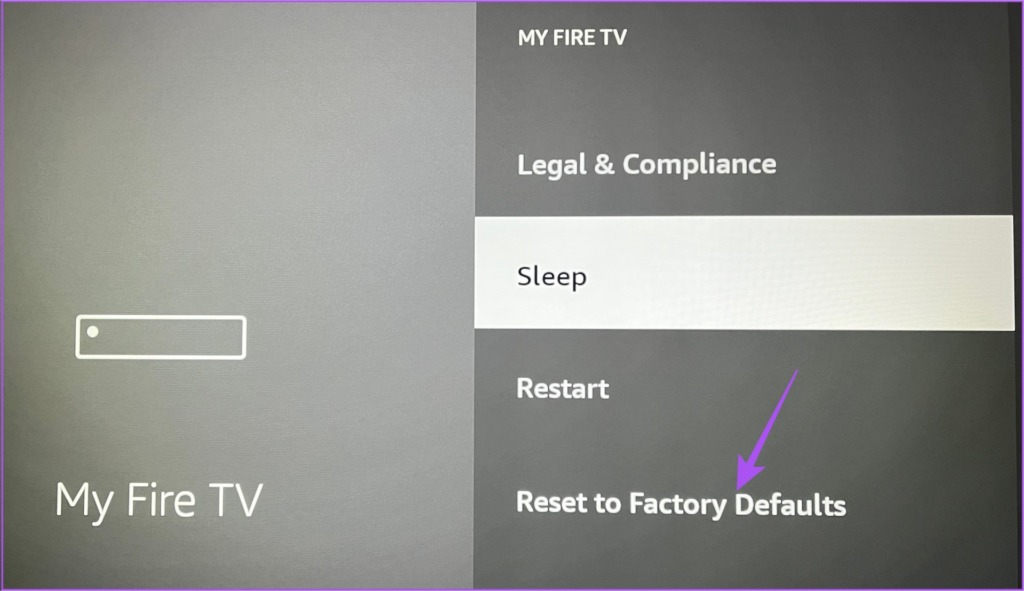
Step 2: Scroll to the right and select My Fire TV.
Step 3: Scroll down and select Reset to Factory Defaults.
Was this helpful?
Last updated on 01 July, 2024
1 Comment
Leave a Reply
Read Next
 3 Ways to Fix Amazon Fire TV Stick Keeps Restarting
Basic Fixes Use official accessories: If you aren't using the original accessories with your Firestick, you might use an incompatible USB cable or adapter.
3 Ways to Fix Amazon Fire TV Stick Keeps Restarting
Basic Fixes Use official accessories: If you aren't using the original accessories with your Firestick, you might use an incompatible USB cable or adapter.
 2 Ways to Fix Black Screen on Amazon Fire TV Stick
Basic Fixes Check Amazon server status: You can visit DownDetector to see if Amazon servers are working fine for your region.
2 Ways to Fix Black Screen on Amazon Fire TV Stick
Basic Fixes Check Amazon server status: You can visit DownDetector to see if Amazon servers are working fine for your region.
 3 Ways to Fix Fire TV Stick Stuck on Amazon Logo Screen
Basic Fixes Use the official accessories: Your Fire TV Stick comes with official accessories that help ensure your device gets sufficient power and can work properly.
3 Ways to Fix Fire TV Stick Stuck on Amazon Logo Screen
Basic Fixes Use the official accessories: Your Fire TV Stick comes with official accessories that help ensure your device gets sufficient power and can work properly.
 How to Fix Netflix Not Working on Amazon Fire TV Stick
Basic Fixes Check Netflix server status: You can visit DownDetector to see if the Netflix servers are working for your area.
How to Fix Netflix Not Working on Amazon Fire TV Stick
Basic Fixes Check Netflix server status: You can visit DownDetector to see if the Netflix servers are working for your area.
 3 Ways to Fix Apple TV App Not Working on Amazon Fire TV Stick
Basic Fixes Force quit and relaunch Apple TV app: This will give the app a fresh start on your Firestick.
3 Ways to Fix Apple TV App Not Working on Amazon Fire TV Stick
Basic Fixes Force quit and relaunch Apple TV app: This will give the app a fresh start on your Firestick.
 No Sound on Amazon Fire TV Stick YouTube App? Here’s the Fix
Basic Fixes Check if the audio is muted: The Fire TV 4K remote has a dedicated Mute button to disable audio.
No Sound on Amazon Fire TV Stick YouTube App? Here’s the Fix
Basic Fixes Check if the audio is muted: The Fire TV 4K remote has a dedicated Mute button to disable audio.
 5 Ways to Fix Amazon Silk Browser Not Working on Fire TV Stick
Basic Fixes Check your network connection: Open Fire OS settings via the Gear icon at the top right.
5 Ways to Fix Amazon Silk Browser Not Working on Fire TV Stick
Basic Fixes Check your network connection: Open Fire OS settings via the Gear icon at the top right.
 3 Ways to Fix YouTube TV Not Working on Amazon Fire TV Stick
Basic Fixes Check the YouTube server status: Visit Downdetector to check an active YouTube TV server outage.
3 Ways to Fix YouTube TV Not Working on Amazon Fire TV Stick
Basic Fixes Check the YouTube server status: Visit Downdetector to check an active YouTube TV server outage.
The article above may contain affiliate links which help support Guiding Tech. The content remains unbiased and authentic and will never affect our editorial integrity.

Thanks, Got it