


Why Can’t You See Notes on Instagram?
- Feature not available to everyone – While Instagram blatantly mentions that Notes isn’t available for everyone on their support page, it doesn’t give the deets. It could be that the feature is unavailable in your region, or your account is flagged.
- Server issues – If Instagram is experiencing server-side issues, it can affect the visibility of notes and other content. In such cases, waiting a while and then trying again later may help.
- App compatibility – While Notes is available on the app, mobile, and web browser, It is unavailable for Instagram lite.
- A glitch or bug – It could be a setting- or connection-related issue.
Basic Fixes
- Check the network connection – Slow or unstable internet can cause the issue. Try switching between Wi-Fi and mobile data to see if the issue persists.
- Update Instagram – The Notes function may not appear on an outdated Instagram app on your phone. Try updating the app and see if the feature becomes available.
- Don’t Use VPN – Notes on Instagram may not show up for your account on an active VPN connection. Disable the VPN network, force-close Instagram, and try again.
- Clear Instagram cache – A corrupt Instagram cache can be why notes are not showing for your account. Clear the app cache and try again.
Fix 1. Turn on Activity Status
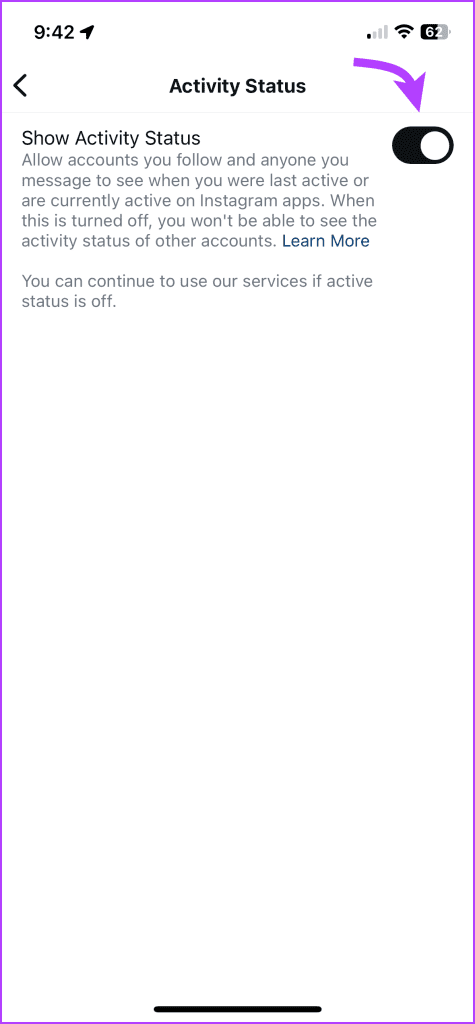
Instagram Notes and activity status are interrelated somehow. The trick has worked for some users. So, ensure that your activity status is enabled for notes to show up or work properly.
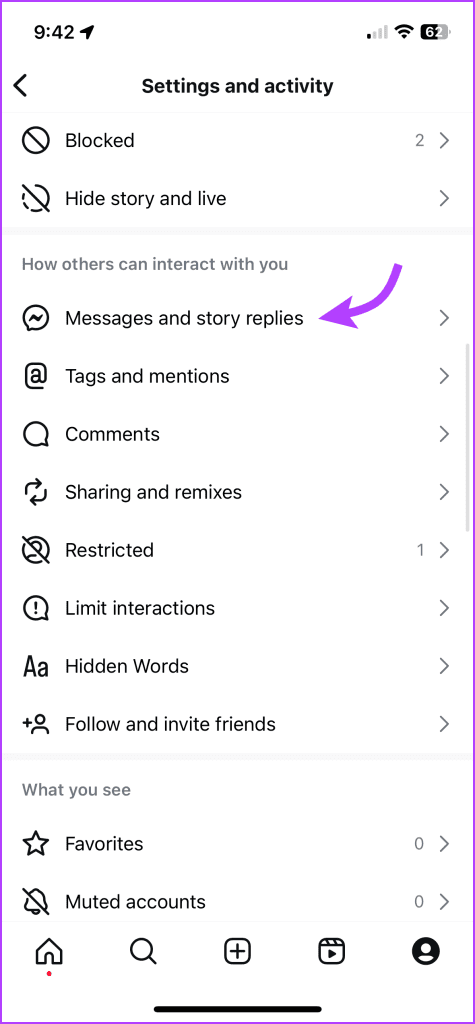
Step 1: Go to your Profile tab and tap the three-line icon.
Step 2: Scroll and select Messages and story replies. You’ll find it under the How others can interact with you section.
Step 3: Tap Show activity status and toggle on the switch.

Fix 2. Log Out and Log In to Your Account
Instagram notes not appearing can be due to an account authentication error. Sign out from your account and sign back in.
Step 1: Open Instagram and go to your profile tab from the bottom left. Tap the three horizontal lines at the top.
Step 2: Scroll down and Log Out from your account.
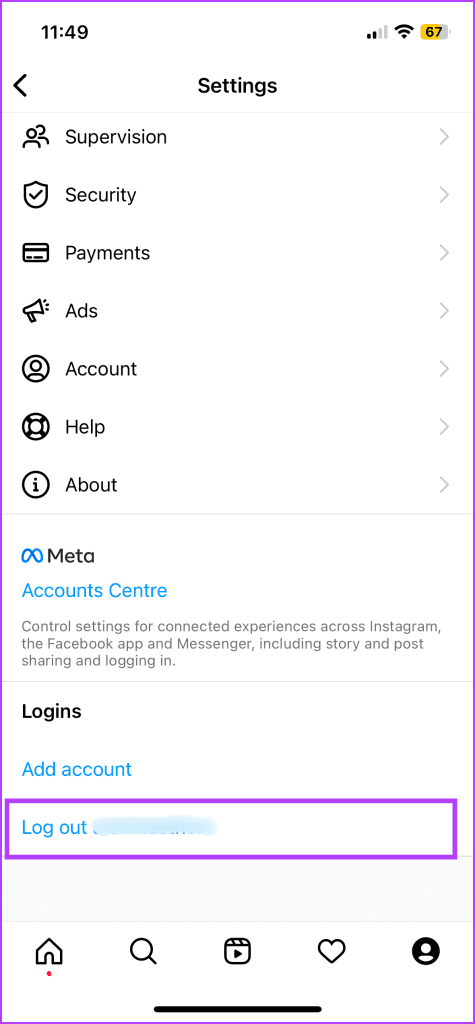

Log in with your account details, and notes will appear on your account. However, if notes are not showing on your Instagram profile, report it to Instagram and let them help you figure it out.
Was this helpful?
Last updated on 02 September, 2024
2 Comments
Leave a Reply
Read Next
 3 Best Ways to Fix Music Not Showing Up in Instagram Notes
Preliminary Fixes Restart Instagram: Sometimes, a simple restart can resolve many app-related issues.
3 Best Ways to Fix Music Not Showing Up in Instagram Notes
Preliminary Fixes Restart Instagram: Sometimes, a simple restart can resolve many app-related issues.
 4 Ways to Fix Instagram Not Showing Profile Picture
Basic Fixes Check internet connectivity: Ensure your device is connected to a Wi-Fi network or cellular data with good signal strength and an active plan.
4 Ways to Fix Instagram Not Showing Profile Picture
Basic Fixes Check internet connectivity: Ensure your device is connected to a Wi-Fi network or cellular data with good signal strength and an active plan.
 3 Ways to Fix Instagram Comments Not Showing on Android and iPhone
Try Basic Fixes Check Instagram’s server status: Server-side glitches could prevent Instagram from loading properly or display strange errors.
3 Ways to Fix Instagram Comments Not Showing on Android and iPhone
Try Basic Fixes Check Instagram’s server status: Server-side glitches could prevent Instagram from loading properly or display strange errors.
 How to Fix “Invite Collaborator” Not Showing on Instagram
Basic Fixes Avoid scheduling your post: Instagram can prevent users from scheduling their content if they have added someone as a collaborator.
How to Fix “Invite Collaborator” Not Showing on Instagram
Basic Fixes Avoid scheduling your post: Instagram can prevent users from scheduling their content if they have added someone as a collaborator.
 3 Ways to Fix Instagram Not Showing Last Active
Why Can't You See if Someone is Active on Instagram Not following each other: While you have the option to communicate in Instagram DM with anyone once they approve your
3 Ways to Fix Instagram Not Showing Last Active
Why Can't You See if Someone is Active on Instagram Not following each other: While you have the option to communicate in Instagram DM with anyone once they approve your
 3 Ways to Fix Instagram Feed Not Showing Friends Posts
Why Can’t I See My Friends’ Posts on My Instagram Feed?
3 Ways to Fix Instagram Feed Not Showing Friends Posts
Why Can’t I See My Friends’ Posts on My Instagram Feed?
 8 Ways to Fix Add Music to Instagram Post Not Showing
Adding music enhances the vibe of an Instagram post.
8 Ways to Fix Add Music to Instagram Post Not Showing
Adding music enhances the vibe of an Instagram post.
 How to Fix Instagram Not Receiving or Showing Messages
Why Can't I See My Messages on Instagram?
How to Fix Instagram Not Receiving or Showing Messages
Why Can't I See My Messages on Instagram?
The article above may contain affiliate links which help support Guiding Tech. The content remains unbiased and authentic and will never affect our editorial integrity.
Hello, cannot see the notes future on Instagram. Please help get this feature as soon as possible. Thank you Instagram Team.
my Instagram ID notes
ka option not available
Please help me 🙏