2 Different Types of Software Updates
There are two different types of software updates your device will receive:
1. Version Updates
Major updates or operating system upgrades are some of the monikers given to version updates. For example, from Android 14 to 15 or iOS 17 to iOS 18. These are usually released annually and bring major changes to the operating system in the form of UI changes, new apps, settings, and more. System updates are larger, ranging from 700MB to 1.5GB or higher.
2. Security and Incremental Updates
Security updates are usually smaller in size and are rolled out often. They are also known as security patches. As the name suggests, they usually fix bugs in your current operating system and secure your phone from malicious attacks by fixing any security lapses.
Google Pixel handsets receive security updates every month. However, that’s not the case with all Android phones. If you are lucky, you might get them once in 2-3 months. Or you will not receive any, depending on the smartphone maker.
Meanwhile, smaller updates that mostly pack an issue fix are often referred to as incremental updates. In such updates, you will get minor new features and security updates bundled together.
Before You Update Your Smartphone
- Updating your phone will take some time. Make sure you have enough battery on your phone. We recommend charging your phone for more than 70%. If you have a low battery or your phone discharges quickly, keep it plugged into the charger while updating it.
- You cannot use your phone when the update is being installed. You will see a text similar to the ‘Installing system update.’
- Ensure there’s enough storage space left on your device to accommodate the new update.
- Lastly, it’s important to remember not to turn off your phone when you are updating it. Even if it’s taking a little longer than expected, do not switch it off. We would suggest updating your handset only when you have enough time at your disposal — at least 30 minutes or
- Don’t worry – your data will not wiped out after you update your phone.
How to Update Your Android or iPhone
On Android
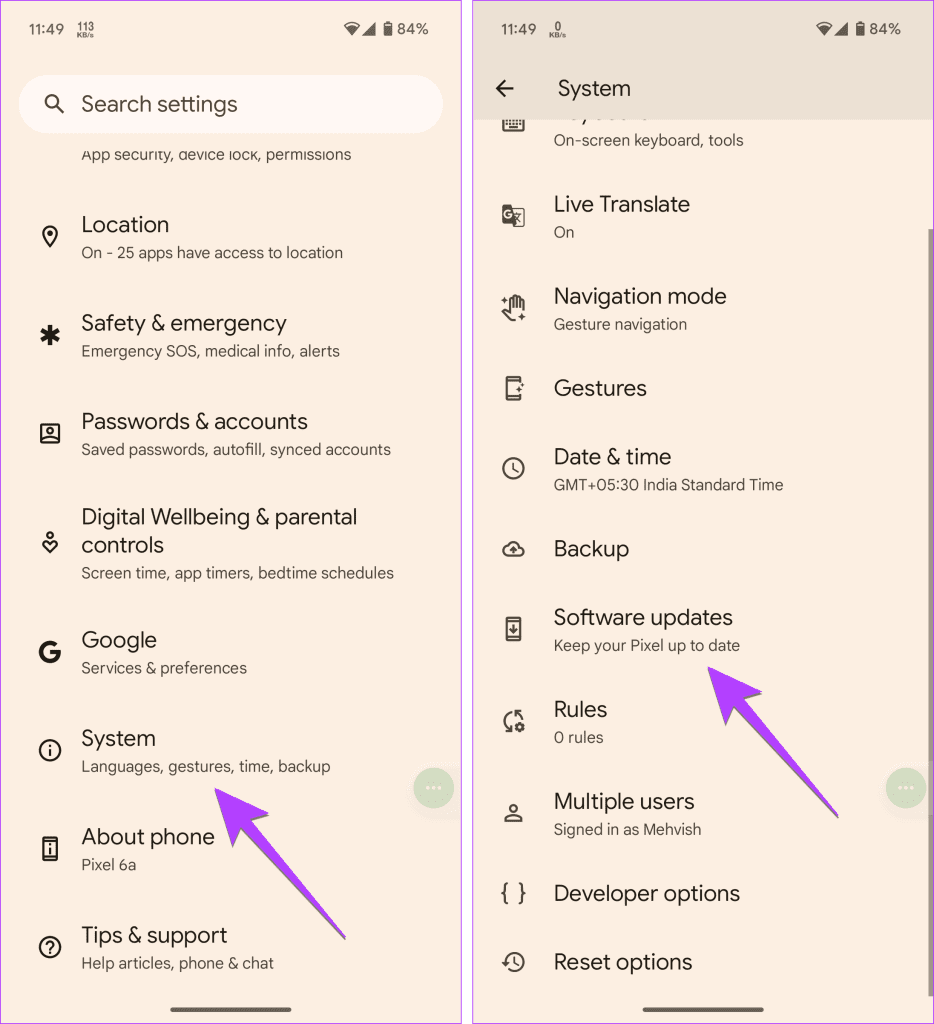
Open Settings > System > Software Updates and check if an update is available.
On iPhone
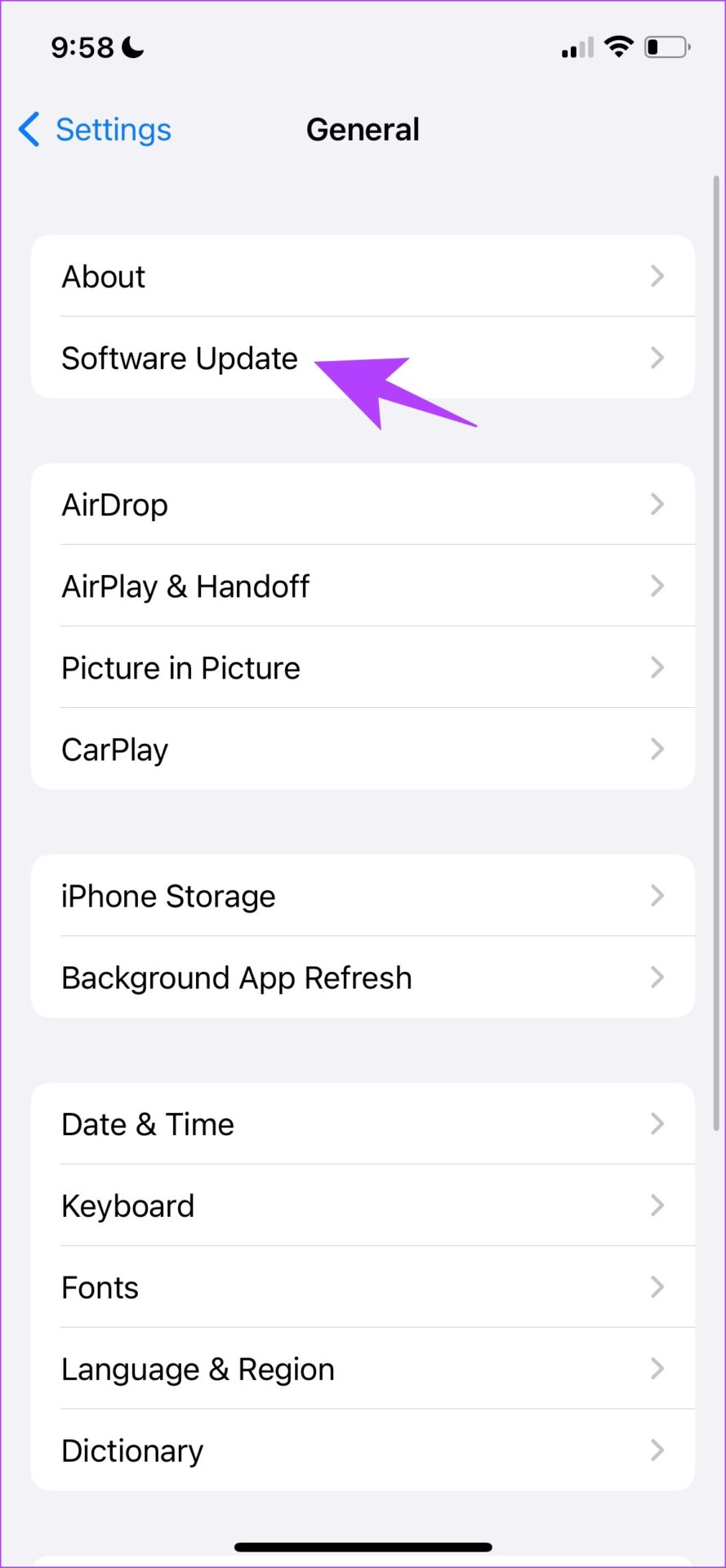
Go to Settings > General > Software Update and check if an update is available.

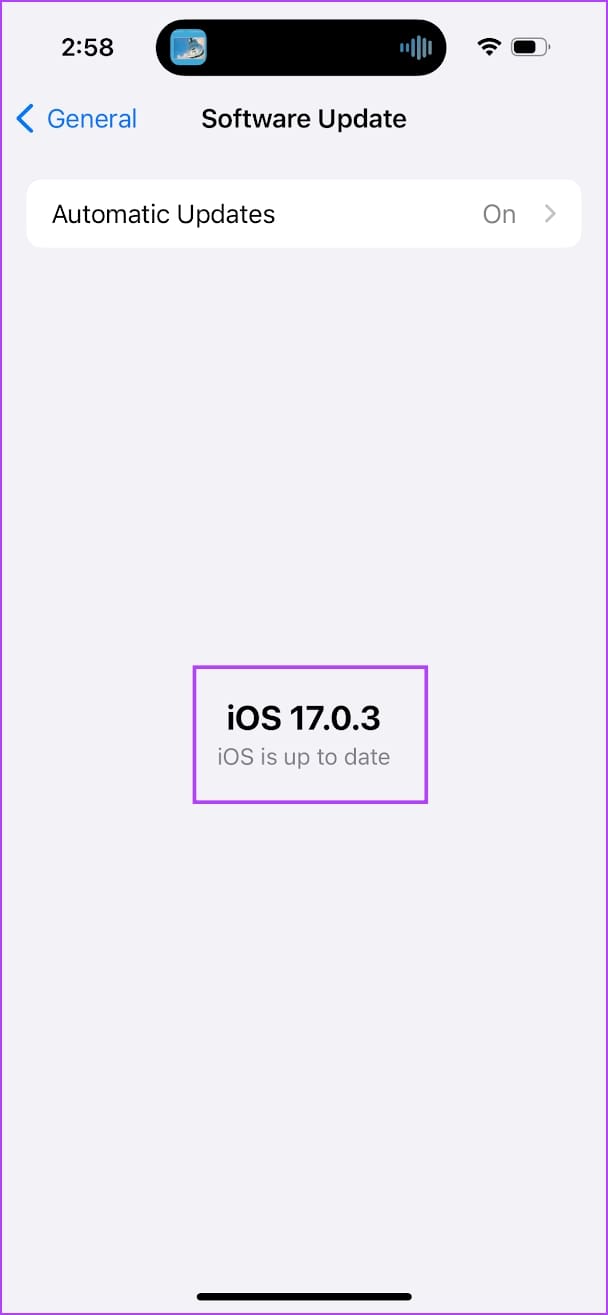
- If an update is available, download the update on your device. Ideally, you will need a Wi-Fi connection – but you can also force the update to download via mobile data.
- When your phone downloads an update, it will prompt you to install it immediately. Only when you give permission, your phone will install it. If your phone doesn’t have sufficient power, then you will be informed to charge your phone before applying the update.
Was this helpful?
Last updated on 23 August, 2024
Read Next
 What Happens When You Force Stop an App on Your Phone
What Does It Mean to Force Stop an App?
What Happens When You Force Stop an App on Your Phone
What Does It Mean to Force Stop an App?
 What Happens if You Delete Gmail App From Phone
What Happens to Emails After Deleting Gmail App?
What Happens if You Delete Gmail App From Phone
What Happens to Emails After Deleting Gmail App?
 What Happens When You Remove a Google Account from Your Phone
1.
What Happens When You Remove a Google Account from Your Phone
1.
 What Happens to WhatsApp When You Change Phone or SIM Card
What Happens to WhatsApp When You Remove SIM Card?
What Happens to WhatsApp When You Change Phone or SIM Card
What Happens to WhatsApp When You Remove SIM Card?
 What Happens When You Uninstall Instagram From Your Phone
Your posts, stories, highlights, and reels will not be deleted from your account.
What Happens When You Uninstall Instagram From Your Phone
Your posts, stories, highlights, and reels will not be deleted from your account.
 What Happens When You Clear Data of an Android App: Popular Apps Explained
What Happens When You Clear Data From an Android App You will be signed out of the account present in the app.
What Happens When You Clear Data of an Android App: Popular Apps Explained
What Happens When You Clear Data From an Android App You will be signed out of the account present in the app.
 How to Disable Apps on Android and What Happens When You Do
How to Disable Apps on Android On Android, you can disable an app from your phone’s Settings menu.
How to Disable Apps on Android and What Happens When You Do
How to Disable Apps on Android On Android, you can disable an app from your phone’s Settings menu.
 How to Reset iPhone and What Happens When You Reset iPhone
https://youtu.be/VPnZOK4EqVQ How to Reset iPhone to Factory Settings Before we move on to erasing data or settings on the iPhone, check out the section below to ensure your data or
How to Reset iPhone and What Happens When You Reset iPhone
https://youtu.be/VPnZOK4EqVQ How to Reset iPhone to Factory Settings Before we move on to erasing data or settings on the iPhone, check out the section below to ensure your data or
The article above may contain affiliate links which help support Guiding Tech. The content remains unbiased and authentic and will never affect our editorial integrity.