Here is the list of things you should know when restricting someone on Instagram. If it sounds good, we have also included a list of methods that can help you restrict it.
Can the Restricted People See or Like Your Instagram Posts or Stories?
Instagram restrict is a lite version of the block function. Instead of unfollowing or blocking your Instagram account, you can restrict someone to limit how they interact with you on the platform. Restricted accounts can see your posts, Stories, Reels, and even like them.
Can Restricted Accounts Comment on Your Posts?
Instagram has designed the Restrict function to remove spam from the comments section. When a restricted account adds a comment to your post, they can see it, but it won’t be visible to others. Meaning these comments won’t be public. The comment won’t be visible to you either. It will be labeled as a ‘Restricted comment’. However, you can see and approve the comment so that others can see it.
The earlier comments made by the restricted accounts remain unchanged. Since they will be public and visible to everyone, you have no option but to delete them from the comments section.
Can a Restricted Person Message You?
Like how a person can comment on your posts, the restricted account can still reach you via messages. However, you won’t get notified about the incoming messages, and Instagram will hide those messages in the request folder. The restricted account won’t see when you read these messages. You won’t reply to those messages unless you unrestrict the account.
Method 1. Restrict Someone on Instagram
There are multiple ways to restrict someone on Instagram. You can restrict an Instagram account from the profile menu, Messages, or the comments section.
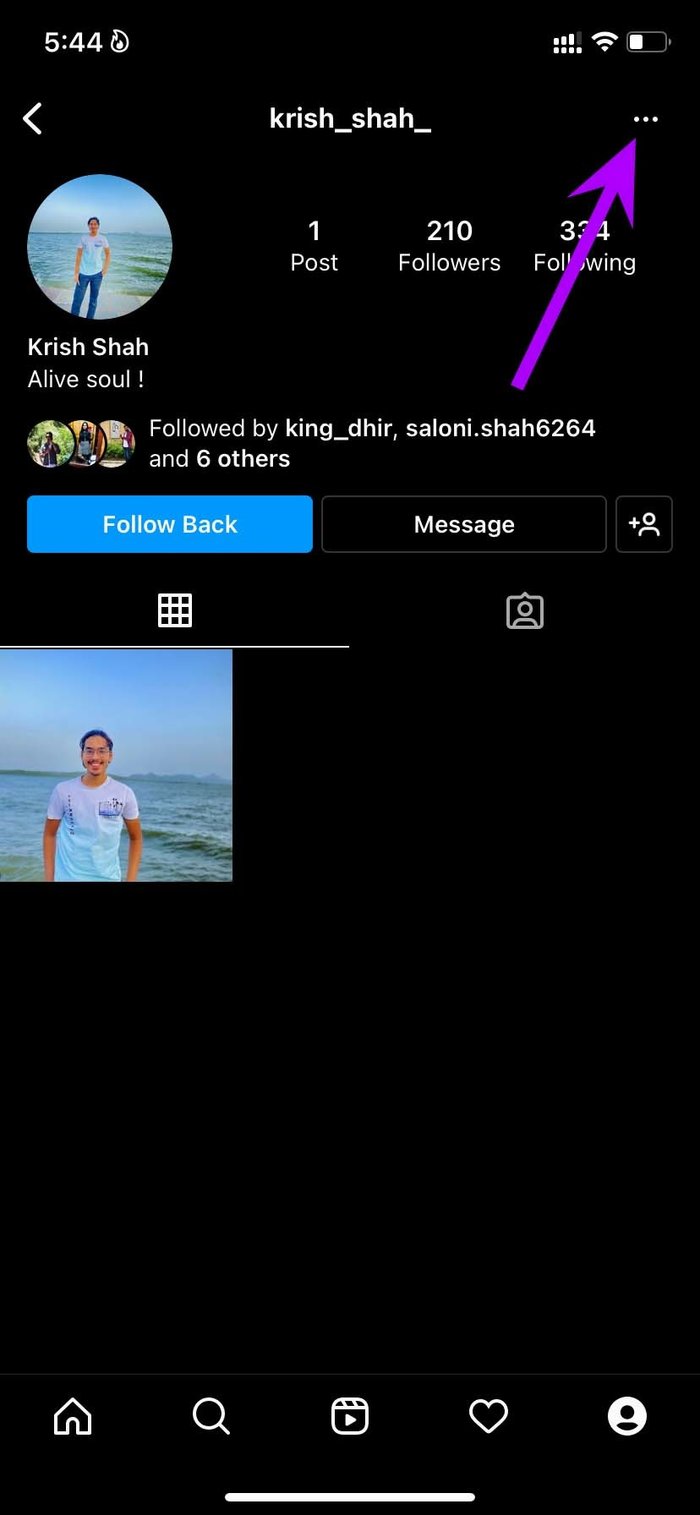
Step 1: Open Instagram and go to the user profile you want to restrict.
Step 2: Tap the three-dot menu at the top and tap Restrict from the flyout menu.
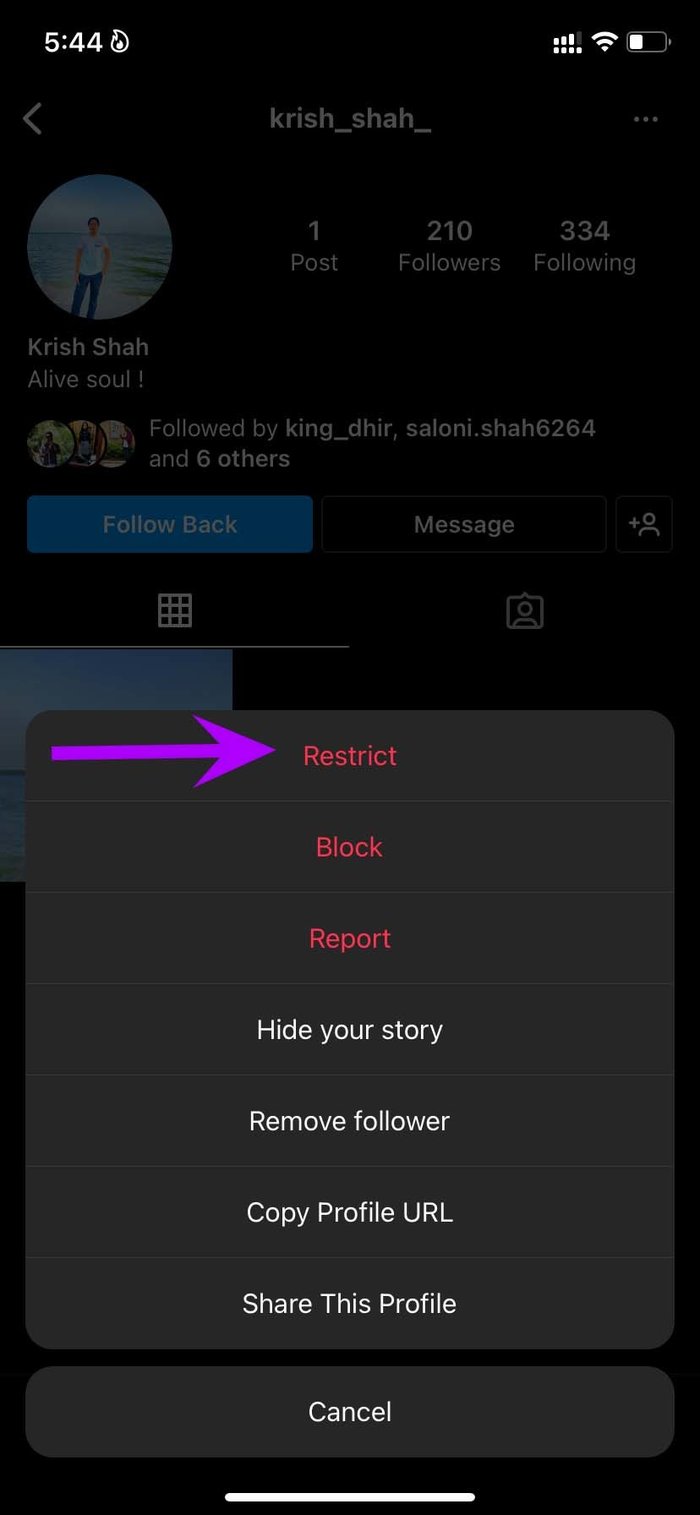
Step 3: Instagram will ask for confirmation. Select Restrict Account.
Note: Instagram restriction and block are two different things.
Method 2. Restrict Someone on Instagram from Comments
You can also restrict someone from the comments section. Maybe you are glancing through comments on your posts and are not a fan of someone spamming or making unwanted comments. And now you want to restrict the person from further commenting on your posts. Here’s what you need to do.
Step 1: Swipe left on the Instagram profile and tap the report icon.
Step 2: Select Restrict, and the person will no longer bother you.
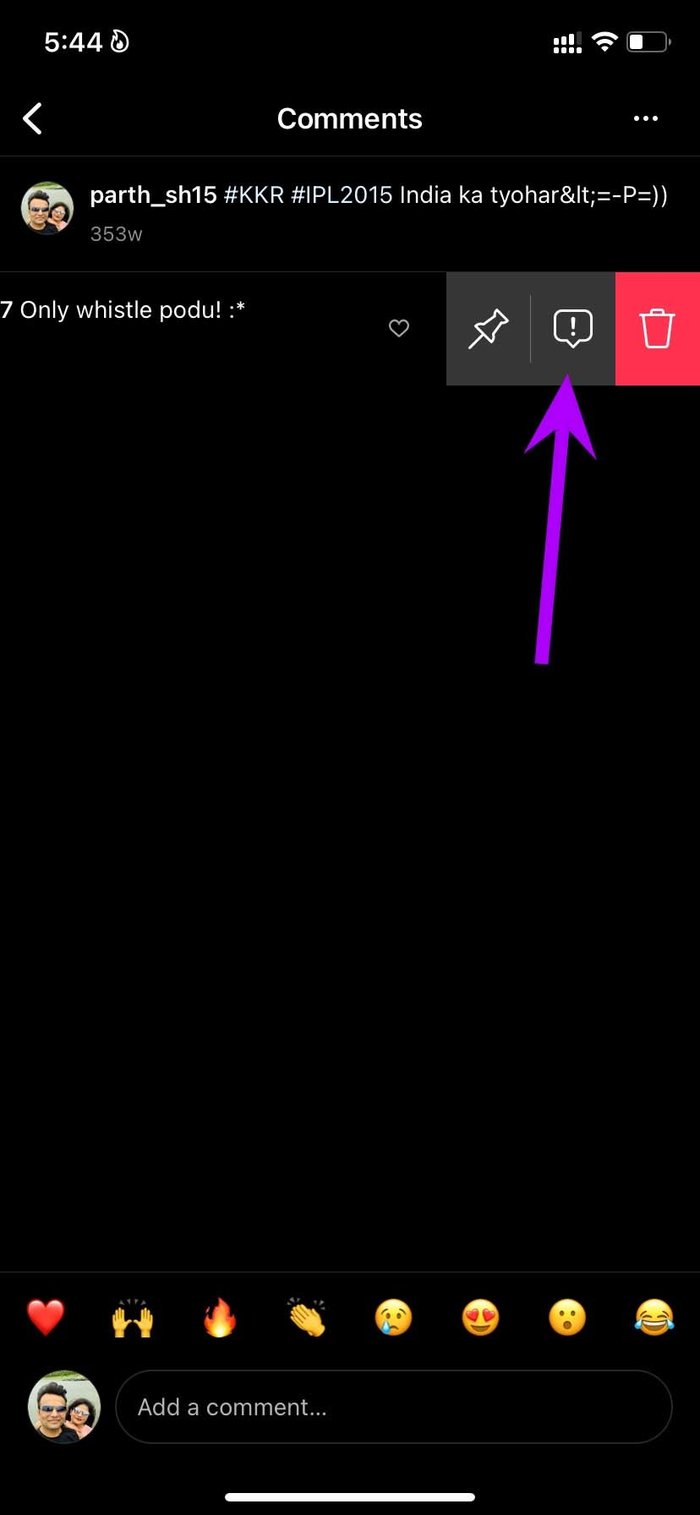
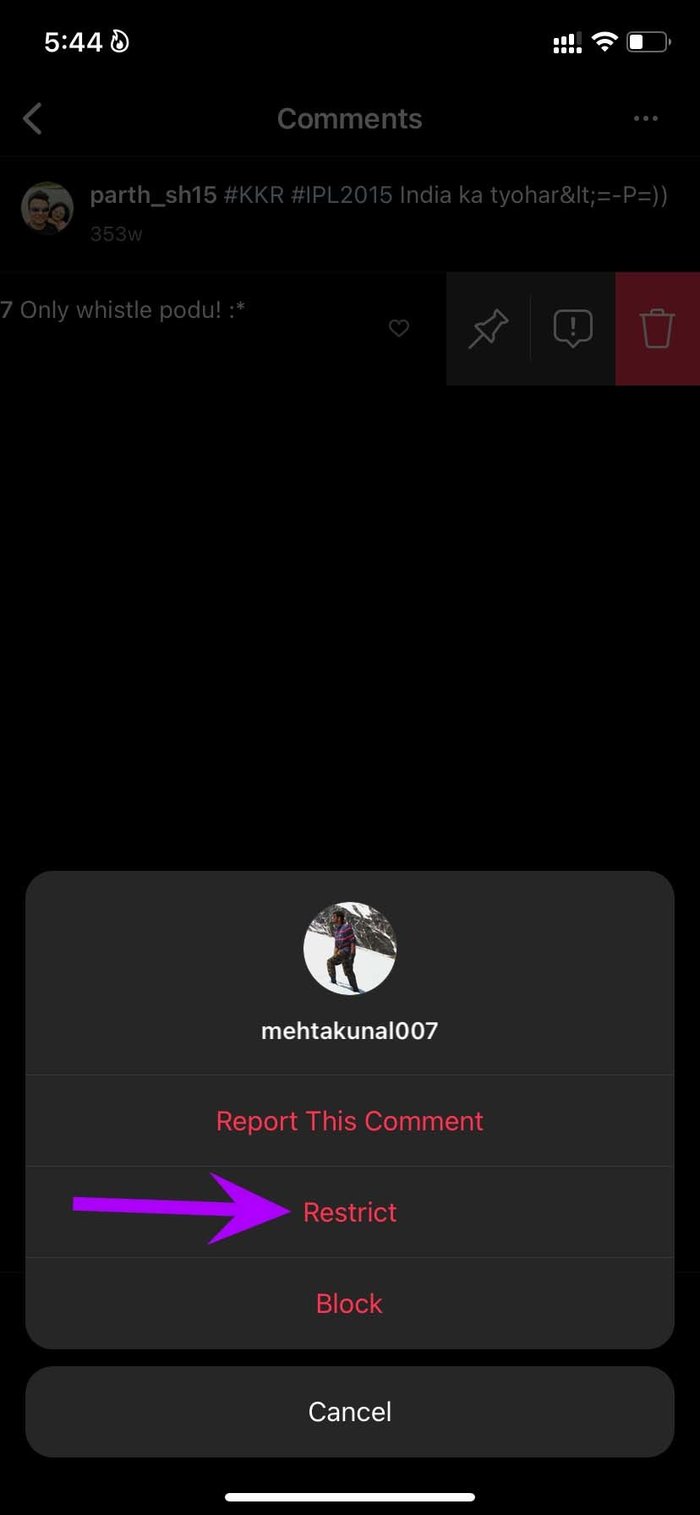
Note: You can’t restrict someone from other users’ Instagram post comments.
Method 3. Restrict Someone from Instagram Messages
Easiest way to restrict a known person is to do it from Instagram comments.
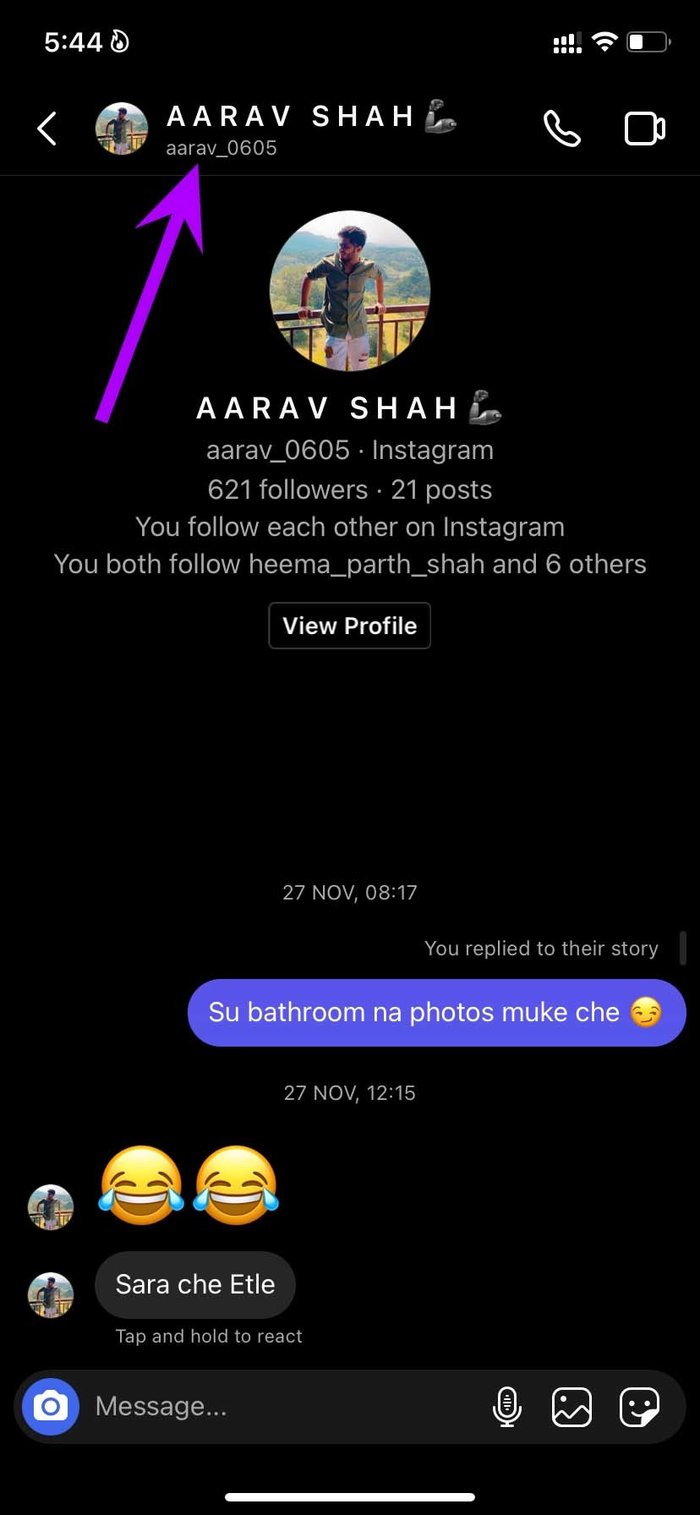
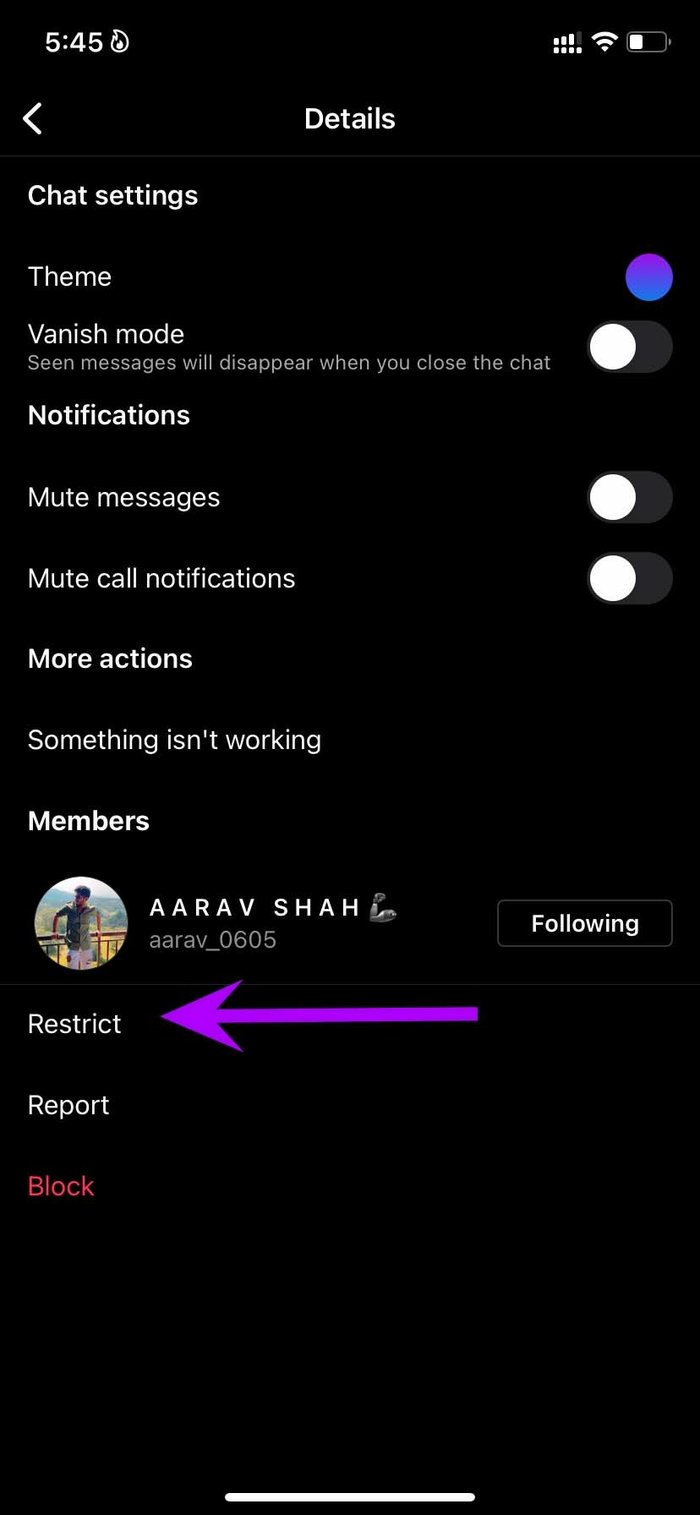
Step 1: Open the chat thread where the account you want to restrict has left a comment.
Step 2: Tap the contact name at the top, select Restrict at the bottom, and confirm your decision.
Was this helpful?
Last updated on 19 July, 2024
Read Next
 What Happens When You Restrict Someone on Facebook Messenger?
What Does Restrict Mean on Messenger?
What Happens When You Restrict Someone on Facebook Messenger?
What Does Restrict Mean on Messenger?
 What Happens When You Block Someone on Instagram
What Happens to Profile When You Block Someone Instagram gives two options for ignoring someone, mute and block.
What Happens When You Block Someone on Instagram
What Happens to Profile When You Block Someone Instagram gives two options for ignoring someone, mute and block.
 What Happens When You Unfollow Someone on Instagram?
What Happens When You Unfollow Someone on Instagram?
What Happens When You Unfollow Someone on Instagram?
 What Happens When You Report Someone on Instagram
 Instagram might ban or deactivate the reported account or post.
What Happens When You Report Someone on Instagram
What Happens When You Report Someone on Instagram Instagram might ban or deactivate the reported account or post.
 Instagram Restrict vs. Block: Which Privacy Option Should You Use
What Does Restrict Mean on Instagram Touted as an anti-bullying feature, restrict on Instagram helps avoid unwanted interactions without letting the other person know about it.
Instagram Restrict vs. Block: Which Privacy Option Should You Use
What Does Restrict Mean on Instagram Touted as an anti-bullying feature, restrict on Instagram helps avoid unwanted interactions without letting the other person know about it.
 4 Ways to Fix “We Restrict Certain Activity to Protect Our Community” on Instagram
Basic Fixes Check if Instagram is down: Check if Instagram is facing downtime.
4 Ways to Fix “We Restrict Certain Activity to Protect Our Community” on Instagram
Basic Fixes Check if Instagram is down: Check if Instagram is facing downtime.
 What Happens When You Block Someone on Facebook Messenger
What Happens When You Block Someone On Messenger Action Blocked PersonYouSend MessagesNoNoMessage in groupsYesYesCall on MessengerNo NoDelete chat historyNo NoSee old messages YesYesReact to old messages No NoSee online status
What Happens When You Block Someone on Facebook Messenger
What Happens When You Block Someone On Messenger Action Blocked PersonYouSend MessagesNoNoMessage in groupsYesYesCall on MessengerNo NoDelete chat historyNo NoSee old messages YesYesReact to old messages No NoSee online status
 What Happens When You Unfollow Someone on Facebook
What Does Unfollow Mean on Facebook Unfollow in simple terms means to stop seeing someone’s posts on your newsfeed.
What Happens When You Unfollow Someone on Facebook
What Does Unfollow Mean on Facebook Unfollow in simple terms means to stop seeing someone’s posts on your newsfeed.
The article above may contain affiliate links which help support Guiding Tech. The content remains unbiased and authentic and will never affect our editorial integrity.