

Things to Know Before Using Secret Conversations on Messenger
Before we start, let’s briefly examine what happens when you start or view a secret conversation on Messenger.
- Secret conversations will appear separate from normal chats and have a visible lock sign.
- Only you and the other participant can see the secret conversation chat window. These messages will be end-to-end encrypted.
- You can set a timer to ensure your chats are auto-deleted within the specified timeframe once they are read.
- Secret conversations will always be one-on-one and can only be done using the Messenger Android and iOS apps.
- You can access your previous secret conversations using Messenger on a web browser.
How to Start a Secret Conversation on Messenger
There are two ways to start a secret conversation on Messenger: using the good old chat window and the search option. When using these methods, we found that the chat window is a more convenient way if you already have a normal chat open with the user. Here’s a step-by-step look.
Method 1: Using Chat Window
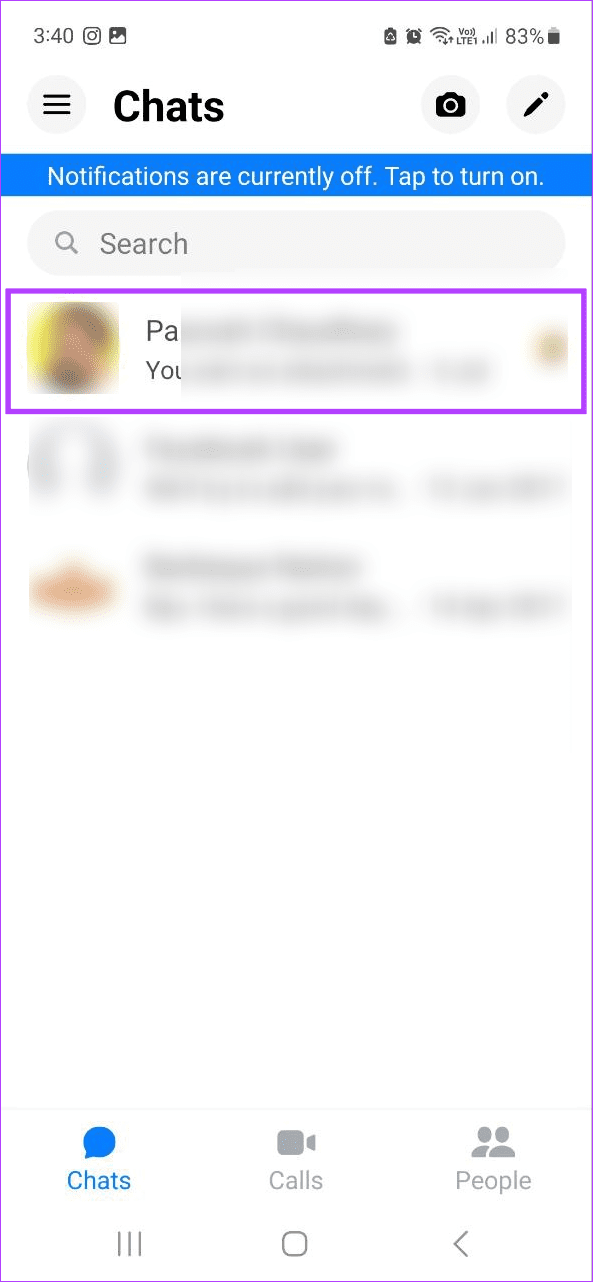
Step 1: Open the Messenger mobile app and tap on the relevant contact.
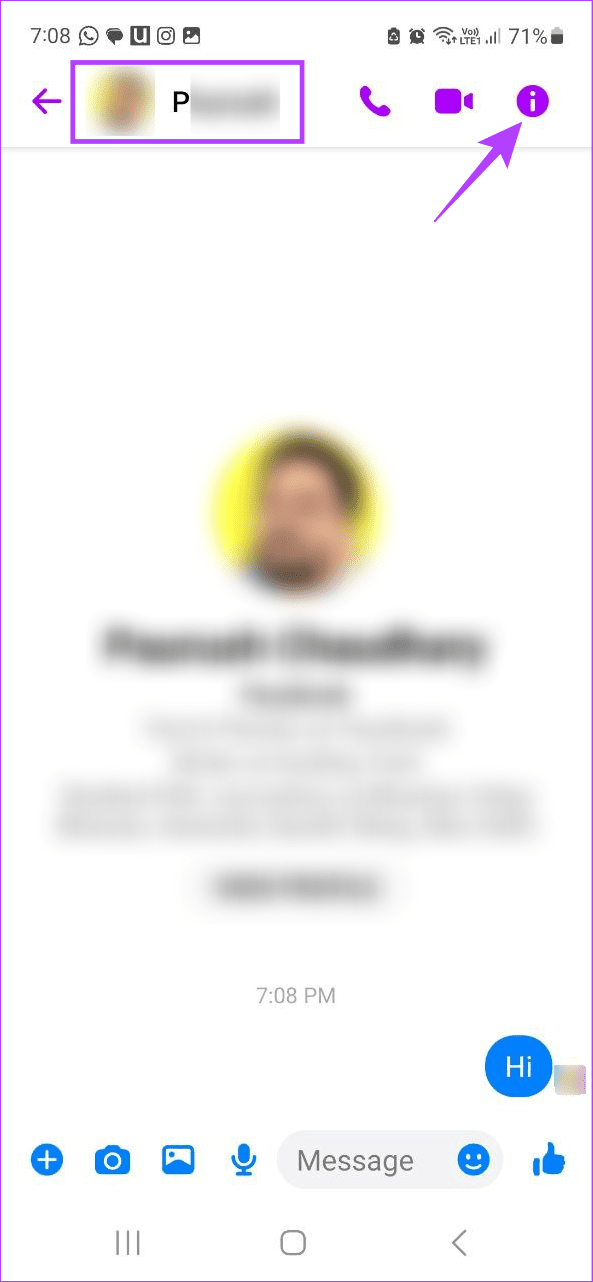
Step 2: Now, tap on the i icon at the top right corner. iOS users can tap on the username at the top left corner.
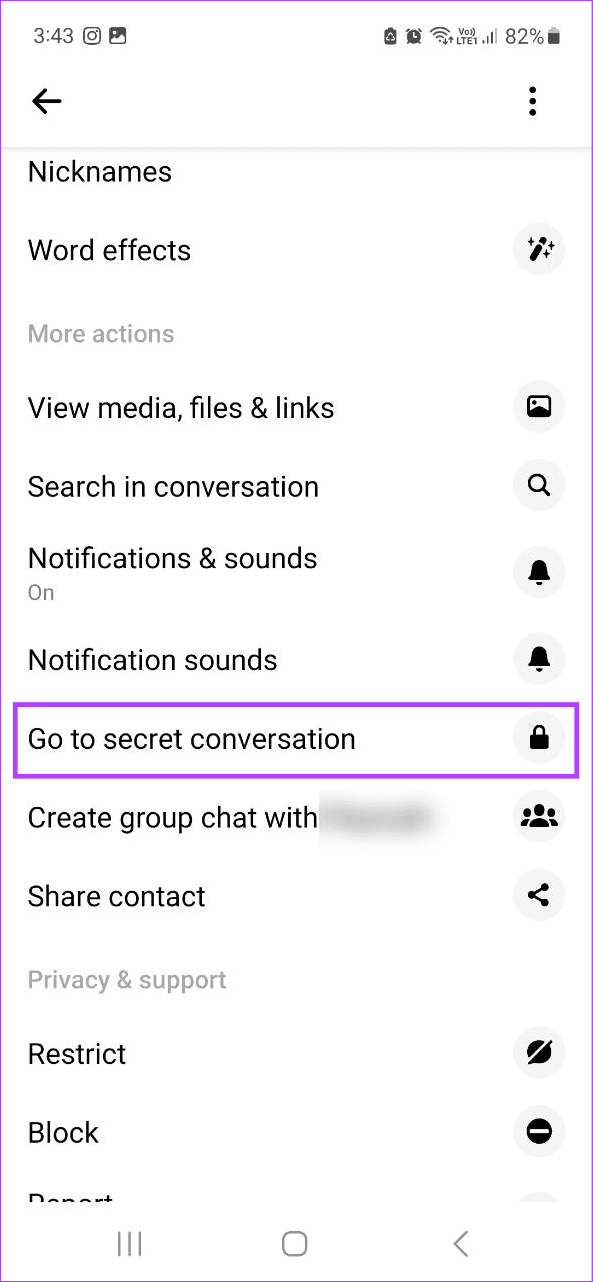
Step 3: Scroll down and tap on Go to secret conversation.
Method 2: Using the Search Option
Step 1: Open Messenger and tap on the pencil icon. Then, turn on the lock toggle at the top right corner.
Step 2: Now, type the name of the user with whom you wish to have a secret conversation in the search bar.
Step 3: Now, tap on the user from the search results.

If you have previously interacted with the selected user through Messenger secret conversations, the chat window with previous chats will open. If not, you will be redirected to a new chat window.
Also Read: How to send disappearing messages in Facebook Messenger
How to View Secret Conversation History on Messenger
If someone has previously contacted you via a secret conversation, but you’re not friends yet, Messenger might not show these conversations in the main chat window. However, you can still view the secret conversation history using the Messenger mobile and Facebook desktop apps. Here’s how.
Method 1: Through the Facebook Web App
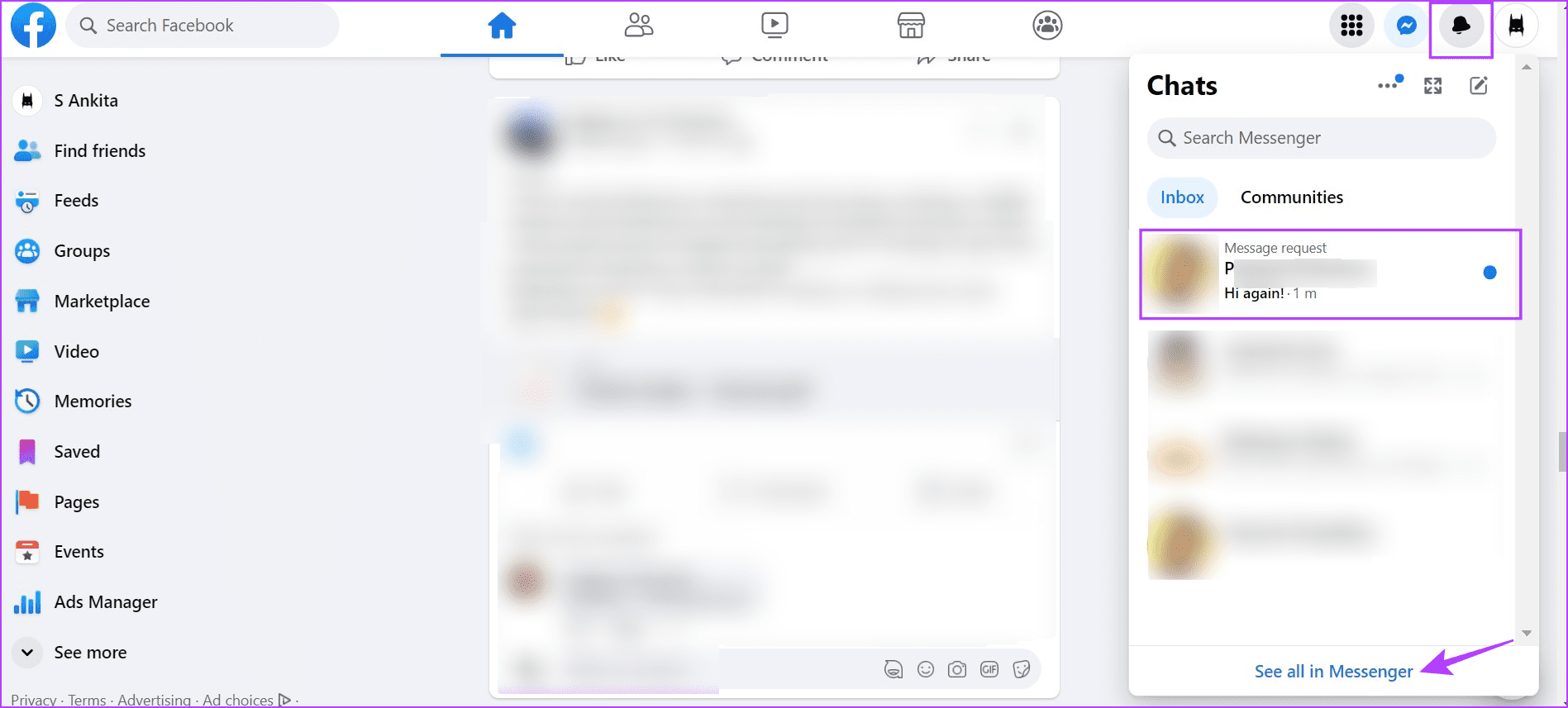
Step 1: Open Facebook on any web browser, sign in, and click on the bell icon.
Step 2: Once the Chats window opens, click on the relevant chat. Or, click on See all in Messenger.
Method 2: Through Message Request
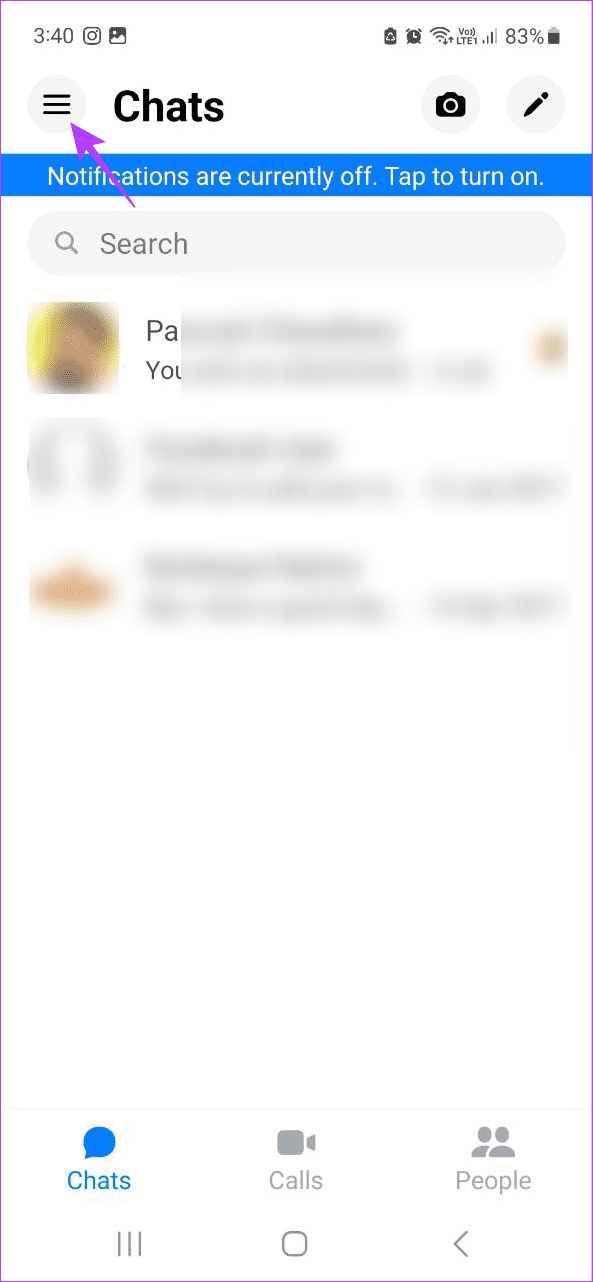
Step 1: Open the Messenger mobile app and tap on the hamburger icon at the top left corner.
Step 2: From the menu options, tap on Message requests.
Step 3: Here, switch between You May Know and Spam to find the relevant user.
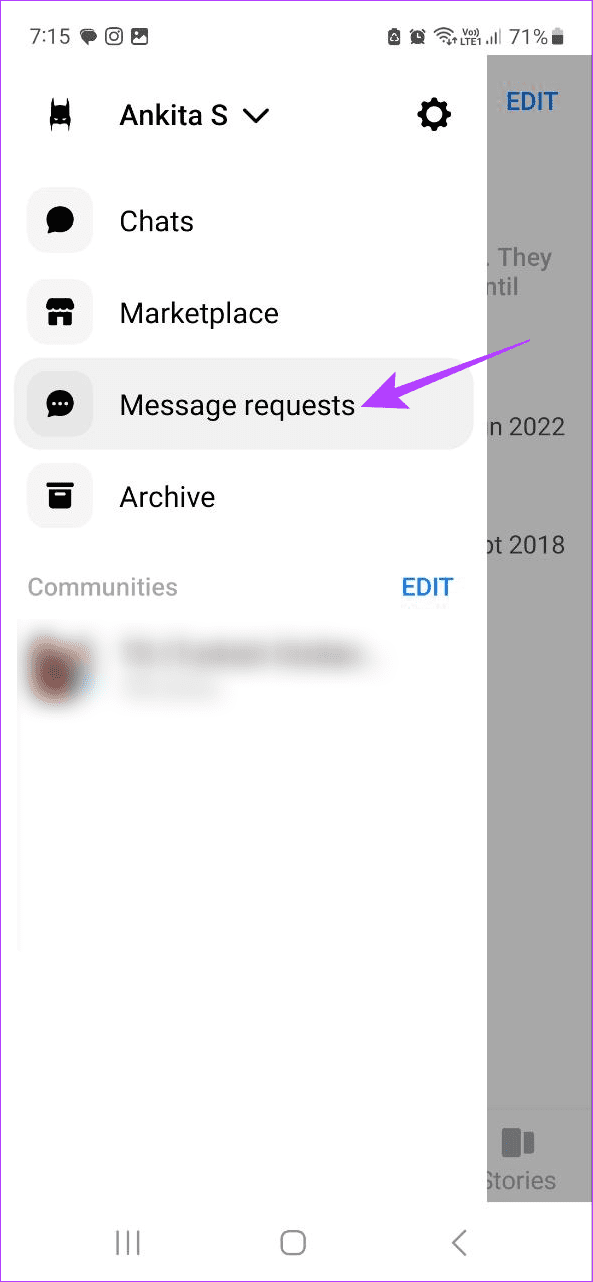

Once you find the user, tap on their name to view your secret conversation history on the Messenger app.
Tip: You can also check your previously archived messages and conversations in Facebook Messenger and unarchive the relevant secret conversation.
FAQs
Currently, Messenger does not have a native option to see or restore deleted secret conversations. Users may use third-party apps to view deleted conversations. However, you must give access to your account credentials and other details to do that, which we don’t recommend.
No. There are no native options to start secret conversations when using Messenger on the web browser.
No, secret conversations are between you and the other user. No one outside your chat window can see your secret conversations on Messenger.
Was this helpful?
Last updated on 16 May, 2024
3 Comments
Leave a Reply
Read Next
 7 Easy Ways to Hide Conversations on Snapchat
Method 1: Clear Conversation from the Chat Feed Step 1: Launch the Snapchat app on your Android or iOS device.
7 Easy Ways to Hide Conversations on Snapchat
Method 1: Clear Conversation from the Chat Feed Step 1: Launch the Snapchat app on your Android or iOS device.
 Instagram’s Secret Sharing: Unraveling the Close Friends Feature
What Is the Close Friends List on Instagram?
Instagram’s Secret Sharing: Unraveling the Close Friends Feature
What Is the Close Friends List on Instagram?
 How to Use Secret Chat in Telegram on Android and iPhone
How to Start Secret Chat on Telegram First, let’s see how you can start a Secret Chat in Telegram on Android and iOS.
How to Use Secret Chat in Telegram on Android and iPhone
How to Start Secret Chat on Telegram First, let’s see how you can start a Secret Chat in Telegram on Android and iOS.
 How to Start a Spotify Jam Session With Friends
Starting a Jam Session Open the Spotify app and go to the now playing screen.
How to Start a Spotify Jam Session With Friends
Starting a Jam Session Open the Spotify app and go to the now playing screen.
 How to View, Download, and Delete Your Instagram Data
How to View Your Instagram Data If you only want to see what data Instagram has collected during your usage, you can easily access it in the Instagram app on
How to View, Download, and Delete Your Instagram Data
How to View Your Instagram Data If you only want to see what data Instagram has collected during your usage, you can easily access it in the Instagram app on
 How to View Lyrics on Spotify Mobile, Desktop and TV
How to See Lyrics in Spotify for Desktop or Web Players If lyrics are available for that particular song, you’ll notice a tiny Mic icon in the Now Playing bar
How to View Lyrics on Spotify Mobile, Desktop and TV
How to See Lyrics in Spotify for Desktop or Web Players If lyrics are available for that particular song, you’ll notice a tiny Mic icon in the Now Playing bar
 How to Use Map View in Google Photos
How to See Your Photos in Google Photos Map View Google Photos creates an interactive heat map based on all the photos and videos you’ve captured in different places.
How to Use Map View in Google Photos
How to See Your Photos in Google Photos Map View Google Photos creates an interactive heat map based on all the photos and videos you’ve captured in different places.
 How to View Old Chats on ChatGPT Without Sharing Data
Accessing ChatGPT Chat History Wasn’t Available With Data Sharing Turned Off OpenAI used to provide the option to disable data sharing, which meant losing access to your chat history altogether.
How to View Old Chats on ChatGPT Without Sharing Data
Accessing ChatGPT Chat History Wasn’t Available With Data Sharing Turned Off OpenAI used to provide the option to disable data sharing, which meant losing access to your chat history altogether.
The article above may contain affiliate links which help support Guiding Tech. The content remains unbiased and authentic and will never affect our editorial integrity.


Starting from chat screen, there is no “Start Secret Conversation”
Starting from the Search page, there is no toggle switch
I use Samsung A14 5G
On Android, once you open the chat window for the contact, you should see an i icon in the top-right corner. Tap on it and scroll down.
Here, you should get an option to Go to secret conversation. Tap on it to launch the secret conversation in a seperate window.
Hope this helps!
I am also an Android user. I do not see an option to begin a secret conversation when I select the i icon in the chat window. If it matters, this was someone I used to have a secret message with. But I deleted it. Now i’m not being given an option to start another one or even choose end to end encryption