


What Are Suggested For You Posts on Facebook
Facebook does everything it can to keep you doom-scrolling, from search suggestions to suggesting posts. Auto-generated by Facebook’s algorithm, the Suggested for You section showcases content, pages, and groups that you might like to view.
It works similarly to recommended posts on Instagram and is curated as per your recent or past activity, likes, and interests. However, it’s really a hit-or-miss game. You might not always come across new and exciting content. But the real question is whether you can turn off them.
Note: Suggested for You is different from the Sponsored posts on Facebook. The former is to recommend content you may like. While the latter is paid ads based on your Facebook activity.
Can You Disable or Remove Suggested for You on Facebook
No, Facebook doesn’t let you permanently stop seeing suggested posts on Facebook. However, there are ways you can manage what is suggested. Declutter your newsfeed by guiding and telling Facebook what you don’t want to see.
Method 1. Use ‘Feeds’ Option From the Facebook Menu
Apart from the usual news feed on Facebook’s home screen, you can also see a customized Feed, wherein, you can see posts just from your friends, favorites, pages, etc.
Notably, this new Feed not only avoids the suggested for you posts but also arranges all posts in chronological order. So, you’ll see the most recent posts first rather than the most popular ones.
For Facebook app for iOS or Android
Step 1: Open Facebook and tap the three-line icon from the bottom-right corner(iPhone) or top-right corner (Android).
Step 2: Here, under Shortcuts, select Feeds. If you can’t see Feeds, tap See more.
Step 3: Now, you can see All posts (except those suggested for you) or select a specific genre, say friends, favorites, etc.


Note: Unfortunately, you can’t get rid of the sponsored content even in this Feed. You’ll see sponsored posts repeatedly after a few posts.
For Facebook Web
Step 1: Open Facebook on the browser of your choice. Click the Menu (grid icon) from the top bar.
Step 2: Select Feed from the left-side bar.
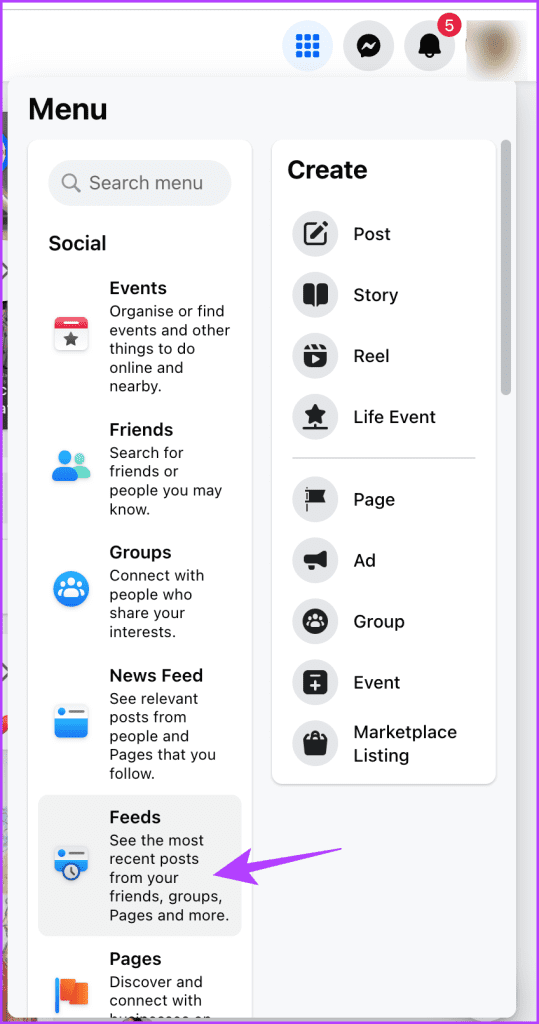
Step 3: Select what you want to see from the Left-side bar.

Method 2. Snooze “Suggested for You” Posts For 30 Days
For Facebook app for iOS or Android
Step 1: Open your Facebook app. Scroll to the Suggested for You post you want to manage.
Step 2: Tap the three-dot icon next to the post, select Snooze (account name) for 30 days, i.e., Stop seeing posts from the account for the next 30 days.
You can also choose any of the following options, depending on your preference.
- Show more – View more suggested posts in your feed as you liked the content.
- Show less or Hide post – Show fewer suggestions for such posts in your feed.
- Hide all from (account name) – Permanently stop seeing any post from this account.
- Find support or report post – If you want to report the content or user.

For Web Browser
Step 1: Log in to your Facebook account and scout out the Suggested for You post.
Step 2: Click the three-dot icon next to it and select any of the following,
- Show more
- Show less
- Hide post
- Snooze (account name) for 30 days
- Hide all from (account name)
- Find support or report post
Method 3. Use Browser Extension to Stop Suggested for You Posts
Caution– Such third-party apps and extensions require access to your Facebook account, which could open the floodgates for data breaches and misuse. So only go this route, if you’re really desperate.
While Facebook doesn’t offer the perk, a third-party app or extension like Fluff Busting Purity for Chrome can help you turn off Suggested For You posts on Facebook. Such tools are specifically designed to block Facebook Ads, suggested pages/posts, game spam, etc., from your newsfeed.
The best part is that it works in the background, like most Chrome Extensions. All you have to do is click Add to Chrome from the extension page, and it will handle the rest.
Influence Facebook’s Suggested For You Posts
Whether you’re seeing many Suggested for You Posts or Facebook is showing Suggested for You posts only, the culprit might be you. Well, usually, Facebook is following your cue.
The more you interact, the more it suggests. The following factors can influence the posts suggested for you:
- Who interacted with the post – If other users, especially friends and people you follow, have recently interacted with a post, Facebook will recommend it.
- Related topics – Facebook may suggest other posts related to a topic you’ve recently engaged with. For instance, if you recently liked a post about cats, Facebook will suggest other posts and pages about cats.
- Location and people – Facebook may suggest posts based on your current location and what people near you are interacting with.
While you can’t completely control the content Facebook suggests, you can use the above knowledge to manipulate the Suggested For You feed.
- Interact with the right people and content – Engage with posts and pages that interest you. Avoid liking, sharing, or commenting on posts you want to ignore.
- Avoid Suggested For You posts – Again, don’t like, share, or comment on too many suggested posts or posts you don’t want to see again.
- Clean up your following list – If you don’t like the content of a page, don’t snooze it. Unfollowing the page or group is better than a cluttered feed.
- Turn off location access – Don’t want location-based suggestions? Then stop Facebook from accessing your location.
Remember, Facebook’s algorithms will continue to adapt to your behavior, so it’s an ongoing process. So, it’s essential to curate your feed actively by engaging with content that genuinely interests you.
Notably, if you’re facing similar issues with Instagram as well, here’s how to see more of your friend’s posts on Instagram.
Was this helpful?
Last updated on 30 July, 2024
5 Comments
Leave a Reply
Read Next
 How to Remove Someone From Suggested on Facebook Messenger
What Happens When You Hide Someone From Suggested You see less of your contact.
How to Hide All Posts on Facebook From Public or Friends
How to Hide Past Posts on Facebook The good news is that you can manage the visibility of previously posted content.
How to Remove Someone From Suggested on Facebook Messenger
What Happens When You Hide Someone From Suggested You see less of your contact.
How to Hide All Posts on Facebook From Public or Friends
How to Hide Past Posts on Facebook The good news is that you can manage the visibility of previously posted content.
 How to Get Notifications When Someone Posts on Facebook
Information overload is a significant issue on social media platforms, and Facebook is no exception.
How to Get Notifications When Someone Posts on Facebook
Information overload is a significant issue on social media platforms, and Facebook is no exception.
 What to Do if You Can’t Post Comments on Facebook Posts
Try Basic Fixes The post owner has moderated comments: If the post owner has turned off comments from friends and followers, you won’t be able to comment.
What to Do if You Can’t Post Comments on Facebook Posts
Try Basic Fixes The post owner has moderated comments: If the post owner has turned off comments from friends and followers, you won’t be able to comment.
 3 Ways to Fix Instagram Not Loading New Posts on Your Phone
Basic Fixes: Ensure your Instagram account is not blocked/suspended: If you use Instagram excessively for several hours or take too many actions quickly, the service may temporarily block you.
3 Ways to Fix Instagram Not Loading New Posts on Your Phone
Basic Fixes: Ensure your Instagram account is not blocked/suspended: If you use Instagram excessively for several hours or take too many actions quickly, the service may temporarily block you.
 How to See Upvoted and Downvoted Posts on Reddit
Where to Find Upvoted and Downvoted Posts on the Reddit App While we published an article earlier on how to view saved posts on Reddit, you can also view upvoted
How to See Upvoted and Downvoted Posts on Reddit
Where to Find Upvoted and Downvoted Posts on the Reddit App While we published an article earlier on how to view saved posts on Reddit, you can also view upvoted
 How to Unlike or Unsave All Posts on Instagram at Once
How to Unlike All Posts on Instagram On Mobile App The steps are identical on Android devices and iPhones.
How to Unlike or Unsave All Posts on Instagram at Once
How to Unlike All Posts on Instagram On Mobile App The steps are identical on Android devices and iPhones.
 How to Find Saved Posts and Jobs on LinkedIn
How to Save a Job Search on LinkedIn On Desktop Step 1: Open LinkedIn in your preferred browser and go to Jobs at the top navigation bar.
How to Find Saved Posts and Jobs on LinkedIn
How to Save a Job Search on LinkedIn On Desktop Step 1: Open LinkedIn in your preferred browser and go to Jobs at the top navigation bar.
The article above may contain affiliate links which help support Guiding Tech. The content remains unbiased and authentic and will never affect our editorial integrity.
On some suggested for you posts, you can hide the source, or hide an app or user associated with the post. Which excludes a wider span of suggested posts. I hide Far Side, but I see it again in a couple of days, but there is also a hide all from “name” in the options
Already delete individual “suggested for you” posts but it’s very time consuming. How do you stop facebook from totally adding “suggested for you” sites.
I’m to the point that I don’t even want to turn facebook on because of all the “suggested for you” garbage.
Facebook now mostly worthless. I block dozens of suggested pages per day, literally thousands already.
Indeed, Marks little nightmare keeps “adapting”.
Now I report 100% of suggested pages as hate speech.
QClean not found.
so, tl;dr: “you can’t”.
the only way is to stop using facebook.
50% of posts in my feed is from pages i don’t follow. why am i still here?