


Basic Fixes
- Check for Physical Damage: Before starting, it’s important to ensure that this isn’t a hardware issue. Make sure to remove the phone case, closely inspect the camera at the back, and check for any physical damage to the phone. If the camera module has been damaged physically, you should immediately consult with the service center.
- Ensure the Phone Isn’t Heating Up: The latest high-end Android CPU offerings from Qualcomm and Exynos are prone to overheating during long video recording or gaming sessions. The focus might fail to work if you use the camera during high temperatures. In such a scenario, you should wait for a few minutes and let the phone cool down
- Avoid Using Social Media Apps: Social media apps like Instagram, Snapchat, and TikTok simply screenshot the camera view when taking pictures. Unlike iPhones, these apps don’t integrate well with the phone’s camera app on Android. You should use your phone’s Camera app to take pictures and then upload them to Instagram and Snapchat.
How to Fix Camera Focus Not Working on Android
1. Force Quit and Relaunch the Camera App
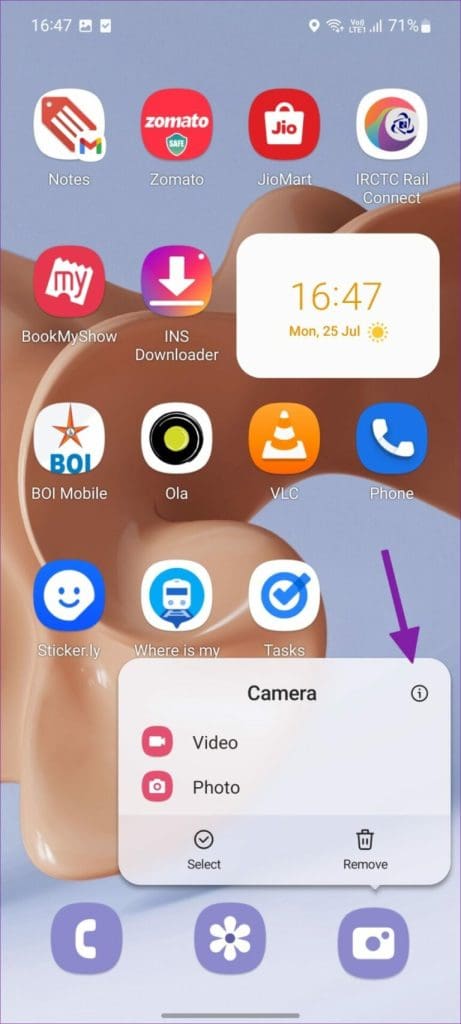
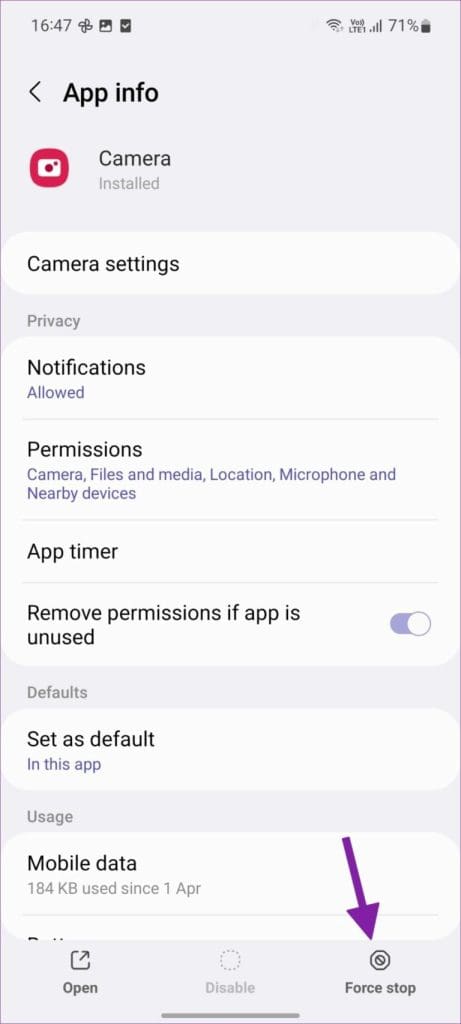
When the Camera app acts up, you can close it completely, relaunch it, and try using it again. That might give it a fresh start on your Android. To do that, long-press on the Camera app icon and tap on App info. Then, tap on Force Stop. Finally, relaunch the Camera app to see if it can focus properly.
Fix 2: Use Pro Mode
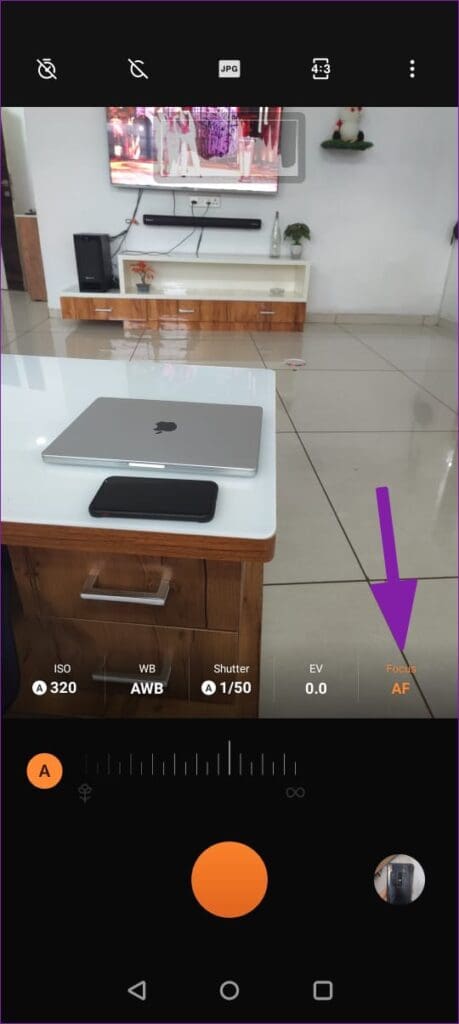
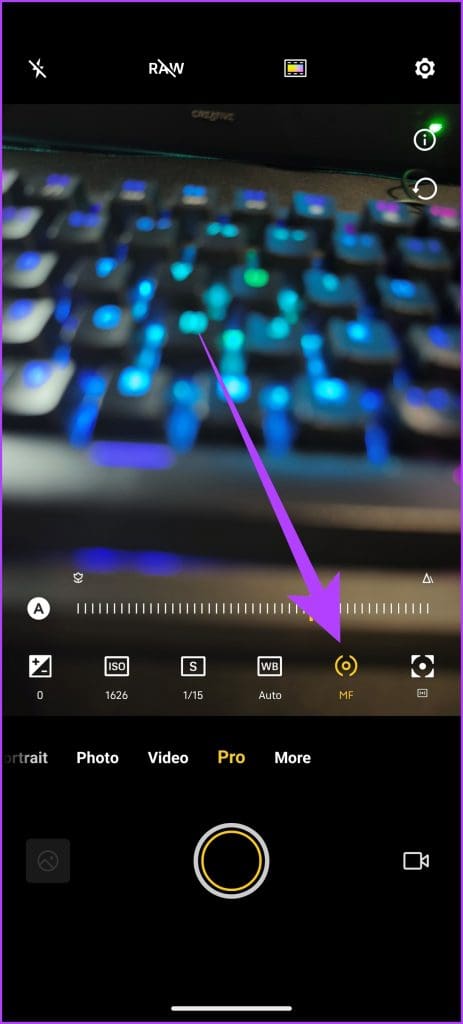
If the Camera app doesn’t focus on the main subject automatically, you can tap on the main object and switch focus. Additionally, on some Android phones, you can switch to the Pro mode and manually adjust focus for better photography. For instance, here’s what the Pro Mode in OnePlus and vivo smartphones look like.
Fix 3: Try Using Macro Mode
When the subject is near your camera lens, the primary camera lens can’t focus on the object correctly. Thankfully, some Android smartphones come with a dedicated Macro lens to shoot these images. Alternatively, other devices use the Ultrawide lens to shoot macro images effectively. In either case, you will have to enable the Macro Mode from the camera settings.
For OnePlus users, open the Camera app and tap on the three-dot menu in the top right corner. Next, open Settings, and enable ‘Auto macro’ mode. Similarly, Samsung’s One UI Camera app also offers a similar option inside its settings to enable macro mode.


Now, whenever the Camera app detects a close object, it automatically switches to the macro mode.
Fix 4: Use Night Mode
Night mode is a standard feature among most Android phones. When you deal with challenging lighting conditions, the primary camera might face a hard time keeping the subject in focus. You can switch to night mode and capture the scene without any focusing issues.
When you move to the night mode, the system will open the camera shutter for a long time to gather more light and deliver a better result. Most Android camera apps will detect low-light scenes and offer to use the night mode.
Fix 5: Try Third-Party Camera Apps
If you are still having issues with the native Camera app on Android, you should try installing GCam on your phone. Google Camera’s post-processing algorithm is one of the best in the industry. First, you must confirm if your phone supports GCam and follow XDA Developer’s dedicated guide to install the app.
Alternatively, there are plenty of other third-party camera apps available on the Google Play Store. Some of the best recommendations are:
Fix 6: Update Android Software
Chances are that the focus issue you’re facing with the camera app is merely a bug caused by a faulty software update. Thankfully, Android phone makers like Samsung, Google, and OnePlus regularly release monthly security patches with bug fixes.
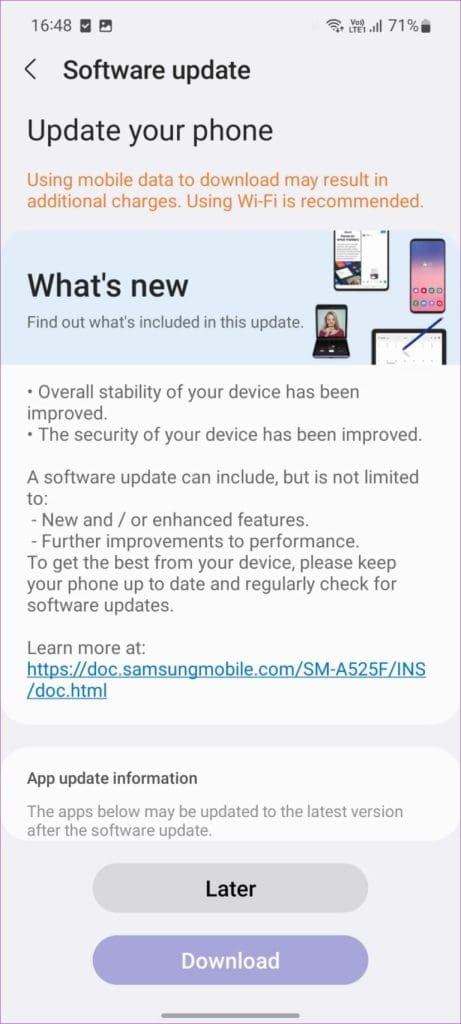
These companies fix camera misbehaves with monthly patches. You should head to Settings and install the latest software update to improve the camera experience.
Was this helpful?
Last updated on 27 June, 2024
Read Next
 5 Ways to Fix Camera App Not Working on Android Issue
Basic Fixes: Restart your phone: Rebooting your Android phone fixes common glitches with the Camera app.
5 Ways to Fix Camera App Not Working on Android Issue
Basic Fixes: Restart your phone: Rebooting your Android phone fixes common glitches with the Camera app.
 3 Ways to Fix Facebook Messenger Camera Not Working on Android and iPhone
Fix 1: Enable Camera Permission for Messenger Like any other app, Messenger needs permission to access your phone's camera.
3 Ways to Fix Facebook Messenger Camera Not Working on Android and iPhone
Fix 1: Enable Camera Permission for Messenger Like any other app, Messenger needs permission to access your phone's camera.
 Firefox Focus vs DuckDuckGo: Which Is the Best Browser for Privacy
Firefox Focus vs DuckDuckGo Browsers: Key Differences FeaturesFirefox FocusDuckDuckGo BrowserTracking ProtectionIt offers enhanced tracking protection and allows you to block/unblock trackers and scripts for advertising, analytics, social media, and content.It
Firefox Focus vs DuckDuckGo: Which Is the Best Browser for Privacy
Firefox Focus vs DuckDuckGo Browsers: Key Differences FeaturesFirefox FocusDuckDuckGo BrowserTracking ProtectionIt offers enhanced tracking protection and allows you to block/unblock trackers and scripts for advertising, analytics, social media, and content.It
 Firefox vs Firefox Focus: Should You Switch
Firefox Focus is a strange name for a browser, and the fact that it’s developed by none other Mozilla is even weirder.
Firefox vs Firefox Focus: Should You Switch
Firefox Focus is a strange name for a browser, and the fact that it’s developed by none other Mozilla is even weirder.
 Why Am I Getting Calls When Do Not Disturb or Focus Mode Is On
Stop Getting Calls During DND or Focus Mode on iPhone 1.
Why Am I Getting Calls When Do Not Disturb or Focus Mode Is On
Stop Getting Calls During DND or Focus Mode on iPhone 1.
 How to Enable and Disable Focus Mode in Microsoft Word
How to Enable Focus Mode in Microsoft Word Focus Mode hides the Ribbon and Taskbar on your document to reduce distractions and let you work only on the document's text
How to Enable and Disable Focus Mode in Microsoft Word
How to Enable Focus Mode in Microsoft Word Focus Mode hides the Ribbon and Taskbar on your document to reduce distractions and let you work only on the document's text
 What Is Share Focus Status on iPhone and How to Use It
What Is Share Focus Status on iPhone?
What Is Share Focus Status on iPhone and How to Use It
What Is Share Focus Status on iPhone?
 5 Ways to Fix Security Policy Prevents Camera Use on Android
Fix 1: Turn Off Sensors and On Again Your Android phone has a hidden option that lets you turn off all the sensors, and the camera sensor is one of
5 Ways to Fix Security Policy Prevents Camera Use on Android
Fix 1: Turn Off Sensors and On Again Your Android phone has a hidden option that lets you turn off all the sensors, and the camera sensor is one of
The article above may contain affiliate links which help support Guiding Tech. The content remains unbiased and authentic and will never affect our editorial integrity.

