


Method 1: Using the Google Contacts App
If you use a Stock Android phone, it must have the Google Contacts app. If not, you may download the app and follow the steps below.
Step 1: Open the Google Contacts app, tap the Organize at the bottom right, and select Settings from the menu.


Step 2: Scroll down and tap on Undo changes.
Step 3: Select the time to undo the changes and tap on Confirm.
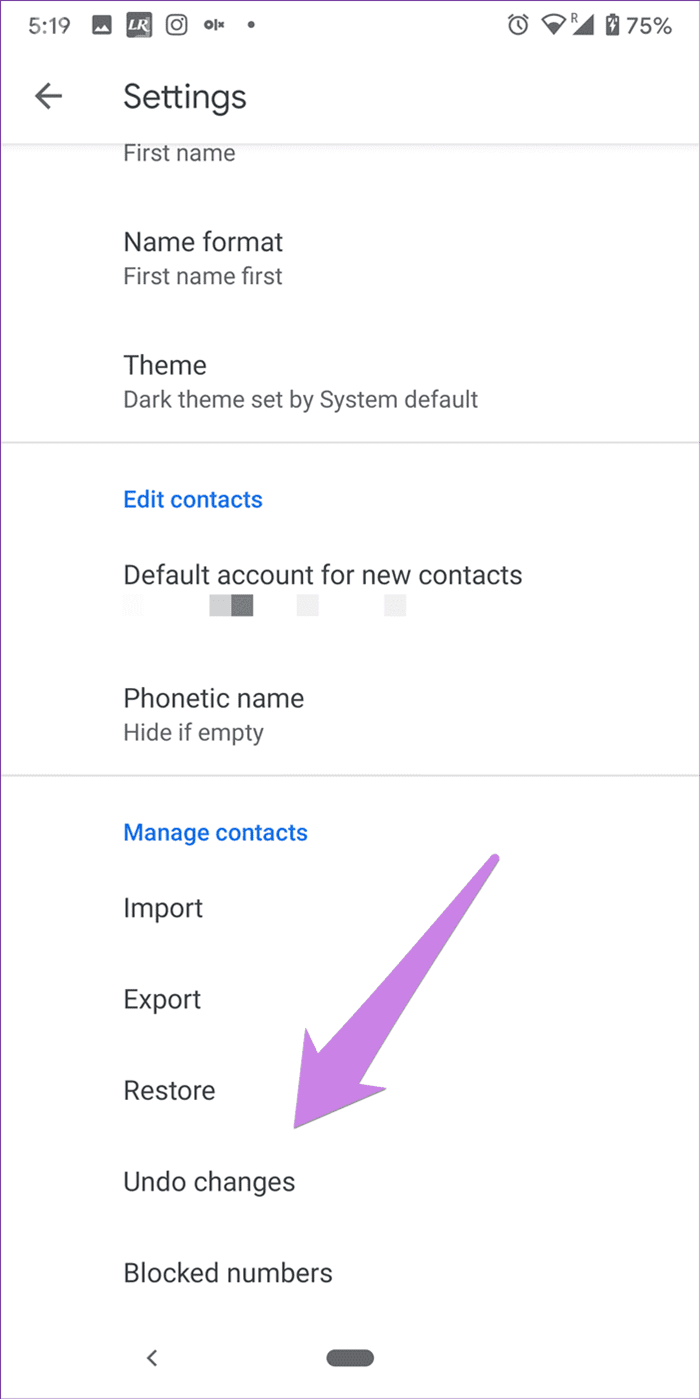
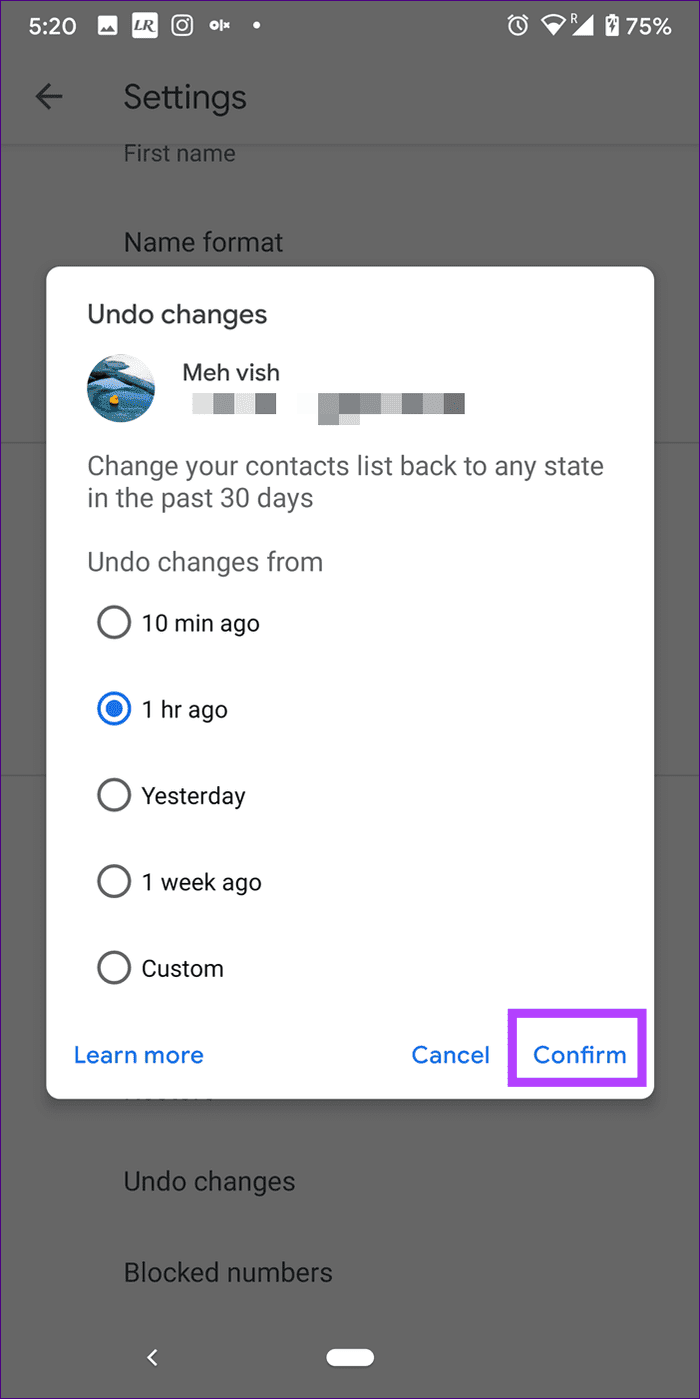
Step 4: Wait for 2-3 minutes to let Google process your data.
Method 2: Using the Google Contact website
You may find a list of all your contacts on the Google Contacts website. The website is essential for managing or retrieving contacts. For that, follow these steps:
Step 1: Open Google Contacts on your PC and log in to your Google account from which you want to restore the contacts.
Step 2: Click on the settings icon at the top. Select Undo changes from it.
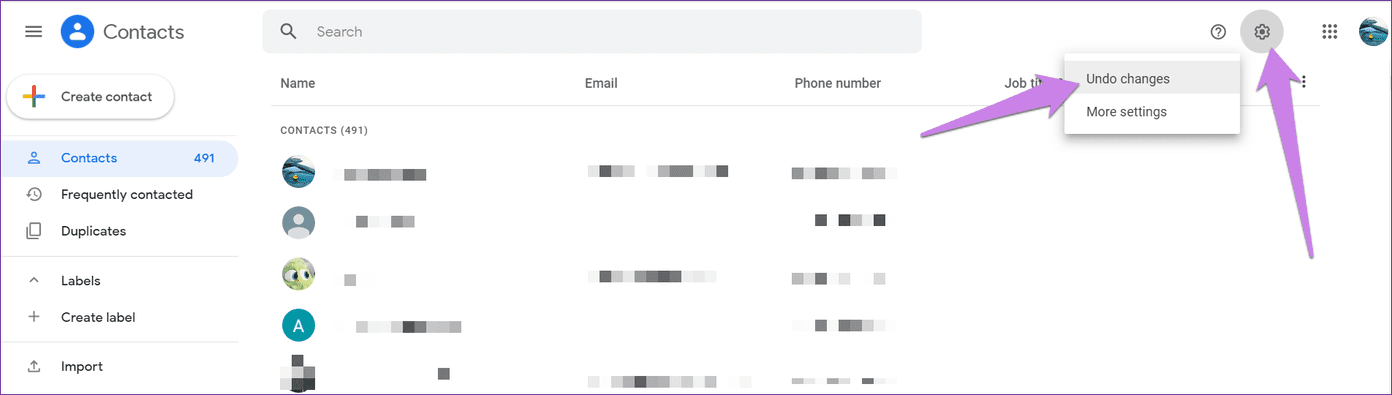
Step 3: Choose a custom duration or any set time frame and click on Confirm.

Step 4: Wait for some time. Then, look for deleted contacts.
Method 3: Check Trash Folder in Google Contacts
After deleting a contact, it remains in the Trash folder on the Google Contacts website. You may recover it from this location by following the steps below.
Step 1: Open Google Contacts on your PC and log in to your Google account from which you want to restore the contacts.
Step 2: Click on the Trash option on the left pane.
Step 3: Hover on the deleted contact and click the Recover option.

Pro Tip: You can sync iPhone contacts to a Google account.
Conditions Necessary to Retrieve Deleted Contacts
For you to recover Google contacts, there are a few essential conditions to note:
- You can restore only those contacts that were present or synced to Google Contacts; a restore will not work for SIM contacts.
- You can recover deleted contacts only up to 30 days after they were deleted. If they were deleted before that, they cannot be recovered.
Was this helpful?
Last updated on 13 July, 2024
Read Next
 5 Ways to Restore Deleted Contacts on iPhone
Method 1: Enable iCloud or Google Contacts Sometimes, contacts on your iPhone can simply disappear with an accidental tap.
5 Ways to Restore Deleted Contacts on iPhone
Method 1: Enable iCloud or Google Contacts Sometimes, contacts on your iPhone can simply disappear with an accidental tap.
 Google Contacts vs Samsung Contacts: Which App Is Best for Saving and Managing Contacts
Apart from phones running Stock Android, all other Android phones have their own set of basic apps.
Google Contacts vs Samsung Contacts: Which App Is Best for Saving and Managing Contacts
Apart from phones running Stock Android, all other Android phones have their own set of basic apps.
 iCloud Contacts vs Google Contacts: Where Should You Save Contacts on Your iPhone
When you are using an Android phone, one prefers using Google Contacts to store and manage contacts.
iCloud Contacts vs Google Contacts: Where Should You Save Contacts on Your iPhone
When you are using an Android phone, one prefers using Google Contacts to store and manage contacts.
 How to Restore Accidentally Deleted Google Play Store
Fix 1: Check Hidden Apps The Play Store might be missing from your phone because you have hidden it accidentally.
How to Restore Accidentally Deleted Google Play Store
Fix 1: Check Hidden Apps The Play Store might be missing from your phone because you have hidden it accidentally.
 5 Fixes for “Not All Contacts Were Deleted” Error on iPhone
Fix 1: Delete Contact Using the Same App Used to Create It One of the most common reasons you may encounter the "Not all contacts were deleted" error on your
5 Fixes for “Not All Contacts Were Deleted” Error on iPhone
Fix 1: Delete Contact Using the Same App Used to Create It One of the most common reasons you may encounter the "Not all contacts were deleted" error on your
 How to Use Google Contacts Instead of Samsung Contacts
Samsung Galaxy phones carry a lot of pre-loaded apps, and some of them you'll rarely use.
How to Use Google Contacts Instead of Samsung Contacts
Samsung Galaxy phones carry a lot of pre-loaded apps, and some of them you'll rarely use.
 How to Recover Deleted Passwords in Google Chrome
Recover Deleted Passwords in Google Chrome Step 1: Launch Google Chrome on the computer you have previously logged into your Google account.
How to Recover Deleted Passwords in Google Chrome
Recover Deleted Passwords in Google Chrome Step 1: Launch Google Chrome on the computer you have previously logged into your Google account.
 6 Ways to Restore Missing Google Chrome Icon on Windows
Method 1: Restore Chrome Icon From Start Menu One of the easiest ways to put the Google Chrome icon on your desktop is to drag and drop it from the
6 Ways to Restore Missing Google Chrome Icon on Windows
Method 1: Restore Chrome Icon From Start Menu One of the easiest ways to put the Google Chrome icon on your desktop is to drag and drop it from the
The article above may contain affiliate links which help support Guiding Tech. The content remains unbiased and authentic and will never affect our editorial integrity.

