Have you ever wondered if RAM can be used as video memory instead? The answer is yes, but with a lot of caveats. Straight up front, we’re going to tell you that system RAM isn’t a replacement for dedicated VRAM when it comes to graphics performance, but there are ways for GPUs to use system memory when necessary.
Can you turn RAM into VRAM? This article will explore how it does, and what it can’t do.
Can You Turn RAM Into VRAM?

Graphics cards are dedicated pieces of hardware for a reason. Dedicated GPUs typically use dedicated high-bandwidth VRAM to handle the demands of graphically intensive apps, from games to design software. Your system RAM handles the other memory needs of your PC, while GPUs can also access shared system memory when supported. By and large, system RAM provides less memory bandwidth than dedicated GPU memory.
DDR5 cannot compete with GDDR6.
Integrated Graphics
Integrated graphics use system RAM rather than relying exclusively on dedicated VRAM. Certain devices (especially budget PCs and laptops) have integrated graphics instead of dedicated cards. Some gaming PCs have dual graphics cards, allowing for smaller apps to use integrated graphics and games to use the VRAM.
If you ever try to run a more demanding app off integrated graphics, the RAM bottleneck will immediately make itself apparent, with low frame rates and frequent stuttering.
Shared Memory
Perhaps what we think of when we want to turn RAM into VRAM is allocating memory space to share with our graphics cards. Interestingly enough, Windows 11 (and Windows 10) already do this and quite efficiently.
Shared system memory is system RAM that the GPU can access when needed, alongside dedicated video memory on systems that have it. Because of that bottleneck, the speed of the RAM would be too slow to manage anything heavier.
If you manually increase the amount of system memory reserved for an integrated GPU in the BIOS, you may reduce the amount of RAM available to the operating system and applications. Whether this improves graphics performance depends on the hardware and workload.
GreenBoost for NVIDIA
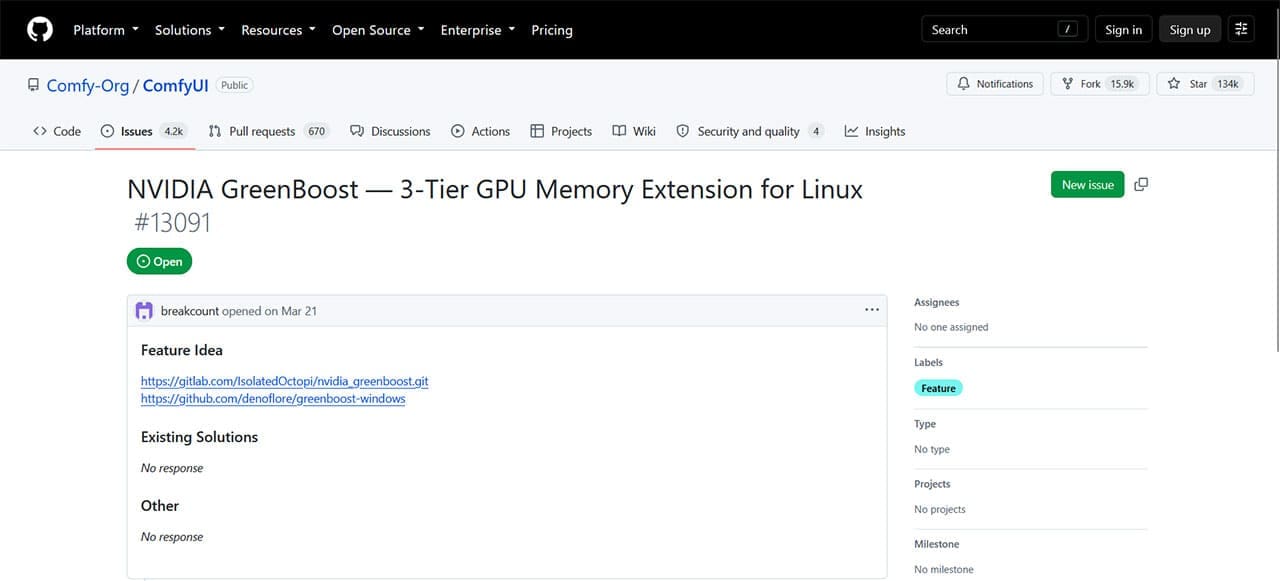
So, if you are still wondering how to turn RAM into VRAM, then there is a third-party, open-source solution. GreenBoost is a recently released Linux kernel module that allocates RAM to use in addition to VRAM. Primarily developed as a CUDA caching layer for LLMs that overrun the limits of graphics cards, GreenBoost is a way to bring your DDR RAM into the fray.
It sounds great until you realize that all we’ve covered above still comes into play. While GreenBoost can use system RAM as an additional memory tier when dedicated VRAM is insufficient, accessing data outside the GPU’s dedicated memory can significantly reduce performance because of the lower bandwidth and additional transfer overhead. It should be seen as a workaround for those who can’t afford a better graphics card rather than a viable solution.
Was this helpful?
Last updated on 25 September, 2026
Read Next
 4 Ways to Increase Dedicated Video Memory (VRAM) in Windows 10/11
Method 1: Upgrade to a Dedicated GPU The best way to increase the dedicated Video RAM (VRAM) on your Windows is by upgrading the Graphics card in your PC.
4 Ways to Increase Dedicated Video Memory (VRAM) in Windows 10/11
Method 1: Upgrade to a Dedicated GPU The best way to increase the dedicated Video RAM (VRAM) on your Windows is by upgrading the Graphics card in your PC.
 5 Ways to Fix “Your Computer Is Low on Memory” Error on Windows 10 and Windows 11
Try Basic Fixes Close unwanted apps and programs: Start by closing any unwanted apps and programs on your computer, especially the ones consuming a major chunk of your PC’s memory.
5 Ways to Fix “Your Computer Is Low on Memory” Error on Windows 10 and Windows 11
Try Basic Fixes Close unwanted apps and programs: Start by closing any unwanted apps and programs on your computer, especially the ones consuming a major chunk of your PC’s memory.
 3 Ways to Check VRAM Capacity on Windows 11
Method 1: Check VRAM Capacity From the Task Manager Task Manager is a useful system application that helps you track system processes and monitor resource consumption.
3 Ways to Check VRAM Capacity on Windows 11
Method 1: Check VRAM Capacity From the Task Manager Task Manager is a useful system application that helps you track system processes and monitor resource consumption.
 4 Fixes for ‘Video Memory Management Internal’ Error on Windows
Basic Fixes Restart PC: Restart your PC to fix temporary bugs and glitches.
4 Fixes for ‘Video Memory Management Internal’ Error on Windows
Basic Fixes Restart PC: Restart your PC to fix temporary bugs and glitches.
 5 Fixes for Microsoft Outlook Out of Memory or System Resources Error on Windows
Fix 1: Run the Inbox Repair Tool Damaged or corrupted PST or OST files can cause Outlook to run out of memory on your Windows computer.
5 Fixes for Microsoft Outlook Out of Memory or System Resources Error on Windows
Fix 1: Run the Inbox Repair Tool Damaged or corrupted PST or OST files can cause Outlook to run out of memory on your Windows computer.
 4 Ways to Fix DirectX ‘Could Not Allocate Sufficient Memory’ Error on Windows 11
Common Fixes Launch the Windows Memory Diagnostic tool: Press the Windows key, search Windows Memory Diagnostic tool, and click to open it.
4 Ways to Fix DirectX ‘Could Not Allocate Sufficient Memory’ Error on Windows 11
Common Fixes Launch the Windows Memory Diagnostic tool: Press the Windows key, search Windows Memory Diagnostic tool, and click to open it.
 9 Ways to Fix Memory Integrity Is Off Error on Windows 11/10
Fix 1: Review Incompatible Drivers Step 1: Press the Windows key, type Windows Security, and hit Enter.
9 Ways to Fix Memory Integrity Is Off Error on Windows 11/10
Fix 1: Review Incompatible Drivers Step 1: Press the Windows key, type Windows Security, and hit Enter.
 6 Ways to Fix Google Chrome Error Code: Out of Memory on Windows
Basic Fixes Restart PC: Restart your PC to fix temporary bugs and glitches.
6 Ways to Fix Google Chrome Error Code: Out of Memory on Windows
Basic Fixes Restart PC: Restart your PC to fix temporary bugs and glitches.
The article above may contain affiliate links which help support Guiding Tech. The content remains unbiased and authentic and will never affect our editorial integrity.