1. Arc Search
Arc has gained popularity on desktop and is quickly climbing the ranks with its mobile adaptation. From the start, it’s clear that this browser is designed with a focus on searching, making it feel lightweight. Like its desktop counterpart, it has a few tricks up its sleeve.


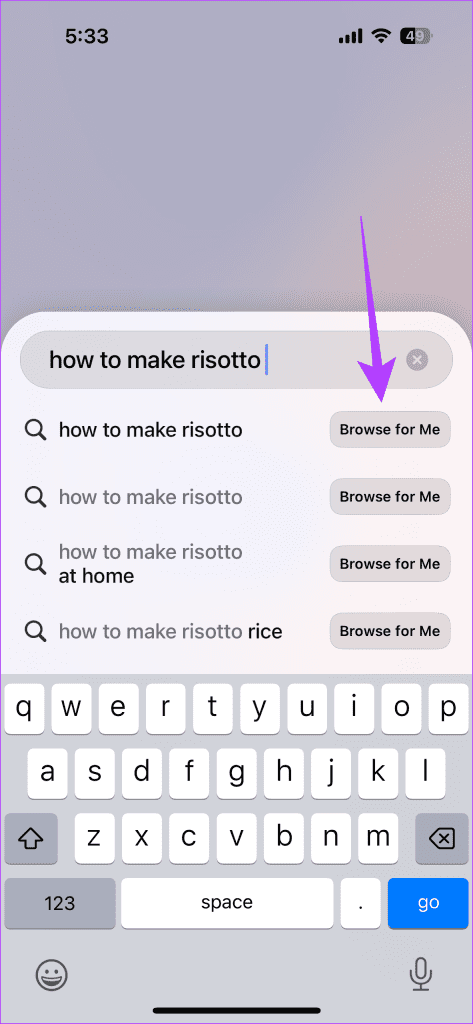
First and foremost, Arc integrates AI features, search capabilities, and browsing into one seamless experience. In essence, it can browse for you by going through a list of popular search results, analyzing them, and creating a new webpage with the information you want.
That said, it does the aforementioned while still providing essential features like ad blocking, cookie banner removal, and tracker prevention.
2. Mozilla Firefox
Mozilla Firefox allows you to block trackers and advertisements completely. The ability to quickly enable and disable Tracking Protection via the Firefox menu means you can easily support your favorite websites.


Firefox is also the perfect replacement for Safari, especially due to its support for all popular platforms. So, whether you use a Mac or PC, you can get your browsing data (passwords, bookmarks, etc.) synced and available across devices.
3. Microsoft Edge
If you want a browser that puts AI first but still lets you avoid pesky ads and maintain your privacy, Microsoft Edge has undergone a massive transformation in the past year or so.
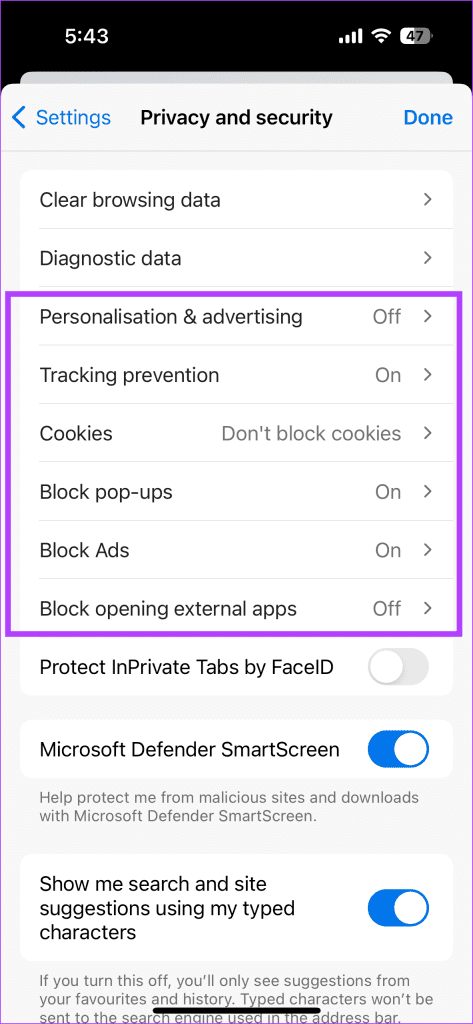
You not only get Microsoft Copilot based on OpenAI’s GPT-4 built-in but also a myriad of key features, such as the ability to deeply personalize the browser, turn off news feeds, and more. Plus, of course, you can turn on Tracker Prevention, block pop-ups, ads, and more.

4. Brave Browser
The Brave browser for iPhone offers blocking of ads, trackers, and fingerprinting scripts. This, coupled with its rewards program, makes for a browser that always puts the user first.

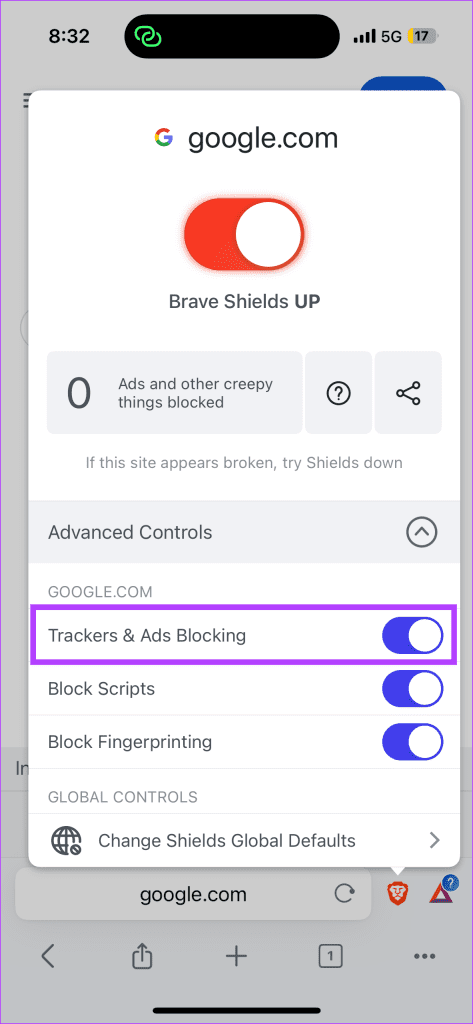
By tapping the Brave logo, you can see the amount of unwanted content blocked on a page in real time. You can also selectively lift these restrictions for specific content types, which is useful when certain web elements malfunction due to the browser’s stringent anti-tracking measures.
5. Opera
Opera is a lightweight and user-friendly browser that makes enabling ad blocking simple. It even prompts you to do so during the initial setup.


It offers numerous features, including seamless webpage translation, blocking of annoying cookie dialogs, and content sharing across devices. In recent years, Opera has added significant functionalities like password management and bookmarking, addressing previous gaps.
Was this helpful?
Last updated on 02 August, 2024
Read Next
 How to Turn Off AdBlock in Safari on iPhone, iPad, and Mac
While ads are an excellent way to keep resources free, they can take up too much space or spoil the browsing experience.
How to Turn Off AdBlock in Safari on iPhone, iPad, and Mac
While ads are an excellent way to keep resources free, they can take up too much space or spoil the browsing experience.
 How to Bypass Adblock Detection on Any Website
Method 1.
How to Bypass Adblock Detection on Any Website
Method 1.
 5 Privacy-Focused Browsers for iPhone and iPad
1.
5 Privacy-Focused Browsers for iPhone and iPad
1.
 How to Disable Private Browsing in Safari on iPhone
Limiting adult websites inside the Content Restrictions menu disables the Private Browsing Mode in Safari.
How to Disable Private Browsing in Safari on iPhone
Limiting adult websites inside the Content Restrictions menu disables the Private Browsing Mode in Safari.
 5 Ways to Fix Safari Private Browsing Not Available on iPhone or iPad
Private Browsing, aka, the incognito mode allows you to surf the internet without leaving a trace of your online activities.
5 Ways to Fix Safari Private Browsing Not Available on iPhone or iPad
Private Browsing, aka, the incognito mode allows you to surf the internet without leaving a trace of your online activities.
 4 Android Browsers With Extension Support
1.
4 Android Browsers With Extension Support
1.
 How to Update Opera Browsers on Desktop and Mobile
Method 1: Update Opera Browser on iPhone Updating the Opera browsers on your iPhone is straightforward.
How to Update Opera Browsers on Desktop and Mobile
Method 1: Update Opera Browser on iPhone Updating the Opera browsers on your iPhone is straightforward.
 6 Ways to Fix YouTube Lagging on Chrome, Firefox, and Other Browsers
https://youtu.be/YyRuUvT3-ho Basic Fixes Use a reliable Wi-Fi network: It goes without saying that you need a fast and reliable network connection to play YouTube videos.
6 Ways to Fix YouTube Lagging on Chrome, Firefox, and Other Browsers
https://youtu.be/YyRuUvT3-ho Basic Fixes Use a reliable Wi-Fi network: It goes without saying that you need a fast and reliable network connection to play YouTube videos.
The article above may contain affiliate links which help support Guiding Tech. The content remains unbiased and authentic and will never affect our editorial integrity.