What Is End-to-End Encryption on Instagram
With End-to-End encryption, Instagram will secure chats with under an extra layer of protection. Only you and the other chat participant can see and read your messages. All your messages will be private and protected with end-to-end encryption. Even your Instagram video calls and voice messages get encrypted while using an end-to-end encrypted chat. This differs from Vanish Mode on Instagram, which will automatically delete the message once everyone in the conversation has read it.
Here is a list of some important things to remember:
- You cannot start end-to-end encrypted chats with Professional accounts on Instagram.
- You can only create an end-to-end encrypted chat with users who have received this feature for their Instagram account.
How to Turn On End-To-End Encryption for Instagram Chat
Its quite easy to enable end-to-end encryption for your Instagram chat on Android and iPhone. Besides turning it on, you can also check how to verify that a chat is end-to-end encrypted on Instagram. We suggest you update the app to its latest version on your device before following the steps.
Step 1: Open Instagram on your iPhone or Android phone.
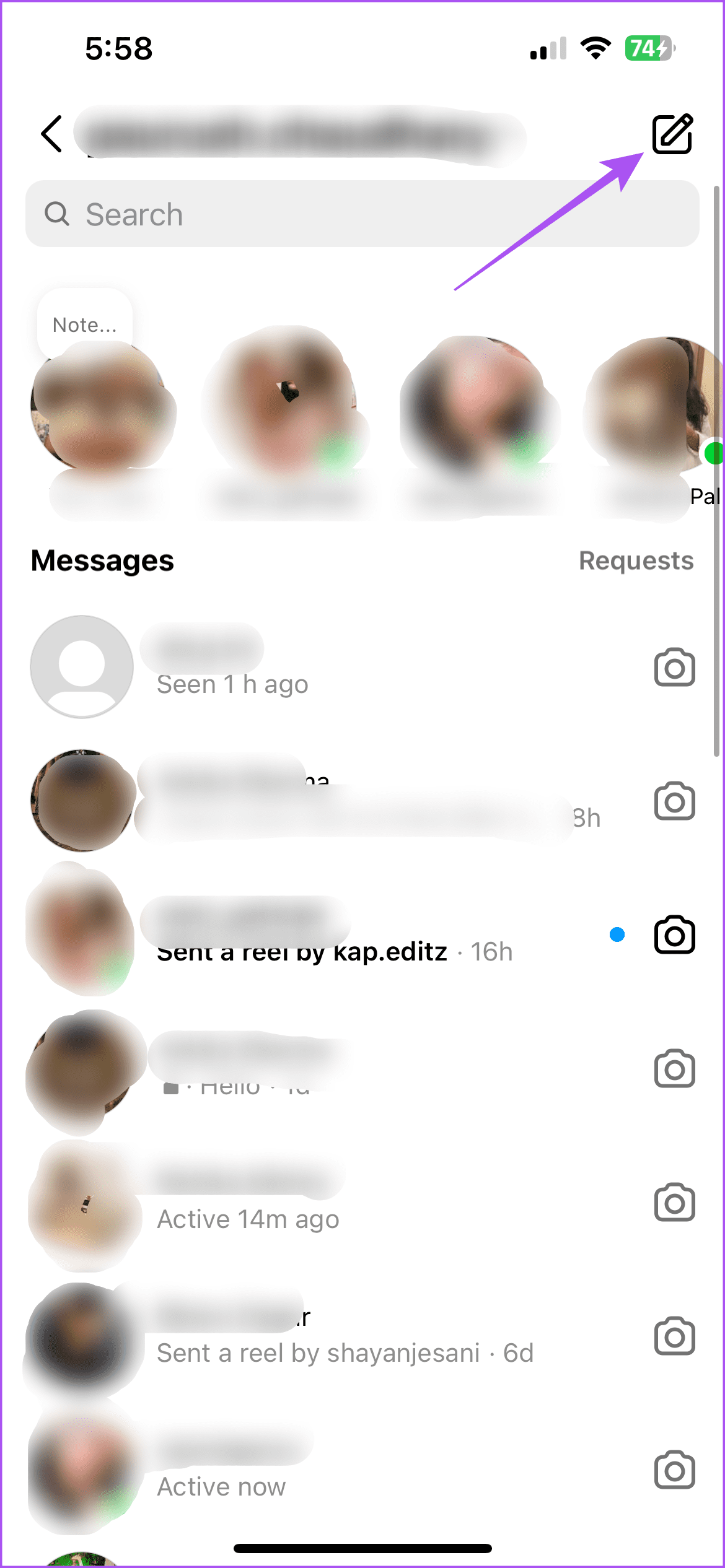
Step 2: Tap the Messages icon at the top-right corner and then open the chat that you want to encrypt.
Step 3: Tap on the name of your contact at the top of the chat window.
Step 4: Scroll down and then select Use end-to-end encryption.

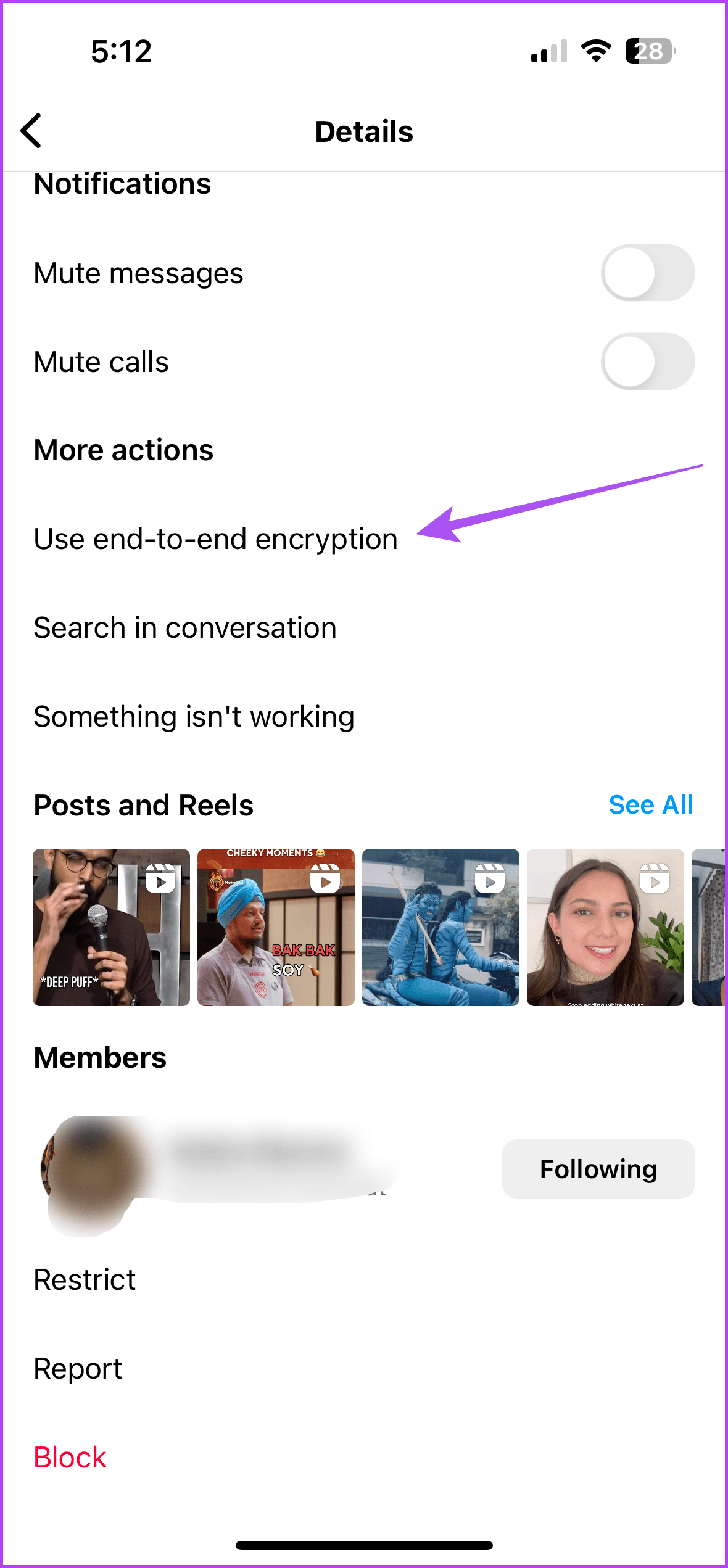
A new encrypted chat window will open on your screen where you can start your conversation. Your messages, calls, and voice messages will be end-to-end encrypted with this chat.
How to Verify End-To-End Encryption
Step 1: In your encrypted chat of the Messenger, tap the name of your contact at the top.
Step 2: Tap on Privacy and Safety and then select End-to-end encryption.


Step 3: Tap on your name to see the alphanumeric verification keys for your encrypted chat. You can ask your contact to do the same and then verify the keys.


How to Start End-To-End Encrypted Group Chat on Instagram
You can also create an end-to-end encrypted chat with more than one participant on your Instagram account. Here’s how.
Step 1: Open Instagram and then tap the Messages icon at the top-right corner.
Step 2: Tap the pencil icon at the top-right corner and then tap the lock icon to enable end-to-end encryption.

Step 3: Select the contacts whom you want to add to the group and tap on Create Group Chat at the bottom.
The contacts whose names have been greyed out have not received the feature of encrypted chats yet.
How to Turn Off End-To-End Encryption on Instagram
You cannot turn off end-to-end encryption but you can delete your encrypted chats on Instagram. Press and swipe right on the chat you want to delete and then tap on Delete.
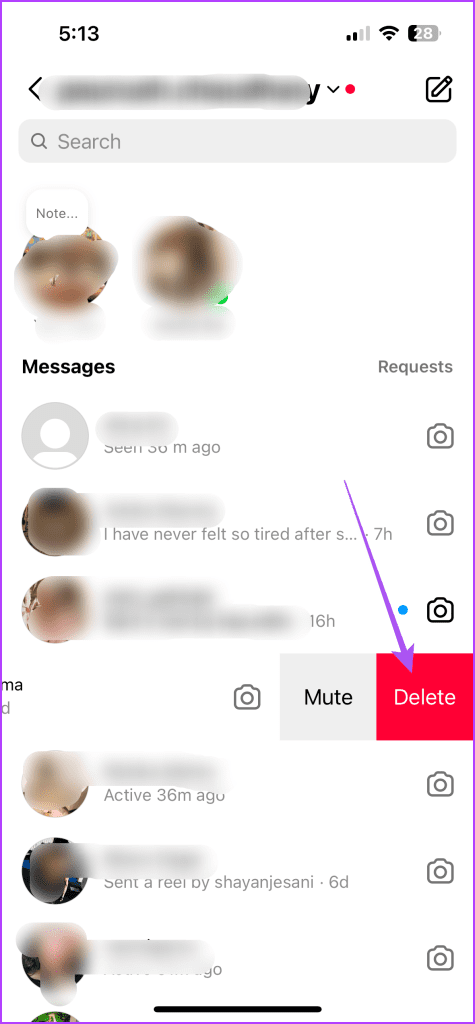
Do note that the chat will be deleted only from your device. Your contact will have to follow the same steps to completely delete the encrypted chat.
Enable Security Alerts for Encrypted Chats on Instagram
Instagram has an option to enable security alerts for end-to-end encrypted chats when the security keys or the device changes to a new one. This can be turned on for you and your contact in the encrypted chat.
Step 1: Open Instagram > Profile > Settings > Messages and story replies.
Step 2: Tap on Security alerts and enable them either for your device or your contact’s device.


Tip: Learn how to unsend or delete messages on Instagram.
Was this helpful?
Last updated on 05 July, 2024
Read Next
 5 Ways to Hide WhatsApp Chats
Method 1: Hide WhatsApp Chat of One Person WhatsApp has a native feature known as Chat Lock that lets you hide individual chats by locking them using a fingerprint, Face
5 Ways to Hide WhatsApp Chats
Method 1: Hide WhatsApp Chat of One Person WhatsApp has a native feature known as Chat Lock that lets you hide individual chats by locking them using a fingerprint, Face
 How to Lock Individual and Group Chats in WhatsApp on iPhone
Things to Remember Before proceeding with the steps, we want to highlight some important aspects.
How to Lock Individual and Group Chats in WhatsApp on iPhone
Things to Remember Before proceeding with the steps, we want to highlight some important aspects.
 How to Delete Multiple or All Chats in WhatsApp
We have covered the following things here: How to delete multiple chats on WhatsApp.
How to Delete Multiple or All Chats in WhatsApp
We have covered the following things here: How to delete multiple chats on WhatsApp.
 How to Hide and Unhide Viber Chats on Mobile
How to Hide Viber Chats You can hide individual chats or group conversations on Viber to protect your privacy.
How to Hide and Unhide Viber Chats on Mobile
How to Hide Viber Chats You can hide individual chats or group conversations on Viber to protect your privacy.
 How to View Old Chats on ChatGPT Without Sharing Data
Accessing ChatGPT Chat History Wasn’t Available With Data Sharing Turned Off OpenAI used to provide the option to disable data sharing, which meant losing access to your chat history altogether.
How to View Old Chats on ChatGPT Without Sharing Data
Accessing ChatGPT Chat History Wasn’t Available With Data Sharing Turned Off OpenAI used to provide the option to disable data sharing, which meant losing access to your chat history altogether.
 6 Ways to Fix Twitch Chats Not Loading Issue
Basic Fixes Check your network connection: Ensure your device has good internet.
6 Ways to Fix Twitch Chats Not Loading Issue
Basic Fixes Check your network connection: Ensure your device has good internet.
 How to Enable and Disable Two-Factor Authentication (2FA) on Discord
Discord is a fantastic platform to hang out with friends and like-minded people.
How to Enable and Disable Two-Factor Authentication (2FA) on Discord
Discord is a fantastic platform to hang out with friends and like-minded people.
 How to Enable or Disable NSFW Channels on Discord
Discord provides the option to change the status of your Discord channel.
How to Enable or Disable NSFW Channels on Discord
Discord provides the option to change the status of your Discord channel.
The article above may contain affiliate links which help support Guiding Tech. The content remains unbiased and authentic and will never affect our editorial integrity.