Basic Ways:
- Using the side button: Whenever you get an incoming call that you wish to silence, press the side button once. This will instantly silence the call on your iPhone’s screen.
- Via the volume button: You can also press and hold the volume down button until the ringer volume goes down to silence incoming calls. Or, press either of the volume buttons to manually silence any specific incoming calls on your iPhone.
Method 1: Use Mute Switch or Action Button
On iPhone 15, 15 Plus, and other older models, flip the mute switch downwards to switch to silent mode. On iPhone 15 Pro or iPhone 15 Pro Max models, press and hold the Action button to trigger the Silent Mode. This should silence all incoming calls on your iPhone.
Method 2: Silence Unknown Callers on iPhone
If you get too many spam calls from numbers not in your contacts, your iPhone also lets you silence these unwanted, unknown callers. This can be useful if you wish to silence only the unknown callers while still being notified of calls from your contacts. Here’s how.
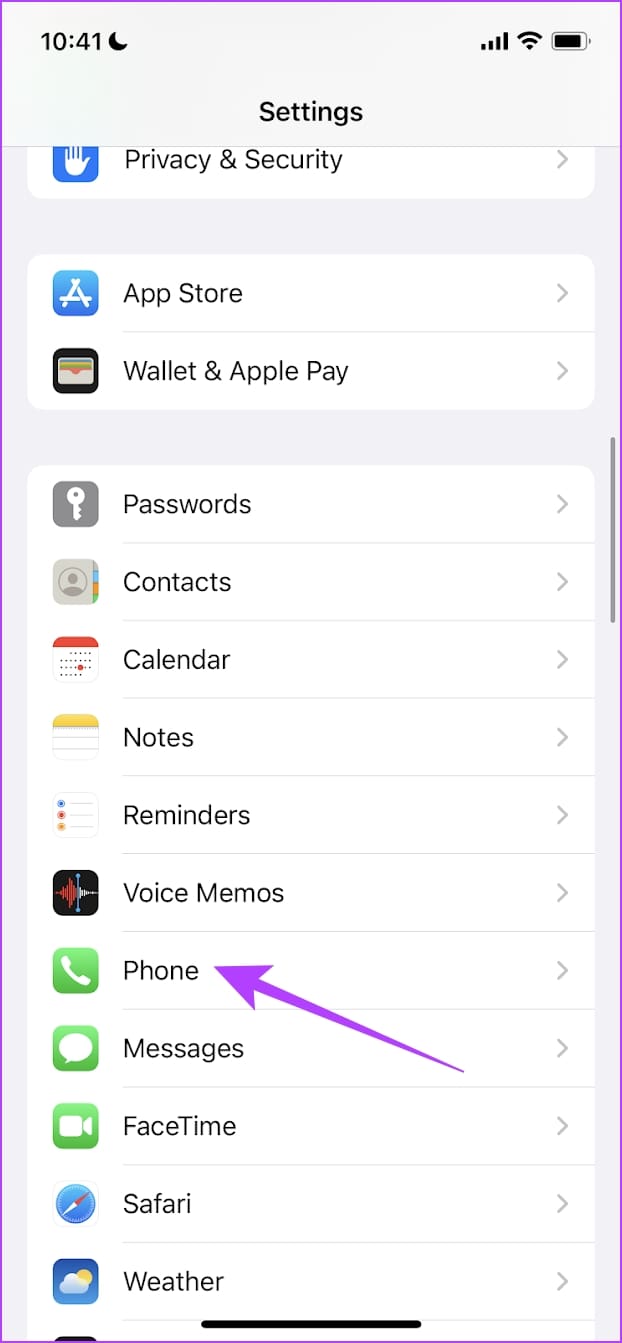
Step 1: Open the Settings app and tap on Phone. Here, tap on Silence Unknown Callers.
Step 2: Now, turn on the toggle for Silence Unknown Callers.


Also Read: How to block all calls except contacts on Android and iPhone
Method 3: By Using Focus Mode
Your iPhone has an amazing feature called Focus Modes. You can also use it to silence calls on your iPhone without permanently blocking someone. Once enabled, Focus Mode will block all incoming calls, notifications, etc., on your iPhone until disabled. Follow the below steps to enable it.
Step 1: Swipe down from the top-right corner of the screen to access Control Center and long-press on Focus.
Step 2: Here, tap the relevant Focus Mode.
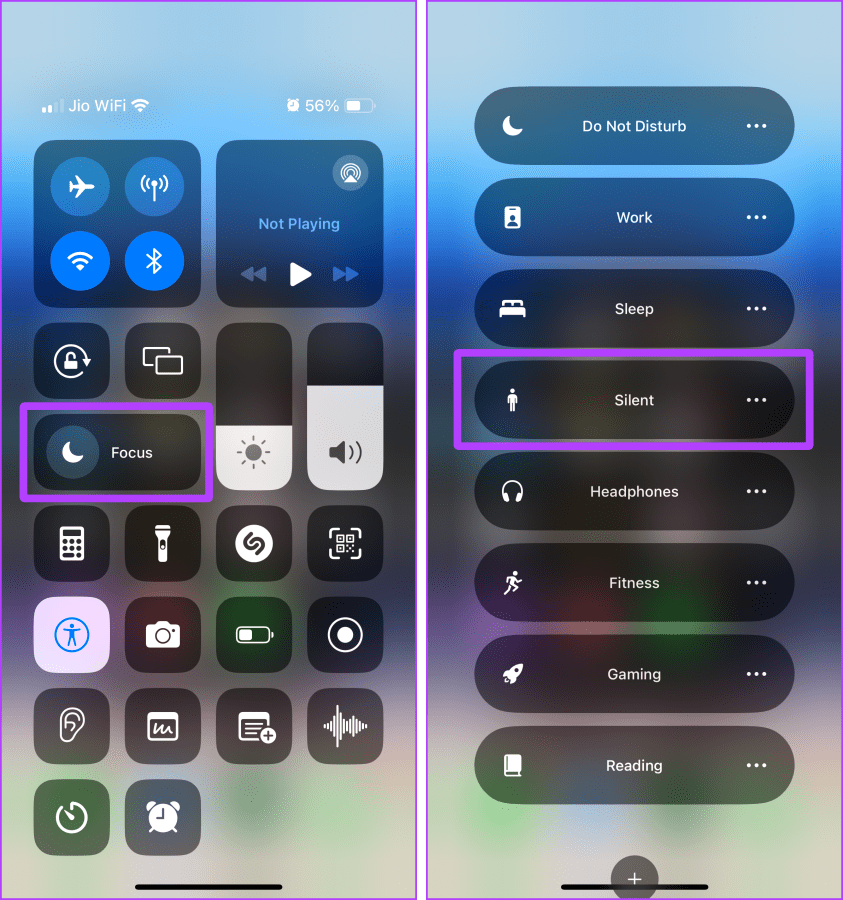
You can also customize this Focus Mode to allow calls or notifications from certain contacts on your iPhone if necessary.
Was this helpful?
Last updated on 20 May, 2024
Read Next
 6 Ways to Fix iPhone Not Ringing for Incoming Calls
Basic Fixes Disable silent mode: If the color beside the alert slider is orange, your iPhone is set to silent.
6 Ways to Fix iPhone Not Ringing for Incoming Calls
Basic Fixes Disable silent mode: If the color beside the alert slider is orange, your iPhone is set to silent.
 6 Ways to Fix Telegram Calls Not Ringing on iPhone
Basic Fixes: Allow anyone to call you: Telegram offers excellent privacy and security options.
6 Ways to Fix Telegram Calls Not Ringing on iPhone
Basic Fixes: Allow anyone to call you: Telegram offers excellent privacy and security options.
 3 Ways to Fix Unable to Answer Calls on iPhone
Common Fixes Force restart your iPhone: Press and quickly release Volume Up, followed by the Volume Down buttons.
3 Ways to Fix Unable to Answer Calls on iPhone
Common Fixes Force restart your iPhone: Press and quickly release Volume Up, followed by the Volume Down buttons.
 4 Ways to Fix iPhone Calls Not Showing up on iPad
Basic Fixes: Connect to the same Wi-Fi network: For Apple Continuity to work flawlessly, you’ll need to connect your iPhone and iPad to the same Wi-Fi connection. Open the Control Center on
4 Ways to Fix iPhone Calls Not Showing up on iPad
Basic Fixes: Connect to the same Wi-Fi network: For Apple Continuity to work flawlessly, you’ll need to connect your iPhone and iPad to the same Wi-Fi connection. Open the Control Center on
 4 Ways to Fix iPhone Not Making Calls but Can Text
Basic Fixes: Use Airplane Mode: Enabling and disabling Airplane Mode helps reset the network connectivity on your iPhone.
4 Ways to Fix iPhone Not Making Calls but Can Text
Basic Fixes: Use Airplane Mode: Enabling and disabling Airplane Mode helps reset the network connectivity on your iPhone.
 3 Best Ways to Fix iPhone Calls Not Ringing on Mac
Basic Fixes Connect devices with the same Wi-Fi: Such features work only when your Apple devices are connected to the same Wi-Fi network.
3 Best Ways to Fix iPhone Calls Not Ringing on Mac
Basic Fixes Connect devices with the same Wi-Fi: Such features work only when your Apple devices are connected to the same Wi-Fi network.
 3 Ways to Fix Telegram Calls Not Switching to Speaker on iPhone
Common Fixes Check volume levels - Go to Settings > Sounds & Haptics and maximize the Ringtone and Alerts volume slider.
3 Ways to Fix Telegram Calls Not Switching to Speaker on iPhone
Common Fixes Check volume levels - Go to Settings > Sounds & Haptics and maximize the Ringtone and Alerts volume slider.
 5 Ways to Fix Apple Watch Not Ringing for Incoming Calls
Basic Fixes Restart Apple Watch: Restarting your Apple Watch can get rid of any temporary bugs and glitches.
5 Ways to Fix Apple Watch Not Ringing for Incoming Calls
Basic Fixes Restart Apple Watch: Restarting your Apple Watch can get rid of any temporary bugs and glitches.
The article above may contain affiliate links which help support Guiding Tech. The content remains unbiased and authentic and will never affect our editorial integrity.