How to Delete a Single Instagram Search Suggestion
If you only want to remove one entry from your search history on Instagram or remove individual entries manually, here’s how to do it.
Step 1: Open the Instagram app on your smartphone. Tap on the search icon at the bottom of the screen.
Step 2: Tap the search bar at the top.
Step 3: You will see a list of your recent searches. Tap on the X button next to the entry you want to remove.


How to Remove Your Entire Search History From Instagram
Too many people on your suggested list? Here’s how to reset your Instagram search suggestions quickly.
Step 1: Open the Instagram app on your smartphone and tap your profile icon in the bottom-right corner.
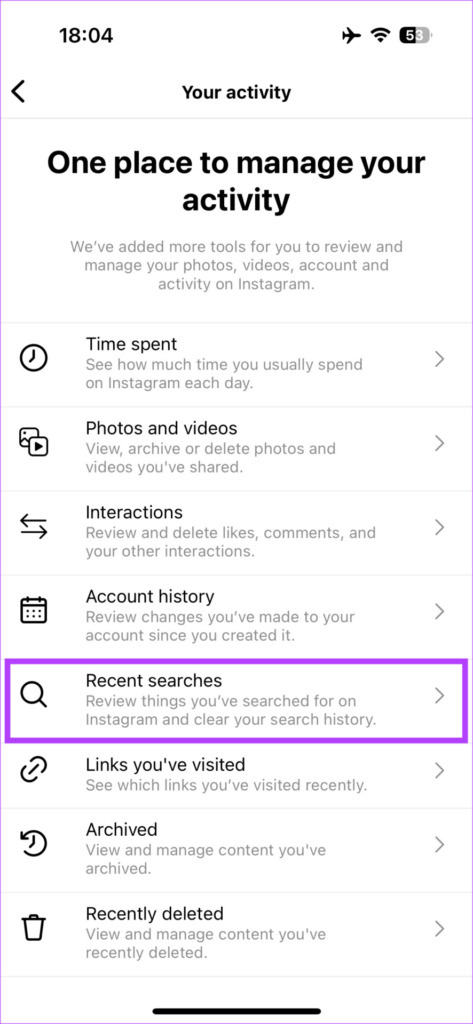
Step 2: Select the hamburger menu in the top-right corner and select Your activity.
Step 3: Tap Recent searches and hit the Clear All button in the top-right corner.


How to Turn Off Account Suggestions on Instagram
Aside from clearing search suggestions, you can also prevent Instagram from suggesting accounts entirely. Here’s how:
Note: You need to use Instagram on your browser to achieve this. It will not work using the app.
Step 1: Head over to the Instagram website on your computer using the link below. Log in to your account.
Step 2: Click More in the bottom left corner and select Settings.

Step 3: Uncheck the Show account suggestions on profiles checkbox.
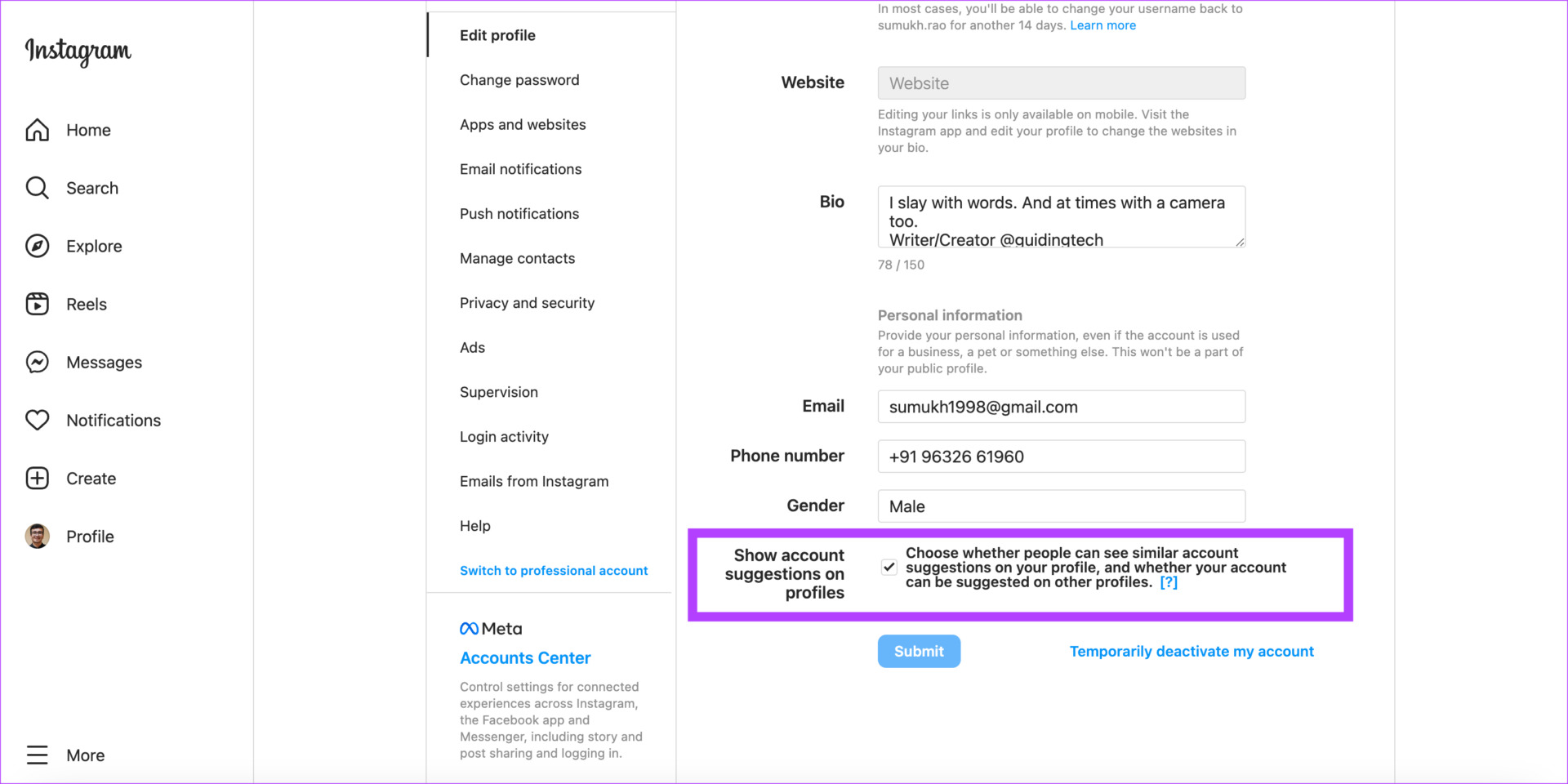
Note: If you disable suggestions using this method, your profile will also not be suggested to others.
Was this helpful?
Last updated on 05 September, 2024
Read Next
 How to Clear Facebook Search Suggestions From Any Device
4 Ways to Clear Facebook Search Suggestions on iPhone or Android Facebook uses your search history to show better search results and suggestions.
How to Clear Facebook Search Suggestions From Any Device
4 Ways to Clear Facebook Search Suggestions on iPhone or Android Facebook uses your search history to show better search results and suggestions.
 4 Fixes for Google Search Suggestions Not Showing in Safari on Mac
Basic Fixes Force quit and relaunch Safari: Click the Apple logo > Force Quit > Select Safari > Force Quit.
4 Fixes for Google Search Suggestions Not Showing in Safari on Mac
Basic Fixes Force quit and relaunch Safari: Click the Apple logo > Force Quit > Select Safari > Force Quit.
 How to Appear on Someone’s Instagram Suggestions
Method 1: Follow the User on Instagram One of the easiest ways to pop up on someone's suggested friends is by following them on Instagram.
How to Appear on Someone’s Instagram Suggestions
Method 1: Follow the User on Instagram One of the easiest ways to pop up on someone's suggested friends is by following them on Instagram.
 How to Turn Off Follow Suggestions on Instagram
Turn Off Follow Suggestion on Instagram On Mobile After understanding how Instagram suggests other accounts to follow, here is a guide on how to disable this feature in the app.
How to Turn Off Follow Suggestions on Instagram
Turn Off Follow Suggestion on Instagram On Mobile After understanding how Instagram suggests other accounts to follow, here is a guide on how to disable this feature in the app.
 5 Ways to Fix iPad and iPhone Stuck on Siri Suggestions
Basic Fixes: Connect to a charger and restart the iPhone: Restarting your device helps close all features and functions and start them over again.
5 Ways to Fix iPad and iPhone Stuck on Siri Suggestions
Basic Fixes: Connect to a charger and restart the iPhone: Restarting your device helps close all features and functions and start them over again.
 A Guide to Using the Search Bar and Search Operators in Microsoft Outlook
How to Use the Microsoft Outlook Search Bar There are two ways to use the Microsoft Outlook Search bar.
A Guide to Using the Search Bar and Search Operators in Microsoft Outlook
How to Use the Microsoft Outlook Search Bar There are two ways to use the Microsoft Outlook Search bar.
 How to Clear Your Amazon Search History
Delete Amazon Search and Browsing History From Web Search history is different from the browsing history.
How to Clear Your Amazon Search History
Delete Amazon Search and Browsing History From Web Search history is different from the browsing history.
 Prime Video: Clear Continue Watching, Search, and Watch History
Clear Continue Watching on Amazon Prime Video The new Prime Video interface lacks an Edit button for managing its Continue Watching section.
Prime Video: Clear Continue Watching, Search, and Watch History
Clear Continue Watching on Amazon Prime Video The new Prime Video interface lacks an Edit button for managing its Continue Watching section.
The article above may contain affiliate links which help support Guiding Tech. The content remains unbiased and authentic and will never affect our editorial integrity.