How to Remove Linked Accounts From Your Google Home
Method 1: Remove Additional Linked Accounts
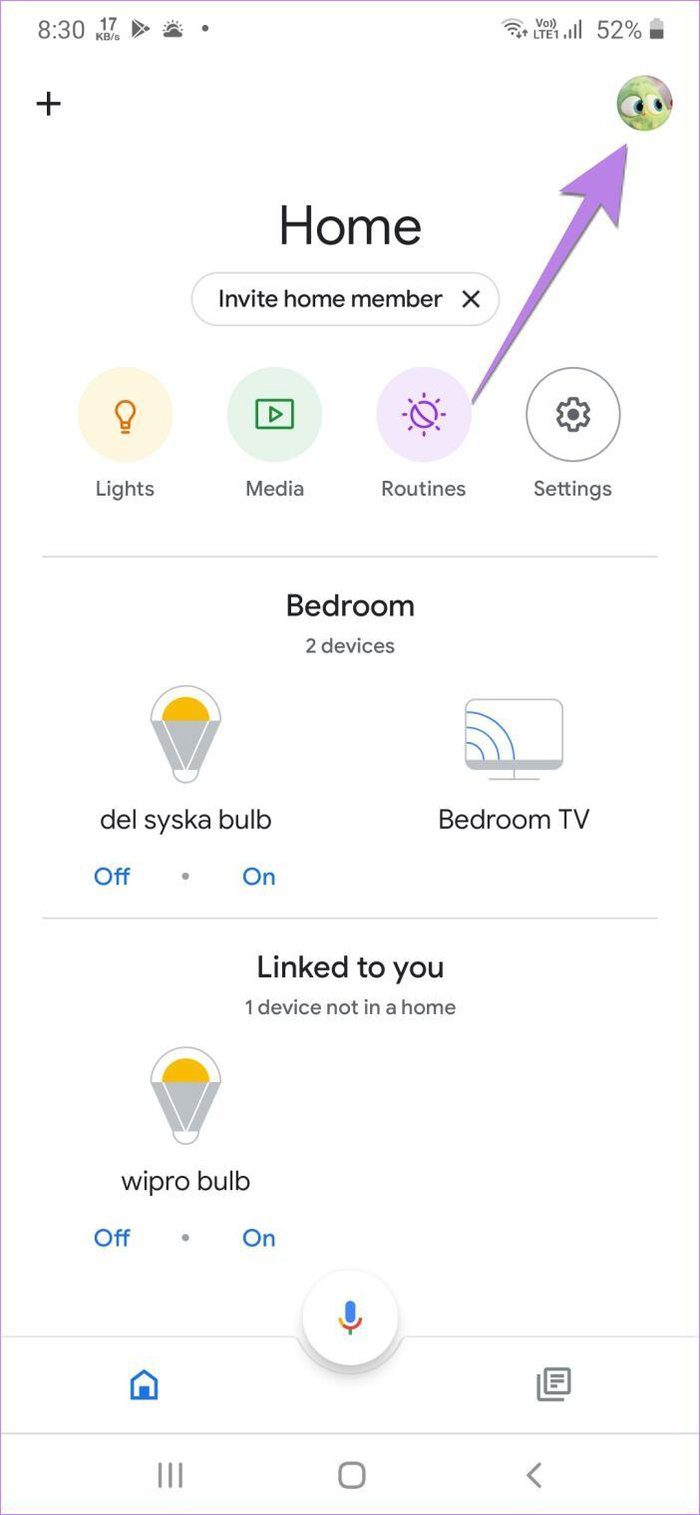
Step 1: Open the Google Home app > tap on the profile picture icon at the top right.
Step 2: Tap on Assistant settings.
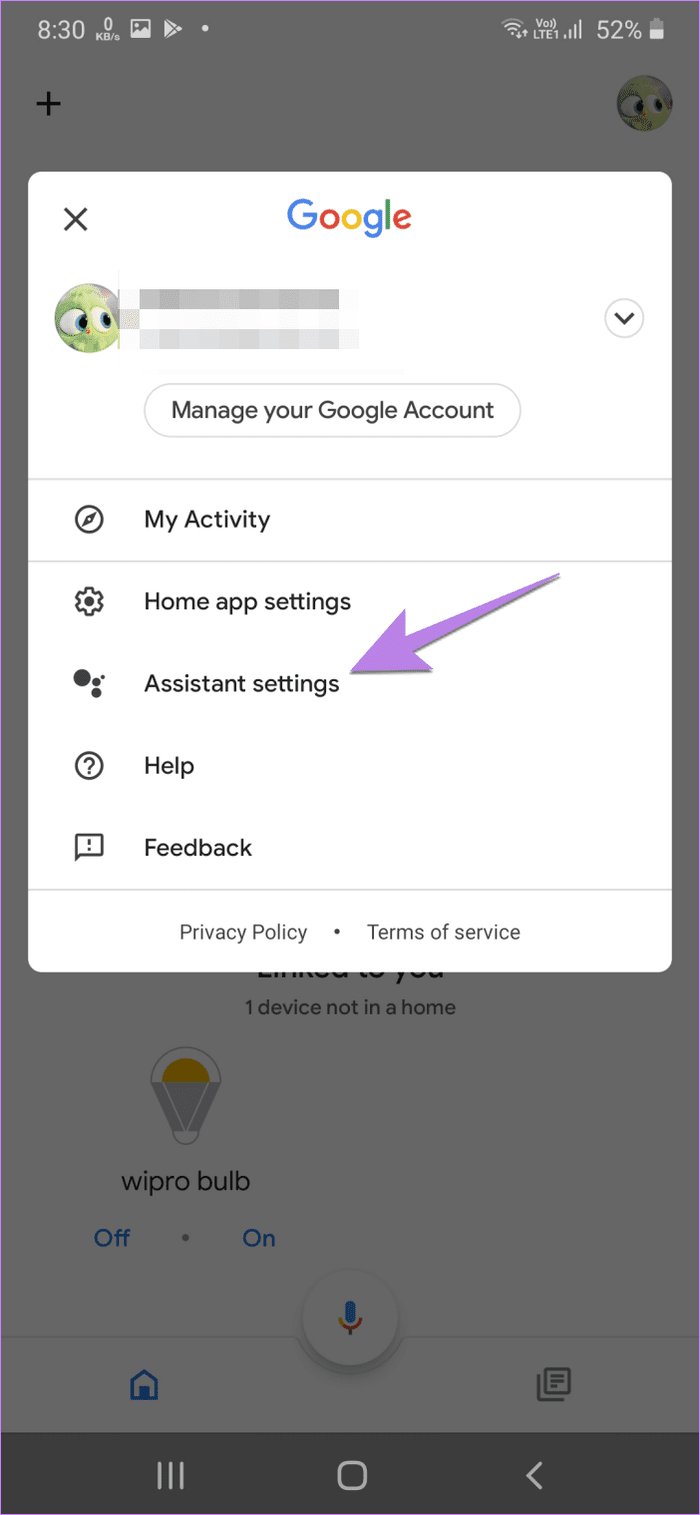
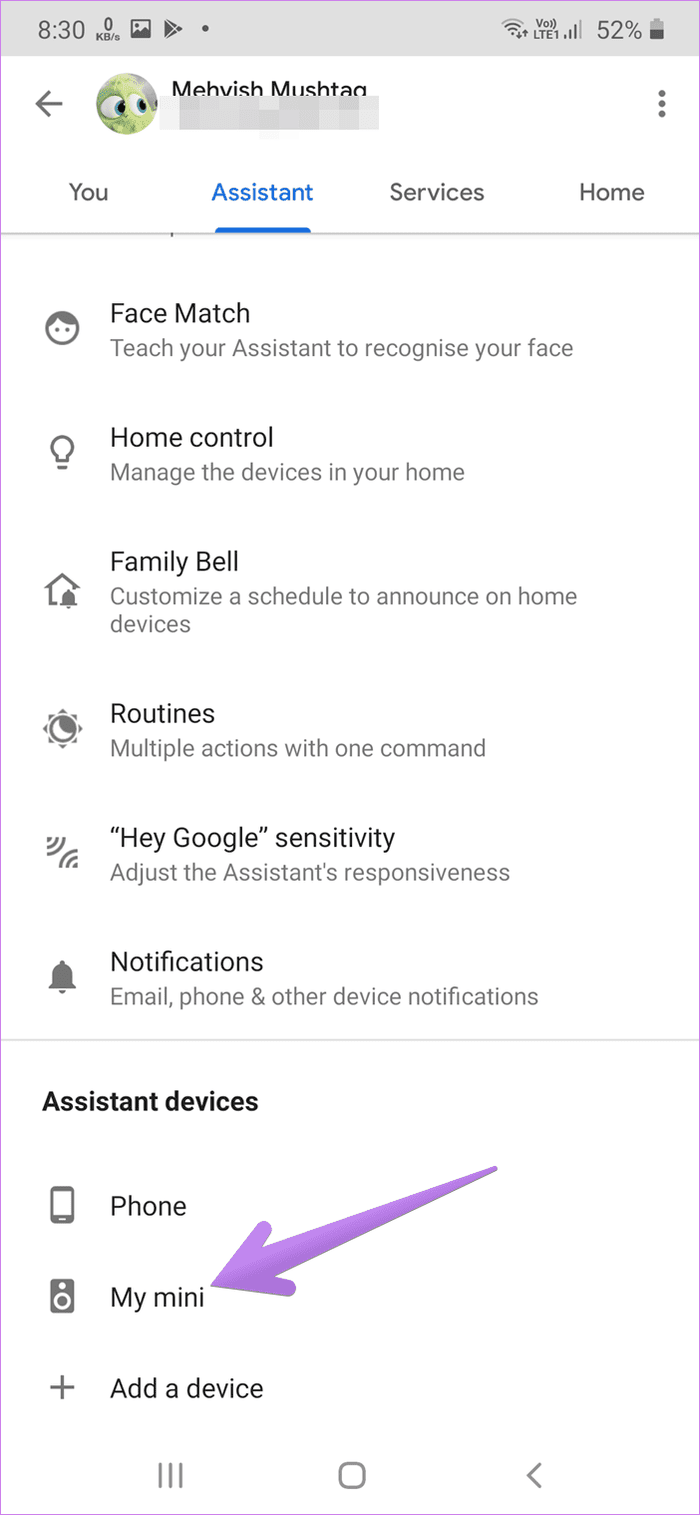
Step 3: Go to the Assistant tab and tap on your Google Home device. In my case, it is My mini.
Step 4: Tap on Linked accounts. Tap on the X mark next to the Google account you want to remove. Confirm on the next screen.
Note: If you don’t see the X mark, touch and hold on the account name. Then, tap on the delete icon or the X mark, depending on the available option.

Method 2: Remove Home Member
Note: When you remove a member, they will be notified about it and won’t have access to Google Home services.
Step 1: Open the Google Home app and tap on the profile picture icon.
Step 2: Tap on Assistant settings.
Step 3: Go to the Home tab > tap on Home members.
Step 4: Touch and hold the member that you want to remove. Tap on the delete icon.


Method 3: Delete Home
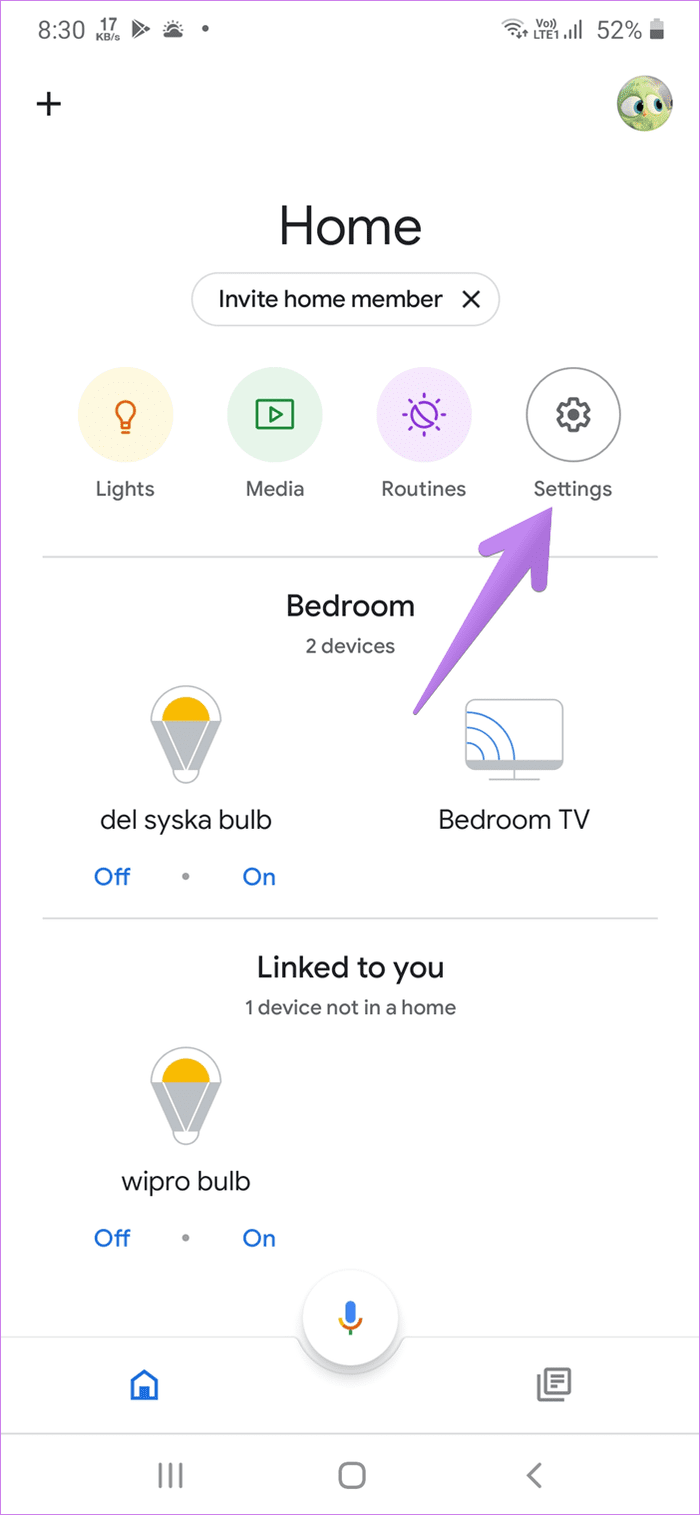
Step 1: Launch the Google Home app and tap on the Settings icon on the home screen.
Step 2: Tap on Delete this home.

How to Remove Yourself From Google Home
Now, if your Google account is linked to a Google Home that you no longer use, here are two methods to unlink your Google account from the speaker.
Method 1: Unlink Device
Step 1: Open the Google Home app and tap on the profile icon at the top right.
Step 2: Tap on Assistant settings.
Step 3: Under the Assistant tab, scroll down and tap on your Google Home speaker.
Step 4: In the Google Home device settings, scroll down and tap on Unlink device. Confirm when asked.

Method 2: Remove Google Home From Your Google Account
If you don’t have access to the linked speaker on the Google Home app, remove its access from your Gmail account. For that, visit Google’s Device Activity page and sign in with your account. You will see the Google Home speaker. Click or tap on the three-dot icon and select Sign out.
Was this helpful?
Last updated on 29 August, 2024
Read Next
 How to Fix “Page is Already Linked to Instagram Account” Error
Basic Fixes Remove special characters from the account name: Apparently adding special characters or emojis to your Facebook page or Instagram Business profile name can cause issues such as this
How to Fix “Page is Already Linked to Instagram Account” Error
Basic Fixes Remove special characters from the account name: Apparently adding special characters or emojis to your Facebook page or Instagram Business profile name can cause issues such as this
 How to Log Out Linked Devices From WhatsApp Account
https://youtu.be/Ij8bVFcMnbE Log Out Linked Devices From WhatsApp on Mobile Before moving on with the steps, we suggest updating WhatsApp version on your iPhone or Android.
How to Log Out Linked Devices From WhatsApp Account
https://youtu.be/Ij8bVFcMnbE Log Out Linked Devices From WhatsApp on Mobile Before moving on with the steps, we suggest updating WhatsApp version on your iPhone or Android.
 How to Remove Remembered Instagram Accounts
How to Remove a Remembered Instagram Account on Mobile Once you log out of the app, Instagram saves your accounts and remembers them for easy login.
How to Remove Remembered Instagram Accounts
How to Remove a Remembered Instagram Account on Mobile Once you log out of the app, Instagram saves your accounts and remembers them for easy login.
 How to Remove Email or Accounts From Facebook Login Screen
Remove Remembered Info in Facebook Login on Desktop You can remove the login info from the Facebook webpage or by removing the autofill password for your Facebook account using browser
How to Remove Email or Accounts From Facebook Login Screen
Remove Remembered Info in Facebook Login on Desktop You can remove the login info from the Facebook webpage or by removing the autofill password for your Facebook account using browser
 How to Switch Google Accounts in Chrome for iOS, iPad and Android
Things to Know Before Switching Google Accounts in Chrome When you switch Google accounts in Chrome, your browsing history, bookmarks, passwords, and other settings associated with the current account will
How to Switch Google Accounts in Chrome for iOS, iPad and Android
Things to Know Before Switching Google Accounts in Chrome When you switch Google accounts in Chrome, your browsing history, bookmarks, passwords, and other settings associated with the current account will
 How to Use Two WhatsApp Accounts on iPhone
Setting up the First WhatsApp Account If you're not using WhatsApp on your iPhone already, the first thing is to set up an account with your primary phone number.
How to Use Two WhatsApp Accounts on iPhone
Setting up the First WhatsApp Account If you're not using WhatsApp on your iPhone already, the first thing is to set up an account with your primary phone number.
 3 Ways to Stop Instagram From Automatically Following Accounts
Fix 1: Unlink Third-Party Apps and Websites Third-party apps and services linked to your Instagram account may auto-follow specific accounts in the background.
3 Ways to Stop Instagram From Automatically Following Accounts
Fix 1: Unlink Third-Party Apps and Websites Third-party apps and services linked to your Instagram account may auto-follow specific accounts in the background.
 7 Fixes for “Disabled Accounts Can’t Be Contacted” on Instagram
Instagram is a vibrant platform where connections are forged, creativity flourishes, and stories unfold.
7 Fixes for “Disabled Accounts Can’t Be Contacted” on Instagram
Instagram is a vibrant platform where connections are forged, creativity flourishes, and stories unfold.
The article above may contain affiliate links which help support Guiding Tech. The content remains unbiased and authentic and will never affect our editorial integrity.