How to Change Discord Password
For Mobile
Note: The steps to change your Discord password are the same for Android phones and iPhones.
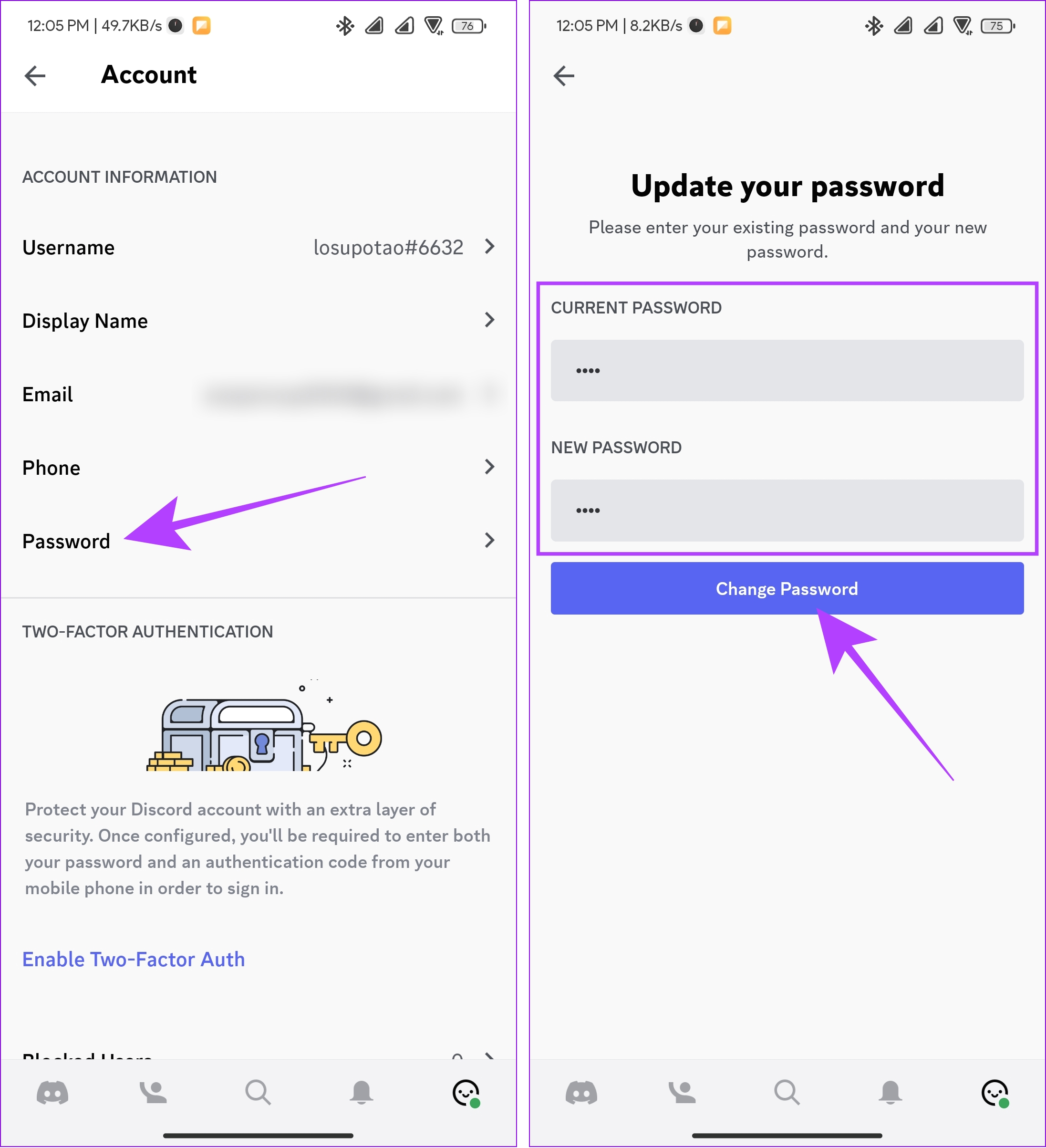
Step 1: Launch the Discord app on your smartphone. Tap your profile at the bottom-right corner and select Account.

Step 2: Tap Password and enter your current password. Now, enter the new password and hit Change Password.
On Desktop App and Web
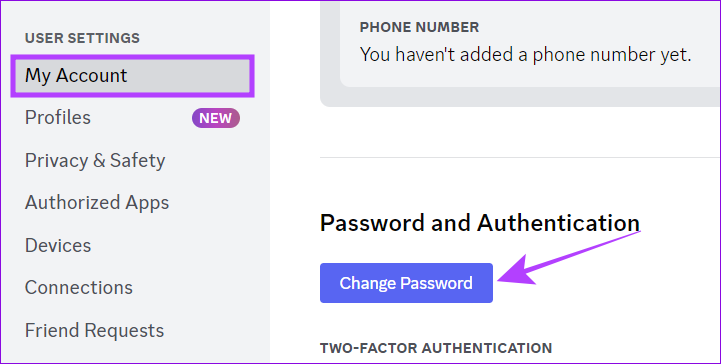
Step 1: Open the Discord app or on the browser. Click the Gear icon next to your account name.

Step 2: Choose My Account from the sidebar and hit Change Password.
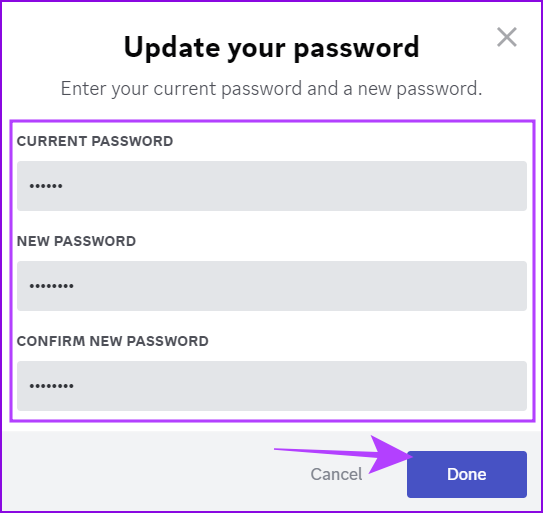
Step 3: Enter the current password. Next, enter the new password and enter it again to confirm.
Step 4: Once the password is verified, hit Done.
What to Do When You Forget Discord Password
Unlike many other apps, you don’t have the option to change your password inside Discord. So, here’s what to do.
Note: If you are logged in, you must log out of your Discord account to reset your Discord password.
On Mobile
Step 1: Open the Discord app on your smartphone. Tap Log In and enter your email or phone number.
Step 2: Select Forgot your password.
Step 3: Discord will send a password reset link to your email ID. Tap Okay, then go to your email app and open the latest mail from Discord.
Step 4: Once you open the mail from Discord, tap Reset password.

Step 5: Enter the new password and hit Change Password.
On Desktop
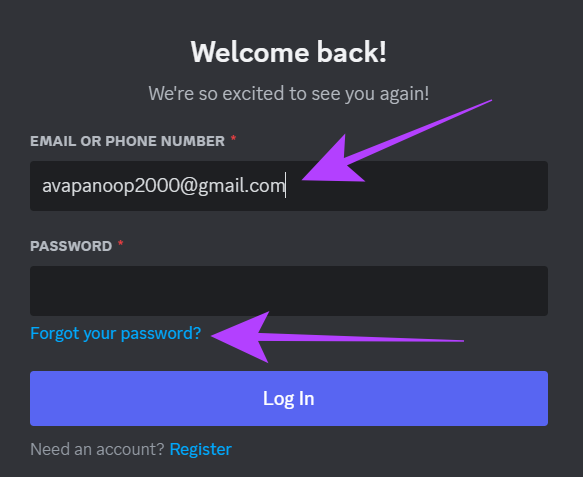
Step 1: Open the Discord app or its official website. Enter the email ID linked to your Discord account.
Step 2: Hit Forgot your password.
Step 3: You’ll receive a reset link on your mail app. Tap Okay and open the mail app.
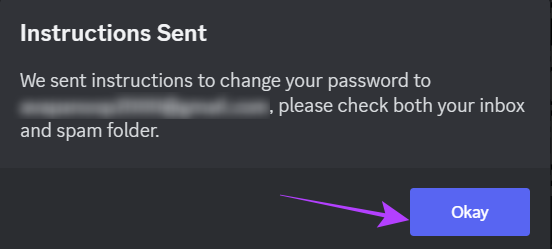
Step 4: Open the mail from Discord and hit Reset password.
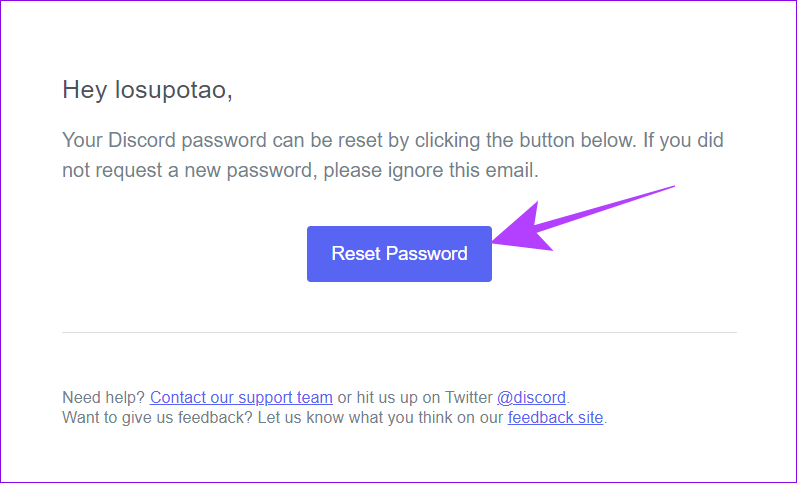
Step 5: Enter the new password and click Change password.
How to Recover a Discord Account if You Don’t Know the Email
As you know, it’s easy to recover the account even if you forget your Discord password but remember the email. However, if you don’t remember the email linked to your account, there is no other option besides creating a new account.
But if you are still logged in, you can change the email linked to your Discord account or the phone number added to your Discord ID.
Things to Note While Making a New Password for Discord
- Length: It’s best to choose a password that’s at least 12 characters long as they are generally more secure and hard to crack.
- Complexity: Use a combination of uppercase letters, lowercase letters, numbers, and special characters (!@#$%^&*, etc.) in your password.
- Avoid these: Common words, predictable patterns, dictionary words, personal information like your name, username, birthdate, or phone number, and guessable words such as password, 123456, or qwerty.
- Keep it unique: Using a unique password is better than using the same one everywhere. Reusing the same password increases the risk of compromising multiple accounts if one is breached.
- Enable Two-Factor Authentication (2FA): Enable 2FA on your Discord account, as it adds an extra layer of security.
- Stay away from suspicious links: Be vigilant and avoid clicking on suspicious links or providing your password on unauthorized websites. Discord will never ask for your password outside of its official login page.
By following these guidelines, you can create a strong and secure password for your Discord account, protect your personal information, and maintain its privacy.
FAQs on Resetting Discord Password
If you are still logged in to Discord, you can continue using the app even if you forget your Discord password. However, you must reset the password to log in to your Discord account on a new device.
Yes. Once you have deleted your Discord account, you can later create a new one using the same email ID/phone number.
No. You won’t be logged out of your Discord account even if you change your Discord password.
Knowing how to change your Discord password improves account safety and reduces the chance of forgetting it.
Was this helpful?
Last updated on 19 May, 2024
Read Next
 Forgot iPhone Passcode: How to Reset iPhone Without Losing Data
Don't we all dread the sight of our phones not unlocking when we enter the password?
Forgot iPhone Passcode: How to Reset iPhone Without Losing Data
Don't we all dread the sight of our phones not unlocking when we enter the password?
 Forgot Samsung PIN or Pattern? Here is How to Unlock the Device
Factory Reset Your Samsung Device If you forget the PIN or pattern on your Samsung device, a factory reset is the only solution.
Forgot Samsung PIN or Pattern? Here is How to Unlock the Device
Factory Reset Your Samsung Device If you forget the PIN or pattern on your Samsung device, a factory reset is the only solution.
 How to Play Discord Games Using Discord Activities
What Are Discord Games?
How to Play Discord Games Using Discord Activities
What Are Discord Games?
 How to Reset Admin Password in Windows 11/10
Method 1: Reset Microsoft Account Password Windows now uses Microsoft Account to sign into your computer.
How to Reset Admin Password in Windows 11/10
Method 1: Reset Microsoft Account Password Windows now uses Microsoft Account to sign into your computer.
 How to Change Your Yahoo Mail Password
Yahoo's database has been breached many times, so if you still use their email service or are still sticking around, you should regularly update your passwords.
How to Change Your Yahoo Mail Password
Yahoo's database has been breached many times, so if you still use their email service or are still sticking around, you should regularly update your passwords.
 How to Change Outlook Password on Mobile, Desktop, and Web
Change Password in Outlook Mobile App The Outlook client app on Android and iPhone doesn’t have the option to change your account password.
How to Change Outlook Password on Mobile, Desktop, and Web
Change Password in Outlook Mobile App The Outlook client app on Android and iPhone doesn’t have the option to change your account password.
 How to Change Instagram Password on Your Phone or Desktop
Change Instagram Password Android Step 1: Open the Instagram app > go to your profile page.
How to Change Instagram Password on Your Phone or Desktop
Change Instagram Password Android Step 1: Open the Instagram app > go to your profile page.
 2 Ways to Change Your Age (and Birth Date) on Discord
Things to Know Before Changing Your Age on Discord 1. Discord's 'Terms of Service' clearly state that users must be at least 13 years old to use the platform.
2 Ways to Change Your Age (and Birth Date) on Discord
Things to Know Before Changing Your Age on Discord 1. Discord's 'Terms of Service' clearly state that users must be at least 13 years old to use the platform.
The article above may contain affiliate links which help support Guiding Tech. The content remains unbiased and authentic and will never affect our editorial integrity.