What Does Story Unavailable Mean on Instagram?
The Instagram story unavailable message can result from any of the below-mentioned reasons:
- Stable Internet connection: Have you checked your internet connection? Instagram consumes too much data. So, if your connection fluctuates, you might see an error message.
- User deleted the story: Although the story has been removed, it may still be shown as viewable, only for you to see the error message.
- You are blocked: Sorry to be the news bearer, but you might have been blocked, preventing you from viewing their stories.
- Account is private: You have to follow an account to view stories if it’s a private account.
- Story has expired: An Instagram story can be viewed for 24 hours. Afterward, it will be moved to the archive and can only be accessed by the user.
- Account deactivated: The user might have deactivated their Instagram account, preventing you from viewing their stories.
- If Instagram is down: Sometimes, it is not you or the user. If the Instagram server is down, you might see the “This story is unavailable” message.
- Story is in Close Friends: Instead of letting every follower see their story, users can limit the viewers to close friends. If you are not in this group, you can’t view it.
- Story is hidden from you: Besides close friends, users can also hide stories from specific people. This time, you might have been included in it.
- The user is on mute: If you have muted anyone on Instagram, their updates won’t display on your home screen including the stories. And if you try to view them, you might see the story unavailable error.
- Instagram removed the Story: This isn’t something that happens often, but if a story or post violates Instagram guidelines, it will be removed from the platform.
Basic Fixes:
- Refresh the feed: To load the feed faster, Instagram shows you a feed from your previous session, which might also include stories that are no longer available. So, it’s good to refresh the feed before opening any story.
- Ensure you’re not blocked: You can’t see the other user’s Instagram story if they have blocked you. So, before troubleshooting the issue, ensure you’re not blocked on Instagram.
- Force quit and restart Instagram: You can also force quit the Instagram app from your iPhone and Android device to solve the issue. This can help eliminate any temporary app glitches.
- Update Instagram: Software glitches can also cause errors, such as Instagram stories showing unavailable. So, it’s a good idea to update Instagram to the latest version.
- Reinstall Instagram: If the issue persists, you can also uninstall the Instagram app. Then, install a fresh copy of the app, sign in, and try opening the relevant story again on Instagram.
Fix 1: Log Out and Log In
When you log out of your Instagram account, the app might delete some cache files, including the ones causing this error. Upon a new login, Instagram will start a new session, and hence, you will have an error-free feed. Here’s how to do it.
Step 1: Open Instagram and tap your profile icon at the bottom right corner.
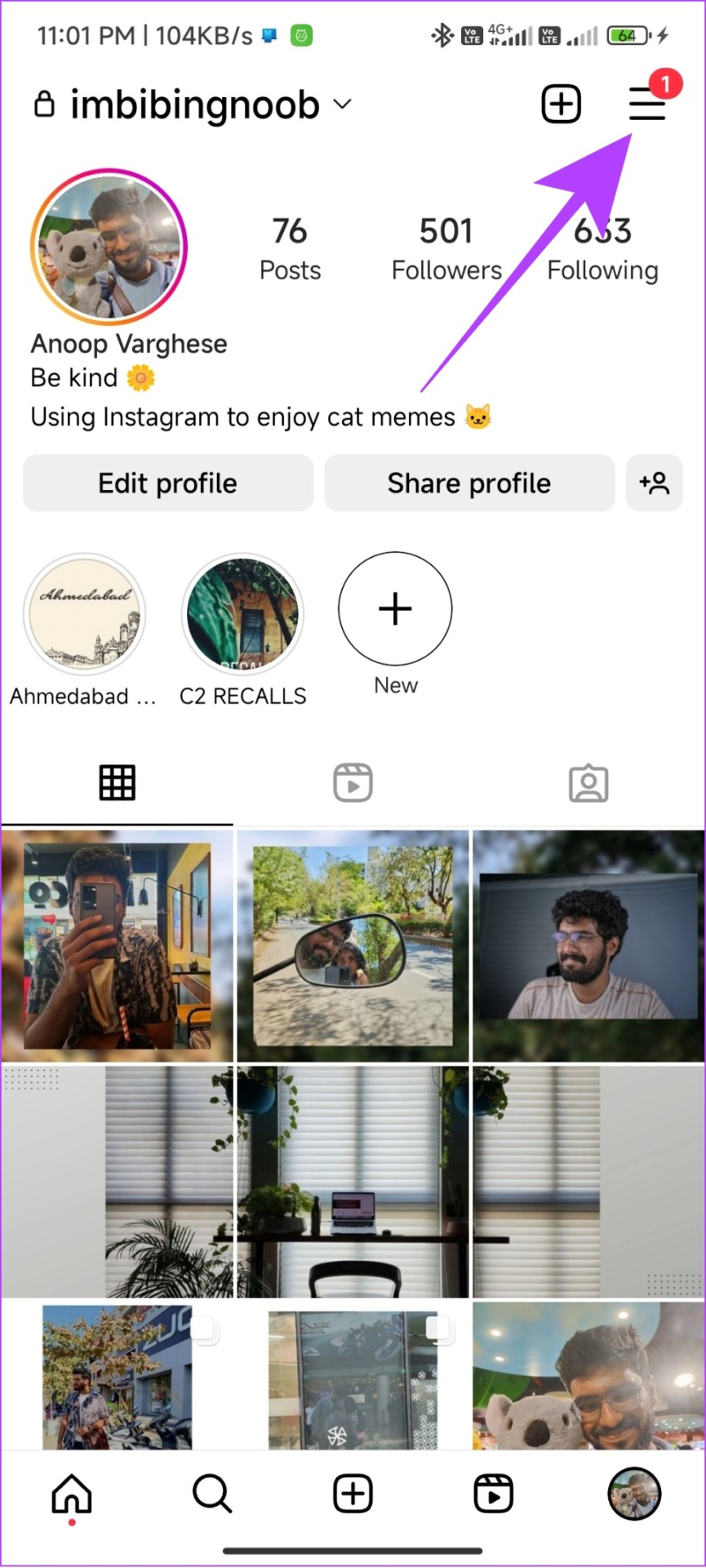
Step 2: Tap the hamburger menu and choose Settings.

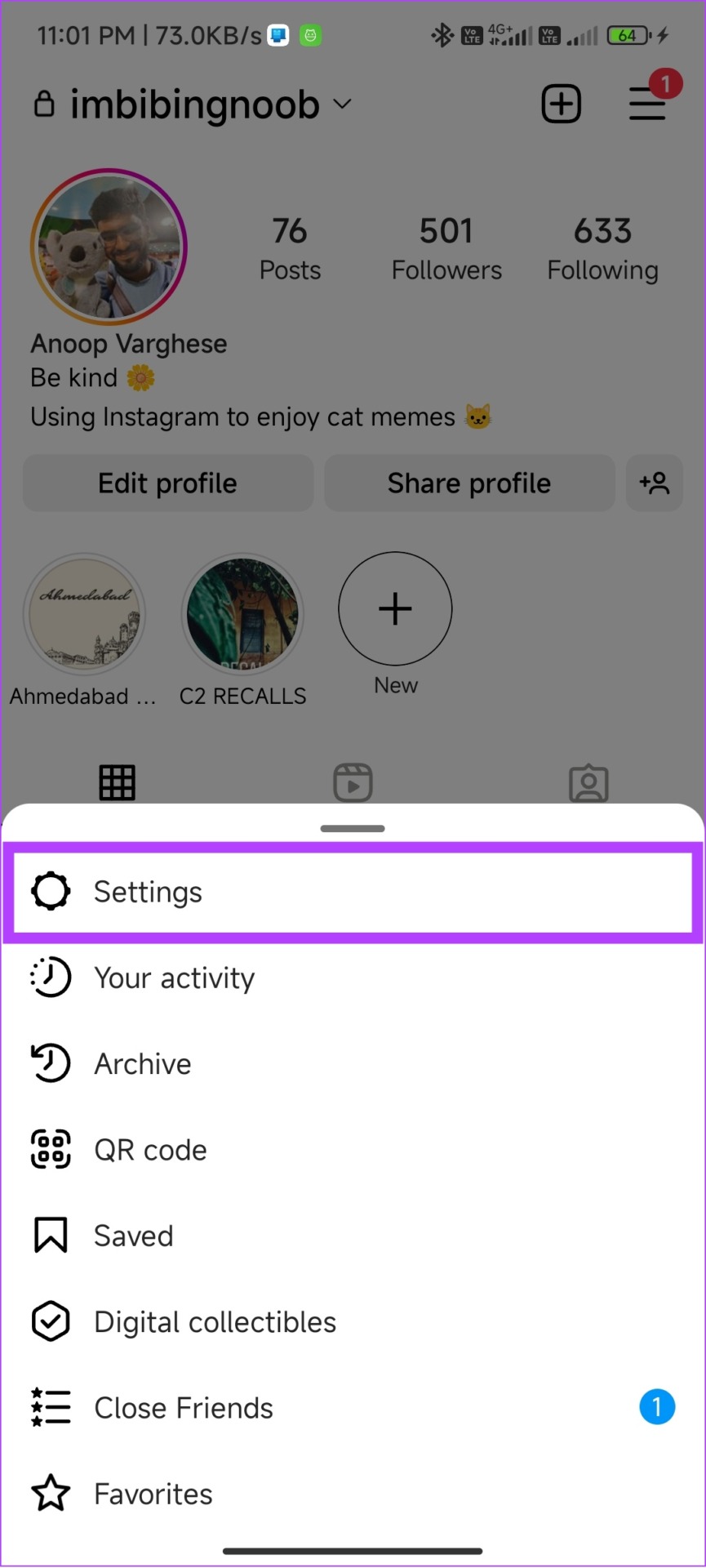
Step 3: Scroll down and tap Log out. Tap on Log out again to confirm.

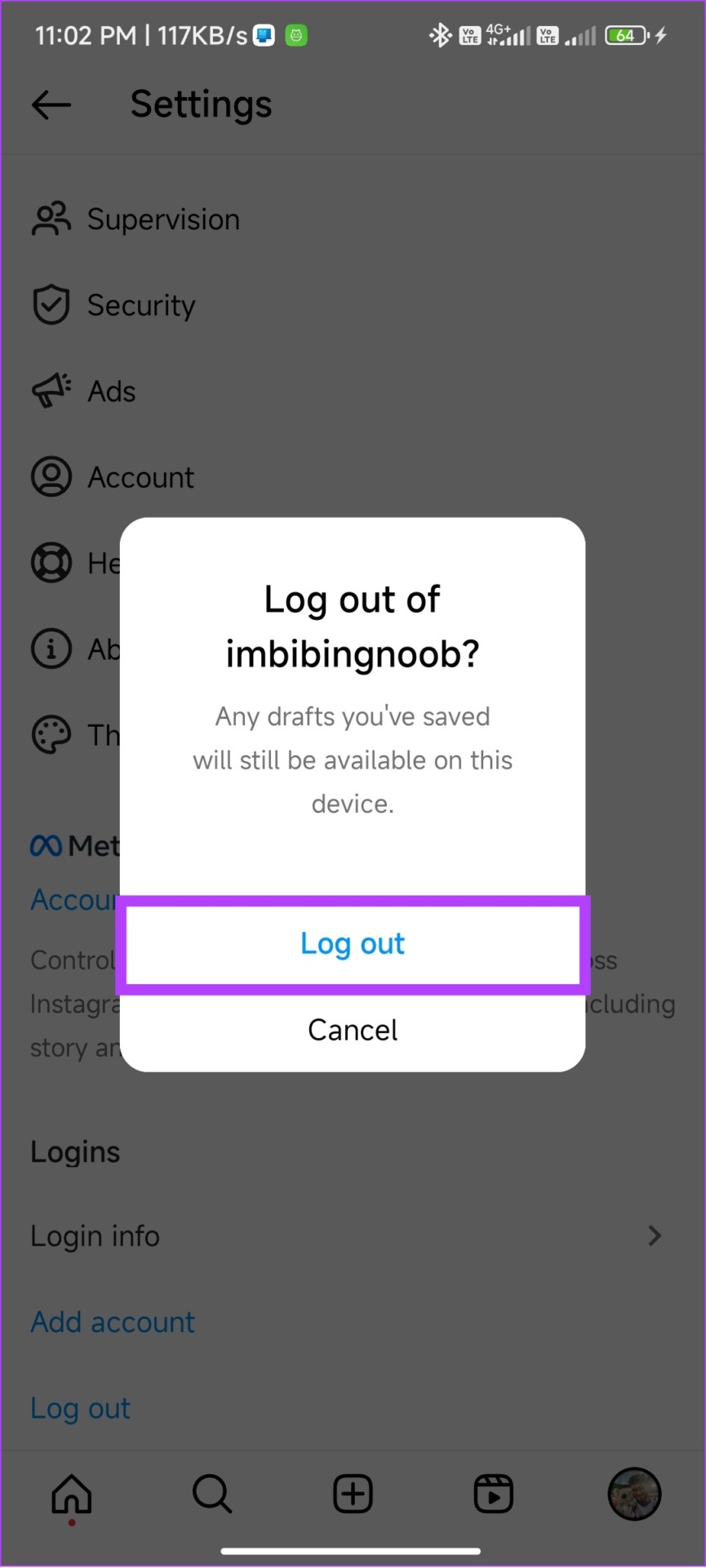
Now, re-enter the correct account details to log back in. Once done, try opening the Instagram story again to check.
Also Read: How to fix Instagram story sound not working
Fix 2: Clear the Instagram App Cache
Cache helps apps load faster by saving some settings and other data in your device’s local storage. However, over time, these cache files accumulate and can do more harm than good. So, if you’re experiencing issues viewing stories, clear the Instagram cache on your phone to fix it.
Fix 3: Check From an Alternate Account
If you have a spam/backup ID, check if you can see the unavailable story on Instagram. This can help if the error is specific to your Instagram account. Follow the below steps to switch accounts on Instagram.
Step 1: Open Instagram → tap the profile icon → choose the account to switch.

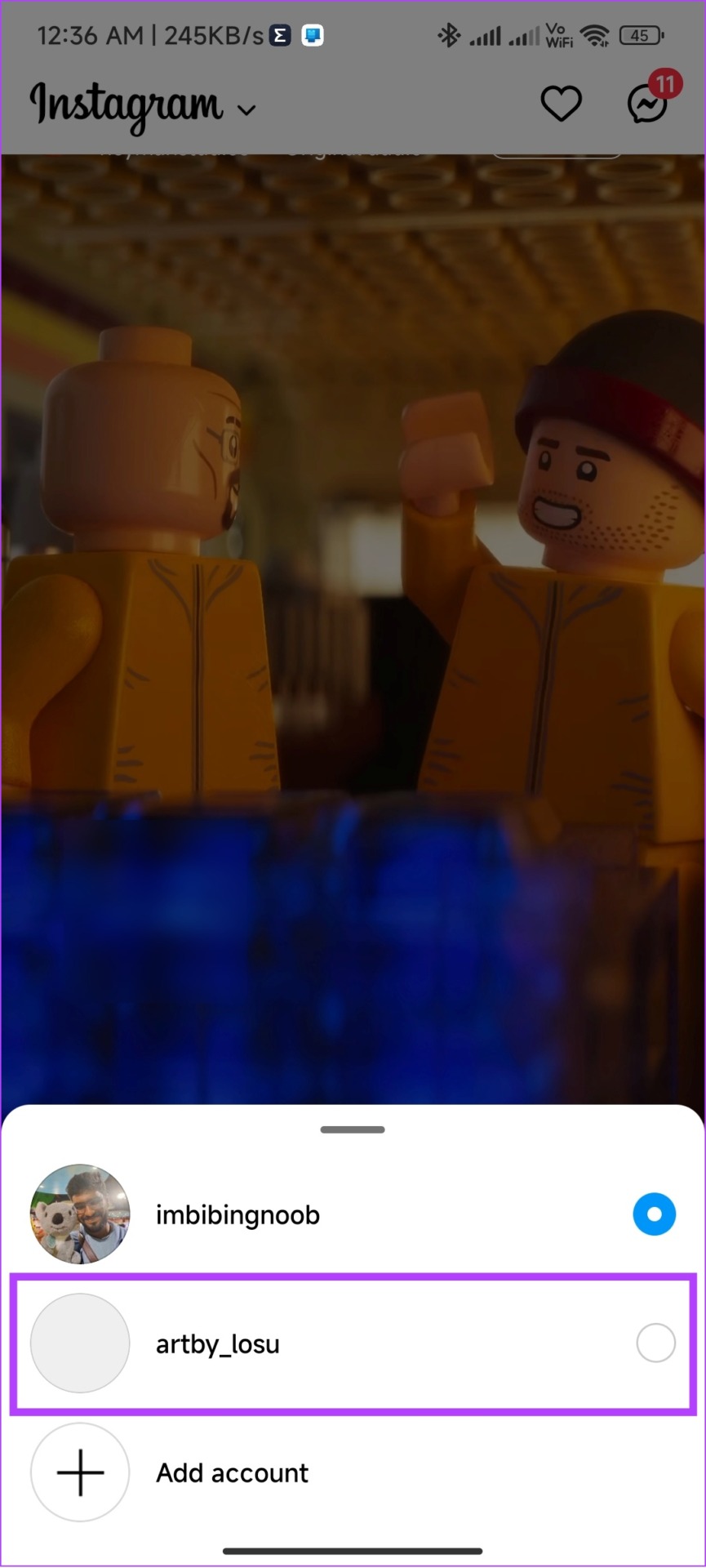
Now, try viewing the story again. If you don’t have a second account, you can also use the Instagram Lite or web app to try viewing the relevant story via your Instagram account.
FAQs
There is no official way to determine if someone has blocked you from viewing their Instagram Story. The only way is to check if the story is visible when viewed through your alternate account or seek help from your mutuals.
Yes. You can make a story unavailable on Instagram by limiting who can view it or by completely deleting it.
No. There is no limit on how many stories you can upload a day on Instagram. The platform is so open to its users uploading stories that it has even increased the length of stories from 15 seconds to 60 seconds.
Was this helpful?
Last updated on 28 June, 2024
Read Next
 How to Fix Instagram Insights Unavailable or Stopped Working
Basic Troubleshooting Clear Instagram cache: If Instagram collects a corrupt cache, it may fail to load the latest insights.
How to Fix Instagram Insights Unavailable or Stopped Working
Basic Troubleshooting Clear Instagram cache: If Instagram collects a corrupt cache, it may fail to load the latest insights.
 Facebook Story vs Messenger Story: Similarities and Differences
Key Differences and Similarities FeatureFacebook StoriesMessenger StoriesCross-PostingFacebook Stories are visible to Messenger contacts.Messenger Stories are visible to Facebook friends.AvailabilityAvailable on mobile apps and the Facebook website.Available only on the mobile
Facebook Story vs Messenger Story: Similarities and Differences
Key Differences and Similarities FeatureFacebook StoriesMessenger StoriesCross-PostingFacebook Stories are visible to Messenger contacts.Messenger Stories are visible to Facebook friends.AvailabilityAvailable on mobile apps and the Facebook website.Available only on the mobile
 4 Ways to Fix YouTube Quality Unavailable on iOS and Android
Basic Fixes Check Internet Connectivity: Ensure your device is connected to a Wi-Fi network or cellular data with good signal strength and an active plan.
4 Ways to Fix YouTube Quality Unavailable on iOS and Android
Basic Fixes Check Internet Connectivity: Ensure your device is connected to a Wi-Fi network or cellular data with good signal strength and an active plan.
 5 Ways to Fix Video Unavailable in Amazon Prime Video
Basic Fixes Check network connection: Playing Prime without any problems requires an optimum internet speed.
5 Ways to Fix Video Unavailable in Amazon Prime Video
Basic Fixes Check network connection: Playing Prime without any problems requires an optimum internet speed.
 4 Ways to Fix “Song Is Unavailable” Error in YouTube Music App
Try Basic Fixes Try playing other songs or playlists: The availability of songs on YouTube Music can vary depending on your geographical location and YouTube's agreements with music copyright owners.
4 Ways to Fix “Song Is Unavailable” Error in YouTube Music App
Try Basic Fixes Try playing other songs or playlists: The availability of songs on YouTube Music can vary depending on your geographical location and YouTube's agreements with music copyright owners.
 4 Ways to Fix Roblox Error 503 “This Service Is Unavailable”
Why Are You Seeing Roblox Error Code 503 Server overload: One of the most common reasons for Roblox error 503 is when the servers become overloaded with too many user
4 Ways to Fix Roblox Error 503 “This Service Is Unavailable”
Why Are You Seeing Roblox Error Code 503 Server overload: One of the most common reasons for Roblox error 503 is when the servers become overloaded with too many user
 4 Ways to Fix Spotify Jam Not Working Issue
https://youtu.be/VlNJzz-q-Gs Basic Fixes: Check for Spotify app updates: Since Spotify Jam is a recent addition, the Spotify mobile app needs to be updated to use it.
4 Ways to Fix Spotify Jam Not Working Issue
https://youtu.be/VlNJzz-q-Gs Basic Fixes: Check for Spotify app updates: Since Spotify Jam is a recent addition, the Spotify mobile app needs to be updated to use it.
 3 Ways to Fix the Resource Unavailable Error in Apple Music on iPhone
What Is the Apple Music Resource Unavailable Error The Resource Unavailable Error in Apple Music is something that we faced while playing certain songs only, and we suspect that the
3 Ways to Fix the Resource Unavailable Error in Apple Music on iPhone
What Is the Apple Music Resource Unavailable Error The Resource Unavailable Error in Apple Music is something that we faced while playing certain songs only, and we suspect that the
The article above may contain affiliate links which help support Guiding Tech. The content remains unbiased and authentic and will never affect our editorial integrity.