Fix 1: Wait for the Transaction to Complete
There might be a delay in transferring funds from your bank to Steam. Steam may also take time to verify the purchase and add it to your library. In any case, we recommend waiting 24 hours before proceeding with the below methods to resolve your issue.
Fix 2: Cancel Existing Pending Transaction
You can cancel the existing pending transactions and then perform the transaction again.
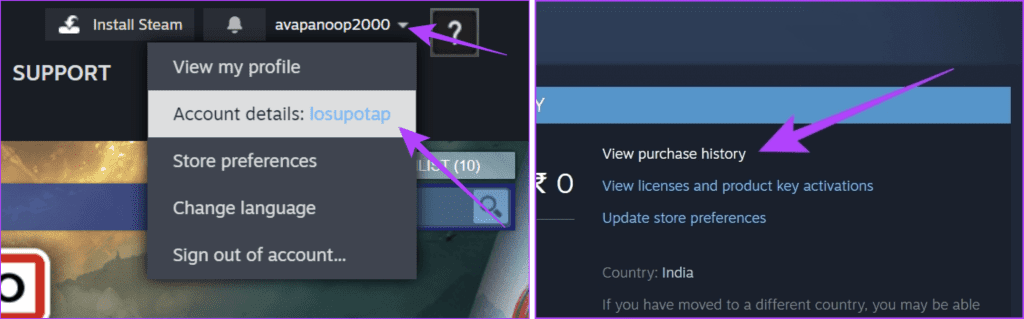
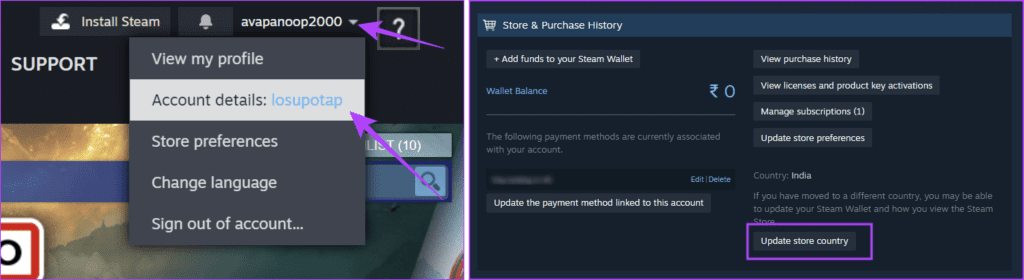
Step 1: Open Steam. Click on your username > Account Details.
Step 2: Select View purchase history.
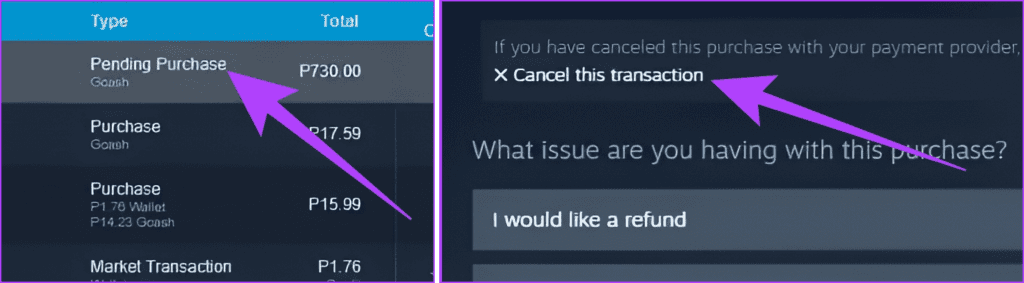
Step 3: Click the item stuck in the pending purchase. Choose Cancel this transaction. State your issue and confirm your action.
Also Read: How to fix Steam error code 16 in Windows
Fix 3: Change Payment Method
If your payment information is incorrect, Steam can’t complete the transaction. You can update your card details or delete and add a new payment method.
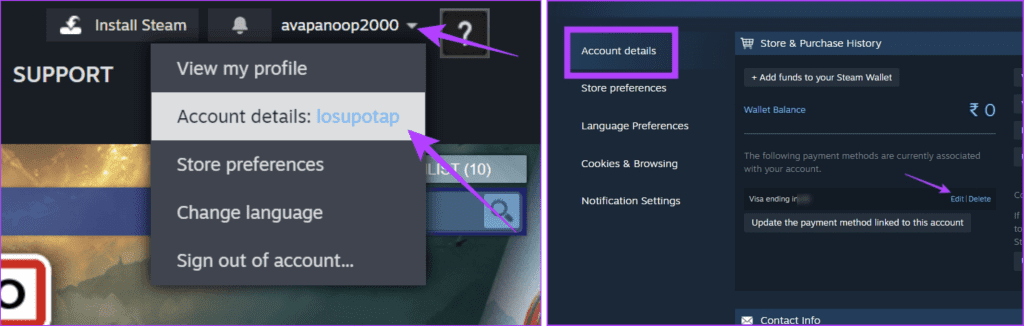
Step 1: Click the username and choose Account details.
Step 2: Now, find your current card and click Edit. If the card is invalid, use the Delete option and add a new card using the Add a Payment Method to this Account option.
Fix 4: Check Download and Store Region
If the download and store regions differ from the one you are based on, you might face problems with your purchases. Moreover, avoid using a VPN to purchase titles on Steam.
To check the download region: In the Steam app, click on Steam > Settings > Downloads. Check and change the Download Region if it is incorrect.
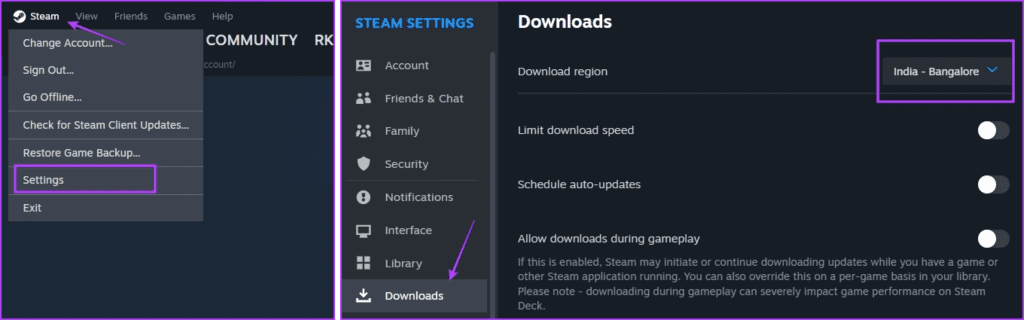
To check the store country: Click the username and choose Account details. Then, check your store country and update if incorrect.
Fix 5: Use the Steam Website for Purchase
The issues can be limited to the Steam app for PC. You can open Steam on your browser and try to complete the purchase. Don’t worry; the user interface is mostly the same as the desktop application.
Fix 6: Contact Steam Support
Besides the fixes mentioned above, you can also request support from Steam to fix the issue if the above methods don’t help. The support team will help you identify the problem with your purchase and quickly resolve it.
Also Read: How to connect Steam to Discord
Was this helpful?
Last updated on 15 May, 2024
Read Next
 4 Ways to Fix Google Play Transaction Can’t Be Completed Error
Basic Fixes Verify your payment info: Make sure you've entered the correct payment details for your purchase in the Google Play Store.
4 Ways to Fix Google Play Transaction Can’t Be Completed Error
Basic Fixes Verify your payment info: Make sure you've entered the correct payment details for your purchase in the Google Play Store.
 15 Ways to Fix OneDrive Sync Is Pending or Stuck Error in Windows 10
One of the most common issues with any cloud storage service is broken sync.
15 Ways to Fix OneDrive Sync Is Pending or Stuck Error in Windows 10
One of the most common issues with any cloud storage service is broken sync.
 4 Ways to Fix Upload Pending Error on Microsoft Word
Basic Fixes Check your internet connection: Microsoft Word needs a constant internet connection to sync the latest changes to the cloud storage.
4 Ways to Fix Upload Pending Error on Microsoft Word
Basic Fixes Check your internet connection: Microsoft Word needs a constant internet connection to sync the latest changes to the cloud storage.
 4 Fixes for Can’t Purchase Anything on Roblox
Try Basic Fixes Use a different payment method: Roblox supports all major credit and debit cards, prepaid credit cards, and PayPal for payments.
4 Fixes for Can’t Purchase Anything on Roblox
Try Basic Fixes Use a different payment method: Roblox supports all major credit and debit cards, prepaid credit cards, and PayPal for payments.
 3 Ways to Fix Content File Locked Error in Steam for Windows
Try Basic Fixes Run Steam as an administrator: If your Steam library folder lacks the necessary write permissions, you may encounter the 'content file locked' error.
3 Ways to Fix Content File Locked Error in Steam for Windows
Try Basic Fixes Run Steam as an administrator: If your Steam library folder lacks the necessary write permissions, you may encounter the 'content file locked' error.
 Top 5 Ways to Fix ‘Steam Stuck on Verifying Installation’ Error in Windows
Basic Fixes Check Your Internet Connection: As a starting point, it's important to ensure that your internet connection is working.
Top 5 Ways to Fix ‘Steam Stuck on Verifying Installation’ Error in Windows
Basic Fixes Check Your Internet Connection: As a starting point, it's important to ensure that your internet connection is working.
 6 Ways to Fix Not Enough Disk Space Error in Steam on Windows 11
Why Don’t I Have Enough Disk Space While Running Steam?
6 Ways to Fix Not Enough Disk Space Error in Steam on Windows 11
Why Don’t I Have Enough Disk Space While Running Steam?
 4 Ways to Fix Access Denied Error in Steam for Windows
Try Basic Fixes Check if Steam is down: Just like any other service, Steam is vulnerable to occasional server-side glitches.
4 Ways to Fix Access Denied Error in Steam for Windows
Try Basic Fixes Check if Steam is down: Just like any other service, Steam is vulnerable to occasional server-side glitches.
The article above may contain affiliate links which help support Guiding Tech. The content remains unbiased and authentic and will never affect our editorial integrity.