Basic Fixes
- Check volume levels: Check whether you have optimum volume levels on your iPhone or Android phone.
- Check internet speeds: Ensure you are connected to a strong Wi-Fi network while taking video calls.
- Disable silent mode: Silent Mode on your iPhone and Android lets you zone out of notifications to focus on something more important.
- Log in again: Doing this will refresh all your data and chats in the Messenger app.
- Force quit and relaunch: This will give the app a fresh start if it has been running in the background.
- Update Messenger app: Install the latest version of the Messenger app to get rid of bugs or glitches.
Fix 1: Check Audio Output Source for Video Calls in Messenger App
If you are having problems with Messenger video call sound, you need to check the audio output source for the app on your iPhone or Android. You can change the output source to your phone speaker or Bluetooth earphones if you have connected them.
Step 1: Open Facebook Messenger on your iPhone or Android. The steps for this solution remain the same for both platforms.
Step 2: Start a video call with your contact.
Step 3: Tap the three dots > Call settings > Audio output > check your output source.


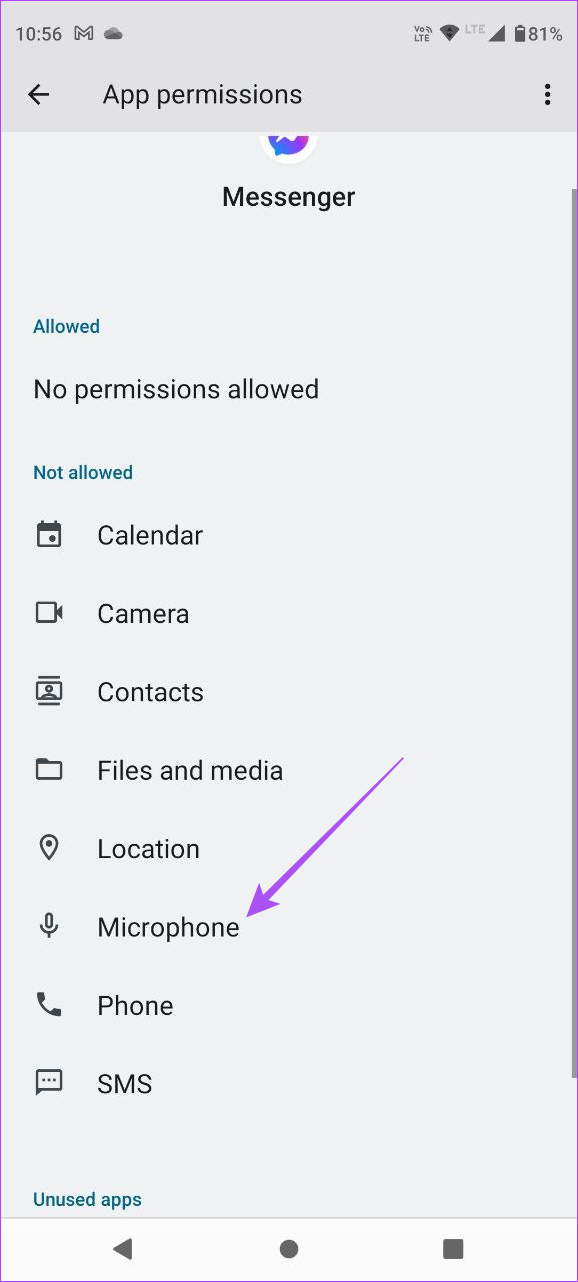
Fix 2: Enable Microphone Permissions
If there is still no sound in Facebook Messenger video calls on your Android or iPhone, you need to enable the Microphone permissions for the app on your device.
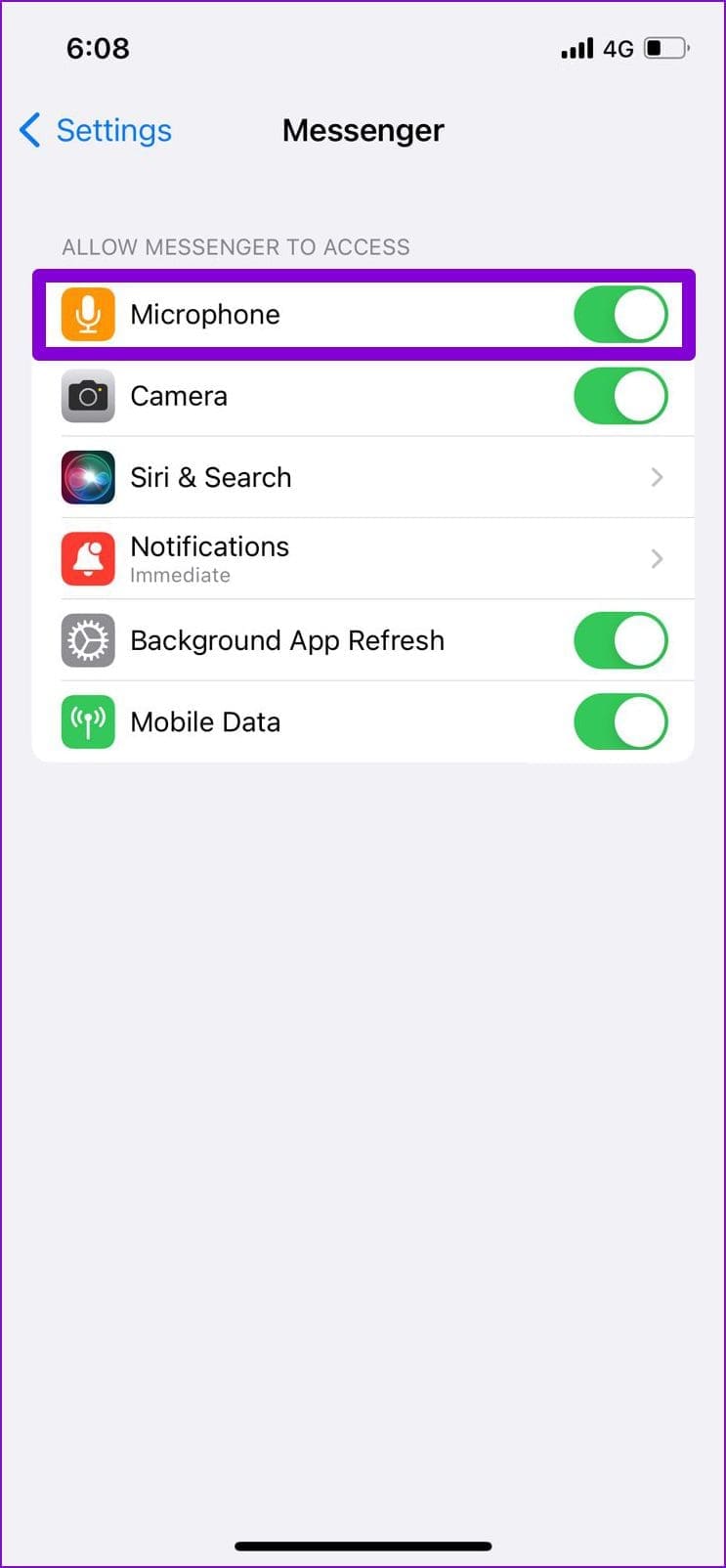
On iPhone
Open Settings > Messenger > enable Microphone access.

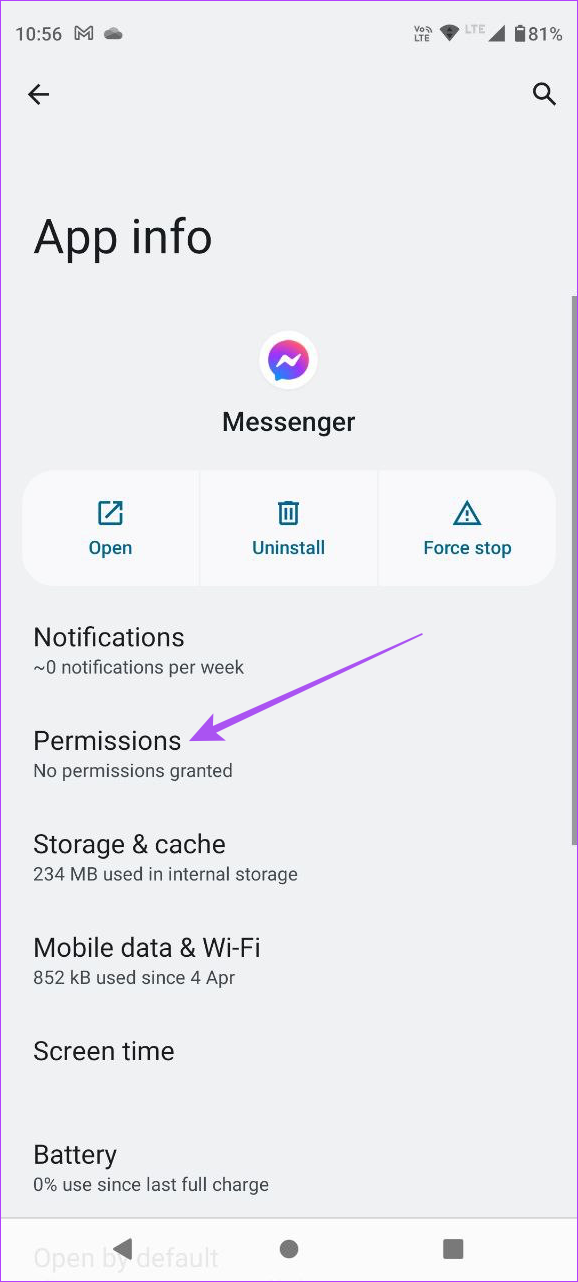
On Android
Open Messenger app info > Permissions > Microphone > enable access.
Fix 3: Clear Messenger App Cache
Lastly, we recommend clearing the app cache for the Facebook Messenger app on your iPhone or Android. This will remove all preferences and login info from your device for the app.
On Android
Open Messenger app info > Storage and cache > Clear cache.


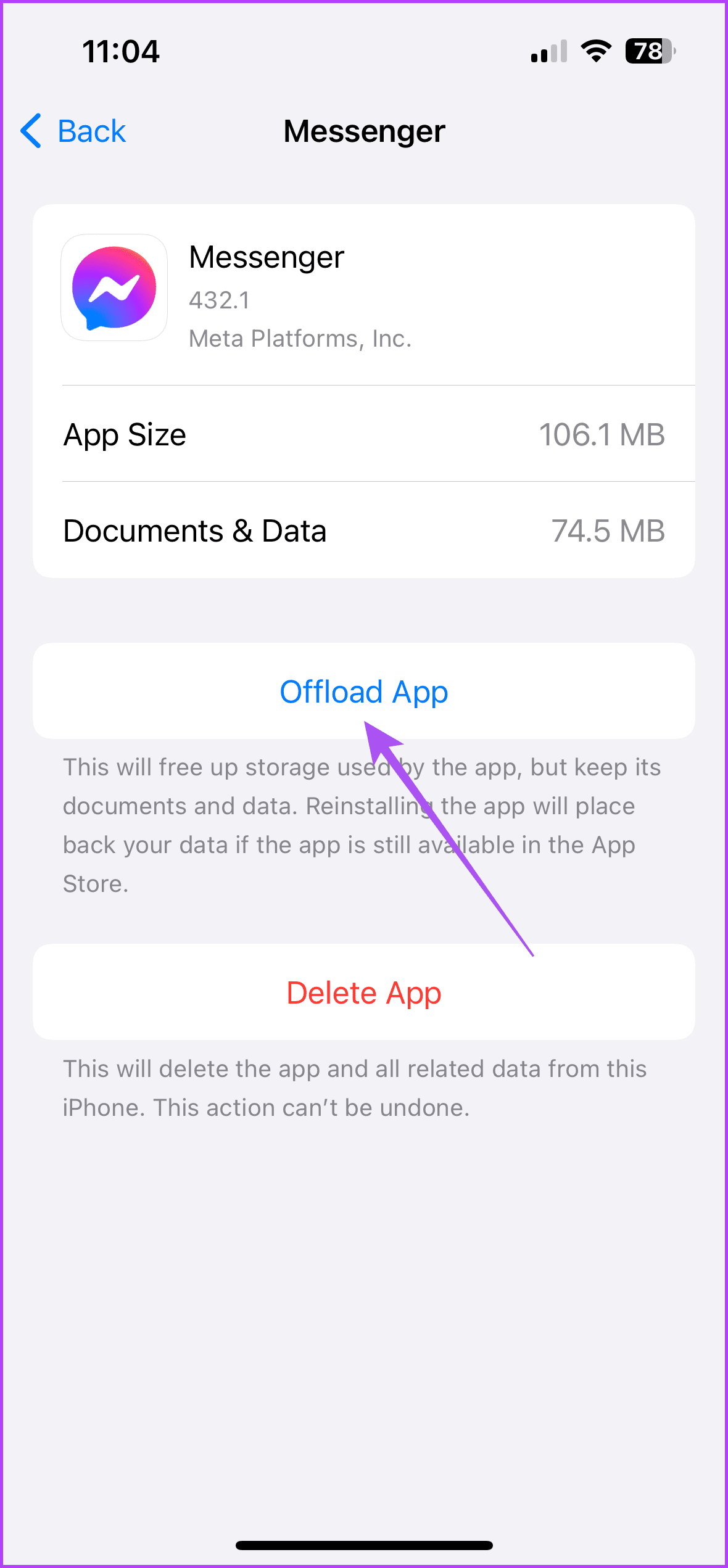
On iPhone
Open Settings > General > iPhone Storage > Messenger > Offload App.

Tip: You can also read our post if the Facebook Messenger notification sound is not working.
Was this helpful?
Last updated on 02 September, 2024
Read Next
 How to Use Your Avatar During Video Calls on Instagram and Facebook Messenger
How to Create Your Avatar on Instagram To use your personalized avatar during video calls, you will first need to create your Instagram avatar.
How to Use Your Avatar During Video Calls on Instagram and Facebook Messenger
How to Create Your Avatar on Instagram To use your personalized avatar during video calls, you will first need to create your Instagram avatar.
 5 Fixes for No Sound in WhatsApp Video Calls on iPhone and Android
Basic Fixes Force quit and relaunch WhatsApp: This will reload the app and give it a fresh start on your iPhone or Android phone.
5 Fixes for No Sound in WhatsApp Video Calls on iPhone and Android
Basic Fixes Force quit and relaunch WhatsApp: This will reload the app and give it a fresh start on your iPhone or Android phone.
 How to Fix Messenger Video Calls Not Working on Windows 11
Basic Fixes Login again to your Messenger account: The very first thing you should do is to log out and then back into your Messenger account.
How to Fix Messenger Video Calls Not Working on Windows 11
Basic Fixes Login again to your Messenger account: The very first thing you should do is to log out and then back into your Messenger account.
 How to Play Games During Messenger Video Calls
 on Android or iPhone All the games available in Messenger are free to play and do not require installation on your Android
How to Play Games During Messenger Video Calls
How to Play Games During Messenger Video Calls on Android or iPhone All the games available in Messenger are free to play and do not require installation on your Android
 Top 5 Ways to Fix Facebook Messenger Calls Not Working (iPhone and Android)
Preliminary Fixes Check the Network Connection: A stable internet connection is crucial for Messenger calls.
Top 5 Ways to Fix Facebook Messenger Calls Not Working (iPhone and Android)
Preliminary Fixes Check the Network Connection: A stable internet connection is crucial for Messenger calls.
 4 Ways to Fix Facebook Messenger Notification Sound Not Working
Try Basic Fixes Close the Messenger app on your computer: If you have the Messenger app open on your computer, notifications may appear there instead of on your phone, and
4 Ways to Fix Facebook Messenger Notification Sound Not Working
Try Basic Fixes Close the Messenger app on your computer: If you have the Messenger app open on your computer, notifications may appear there instead of on your phone, and
 Make Free International Calls With Facebook Messenger
Viber is the standard when it comes to free VoIP calls.
Make Free International Calls With Facebook Messenger
Viber is the standard when it comes to free VoIP calls.
 Top 9 Ways to Fix Facebook Video or Story Sound Not Working
Although Facebook isn’t as popular as before, it still plays a major role for millions to stay in touch with friends and family.
Top 9 Ways to Fix Facebook Video or Story Sound Not Working
Although Facebook isn’t as popular as before, it still plays a major role for millions to stay in touch with friends and family.
The article above may contain affiliate links which help support Guiding Tech. The content remains unbiased and authentic and will never affect our editorial integrity.