Basic Fixes
- Use the volume keys: Press the volume up and down keys on your Google TV remote. to change the audio levels.
- Disconnect Bluetooth devices: Remove any connected Bluetooth devices as you won’t get audio straight from your TV.
- Force quit and relaunch the app: This applies to the specific app that’s facing this issue on your Google TV.
- Update Google TV OS: Open Settings > System > About > Software Update and then install if one is available.
Fix 1: Check Sound Output From Settings
You can check the sound output settings on your Google TV and try playing audio again. Usually, your Google TV is smart enough to detect a connected audio system and play sound through it. However, you run into audio glitches when it fails to detect the system. Here’s what you need to do.
Step 1: Open Settings > Display and Sound > Audio output.

Step 2: Click Digital Audio Output.

You may also see other audio output options like wired headphones, ARC, Bluetooth, optical, wired headphones + internal speakers, and Bluetooth + internal speakers. The options vary based on your Google TV manufacturer.
Fix 2: Change Your HDR Settings
As suggested by users on the official Google forums, you can switch from Dolby Vision to HDR or vice versa on your Google TV. This should fix the issue.
Open Settings > Display and Sound > Advanced display settings > Dynamic range and Color format > Dynamic range format preference > Switch between HDR, SDR, or Dolby Vision.

Fix 3: Reset Sound
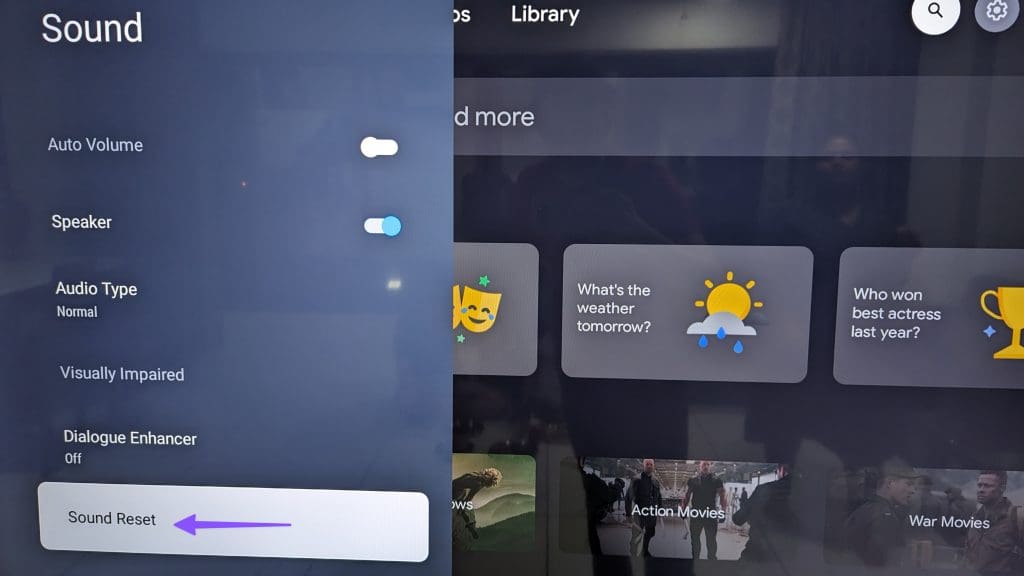
You can reset the sound on your Google TV and try again. As the name suggests, this will restore all sound preferences of your Google TV to default.
Open Settings > Display and Sound > Sound > Sound Reset.
Tip: Learn about the best browsers for your Google TV.
Was this helpful?
Last updated on 27 August, 2024
Read Next
 7 Ways to Fix Google Chrome Sound Not Working on Headphones
Basic Fixes Restart Chrome: Restart Chrome, reload the tab, and restart your PC to eliminate temporary bugs and glitches.
7 Ways to Fix Google Chrome Sound Not Working on Headphones
Basic Fixes Restart Chrome: Restart Chrome, reload the tab, and restart your PC to eliminate temporary bugs and glitches.
 5 Ways to Fix Android TV Sound Not Working
Fix 1: Change Android TV Volume Starting with the basics, you can try changing the volume levels of your Android TV.
5 Ways to Fix Android TV Sound Not Working
Fix 1: Change Android TV Volume Starting with the basics, you can try changing the volume levels of your Android TV.
 How to Fix Sound Not Working on Fire Stick
Basic Fixes Unmute your TV and turn up the volume: Press the Mute button on your TV remote to unmute its volume.
How to Fix Sound Not Working on Fire Stick
Basic Fixes Unmute your TV and turn up the volume: Press the Mute button on your TV remote to unmute its volume.
 11 Ways to Fix Sound Not Working on Windows 11
While Windows 11 is Microsoft's most stable release to date, it's not without its flaws.
11 Ways to Fix Sound Not Working on Windows 11
While Windows 11 is Microsoft's most stable release to date, it's not without its flaws.
 12 Efficient Ways to Fix iPhone Sound Not Working
Sound is an important aspect of your iPhone that alerts you of incoming calls and notifications, lets you groove to your favorite music, and do a lot more.
12 Efficient Ways to Fix iPhone Sound Not Working
Sound is an important aspect of your iPhone that alerts you of incoming calls and notifications, lets you groove to your favorite music, and do a lot more.
 3 Ways to Fix Notification Sound Not Working on Android
Basic Ways: Adjust notification volume: Use the volume buttons or go to the Settings menu to check the current notification volume.
3 Ways to Fix Notification Sound Not Working on Android
Basic Ways: Adjust notification volume: Use the volume buttons or go to the Settings menu to check the current notification volume.
 3 Ways to Fix Video Sound Not Working on iPhone
Basic Fixes: Check iPhone volume levels: You can use the volume up button on your iPhone to turn up the device volume to max.
3 Ways to Fix Video Sound Not Working on iPhone
Basic Fixes: Check iPhone volume levels: You can use the volume up button on your iPhone to turn up the device volume to max.
 3 Ways to Fix Snapchat Sound Not Working on App
Basic Fixes: Double-check if the Snap or Story has sound: We recommend checking if the Snap or Story you’re viewing has sound.
3 Ways to Fix Snapchat Sound Not Working on App
Basic Fixes: Double-check if the Snap or Story has sound: We recommend checking if the Snap or Story you’re viewing has sound.
The article above may contain affiliate links which help support Guiding Tech. The content remains unbiased and authentic and will never affect our editorial integrity.