

Basic Fixes
- Check the internet connection: You must check if you use a strong internet connection to sync all your events quickly. If there is a delay, switch from mobile data to Wi-Fi and check the internet speed.
- Force quit and relaunch: Swipe up and hold to see the background app windows > swipe right to look for the Calendar app > swipe up its window to force quit the app.
- Update calendar app: Install the latest version of iOS to update the Calendar app on your iPhone.
Fix 1: Check Default Calendar Account
You can add multiple email accounts to your iPhone and sync your calendar with the Calendar app. You can keep different calendars for home and work. So, check which calendar is set as your default.
Open Settings > Calendar > Accounts > select one email account and check which one is synced with the Calendar app.


Alternatively, here’s how to check your default Calendar.
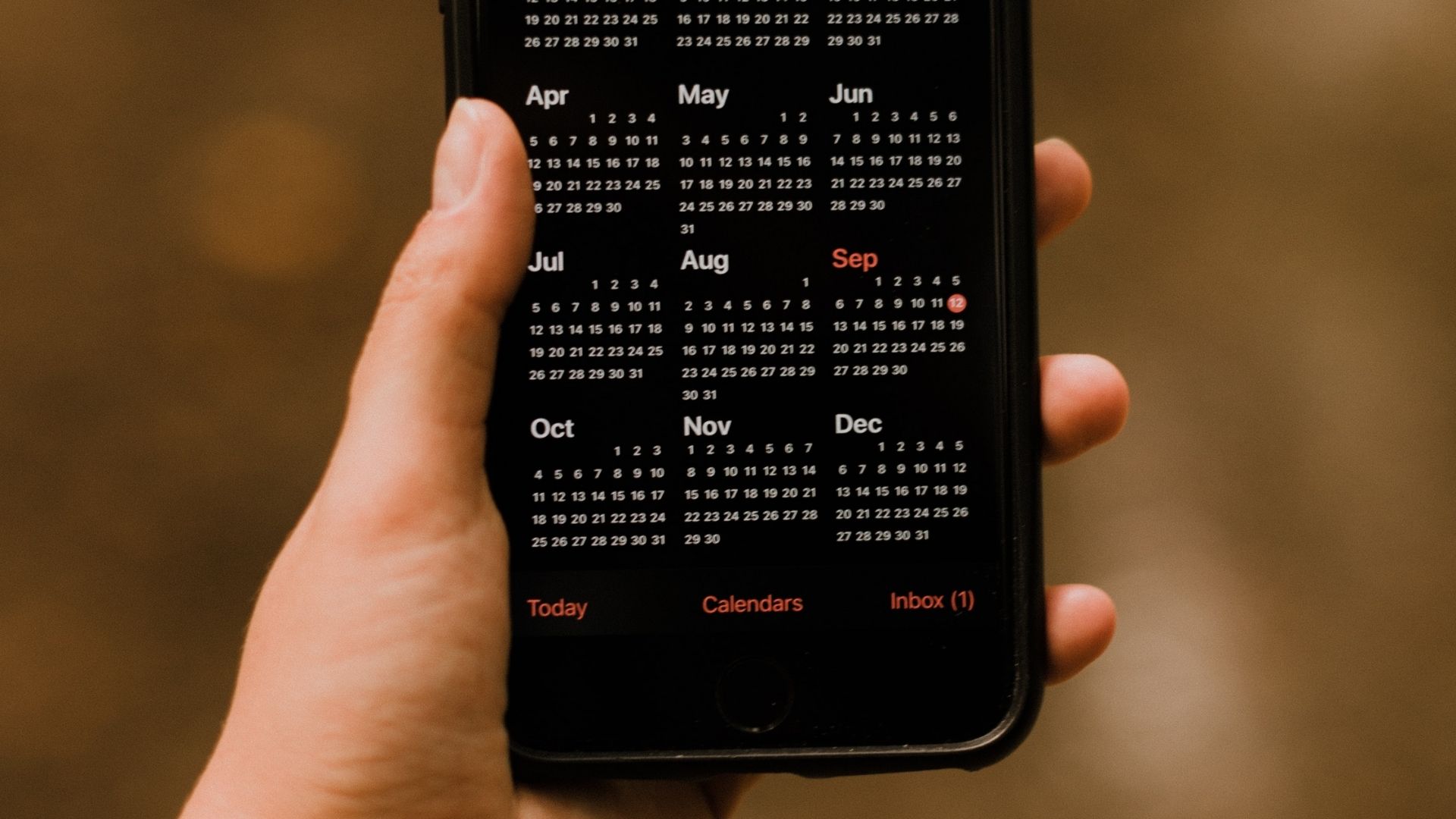
Step 1: Open the Calendar app on your iPhone and tap on Calendars at the bottom.
Step 2: You will see all the calendars that sync with the Calendar app. Uncheck the ones you don’t want to use.


Fix 2: Enable All Event Sync
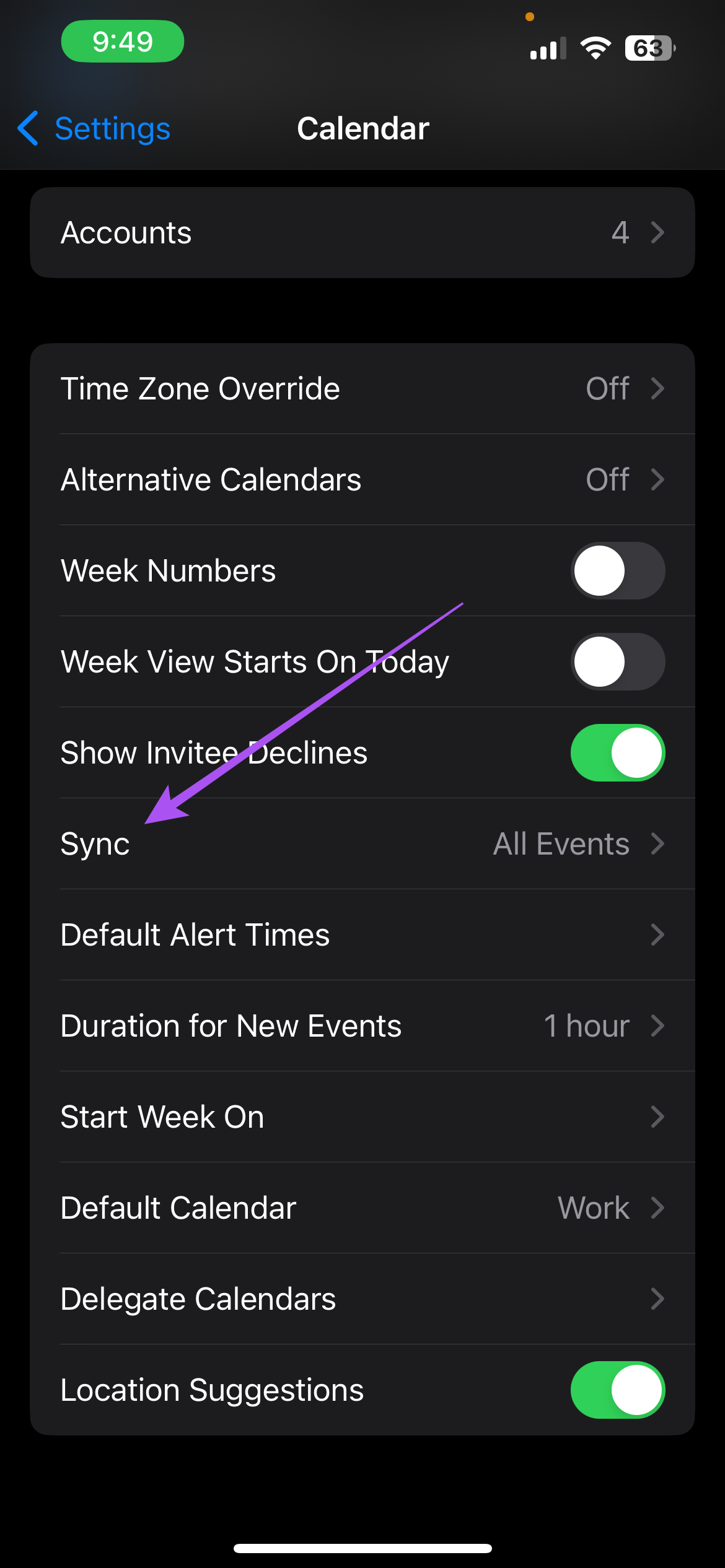
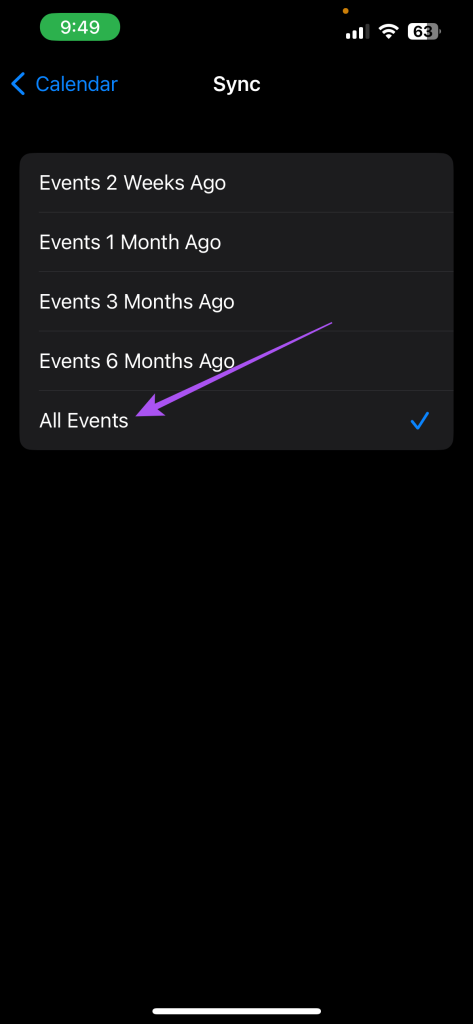
If your calendar events and appointments have disappeared on your iPhone, you need to sync them with the calendar. This means you must enable event syncing for all your scheduled events without any time limitation. For example, you can sync all events only up to 6 months ago, which you have to avoid.
Step 1: Open the Settings app on your iPhone.
Step 2: Scroll down and select Calendar.
Step 3: Scroll down and tap on Sync. Then, select All Events from the list of options.
Fix 3: Enable iCloud Sync for Calendar
If your calendar events are still not showing on your iPhone, check whether you have enabled iCloud calendar syncing. iCloud needs to sync the default Calendar app to enable data synchronization across your Apple devices. Here’s how to check the same.
Step 1: Open the Settings app on your iPhone and tap on your Apple ID account name at the top.
Step 2: Tap on iCloud > Show All > enable the Calendar app to sync.


Fix 4: Allow Full Access to Calendar App
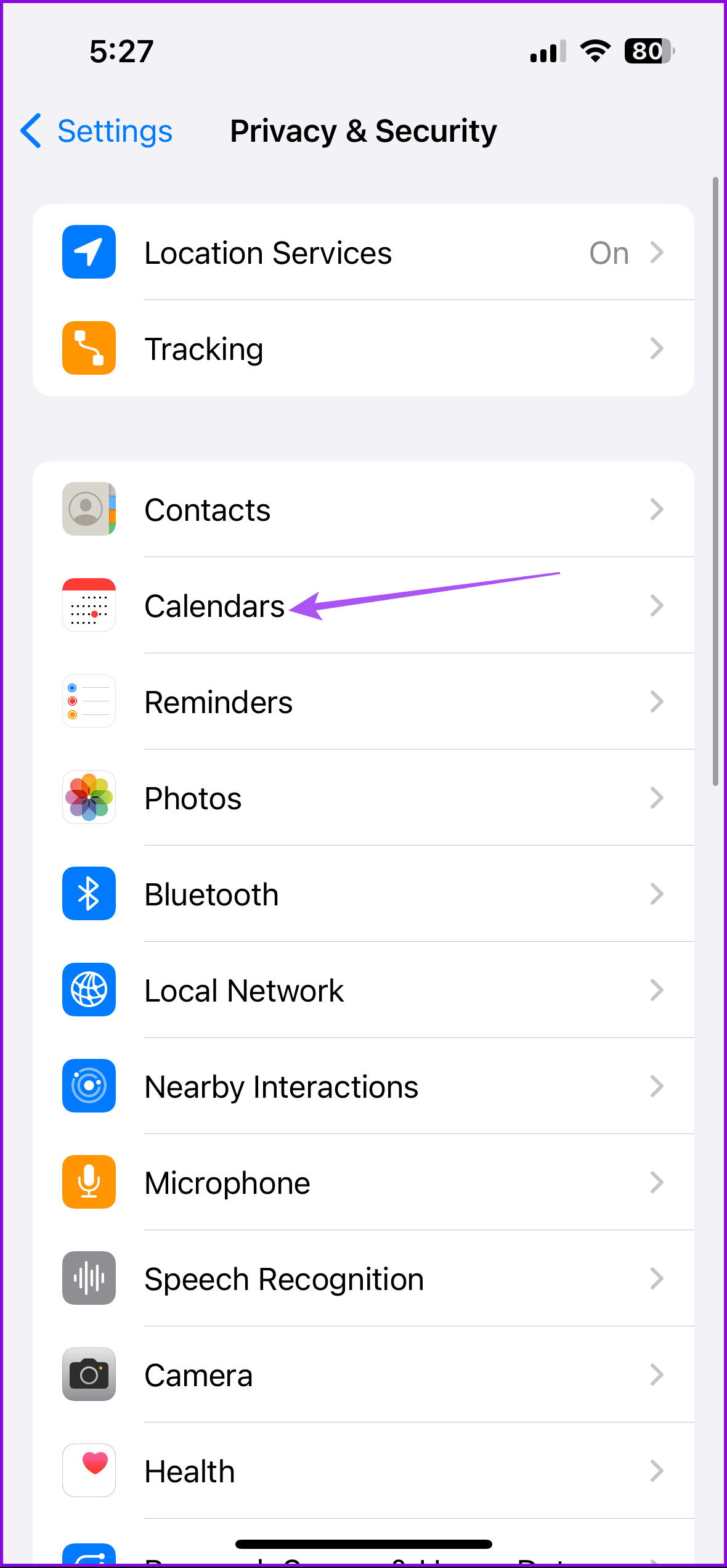
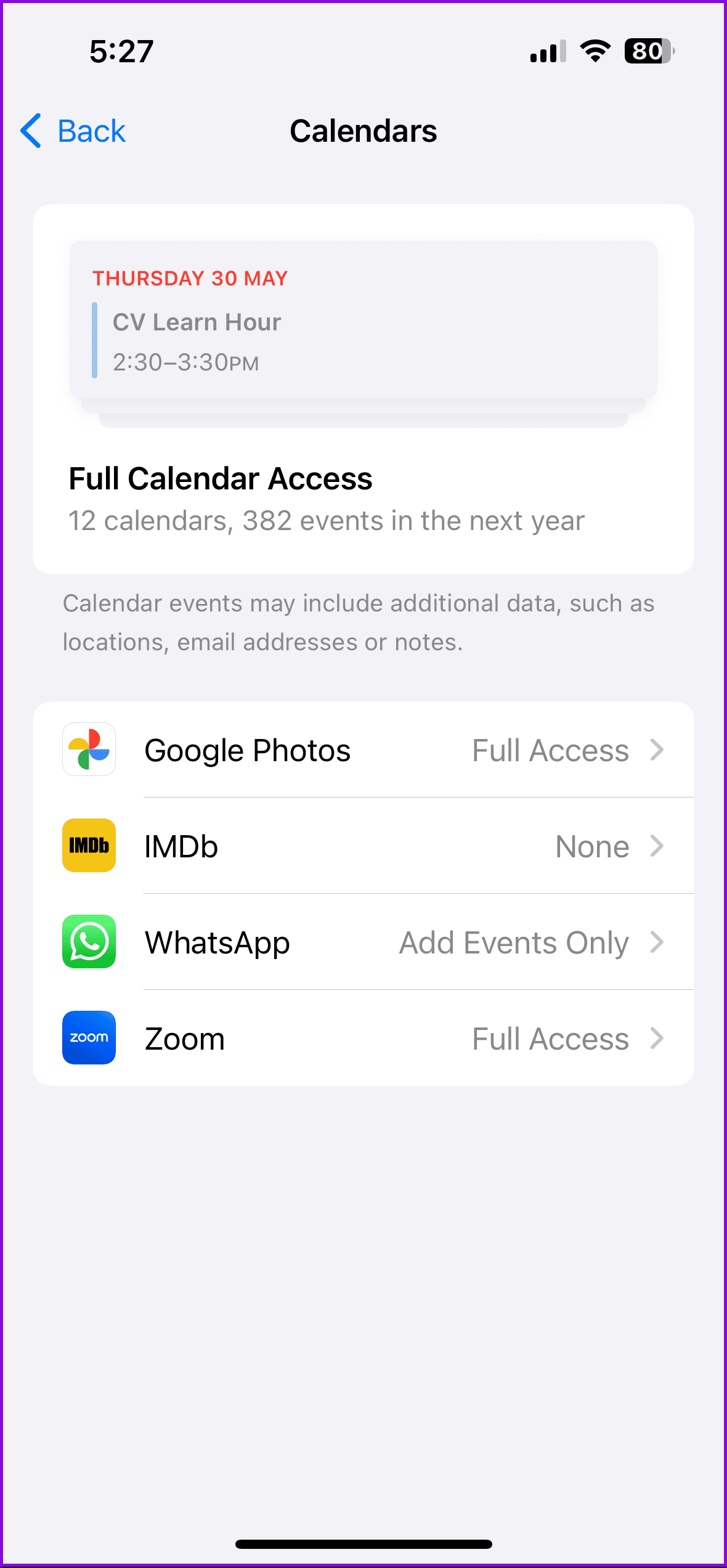
For those using iOS 17 or later, check if other apps like WhatsApp and Zoom are allowed to add events to the Calendar app on your iPhone.
Go to iPhone Settings > Privacy & Security > Calendars > Allow full access to apps of your choice.
Tip: Learn how to send and accept invites using the Calendar app on your iPhone.
Was this helpful?
Last updated on 17 July, 2024
1 Comment
Leave a Reply
Read Next
 4 Fixes for Events Not Showing in Outlook Calendar on Windows 11
Basic Fixes Check your internet speed: You should check the status of your internet speeds in order to sync your calendar events to Outlook Check your Outlook account: If you
4 Fixes for Events Not Showing in Outlook Calendar on Windows 11
Basic Fixes Check your internet speed: You should check the status of your internet speeds in order to sync your calendar events to Outlook Check your Outlook account: If you
 4 Fixes for Samsung Calendar Not Showing Events and Holidays
Basic Fixes Check internet settings: Ensure that you have a high speed internet connection with your Samsung phone.
4 Fixes for Samsung Calendar Not Showing Events and Holidays
Basic Fixes Check internet settings: Ensure that you have a high speed internet connection with your Samsung phone.
 Why Do WhatsApp Messages Disappear and Can You Recover Them?
Why Do WhatsApp Messages Disappear?
Why Do WhatsApp Messages Disappear and Can You Recover Them?
Why Do WhatsApp Messages Disappear?
 5 Ways to Fix Windows Calendar Not Showing Events
Fix 1.
5 Ways to Fix Windows Calendar Not Showing Events
Fix 1.
 How to Add and Remove Holidays Calendar in Apple Calendar App
How to Use Holidays Calendar on iPhone The Apple Calendar app offers a built-in regional calendar, displaying the common holidays (occasions and festivals) from that area.
How to Add and Remove Holidays Calendar in Apple Calendar App
How to Use Holidays Calendar on iPhone The Apple Calendar app offers a built-in regional calendar, displaying the common holidays (occasions and festivals) from that area.
 How to Add Zoom Meetings to Outlook Calendar and Google Calendar
How to Add Zoom Meetings to Google Calendar The easiest way is using the Zoom for Google Workspace Google calendar add-on.
How to Add Zoom Meetings to Outlook Calendar and Google Calendar
How to Add Zoom Meetings to Google Calendar The easiest way is using the Zoom for Google Workspace Google calendar add-on.
 How to Connect Outlook Calendar With Google Calendar: 4 Best Ways
Note: The methods recommended in the article allow two-way syncs in the calendar.
How to Connect Outlook Calendar With Google Calendar: 4 Best Ways
Note: The methods recommended in the article allow two-way syncs in the calendar.
 4 Fixes for Google Calendar Not Loading in Chrome
Fix 1: Ensure JavaScript Is Enabled Numerous modern-day websites rely on JavaScript to render content in your browser.
4 Fixes for Google Calendar Not Loading in Chrome
Fix 1: Ensure JavaScript Is Enabled Numerous modern-day websites rely on JavaScript to render content in your browser.
The article above may contain affiliate links which help support Guiding Tech. The content remains unbiased and authentic and will never affect our editorial integrity.
I type in Dr and and no results but there is in calendar a Dr