What Is Take a Break Feature
The Take a break feature lets you literally take a break from someone on Facebook without blocking or restricting them. The person could be your ex, a friend, a business partner, or anyone.
Say you broke up with someone and want to avoid that person as much as possible — both in the real and digital world. You can unfollow, unfriend, or block them. However, these are harsh and apparent actions. That is where the Take a break feature helps you.

It’s designed to help you avoid or view fewer posts and stories from the person on your feed. Furthermore, it restricts the other person from viewing your updates on Facebook.
While it offers a similar result to unfollowing or unfriending someone, Take a Bbeak is distinctively different, here’s how.
What Happens When You Take a Break from Someone on Facebook
The feature offers you three key options and the result depends on what you choose.
1. Limit What You See of Someone
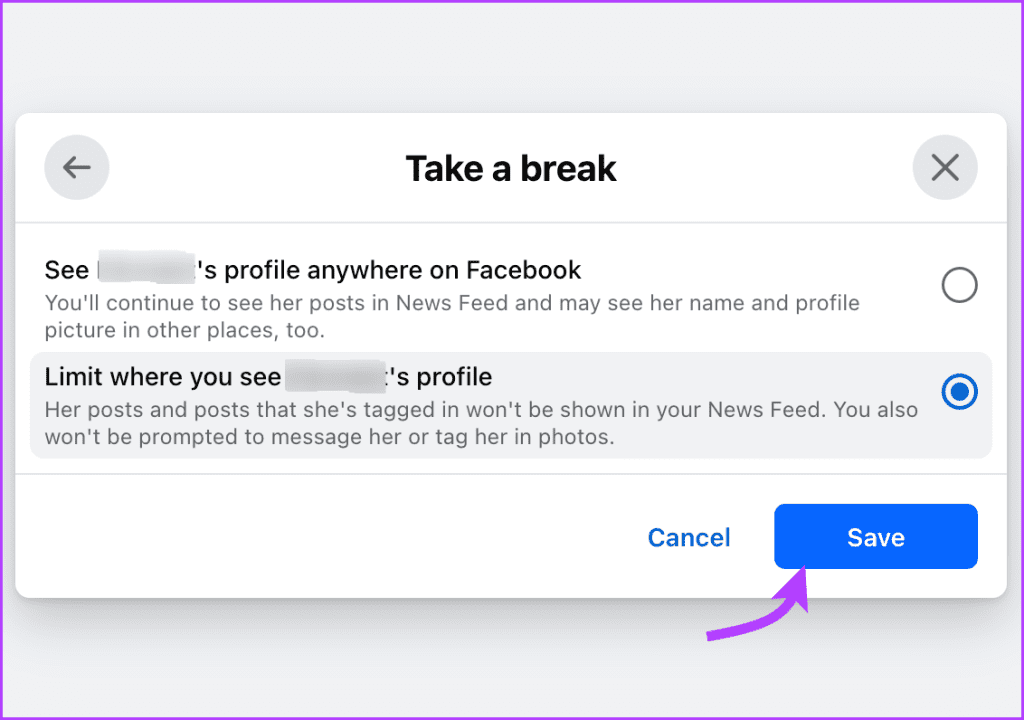
The first major change you can make is to hide the person from your view as much as possible. So, you won’t be seeing their posts and posts they’re tagged in on your News Feed. However, you can visit their profile to see the latest updates.
Even if a mutual friend tags the said person in a picture or post, that won’t show up on your feed. Moreover, you won’t be prompted to message or tag them in photos. You’ll have to search for their name to tag them.
Moreover, like Facebook usually does, it won’t send a notification if you and they are going to the same events.
2. Limit What Other Person Sees of You
The Take a break feature also allows you to hide your posts from the other person’s feed. It’s done by adding the person to Facebook’s restricted list.
It will change the privacy settings so that your future posts and stories won’t be visible to that person. They can only view the update if the post is public or you have tagged the said person.

3. Limit Privacy of Past Posts Between Two of You
You can also decide what will happen to previous posts that you tagged each other in. What’s more, you can do so individually for every post or set a default for all posts.
Firstly, they will be untagged from the posts. They won’t be able to see the content (unless public), although it will be visible to other tagged people.
Secondly, if the other person has tagged you or someone else has tagged you both in the same posts, you will automatically be untagged from such posts. Naturally, you won’t see those posts.

Thirdly, your posts on each other’s timelines before taking a break will be deleted. Notably, it cannot be brought back after you stop taking a break from someone.
Further, if you were a contributor to any shared album with them, you will be removed from it. That is, you can no longer add to those albums.
Where Can You See Each Other
Let’s see what doesn’t change by using this feature.
Messages
Nothing happens to the messages on Facebook Messenger. You can still message each other. However, you won’t see their name as a shortcut. To hide the chat thread from your view on Messenger, you can archive or delete it.
Wall Posts
Both of you can still post on each other’s timeline after taking a break if your privacy settings allow that. Who else can see the post again depends on your existing privacy settings.

Comments
If you both comment on the same post from a friend or a common page/group, you can see other’s comments. You can even reply to the comments.
How to Take a Break from Someone
To take a break from someone on Facebook, you need to perform two major steps — launch the take a break mode and then select its preferences.
Note: By default, when you change your relationship status to single, divorced, or empty, you will be prompted to use the take-a-break feature. Otherwise, you can follow these steps for the Facebook mobile apps and desktop.
Via Facebook Web
Step 1: Go to Take a Break on Facebook Website. Search and select the name of the person.

Step 2: Now, set preferences for how you want to Take a break. Click all you back later See less of Persons’ profile.
Step 3: Select Limit where you see Person’s profile and tap Save.

Step 4: Next, click Limit what Persons’s profile will see. Select a preferred setting and tap Save.
Step 5: Click Edit who can see past posts. Choose a preferred setting and tap Save.
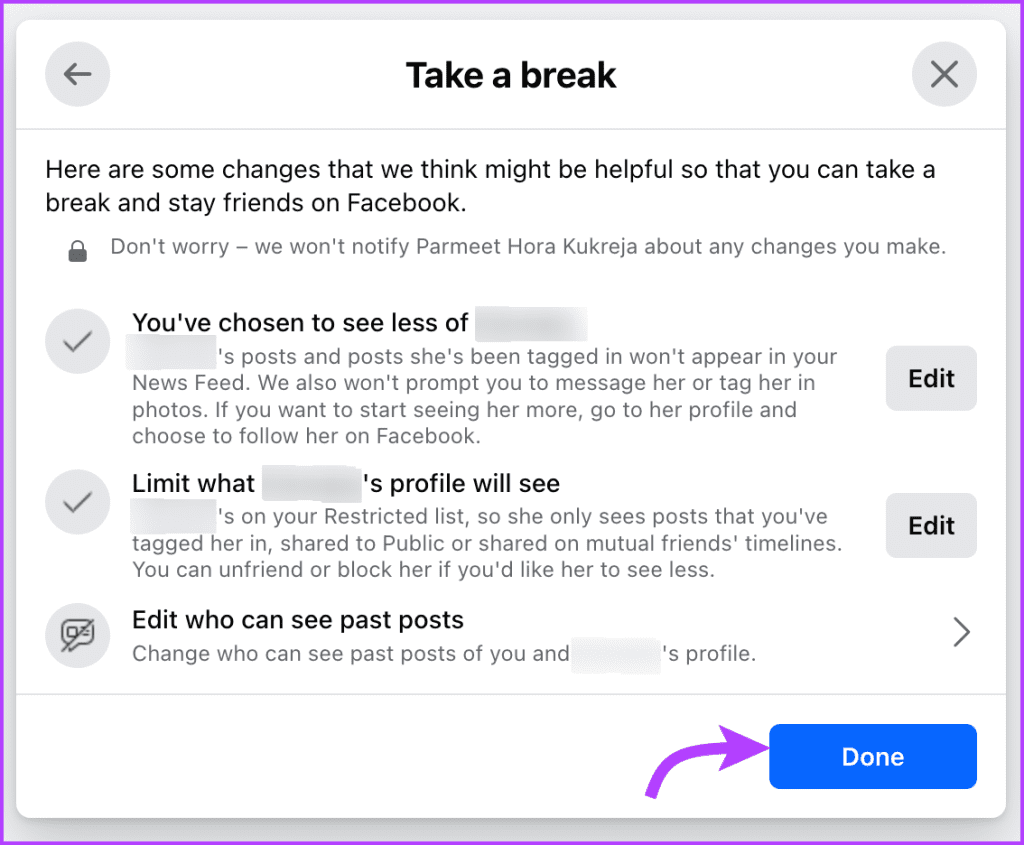
Step 6: Once you’ve selected all the preferences, tap Done to Take a break from that person.
Via Mobile app
Open the Facebook profile of the special person. Tap Friends and select Take a Break from the menu.
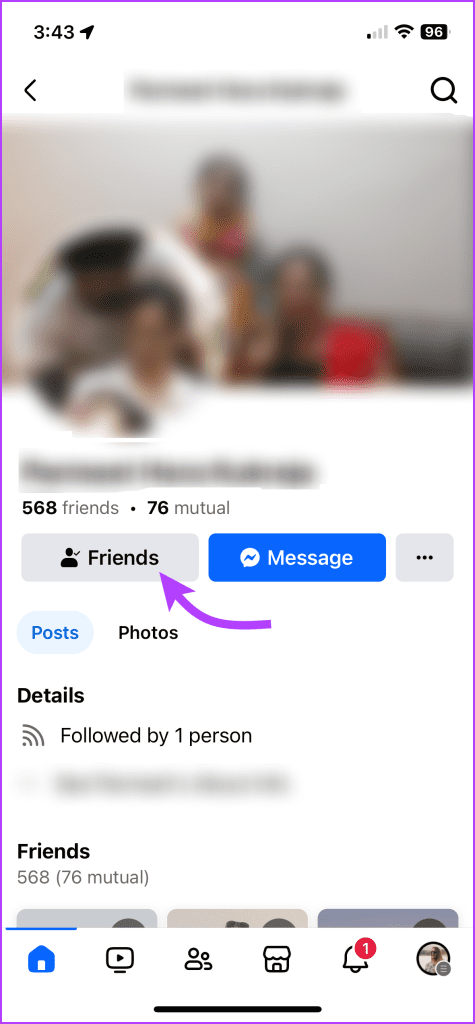
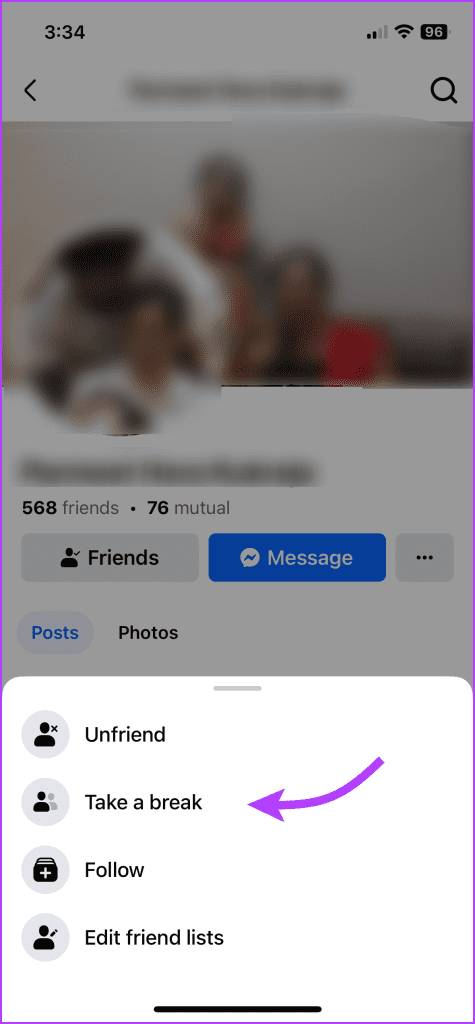
Now, you’ll be directed to the preferences window. Select the terms of your break (as shown above) and tap Done to confirm changes.
How to Reverse Take a Break on Facebook
The process isn’t as easy as removing someone from a list by clicking one button. You need to take slight pain to reverse some of the effects.
On the Facebook website, open the Take a break link or go to their profile and tap Friends > Take a break(on mobile). Type the name of the person from whom you were taking a break.
On the preferences page, tap Edit and bring back the settings to their original values, i.e.,
- See Person’s profile anywhere on Facebook.
- No longer limit what Person’s profile can see.
- Keep all posts as they are.
Alternatively, if you want to go through all this, you can simply start following their Facebook profile again and take them off the restricted list to end the break.
Note: Just like relationships, not all things will be back to as they were. The untagged posts will not be tagged automatically (you can do it manually) and the posts on each other’s timeline (before break), will not come back. However, you could see content posted during the break on each other timeline.
FAQs For Taking a Break On Facebook
Unlike the snooze on Facebook or mute on WhatsApp there is no time limit on this feature. It lasts until you follow the person again or remove them from the restricted list.
No. Nobody gets to know that you have taken a break from someone, including the special person. It’s a sweet little secret between you and Facebook. However, they get a bit suspicious when your posts can’t see your posts on their feed or your wall.
Yes, as messaged earlier, it doesn’t affect Messenger. They can message and call you unless you block them on Messenger.
Was this helpful?
Last updated on 02 August, 2024
Read Next
 Facebook Take a Break vs. Unfollow vs. Unfriend: How Do They Differ
What Does Unfriend Mean on Facebook?
Facebook Take a Break vs. Unfollow vs. Unfriend: How Do They Differ
What Does Unfriend Mean on Facebook?
 Top 11 Things to Know About Snooze Feature on Facebook
Sometimes, I feel people get married to post their pictures on Facebook.
Top 11 Things to Know About Snooze Feature on Facebook
Sometimes, I feel people get married to post their pictures on Facebook.
 What Is Gmail’s Mute Feature and How to Use It Effectively
What Is Gmail’s Mute Feature?
What Is Gmail’s Mute Feature and How to Use It Effectively
What Is Gmail’s Mute Feature?
 Instagram’s Secret Sharing: Unraveling the Close Friends Feature
What Is the Close Friends List on Instagram?
Instagram’s Secret Sharing: Unraveling the Close Friends Feature
What Is the Close Friends List on Instagram?
 Top 10 Things to Know About WhatsApp Business Catalog Feature
WhatsApp has been beneficial for small businesses that don’t have the resources to run a website or expensive marketing.
Top 10 Things to Know About WhatsApp Business Catalog Feature
WhatsApp has been beneficial for small businesses that don’t have the resources to run a website or expensive marketing.
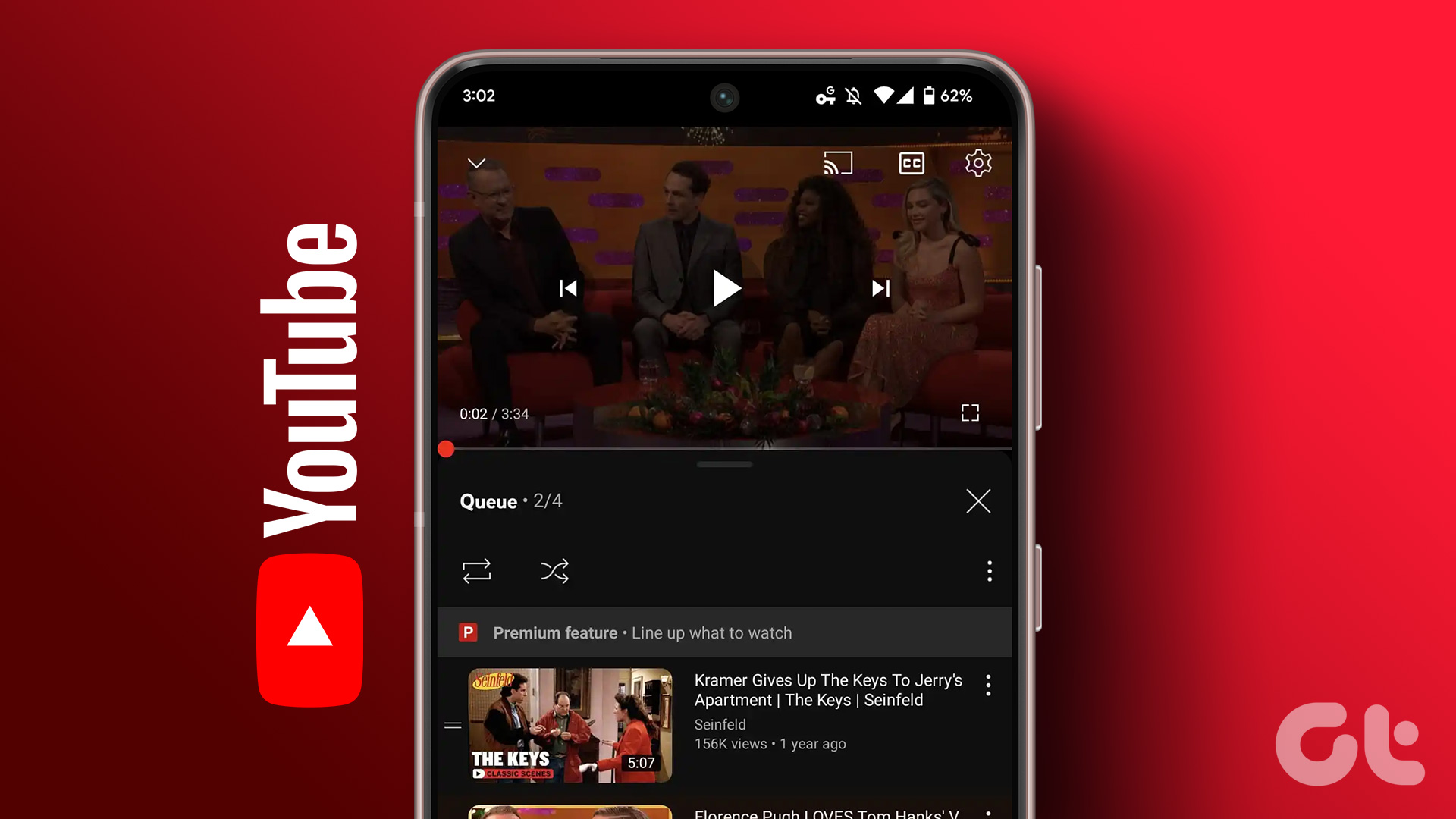 How to Use the Add to Queue Feature in YouTube
Use Add to Queue on YouTube on Desktop Before we start, this feature is only available for YouTube Premium subscribers.
How to Use the Add to Queue Feature in YouTube
Use Add to Queue on YouTube on Desktop Before we start, this feature is only available for YouTube Premium subscribers.
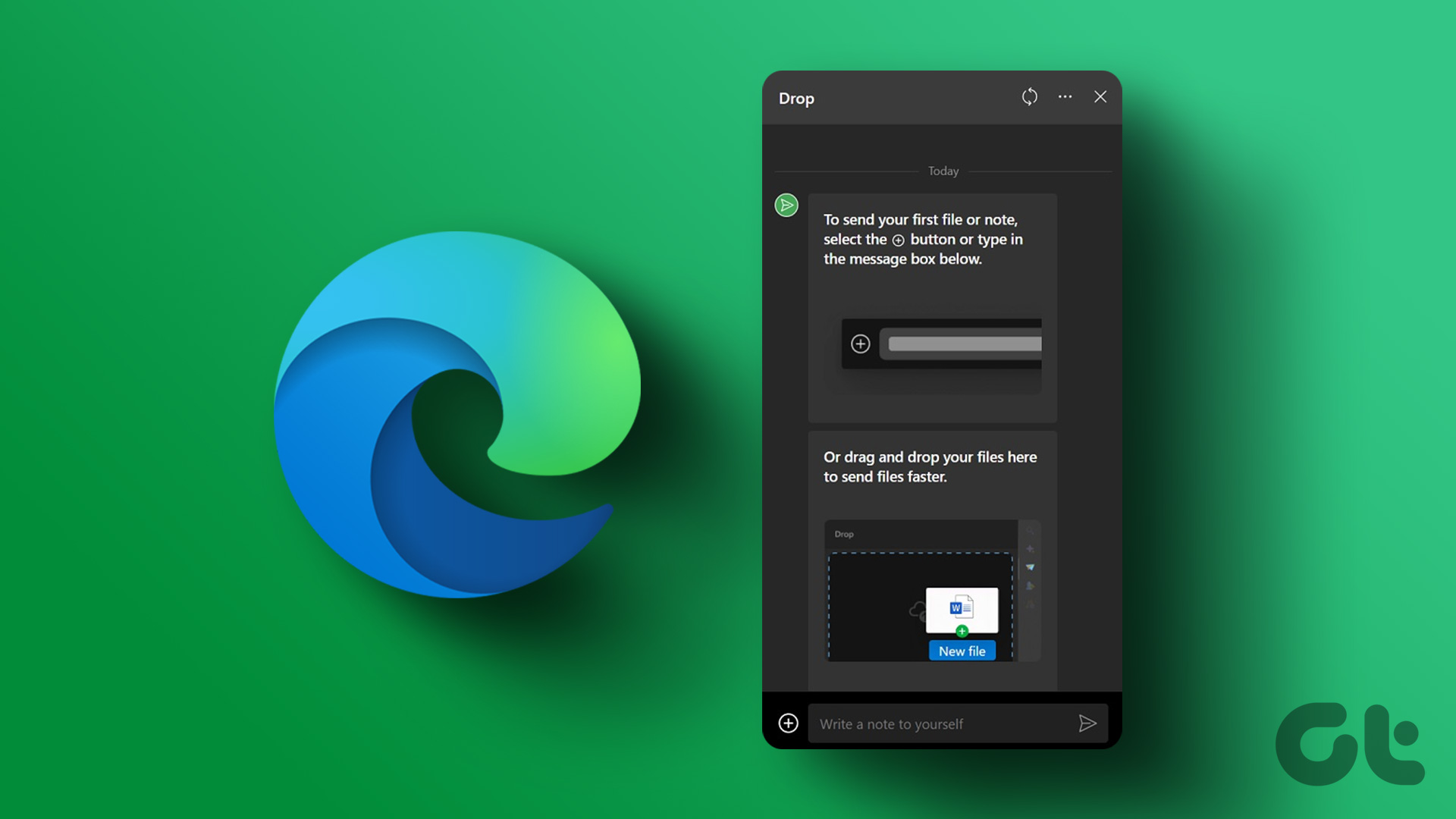 How to Use Microsoft Edge Drop Feature to Share Files Between Devices
How to Send Files From Your Desktop Using Microsoft Edge Drop Microsoft Edge’s Drop feature is only available in version 110.0.1587.41 or later.
How to Use Microsoft Edge Drop Feature to Share Files Between Devices
How to Send Files From Your Desktop Using Microsoft Edge Drop Microsoft Edge’s Drop feature is only available in version 110.0.1587.41 or later.
 How to Use the Read Aloud Feature in Microsoft Edge
Use Read Aloud in Microsoft Edge on Desktop Microsoft Edge’s Read Aloud feature is simple to use and does not require any setup.
How to Use the Read Aloud Feature in Microsoft Edge
Use Read Aloud in Microsoft Edge on Desktop Microsoft Edge’s Read Aloud feature is simple to use and does not require any setup.
The article above may contain affiliate links which help support Guiding Tech. The content remains unbiased and authentic and will never affect our editorial integrity.