Method 1: Use the Gallery App
Some Android devices have an inbuilt feature to extract still images from video. Look at how it is on our OnePlus device. All you need to do is tap on the capture icon while playing the video. The captured image is then stored in your gallery without reduction in quality.

Also Read: How to add location details to photos on Android
Method 2: Take a Picture While Recording a Video
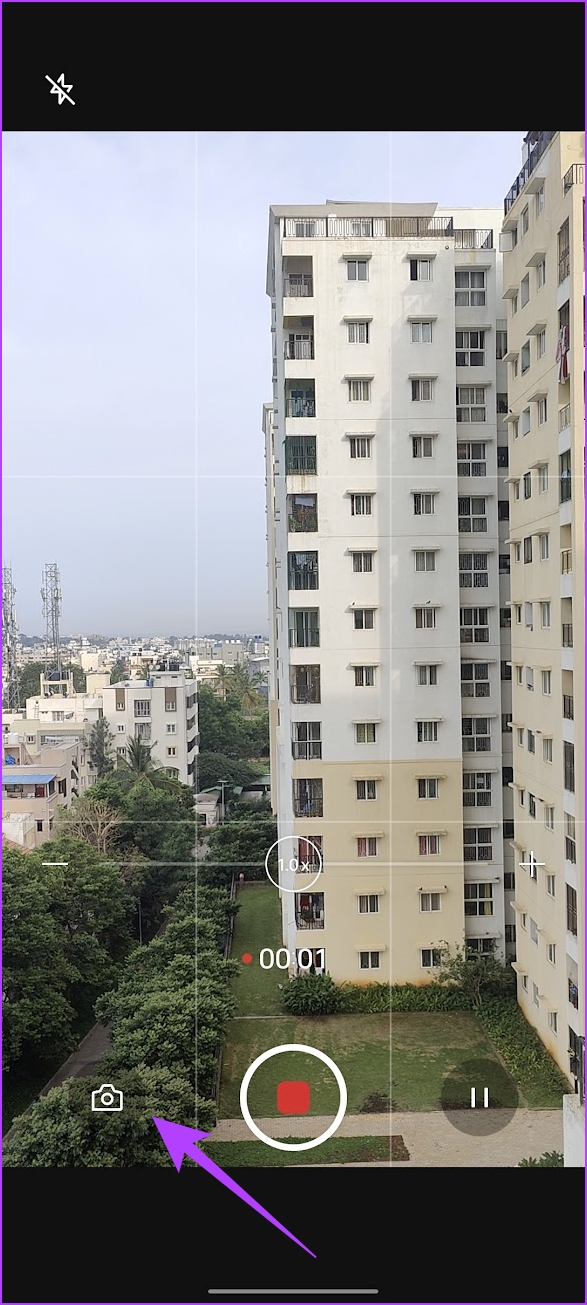
Moreover, you can also extract still images while shooting a video on your Android device by hitting the capture image button. The quality will also not be reduced with this method.
Also Read: Best Android apps to make videos with pictures and music
Method 3: Use Third-Party App
Video to Photo Frame Grabber is a simple app that lets you capture multiple frames from a single video.
- Choose the video from your collection and tap on the Camera icon at the bottom-left corner.
- Additionally, you can select the area of the capture and zoom in on a particular subject.
- Furthermore, you can tweak the image settings, such as the resulting file format, image quality, and image size.

Also Read: How to get still photos from iPhone videos
Was this helpful?
Last updated on 30 June, 2024
Read Next
 How to Send High Quality Photos and Video on Telegram
Send High-Quality Photos and Videos on Telegram on Mobile Let us show you the steps to send photos and videos without losing quality on your iPhone and Android using Telegram.
How to Send High Quality Photos and Video on Telegram
Send High-Quality Photos and Videos on Telegram on Mobile Let us show you the steps to send photos and videos without losing quality on your iPhone and Android using Telegram.
 Download 7 High-Quality Nothing Phone (2a) Wallpapers in 4K
Since its inception, Nothing has been the talk of the town, with fans buzzing about its innovative design and customizable lights.
Download 7 High-Quality Nothing Phone (2a) Wallpapers in 4K
Since its inception, Nothing has been the talk of the town, with fans buzzing about its innovative design and customizable lights.
 How to Send High Quality Videos on WhatsApp (iPhone and Android)
Method 1.
How to Send High Quality Videos on WhatsApp (iPhone and Android)
Method 1.
 How to Turn on High Quality Uploads in Instagram
https://youtu.be/4ciQ4fT42Sc Step 1: Open your Profile on Instagram, and tap on the three-bar menu icon at the top right corner.
How to Turn on High Quality Uploads in Instagram
https://youtu.be/4ciQ4fT42Sc Step 1: Open your Profile on Instagram, and tap on the three-bar menu icon at the top right corner.
 How to Record High-Quality Gameplay Videos Using OBS Studio
How to Setup OBS Studio to Recording Game Play Before recording your gameplay, you must set up OBS Studio.
How to Record High-Quality Gameplay Videos Using OBS Studio
How to Setup OBS Studio to Recording Game Play Before recording your gameplay, you must set up OBS Studio.
 5 Best Android Apps to Extract Audio from Video
Don't you wish you could get the audio from the latest music videos?
5 Best Android Apps to Extract Audio from Video
Don't you wish you could get the audio from the latest music videos?
 6 Ways to Extract and Copy Text From Image in Samsung
Copying text from messages or any other Android app is easy.
6 Ways to Extract and Copy Text From Image in Samsung
Copying text from messages or any other Android app is easy.
 4 Ways to Extract Audio From Video on Mac
Method 1: Use QuickTime Player to Save Audio From a Video QuickTime is the default video player on the Mac.
4 Ways to Extract Audio From Video on Mac
Method 1: Use QuickTime Player to Save Audio From a Video QuickTime is the default video player on the Mac.
The article above may contain affiliate links which help support Guiding Tech. The content remains unbiased and authentic and will never affect our editorial integrity.