Have you suddenly found yourself locked out of your Copilot account and don’t even know why? It’s a frustrating experience, but it doesn’t have to stay that way. In this article, we’ll be exploring the reasons behind a Copilot account suspended and how to get you back to chatting and coding.
Why Was My Copilot Account Suspended?
With any kind of lockout like this, your first thought is most likely: why? A common problem with AI tools is that they aren’t very transparent in their reasoning or in explaining their actions. It’s frustrating, but it doesn’t necessarily mean you were doing anything wrong or illegal. Let’s take a look at some common causes:
- Content generation – Copilot has some strict limitations on the content it generates. Any explicitly violent or sexual content, content that promotes harm to self or others, or anything that goes against guidelines and terms of use can trigger an account suspension.
- Excessive use – There are no hard limits on what constitutes overuse of Copilot, but if you’ve been making too many requests, you might be suspended. Copilot may have mistaken you for a bot.
- IP Addresses – Frequent changes to your IP addresses can result in Copilot suspended.
- Account Issues – If Microsoft detects suspicious activity on your account or logins, it may suspend things for safety.
- Billing – If you have a Copilot license, any billing or subscription problems may trigger this problem.
What to Do With a Copilot Account Suspended
While a suspension is imposed by Microsoft and is reliant on them to lift it, there are a few steps you can take to address and mitigate the issue:
Wait Things Out
Depending on the perceived offense (triggered falsely or otherwise), a suspension seldom lasts more than 24 hours. Most won’t even extend over an hour. Step away from Copilot for a while and even try logging out and back in to see if the ban has been lifted.
Check Your Subscription
If you’re subscribed to Copilot Pro, check that your billing is in order. Here’s what to do:
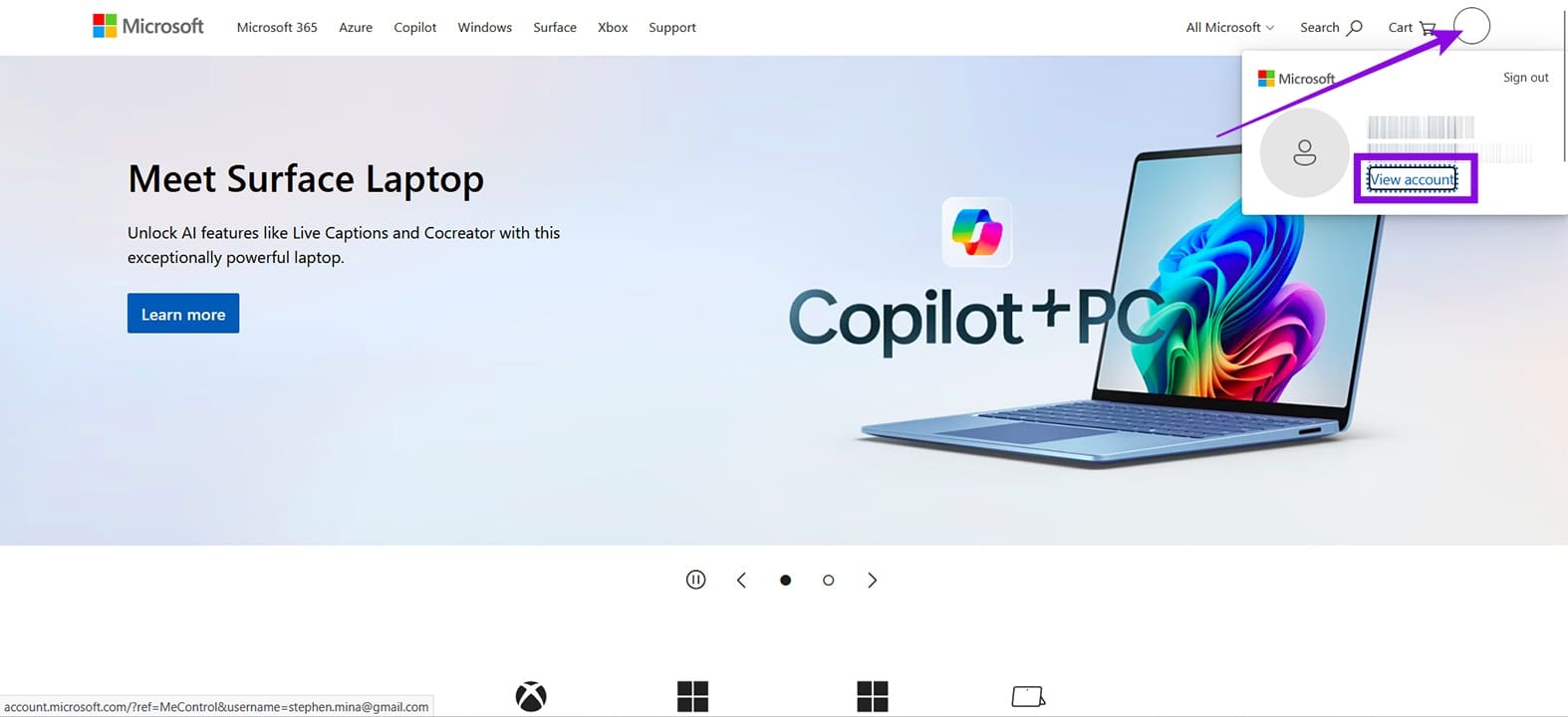
Step 1. Head to Microsoft on your browser, and sign in if needed.
Step 2. Click on your Account Profile in the top-right corner and select “View account.”
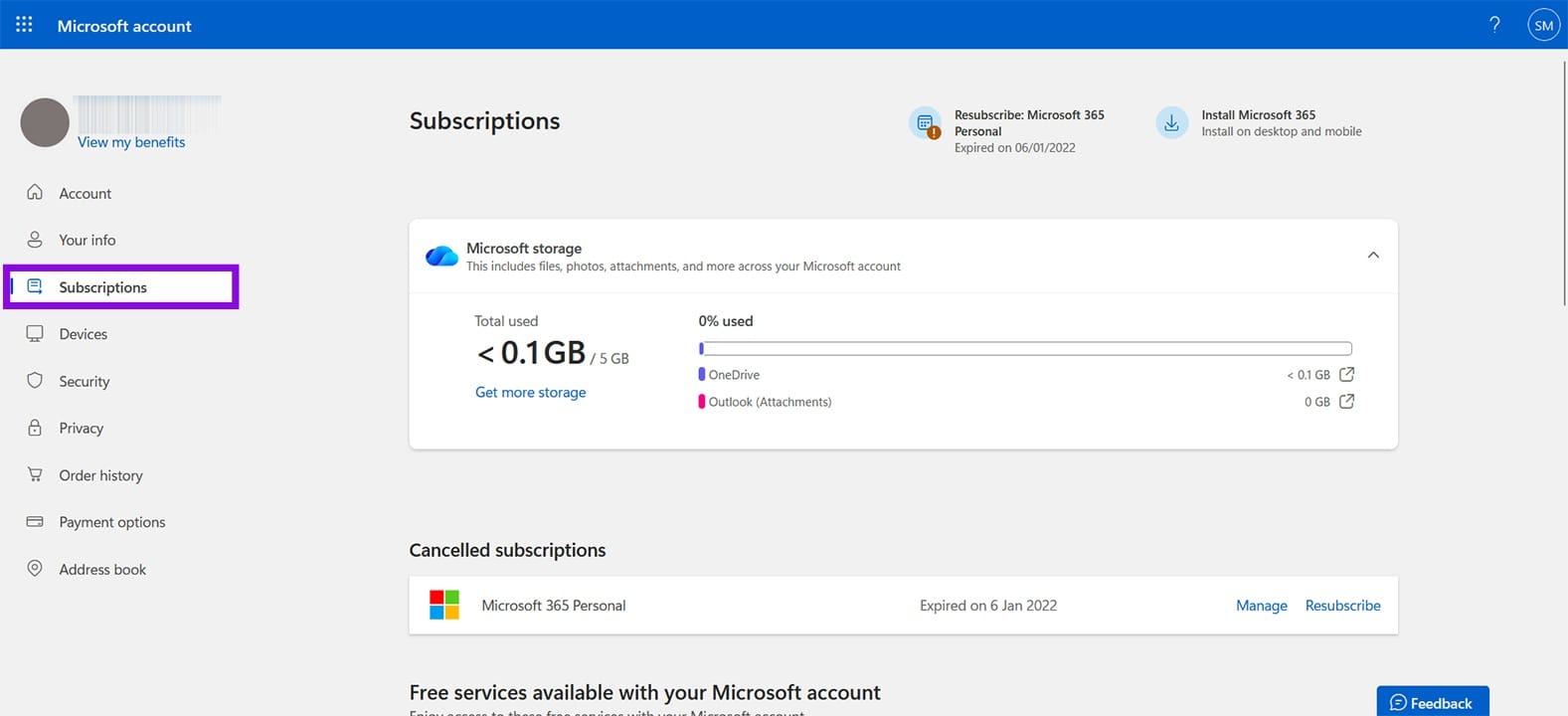
Step 3. Head to the “Subscriptions” panel in the sidebar. You’ll see all your active subscriptions. If you don’t see Copilot Pro, then you may need to resubscribe.
Log an Appeal
If your ban lasts longer than you’re willing to wait, then you can log a ticket with Microsoft Support. If this occurred while coding on GitHub, you’ll need to write to their support, but if it occurred while using Copilot in Windows, head to the “Contact us” section of your Microsoft account online, which can be found at the bottom of your page in your browser.
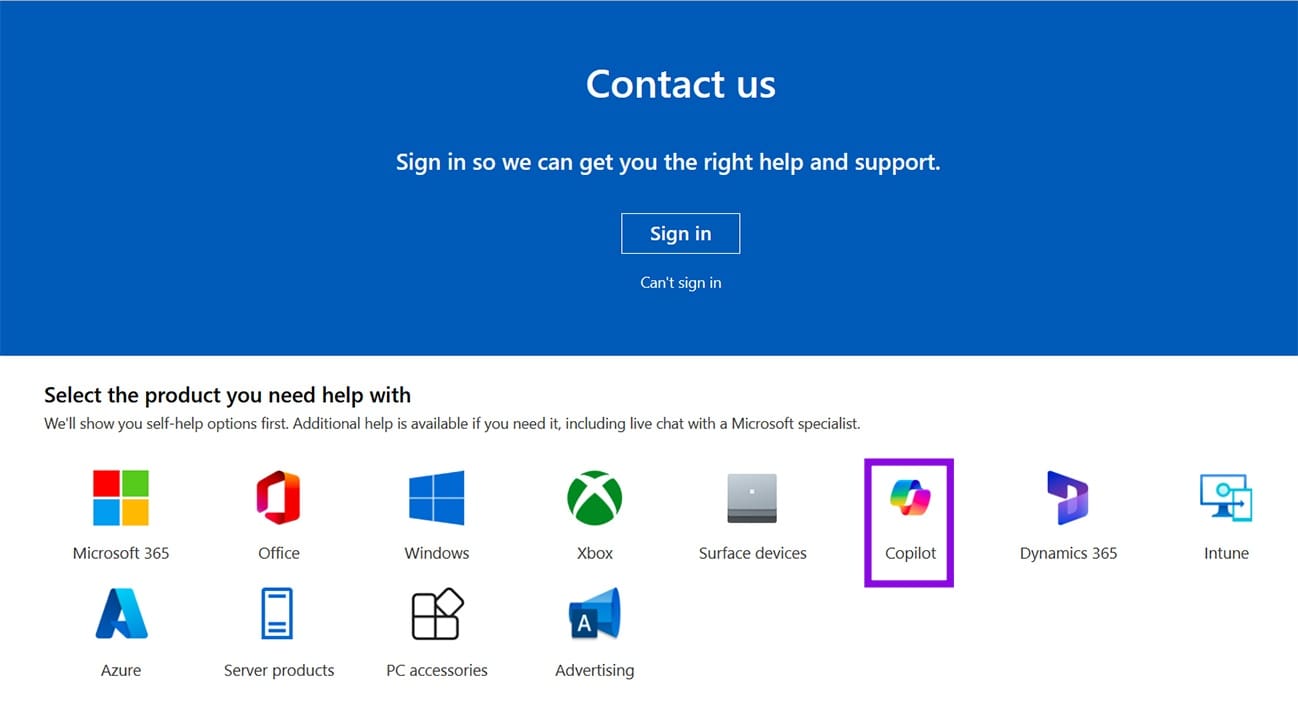
Be sure to include your associated email, including as much detail regarding the suspension as possible. Screenshots can also go a long way in helping fix the situation.
Don’t Create a New Account
This is a warning rather than a troubleshooter, but creating a new Microsoft account to circumvent the ban can make things worse. Microsoft might think your account is a bot, or you’re trying to evade punishment. Another suspension on top of your existing one will just take longer to resolve.
Was this helpful?
Last updated on 14 May, 2026
Read Next
 Why Is My TikTok Account Suspended
TikTok has taken the social media market by storm.
Why Is My TikTok Account Suspended
TikTok has taken the social media market by storm.
 6 Cool Things You Can Do with Telegram’s New Microsoft Copilot AI Bot
Telegram's latest addition is the integration of Microsoft’s Copilot AI bot.
6 Cool Things You Can Do with Telegram’s New Microsoft Copilot AI Bot
Telegram's latest addition is the integration of Microsoft’s Copilot AI bot.
 How to Use Copilot in Edge Browser
There are many great features in Microsoft’s Edge browser, not least of which is the integration of Microsoft’s AI chatbot, Copilot.
How to Use Copilot in Edge Browser
There are many great features in Microsoft’s Edge browser, not least of which is the integration of Microsoft’s AI chatbot, Copilot.
 How to Use Copilot to Summarize a Meeting
Sometimes, you don’t need every detail from a meeting — just the abridged version.
How to Use Copilot to Summarize a Meeting
Sometimes, you don’t need every detail from a meeting — just the abridged version.
 How to Use Copilot to Edit Pictures
Copilot is Microsoft’s own AI bot capable of answering questions, carrying out research, chatting about a range of topics, and generating images.
How to Use Copilot to Edit Pictures
Copilot is Microsoft’s own AI bot capable of answering questions, carrying out research, chatting about a range of topics, and generating images.
 How to Use Copilot to Transcribe Meetings
Microsoft’s Copilot is showing up in all of its major apps, including Teams.
How to Use Copilot to Transcribe Meetings
Microsoft’s Copilot is showing up in all of its major apps, including Teams.
 How to Use Copilot to Set Reminders and Calendar Events
Whether you're planning meetings or keeping track of personal to-dos, Copilot simplifies scheduling with natural language commands.
How to Use Copilot to Set Reminders and Calendar Events
Whether you're planning meetings or keeping track of personal to-dos, Copilot simplifies scheduling with natural language commands.
 Copilot Read Aloud Not Working – How to Fix
The Copilot Read Aloud feature is a fantastic accessibility feature and a handy way to consume a lot of information.
Copilot Read Aloud Not Working – How to Fix
The Copilot Read Aloud feature is a fantastic accessibility feature and a handy way to consume a lot of information.
The article above may contain affiliate links which help support Guiding Tech. The content remains unbiased and authentic and will never affect our editorial integrity.