


How to Change Language on Facebook
Notably, if you change the language settings on one device, it will not automatically update on another device. To change language on Facebook, follow the steps below.
On iPhone or Android
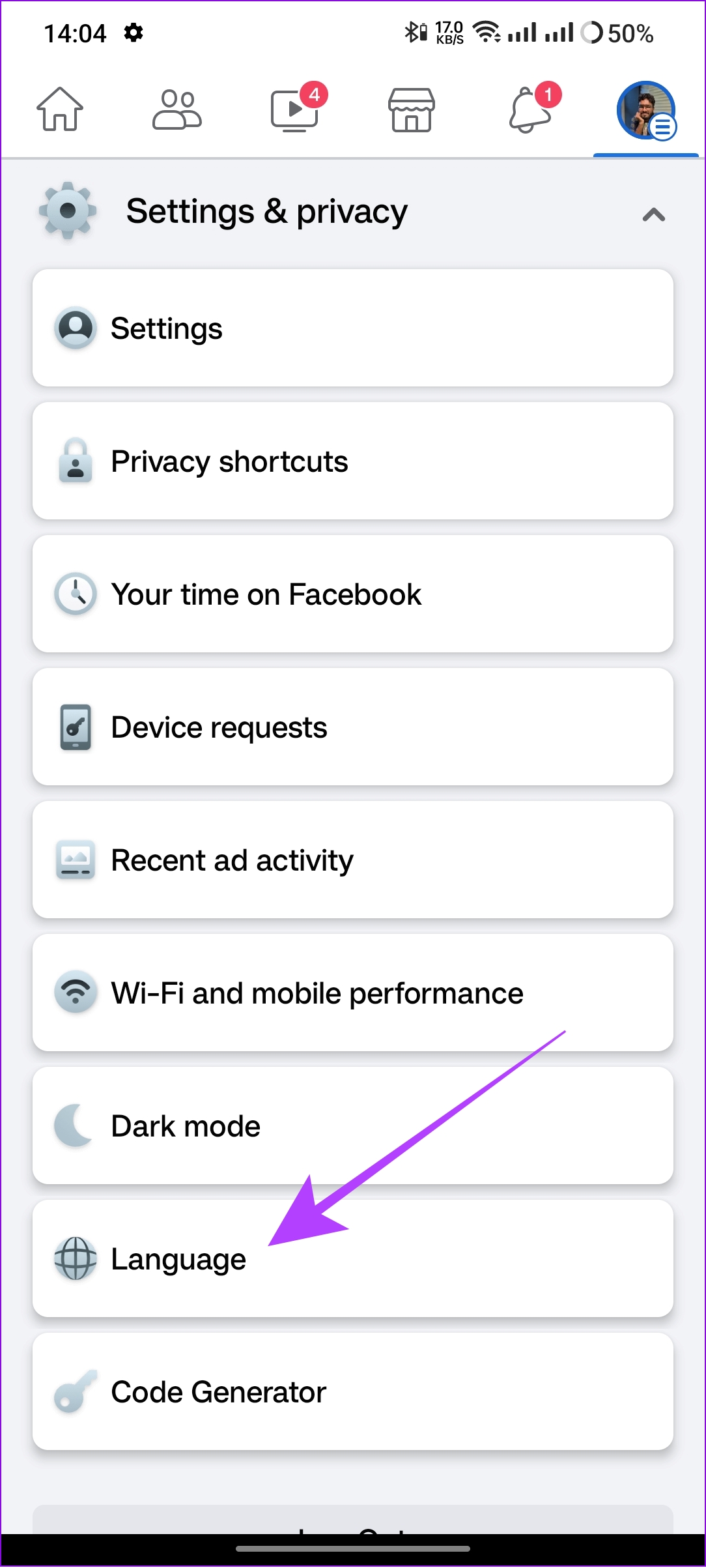
Step 1: Open the Facebook app. Hit the hamburger menu (profile picture).
Step 2: Scroll down and select Settings & privacy.


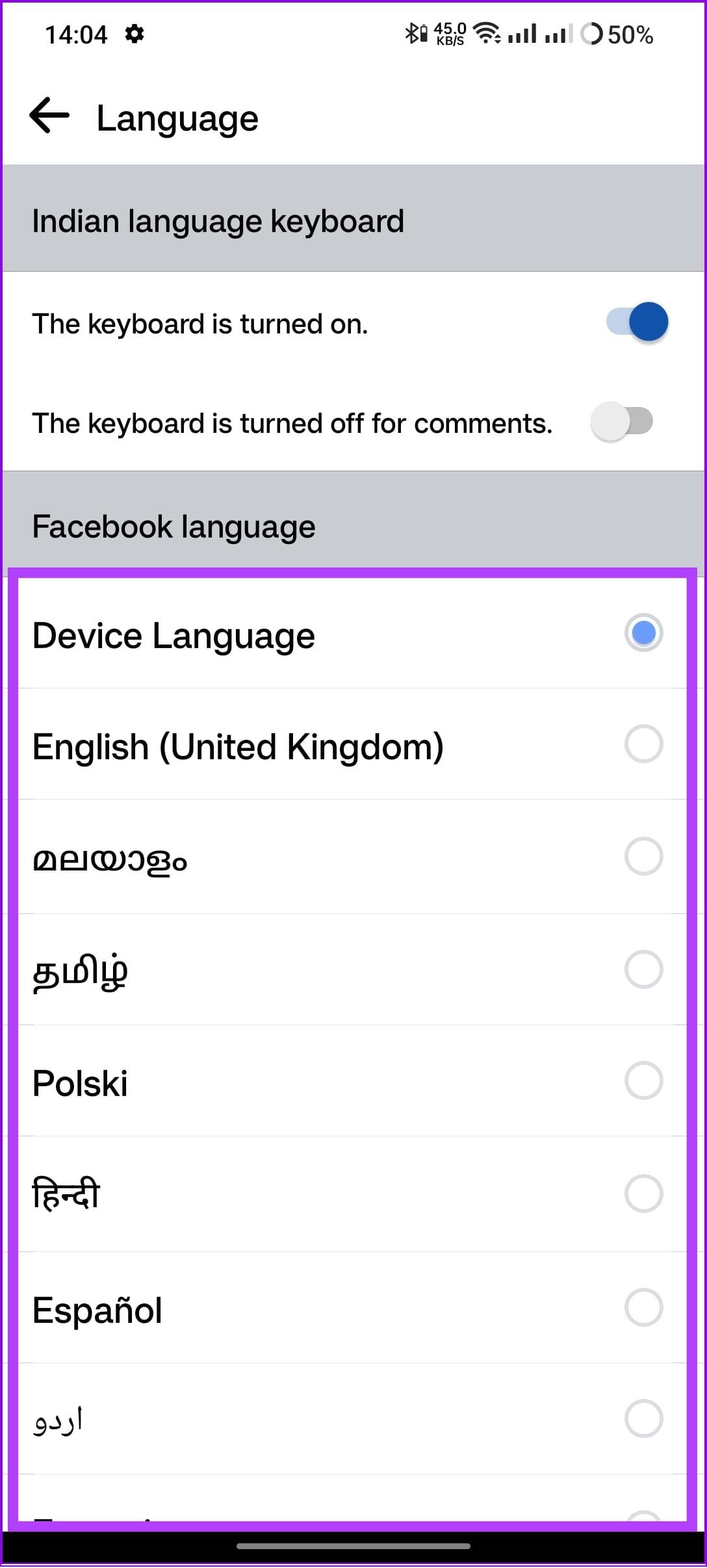
Step 3: Choose Language and then select your preferred language.
Also Read: How to see who viewed your Facebook profile
On Desktop Browser
Similar to the Facebook app, you can also change what language the social media site should be displayed in while accessing it from a web browser. Here’s how you can do it:
Step 1: Visit Facebook on your browser. Hit the profile picture icon.
Step 2: Choose Settings & privacy.

Step 3: Hit Language.

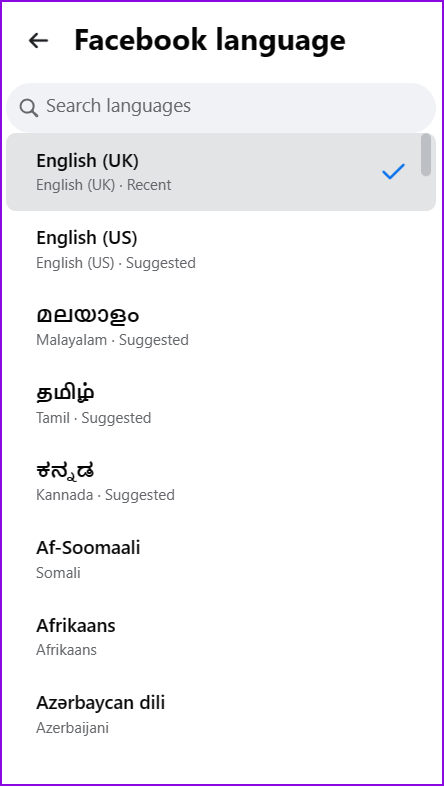
Step 4: Click Facebook language. Choose the language of your choice.
On Mobile Browser
Step 1: Visit Facebook on your mobile browser. Hit the hamburger menu (three lines).
Step 2: Scroll down and tap Language. Choose the one of your choice.


Also Read: Change Facebook account name and username
Was this helpful?
Last updated on 18 August, 2024
1 Comment
Leave a Reply
Read Next
 How to Change YouTube Language (Web and Mobile App)
Recently, an update for Google Chrome changed the default language of the YouTube website for some weird reason.
How to Change YouTube Language (Web and Mobile App)
Recently, an update for Google Chrome changed the default language of the YouTube website for some weird reason.
 How to Change Language on Amazon: A Complete Guide
How to Change Amazon’s Language on Web Browser Note: Amazon's URL dynamically adjusts depending on the region you're accessing it from.
How to Change Language on Amazon: A Complete Guide
How to Change Amazon’s Language on Web Browser Note: Amazon's URL dynamically adjusts depending on the region you're accessing it from.
 How to Change Typing Language in WhatsApp on Android and iPhone
On iPhone Method 1: On Apple Keyboard Follow these steps to type in another language in WhatsApp on iPhone using the Apple keyboard: Step 1: Open a WhatsApp chat so
How to Change Typing Language in WhatsApp on Android and iPhone
On iPhone Method 1: On Apple Keyboard Follow these steps to type in another language in WhatsApp on iPhone using the Apple keyboard: Step 1: Open a WhatsApp chat so
 How to Change the Display and Authoring Language in Microsoft Excel
How to Change the Display Language in Microsoft Excel Display language is the one that Excel uses throughout its interface, which includes menus, buttons, dialog boxes, and more.
How to Change the Display and Authoring Language in Microsoft Excel
How to Change the Display Language in Microsoft Excel Display language is the one that Excel uses throughout its interface, which includes menus, buttons, dialog boxes, and more.
 How to Change the Default Language in Steam for Desktop and Mobile
How to Change the Language in Steam for Desktop Changing the default language in the Steam app is similar on both Windows and Mac, thanks to their comparable interfaces.
How to Change the Default Language in Steam for Desktop and Mobile
How to Change the Language in Steam for Desktop Changing the default language in the Steam app is similar on both Windows and Mac, thanks to their comparable interfaces.
 How to Change Language in WPS Office for Android and iOS
Microsoft does offer a free version of its Office suite for mobile devices.
How to Change Language in WPS Office for Android and iOS
Microsoft does offer a free version of its Office suite for mobile devices.
 How to Change the Default Language in Windows 11
How to Change the Display Language in Windows 11 Windows 11 supports various languages.
How to Change the Default Language in Windows 11
How to Change the Display Language in Windows 11 Windows 11 supports various languages.
 How to Change the Language of Individual Apps on Android 13
How many times have you looked at an application and wished you could use it in a different language?
How to Change the Language of Individual Apps on Android 13
How many times have you looked at an application and wished you could use it in a different language?
The article above may contain affiliate links which help support Guiding Tech. The content remains unbiased and authentic and will never affect our editorial integrity.


Thank you????