

Fix 1: Clear Cache and Cookies
Cache and cookies data stored by your browser can sometimes cause problems, such as Facebook logging you out randomly. In such cases, clearing the existing browsing data can help.
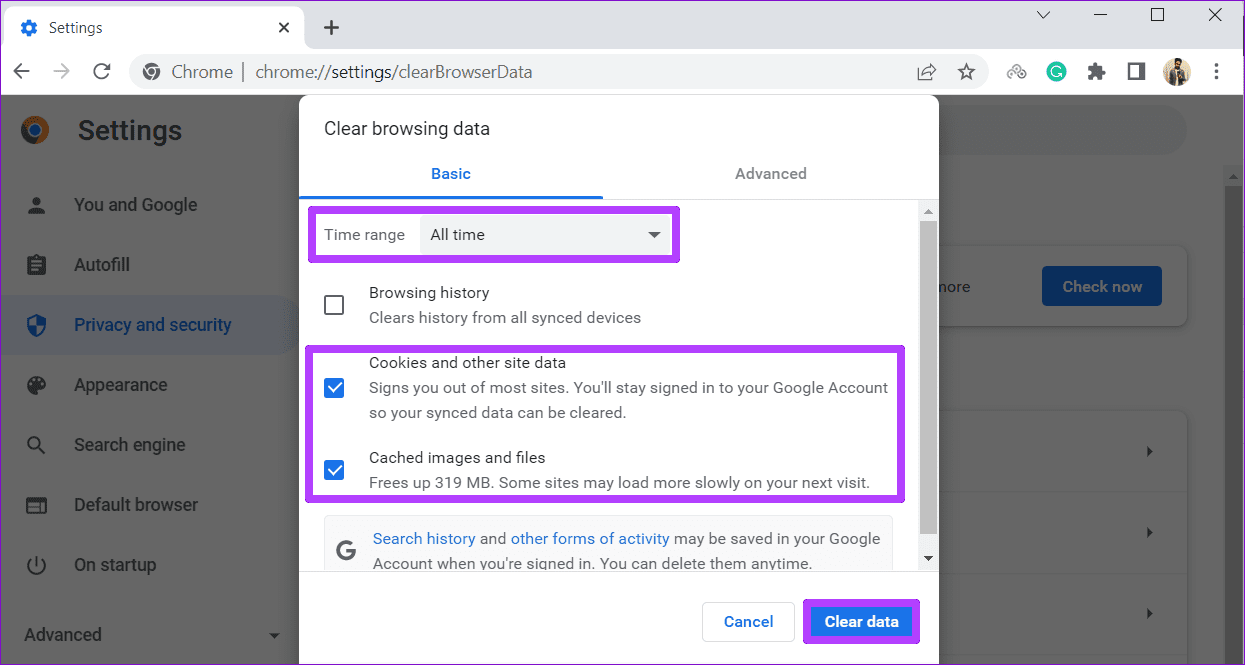
Step 1: Press the Ctrl + Shift + Delete keys on your keyboard to bring up the Clear browsing data panel in Chrome or Edge.
Step 2: Use the drop-down menu next to Time range to select All time. Tick the Cookies and other site data and Cached images and files checkboxes. Then, click the Clear data button.
Fix 2: Change Facebook Password
Facebook may log you out of your account if it detects suspicious activity or if your password is compromised. If you suspect either of these scenarios, it’s best to change your account password.
Head to Facebook’s password reset page and set up a new password. Then, click the Change password button.

Fix 3: Remove Third-Party Access
If Facebook keeps logging you out even after you reset the password, third-party apps linked to your account might be the culprit. It’s a good idea to review the apps connected to your Facebook account and remove any that you no longer use or trust.
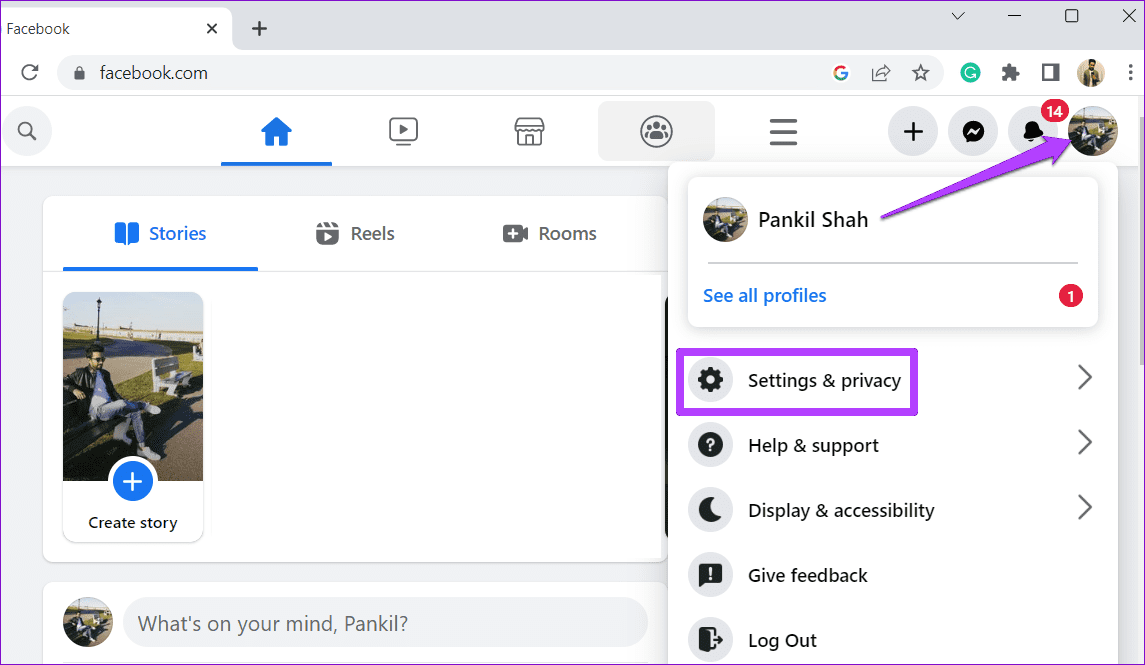
Step 1: Open Facebook in your preferred web browser. Click the profile icon at the top right corner and select Settings & privacy > Settings.
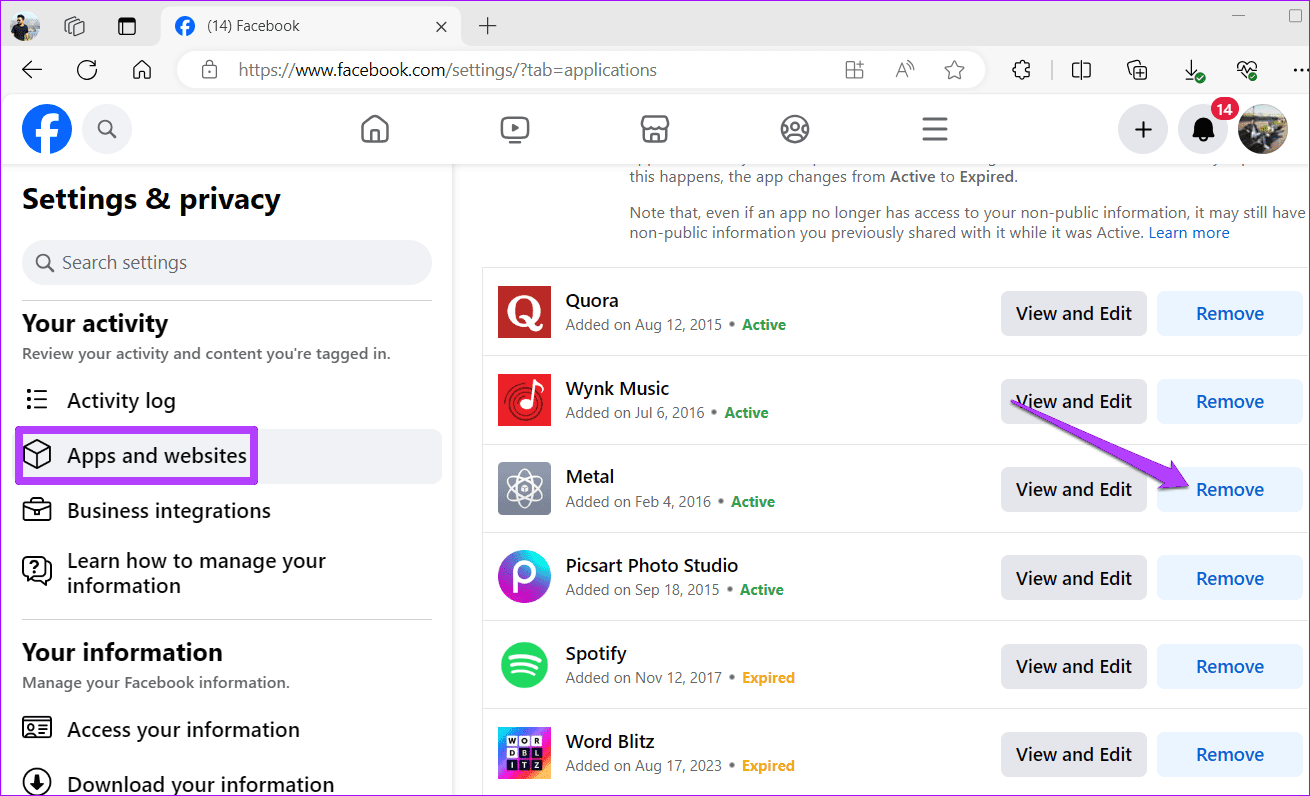
Step 2: Switch to the Apps and websites tab. In the right pane, use the Remove button next to third-party services that you no longer use.
Fix 4: Disable Extensions
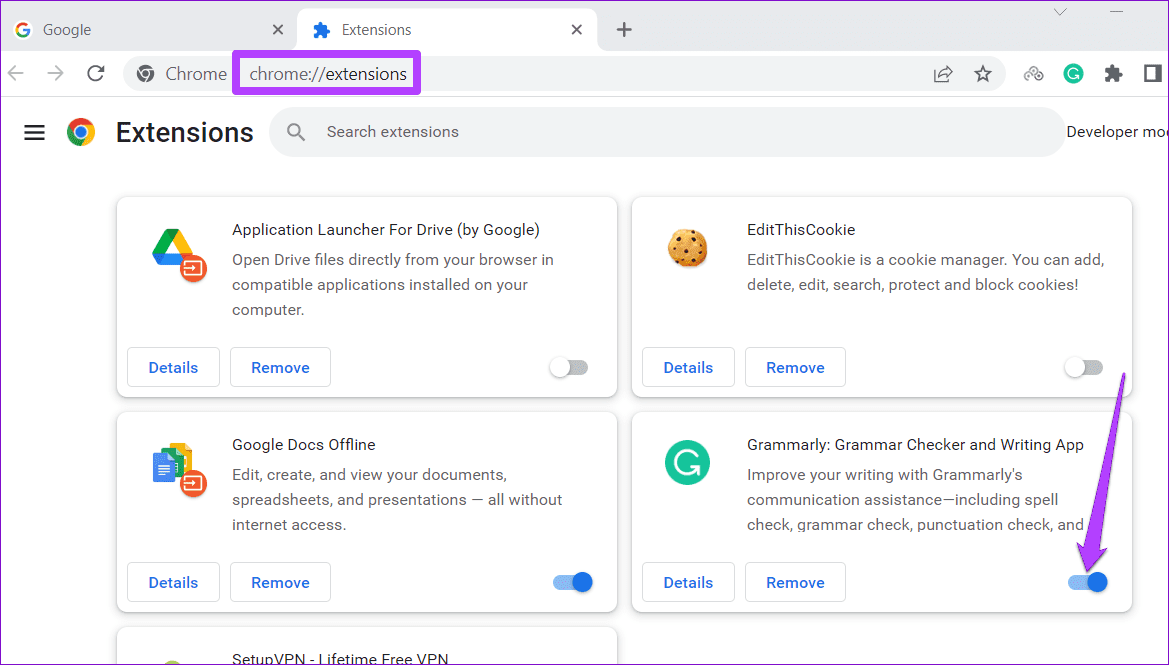
It’s possible that one of your third-party extensions is responsible for unexpected Facebook logouts. To check for this possibility, you should consider disabling all the extensions temporarily.
Type chrome://extensions/ (Chrome) or edge://extensions/ (Edge) in the address bar at the top and press Enter. Use the toggles to disable all the extensions one by one.
Was this helpful?
Last updated on 14 May, 2024
1 Comment
Leave a Reply
Read Next
 6 Ways to Fix Chrome Keeps Logging Me Out Issue
Basic Fixes Disable Chrome extensions: Select the vertical three-dot menu at the top right of Google Chrome, and click Extensions > Manage Extensions.
6 Ways to Fix Chrome Keeps Logging Me Out Issue
Basic Fixes Disable Chrome extensions: Select the vertical three-dot menu at the top right of Google Chrome, and click Extensions > Manage Extensions.
 2 Ways to Fix Discord Keeps Logging Me Out
Basic Fixes: Log out of unknown devices: You should log out from unknown devices and try again.
2 Ways to Fix Discord Keeps Logging Me Out
Basic Fixes: Log out of unknown devices: You should log out from unknown devices and try again.
 5 Things to Try If X (Twitter) Keeps Logging You Out
Try These Things First Disable VPN: If you're using a VPN connection, X may log you out due to unusual or suspicious account activity.
5 Things to Try If X (Twitter) Keeps Logging You Out
Try These Things First Disable VPN: If you're using a VPN connection, X may log you out due to unusual or suspicious account activity.
 3 Fixes for Telegram Keeps Logging Me Out on Mobile and Desktop
Basic Fixes Force quit and relaunch the Telegram app: This will give the app a fresh start on your device.
3 Fixes for Telegram Keeps Logging Me Out on Mobile and Desktop
Basic Fixes Force quit and relaunch the Telegram app: This will give the app a fresh start on your device.
 How to Fix WhatsApp Desktop Keeps Logging Me Out on Windows
Try Basic Fixes Rule out issues with your internet: A slow or patchy internet connection is commonly why WhatsApp Desktop may encounter sync issues and log you out.
How to Fix WhatsApp Desktop Keeps Logging Me Out on Windows
Try Basic Fixes Rule out issues with your internet: A slow or patchy internet connection is commonly why WhatsApp Desktop may encounter sync issues and log you out.
 Why Does Netflix Keep Logging Me Out and 3 Ways to Fix It
Why Netflix Logged You Out Automatically There are a few reasons why Netflix asks for sign-in every time you open the service.
Why Does Netflix Keep Logging Me Out and 3 Ways to Fix It
Why Netflix Logged You Out Automatically There are a few reasons why Netflix asks for sign-in every time you open the service.
 4 Fixes if Facebook Messenger Keeps Crashing on Android and iPhone
Basic Fixes Update the Messenger app: Using an outdated version of an app can cause it to behave strangely.
4 Fixes if Facebook Messenger Keeps Crashing on Android and iPhone
Basic Fixes Update the Messenger app: Using an outdated version of an app can cause it to behave strangely.
 3 Ways to Fix Netflix Keeps Freezing on Your Phone
Basic Fixes: Close and restart all background apps: Background apps can end up hogging system resources, causing the Netflix app not to work as expected.
3 Ways to Fix Netflix Keeps Freezing on Your Phone
Basic Fixes: Close and restart all background apps: Background apps can end up hogging system resources, causing the Netflix app not to work as expected.
The article above may contain affiliate links which help support Guiding Tech. The content remains unbiased and authentic and will never affect our editorial integrity.

None of the given suggestions to keep Facebook from logging me out make any difference. Anything else ?