Basic Fixes
- Use the same Apple account: Once you do that, all your devices will have all your Apple Music data synced.
- Check internet access: Switch to 5GHz frequency band if you have a dual-band router.
- Force quit and relaunch Apple Music: Do this on both devices. This will give Apple Music a fresh start.
- Update software version: Install the latest software update on your iPhone and Mac.
Fix 1: Enable Sync Library on Mac
To sync your Apple Music playlists from iPhone to Mac,check if your Mac is allowed to do this. Sound’s obvious, but that’s is a requirement to synch the playlist data between your Apple devices. There’s an option to sync your music library. Enable it.
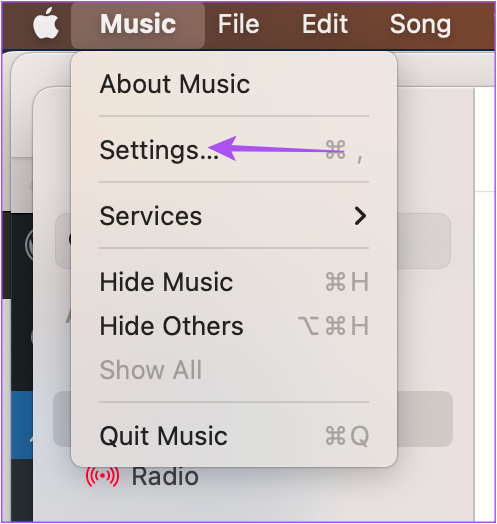
Step 1: Open Apple Music > Click on Music and then select Settings.
Step 2: Enable Sync Library under General settings.
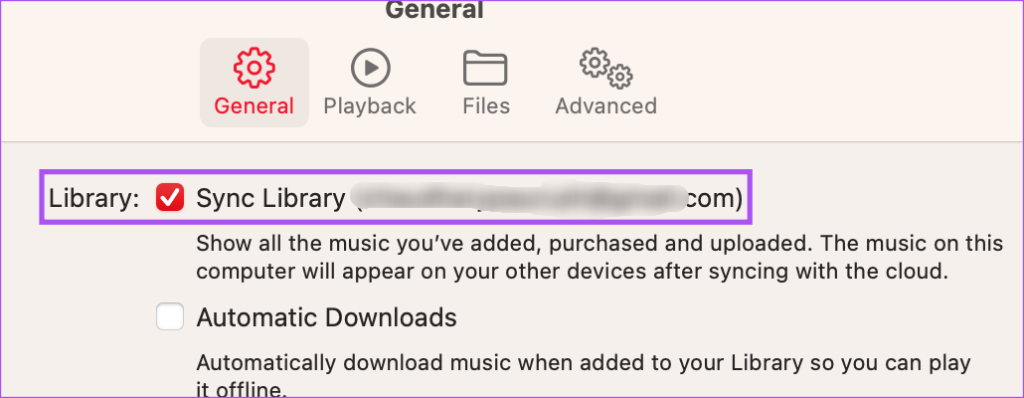
If not, click the checkbox to enable the feature. Then, wait for sometime to complete the syncing.
Fix 2: Enable iCloud Drive Sync
The data syncing of apps between your iPhone and Mac occurs due to iCloud. You should now check if the Apple Music app has been enabled for iCloud Drive syncing on both your iPhone and Mac.
On iPhone
Step 1: Open Settings > Profile name > iCloud.
Step 2: Under Apps Using iCloud, tap on Show All. Scroll down and check if the toggle for the Music app uses iCloud for syncing data.


On Mac
Step 1: Open System Settings > Profile icon > iCloud.

Step 2: Click on iCloud Drive and then click on Options next to Apps Syncing to iCloud Drive.
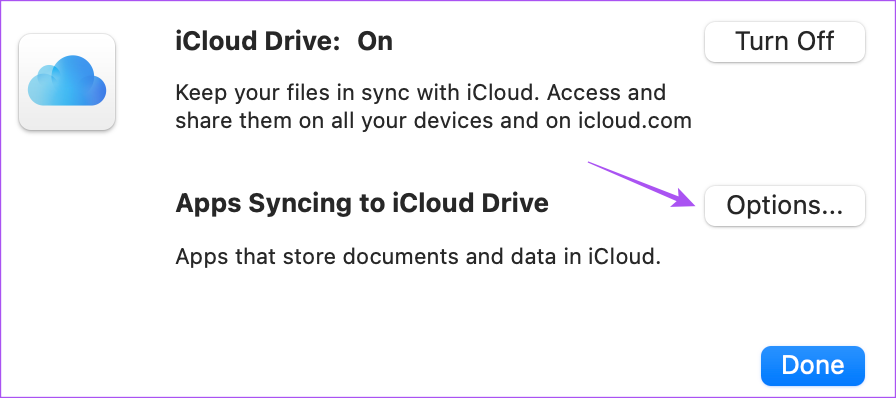
Step 3: Under Documents, scroll down and then check select Music.
If not, click the checkbox to enable the same.
Step 4: Click on Done at the bottom-right side.
Fix 3: Sign In Again to Apple Account
You can log out of your Apple ID on your Mac and iPhone. Wait for some time and then log in again.
Tip: Learn how to add downloaded music to Apple Music library.
Was this helpful?
Last updated on 11 July, 2024
Read Next
 How to Create Smart Playlists in Apple Music (iPhone and Mac)
Create a Smart Playlist on iPhone and iPad You can share playlists on Apple Music on your iPhone and iPad.
How to Create Smart Playlists in Apple Music (iPhone and Mac)
Create a Smart Playlist on iPhone and iPad You can share playlists on Apple Music on your iPhone and iPad.
 4 Fixes for iMessage Not Syncing Between iPhone and Mac
Basic Fixes Plug your Mac into a power source: Sometimes your Mac will start syncing when it is plugged into a power source.
4 Fixes for iMessage Not Syncing Between iPhone and Mac
Basic Fixes Plug your Mac into a power source: Sometimes your Mac will start syncing when it is plugged into a power source.
 3 Fixes for Voice Memos Not Syncing Between iPhone and Mac
Basic Fixes Use the same Apple account: Apple devices will sync only when they are using the same Apple account.
3 Fixes for Voice Memos Not Syncing Between iPhone and Mac
Basic Fixes Use the same Apple account: Apple devices will sync only when they are using the same Apple account.
 3 Best Ways to Fix Apple Books Not Syncing Between iPhone and iPad
Try Basic Fixes Ensure both devices are connected to Wi-Fi: The syncing of any content between an iPhone and iPad happens via iCloud.
3 Best Ways to Fix Apple Books Not Syncing Between iPhone and iPad
Try Basic Fixes Ensure both devices are connected to Wi-Fi: The syncing of any content between an iPhone and iPad happens via iCloud.
 3 Ways to Transfer Playlists From YouTube Music to Apple Music
There are three services you can use to perform the transfer based on your preferences.
3 Ways to Transfer Playlists From YouTube Music to Apple Music
There are three services you can use to perform the transfer based on your preferences.
 4 Ways to Fix Messages Not Syncing Between iPhone and iPad
https://youtu.be/L9BxANv4g00 Basic Fixes: Ensure you're using the same Apple account: You need to use the same Apple account on both iPad and iPhone to enable message syncing.
4 Ways to Fix Messages Not Syncing Between iPhone and iPad
https://youtu.be/L9BxANv4g00 Basic Fixes: Ensure you're using the same Apple account: You need to use the same Apple account on both iPad and iPhone to enable message syncing.
 4 Fixes for Spotify Not Syncing Between Mobile and Desktop
Basic Fixes Use the same account on multiple devices: Sometimes you don't realize, but you must have the same account on all your devices.
4 Fixes for Spotify Not Syncing Between Mobile and Desktop
Basic Fixes Use the same account on multiple devices: Sometimes you don't realize, but you must have the same account on all your devices.
 4 Fixes for Kindle Books Not Syncing Between Devices
Basic Fixes Use the same Kindle account: You should be using the same Amazon Kindle account on all your devices.
4 Fixes for Kindle Books Not Syncing Between Devices
Basic Fixes Use the same Kindle account: You should be using the same Amazon Kindle account on all your devices.
The article above may contain affiliate links which help support Guiding Tech. The content remains unbiased and authentic and will never affect our editorial integrity.