Most people do not fail at budgeting because they do not know what a budget is. They fail because the number that matters most, how much they can actually spend today without wrecking the rest of the month, is not sitting anywhere on their phone. Bank apps show a balance. Spreadsheets show what already happened. Neither one answers the question you actually have at the checkout counter: can I afford this right now?
That gap is what separates the current crop of Android budgeting apps. Some are built to answer it directly. Others are built for a narrower job: tracking multiple currencies, giving you a purely visual read on spending, or letting you budget without ever handing over your bank login.
When you are managing heavy digital tasks or securing remote workflows, you might also look into resources like the best proxy providers to buy from in 2026 tested and compared. We compared how each of the five apps below connects to real accounts, what they charge for the features that matter, and how they hold up specifically on Android rather than as a ported-over iPhone app.
How We Picked These Budgeting Apps for Android
Most budgeting app roundups just rank whatever currently sits at the top of a Play Store search. We started somewhere more useful: what does each app actually let you do before you pay anything?
Money Manager Expense & Budget gives away nearly everything for free: unlimited accounts, unlimited categories, the calendar view, and only charges for cloud sync across devices. Spendee and Wallet by BudgetBakers take the opposite approach: their free tiers work fine for manual tracking, but bank sync, the feature most people actually download these apps for, sits behind a paid plan.
The second was whether an app does anything with your data beyond displaying it back to you. A pie chart of what you spent last month is descriptive. A forecast of whether you are on track to blow your grocery budget by the 20th, or a projected balance for next month, is prescriptive, and it is a much smaller list of apps that actually do the second thing. PocketGuard’s Spending Pace and Wallet’s cash flow projection both cleared that bar; a lot of apps we looked at and didn’t include.
The last filter was matching the app to the problem, not forcing a single winner. An app built to reconcile spending across currencies (Wallet) is solving a different problem than one built so you never have to hand over a bank login at all (Fudget). If you ever run into frustrating system errors while managing your device settings, you can check out guides like fix how to get help in Windows keeps popping up.
| App | Best For | Free Plan | Starting Price |
| PocketGuard | Best overall | Yes | Paid plans unlock full feature set |
| Wallet by BudgetBakers | Multi-currency budgeting | Yes | From $5.99/month |
| Money Manager Expense & Budget | Free all-rounder | Yes, full-featured | $2.49/month for cloud sync |
| Spendee | Visual spending breakdowns | Yes | From ~$2/month |
| Fudget | No-bank-link, manual budget | Yes | One-time upgrade fee |
1. PocketGuard – Best Overall
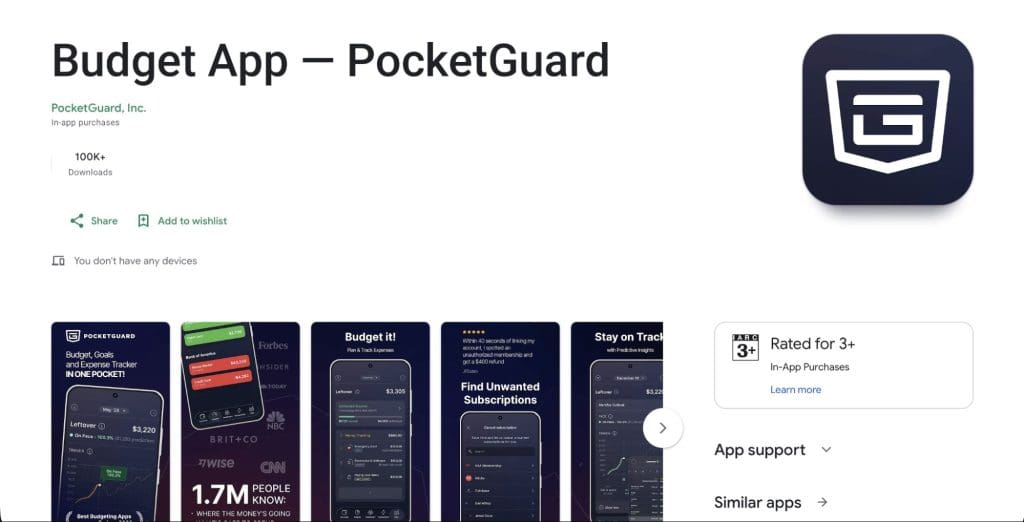
PocketGuard is a strong all-in-one budgeting app for Android users who want both automation and control. It combines automatic transaction tracking with customizable budgeting, so you do not have to choose between a simple tracker and a more structured budgeting system, which is why we are ranking it #1 on this list.
The core idea behind PocketGuard is simple: it tells you what you can safely spend right now, not just what you have already spent. That single shift, from looking backward to planning forward, is what separates it from most expense trackers. Whether you are tracking finances on a phone or reviewing hardware details like those found in a Samsung Galaxy Watch Ultra review, managing your daily numbers efficiently is key.
Key features
- Leftover: a real-time safe-to-spend number calculated after your bills, budgeted spending, and financial goals are accounted for. It is available on iOS, Android, and the web, so the number stays consistent no matter which device you check.
- Spending Pace: a predictive metric that looks at six months of your spending history and forecasts your likely trajectory over the next four weeks against your monthly budget, flagging whether you are On Pace, Under Pace, or Over Pace. Because it is forward-looking rather than a simple running total, it can warn you before a budget category actually breaks.
- Budget Your Way: PocketGuard doesn’t lock you into one budgeting philosophy. You can run a zero-based budget, set up envelope-style categories, follow the 50/30/20 split, or build a fully custom structure, and mix approaches as your needs change.
- Bill & Subscription Organizer: surfaces recurring charges so subscriptions don’t quietly eat into your Leftover amount.
- Financial Goals and Debt Payoff Planner: set savings targets and work through debt using either the avalanche or snowball method, all inside the same app you use for day-to-day budgeting.
- Bank-level security: PocketGuard connects to more than 10,712 financial institutions and protects data with 256-bit AES encryption in transit and at rest, TLS 1.2+, and PIN or biometric login on the app itself.
A newer Insights experience is also rolling out across the platform, building on the spending pattern data PocketGuard already collects, worth keeping an eye on as it expands to Android.
Pricing
PocketGuard offers a free plan for basic tracking and budgeting, with paid plans that unlock the full feature set, including Leftover, Spending Pace, and the debt payoff planner.
Like any app that connects to your accounts, the amount of value you get scales with how much you use the paid tier. The free version is a solid starting point, but the features that make PocketGuard stand out live behind the subscription.
Download: PocketGuard for Android on Google Play
2. Wallet by BudgetBakers – Best for Multi-Currency Budgeting

Get paid in one currency, spend in another, or split a bill with someone whose bank sits in a different country, and most budgeting apps quietly start rounding, guessing, or just dropping the transaction. A Prague-based team built Wallet with that exact scenario in mind, and it shows how far it goes to keep multi-currency numbers accurate.
The bank connection list spans 15,000+ institutions, with far more international coverage than most competitors offer, and every balance converts automatically so a euro account and a dollar account sit correctly in the same total. Two features do most of the heavy lifting day to day: a cash flow projection that estimates your net balance for the current and next month, and automatic detection of recurring bills and subscriptions so nothing renews unnoticed. For households splitting money across people rather than just currencies, shared multi-user access lets a partner or family member see and manage the same budget from their own device.
Pricing
Wallet has a free tier, with premium plans starting around $5.99/month, or a lifetime option for a one-time fee.
Best for
Households or individuals regularly dealing with more than one currency who want automated bank sync alongside clear visual reporting.
3. Money Manager Expense & Budget – Best Free All-Rounder
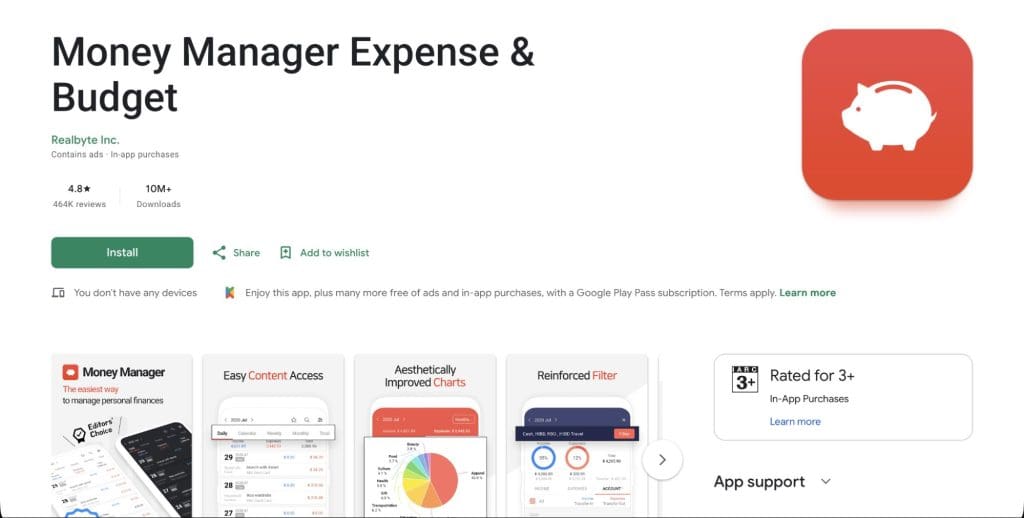
Money Manager Expense & Budget has quietly built one of the most complete free feature sets in the category, with more than 20 million downloads and a loyal user base.
The app supports unlimited manual accounts, multiple currencies, and detailed sub-categorization, along with weekly, monthly, and annual budget planning and statistics. A calendar view lets you see spending day-by-day, and the calculator and search tools make manual entry faster than in most comparable apps. When looking to optimize other devices in your setup, like figuring out hardware limits or asking can you upgrade RAM on a Windows laptop, keeping your financial tools organized helps you budget for upgrades cleanly.
Pricing
The core app is free with no feature gating for manual tracking, while a subscription (around $2.49/month or $19.99/year) unlocks cloud sync across devices.
Best for
Budgeters who don’t mind entering transactions manually in exchange for a deep, free feature set and full control over categories.
4. Spendee – Best for Visual Spending Breakdowns

Spendee’s whole design philosophy is built around turning numbers into pictures. If you think in charts rather than spreadsheets, this is the app that speaks your language.
Spendee organizes transactions into color-coded categories and wallets, with pie charts and trend lines that update as you spend. It supports bank sync, e-wallets like PayPal, and crypto wallets including Coinbase, plus shared finances for couples or roommates and an AI receipt scanner that fills in transaction details automatically from a photo.
Pricing
Spendee has a free version with manual entry and basic charts, while premium plans (roughly $2 to $4/month) add bank syncing and multiple wallets.
Best for
Visual learners who want to understand spending patterns at a glance rather than reading through transaction lists.
5. Fudget – Best for a No-Bank-Link, Manual Budget

Fudget strips budgeting down to its simplest form: a running list of income and expenses you enter yourself, with no bank connection required at any point.
There are no pre-set categories or forced structure. You create individual fudgets for any purpose, whether that is a monthly budget, a vacation fund, or a specific project, and enter line items manually. Entries can be set to recur automatically, and everything syncs across devices without ever touching your bank credentials.
Pricing
Fudget is free to use with ads, with a one-time payment to remove them and unlock a few extra conveniences.
Best for
Anyone who prefers not to link financial accounts to a third-party app, or who wants a lightweight, spreadsheet-like budget without any automation at all.
What to Look for in a Budgeting App
The right app depends less on ratings and more on how you already handle money. A few questions worth answering before you pick one:
- Do you want to be warned before you overspend, or just see it afterward? A running expense log tells you the damage after it is done. A forecasting feature tells you where you are headed while there is still time to change course. If you have ever been surprised by a low balance mid-month, this is the difference that matters most.
- Would you actually type in every purchase, every day? Manual-entry apps only work if you keep up the habit. Miss a week and the budget stops reflecting reality. Bank-synced apps remove that friction but require you to trust the app with read-only account access.
- Does your money move across currencies or accounts you would forget to check? If you get paid in one currency and spend in another, or split expenses with a partner, look specifically at multi-currency handling and shared-account support.
- Are you trying to hit a specific goal, or just see where money goes? Visual trackers are excellent at showing patterns, but if you are actively working toward paying off debt, you will want an app that can structure a plan around that goal.
- What happens to the features you actually need once the free trial ends? Check which specific tools sit behind the paywall before you build a workflow around a free tier you will eventually outgrow.
Frequently Asked Questions
Does PocketGuard’s Android app match the iPhone version?
Most core features, including Leftover, Spending Pace, Budget Your Way, the Bill & Subscription Organizer, Financial Goals, and the Debt Payoff Planner, are available on iOS, Android, and web. A newer Insights experience is currently rolling out and expanding to more platforms over time.
Which app works best without linking a bank account?
Fudget is built specifically for manual, no-bank-link budgeting. Money Manager Expense & Budget also works fully with manual entry if you prefer not to sync accounts.
Do these apps work with Google Pay?
Some apps in this category, including Wallet by BudgetBakers, support Google Pay transaction visibility. Check each app’s current integration details before assuming support, since this can vary by region.
Which app is best for phone and tablet use?
Apps with a web or desktop companion tend to carry over more cleanly between phone and tablet screen sizes, since your data and layout stay consistent across devices.
What’s the difference between free and paid tiers here?
Free tiers generally cover manual tracking, basic categorization, and simple reporting. Paid tiers typically add automated bank sync, cloud backup across devices, predictive budgeting tools, and advanced features like debt payoff planning or receipt scanning.
The Bottom Line
If you want one app that handles automated tracking, flexible budgeting methods, bills, goals, and debt payoff without needing three separate apps, PocketGuard covers the most ground for the widest range of Android users. If your needs are more specific, such as multi-currency accounts, a visual approach, a free deep feature set, or budgeting with zero bank connection, Wallet, Money Manager, Spendee, and Fudget each handle those specific use cases exceptionally well.
Was this helpful?
Last updated on 16 September, 2026
Read Next
 Three Best Mechanical Keyboards to Get In 2026
Mechanical keyboards are the go-to if you need to use them for any extended amount of time.
Three Best Mechanical Keyboards to Get In 2026
Mechanical keyboards are the go-to if you need to use them for any extended amount of time.
 Google Drive Desktop 2026: Ransomware Detection & Restore Explained
Quite a lot of our day-to-day workflow now happens in the Cloud, whether by convenience or necessity.
Google Drive Desktop 2026: Ransomware Detection & Restore Explained
Quite a lot of our day-to-day workflow now happens in the Cloud, whether by convenience or necessity.
 Best Proxy Providers to Buy From in 2026: Tested & Compared
Choosing a proxy provider used to be straightforward.
Best Proxy Providers to Buy From in 2026: Tested & Compared
Choosing a proxy provider used to be straightforward.
 The 3 Best IR Universal Remote Control Apps for Android
AC, TV, Set-top box, smart tv and even my camera, have an IR remote that I use on a daily basis.
The 3 Best IR Universal Remote Control Apps for Android
AC, TV, Set-top box, smart tv and even my camera, have an IR remote that I use on a daily basis.
 5 Free Video Cutter Apps for Android
1.
5 Free Video Cutter Apps for Android
1.
 7 Best Big Button Keyboard Apps for Android
Google Play Store is full of keyboard apps.
7 Best Big Button Keyboard Apps for Android
Google Play Store is full of keyboard apps.
 5 Best Free Reddit Apps For Android That Still Work in 2023
Reddit has increased its API fees significantly, making it impossible for third-party app developers to continue to operate.
5 Best Free Reddit Apps For Android That Still Work in 2023
Reddit has increased its API fees significantly, making it impossible for third-party app developers to continue to operate.
 5 Best Flight Tracking Apps for iPhone and Android (Free)
1.
5 Best Flight Tracking Apps for iPhone and Android (Free)
1.
The article above may contain affiliate links which help support Guiding Tech. The content remains unbiased and authentic and will never affect our editorial integrity.