If you clone your HDD onto an SSD to get more available storage space (or make Windows boot up faster), chances are the system will detect it as a major hardware change and prompt reactivation. If you get Windows deactivated after cloning drive and it doesn’t seem to want to reactivate automatically, there are a few possible fixes to try.
Fix 1: Use the Dedicated Troubleshooter for Windows Deactivated After Cloning Drive Errors
Since Windows 11 can “inherit” a Windows 10 license, it comes with a stock Activation Troubleshooter that can help you fix some of the most common connectivity problems.
Step 1. Go to Settings (“Win + I”) and choose the “System” tab.
Step 2. Scroll down to “Activation” and select it.
Step 3. If your Windows is indeed deactivated, you’ll get a “Troubleshoot” button you can click on.
Step 4. In the Troubleshooter, follow the instructions. Select the option “Activate Windows after Hardware Change” if prompted.
Fix 2: Make Sure Your Microsoft Account Is Connected for Windows Deactivated After Cloning Disk Error
The Microsoft account you used to purchase your copy of Windows (or the account you linked it to) can be used to “offload” a license from the previous hardware to the current one.
Step 1. Go to Settings, then choose the “Accounts” tab on the left, then on “Your info.”
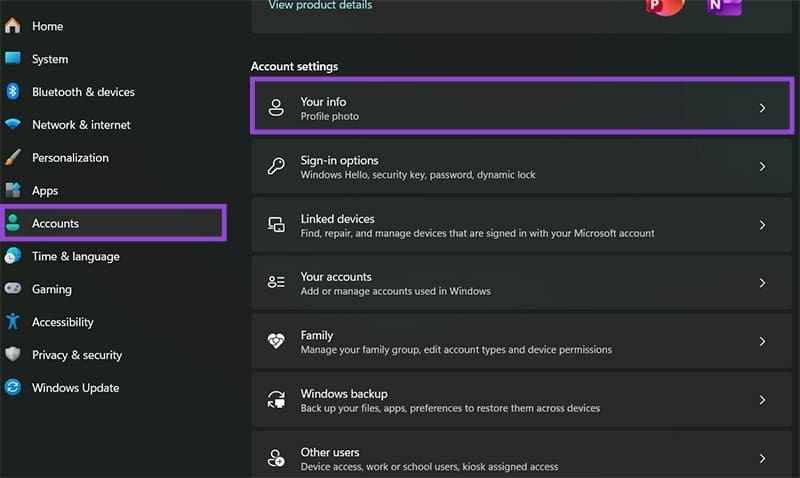
Step 2. If your account info suggests you’re using a local account, click on “Sign in with a Microsoft account instead.” Then, double-check to ensure your account is using the same email address as before you cloned the drive.
Step 3. Go to the Activation options in Settings and try to reactivate or use the Troubleshooter (as in Fix 1).
Fix 3: Alter the Serial Number of the Hard Drive
Windows stores the hard drive’s serial number as the “anchor” for its license, but you can fool your PC into thinking it has the old drive’s serial number.
However, this can’t be done with stock Windows software. Instead, you’ll need a third-party tool.
Step 1. Download and get acquainted with the Hard Disk Serial Number Changer utility. You can also research for other alternatives.
Step 2. Plug in the old hard drive into another PC.
Step 3. On both the PC with your newly cloned drive and the PC with the old one, go to the Command Prompt (right-click on start and select “Terminal (Admin)” then select Command Prompt in the new tab options).
Step 4. Enter the following command: wmic diskdrive get Name, Manufacturer, Model, InterfaceType, MediaType, SerialNumber
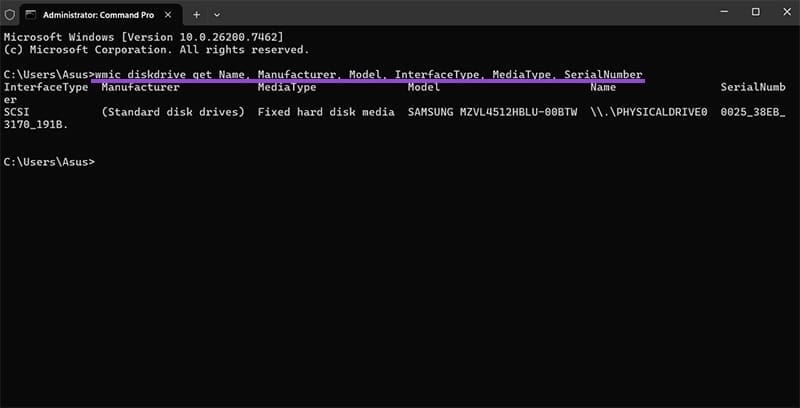
The information will be listed and organized based on drive letters (A-Z).
Step 5. Copy the contents of the result for both drives, then store them somewhere. Turn off the PC with the “old” hard drive.
Step 6. Run the hard drive renaming utility, then use it to change the serial number of the new drive to the old.
Step 7. Restart the PC.
Note that you might not be able to use the “old” drive anymore.
Fix 4: Contact Microsoft Support
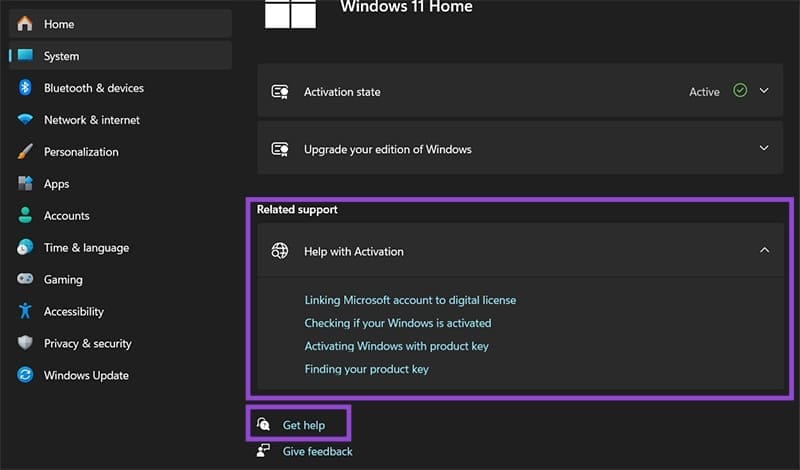
In most cases, Microsoft’s support team can provide more information on your Windows activation and license. You can access it from the “Activation” settings under “Get Help,” but you can also use the four specific links in the “Related Support” option. In either case, you’ll need to provide your Windows activation key and Microsoft account information.
Fix 5: Purchase and Activate a New Windows License
In rare cases, you may get a license for Windows deactivated after cloning drive because it wasn’t legitimate and a jail-braking program was used to trick the rest of the software. If this happened, Microsoft Support will likely inform you and prompt you to purchase a legitimate copy of Windows.
Was this helpful?
Last updated on 11 January, 2026
Read Next
 Windows 11 Deactivated After 24H2 Update
You signed up for Windows 11 and had the fully enabled version installed on your PC.
Windows 11 Deactivated After 24H2 Update
You signed up for Windows 11 and had the fully enabled version installed on your PC.
 How to Find and Remove Deactivated Friends From Facebook
How to Unfriend Deactivated Friends on Facebook First, you must visit the Friends section to remove the deactivated profiles from your Facebook account.
How to Find and Remove Deactivated Friends From Facebook
How to Unfriend Deactivated Friends on Facebook First, you must visit the Friends section to remove the deactivated profiles from your Facebook account.
 How to Fix Windows Clipboard Not Working on Windows 10
Basic Fixes Update Windows: Before starting, make sure that you're running the latest version of Windows.
How to Fix Windows Clipboard Not Working on Windows 10
Basic Fixes Update Windows: Before starting, make sure that you're running the latest version of Windows.
 3 Ways to Delete Old Windows Update Files From Windows 10 and 11
Method 1: Delete Old Windows Update Files via Settings The Storage section of the Settings app provides a detailed breakdown of all temporary files on your PC, including old Windows
3 Ways to Delete Old Windows Update Files From Windows 10 and 11
Method 1: Delete Old Windows Update Files via Settings The Storage section of the Settings app provides a detailed breakdown of all temporary files on your PC, including old Windows
 5 Best Ways To View Windows Update History In Windows 11
By constantly updating your Windows 11 operating system, you get access to new or improved features to deliver a better user experience.
5 Best Ways To View Windows Update History In Windows 11
By constantly updating your Windows 11 operating system, you get access to new or improved features to deliver a better user experience.
 4 Ways to Fix Windows Terminal Not Opening on Windows 11
Fix 1: Ensure Windows Terminal Is Not Disabled If you cannot launch Windows Terminal via the Start menu or Run dialog box, ensure the app is not disabled on your
4 Ways to Fix Windows Terminal Not Opening on Windows 11
Fix 1: Ensure Windows Terminal Is Not Disabled If you cannot launch Windows Terminal via the Start menu or Run dialog box, ensure the app is not disabled on your
 3 Ways to Fix Mouse Keeps Scrolling Automatically Windows 10 and Windows 11
https://youtu.be/1UZ3PWNr-lE Try Basic Fixes Disconnect and reconnect the mouse: Unplug your mouse cable or wireless adapter from your computer and reconnect it to a different port.
3 Ways to Fix Mouse Keeps Scrolling Automatically Windows 10 and Windows 11
https://youtu.be/1UZ3PWNr-lE Try Basic Fixes Disconnect and reconnect the mouse: Unplug your mouse cable or wireless adapter from your computer and reconnect it to a different port.
 7 Best Fixes for Windows Update Error 0x800f081f in Windows 11
Microsoft regularly releases Windows updates to introduce new features and fix known issues.
7 Best Fixes for Windows Update Error 0x800f081f in Windows 11
Microsoft regularly releases Windows updates to introduce new features and fix known issues.
The article above may contain affiliate links which help support Guiding Tech. The content remains unbiased and authentic and will never affect our editorial integrity.