


Basic Fixes
- Check Network Connectivity: If you use WhatsApp without an internet connection, the app can’t fetch the Last Seen or Online status of a user. Further, ensure there isn’t any problem with your internet.
- Restart WhatsApp: If there’s a glitch, closing and restarting the app will help.
- Check if WhatsApp is down: If WhatsApp is facing downtime, not all services of the app may work. Check on DownDetector if the servers are facing an outage.
- Update WhatsApp: Install the latest version of WhatsApp for a bug-free experience. Check for an update on the Play Store or App Store.
Fix 1: Enable Your Last Seen and Online Status
When you disable Last Seen on your WhatsApp account, you can’t check it for other contacts. Make sure you have enabled it.
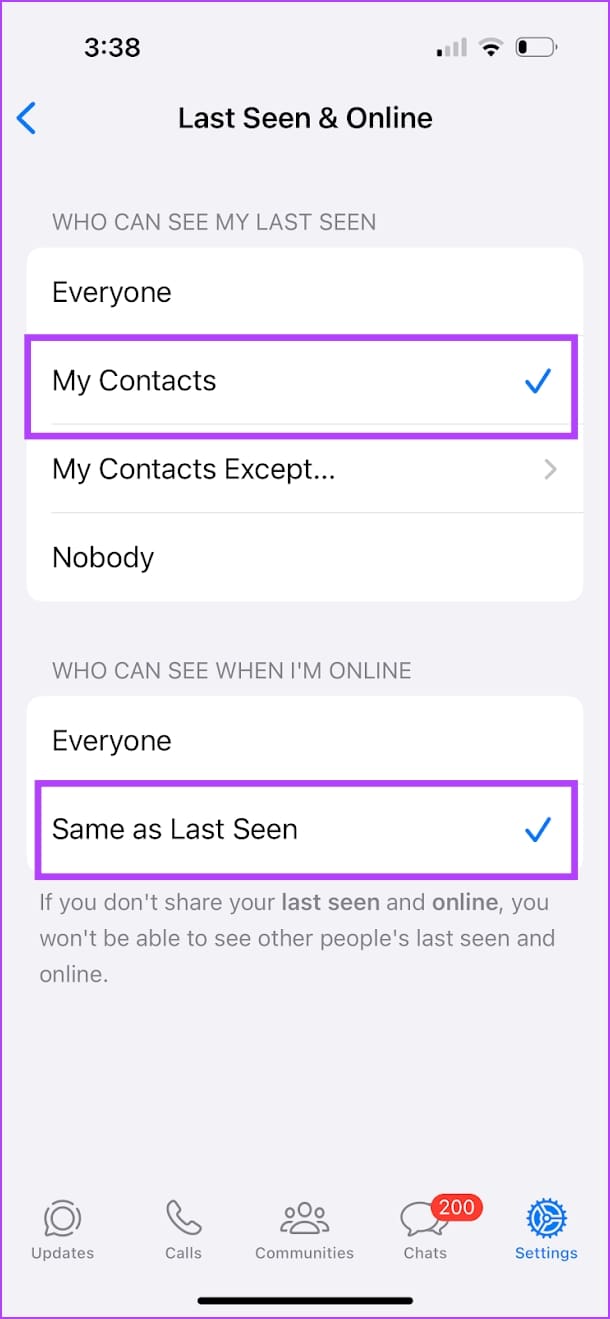
Step 1: Go to Settings and open the Privacy menu in WhatsApp. Go to the Last Seen and Online menu.
Step 2: Select My Contacts for Last Seen status and enable Same as Last Seen for Online status. This ensures all your contacts can view your last seen and online status, meaning you can view theirs, too.

Also Read: How to hide Last Seen and Online status on WhatsApp
Fix 2: Check if You’ve Been Blocked
If a user has blocked you on WhatsApp, you can’t check their Last Seen and online status. Here are a few ways to check if you’ve been blocked by someone on WhatsApp.
- You can’t see the person’s profile picture.
- You can’t see WhatsApp contacts’ about status.
- Your text messages, media files, and voice clips won’t reach them (you won’t see double checkmarks for them).
- You can’t add the person to any WhatsApp group.
- You cannot call them (voice or video) on WhatsApp.
Fix 3: Check if the User Has Saved Your Number
Most WhatsApp users only share their Last Seen status with contacts. If the person didn’t save your cellular number on their phone, you probably won’t see their Last Seen status. You can ask the recipient to add your mobile number to their contacts list.
Also Read: How to fix WhatsApp contacts not showing
Was this helpful?
Last updated on 18 April, 2024
1 Comment
Leave a Reply
Read Next
 How to Hide Last Seen and Online Status in WhatsApp
Hide Last Seen and Online Status For Everyone in WhatsApp Used by over two billion users worldwide, WhatsApp eventually added privacy features to hide your status, profile picture, and About
How to Hide Last Seen and Online Status in WhatsApp
Hide Last Seen and Online Status For Everyone in WhatsApp Used by over two billion users worldwide, WhatsApp eventually added privacy features to hide your status, profile picture, and About
 How to Hide Last Seen From Specific Contacts on WhatsApp
Thanks to WhatsApp’s new privacy tools, you no longer need to explain your latenight last seen to your friends or family members.
How to Hide Last Seen From Specific Contacts on WhatsApp
Thanks to WhatsApp’s new privacy tools, you no longer need to explain your latenight last seen to your friends or family members.
 5 Ways to See WhatsApp Status Without Being Seen
Method 1: Turning off Read Receipts Read receipts help you know who has seen your message, status, story, etc., on WhatsApp.
5 Ways to See WhatsApp Status Without Being Seen
Method 1: Turning off Read Receipts Read receipts help you know who has seen your message, status, story, etc., on WhatsApp.
 How to Appear Offline and Browse Facebook Privately
Disable Your Active Status on Facebook (Desktop) If you're browsing Facebook on your PC and wish to appear offline, turn off your Active Status to hide it from everyone or
How to Appear Offline and Browse Facebook Privately
Disable Your Active Status on Facebook (Desktop) If you're browsing Facebook on your PC and wish to appear offline, turn off your Active Status to hide it from everyone or
 How to Hide Last Seen on Truecaller
What Is Last Seen on Truecaller and How to Disable It The "Last Seen" Truecaller means the last time a person was active on the Truecaller app.
How to Hide Last Seen on Truecaller
What Is Last Seen on Truecaller and How to Disable It The "Last Seen" Truecaller means the last time a person was active on the Truecaller app.
 How to See Instagram Messages Without Being Seen
Your friends on Instagram can send you DMs or direct messages, delivered straight to the messages section.
How to See Instagram Messages Without Being Seen
Your friends on Instagram can send you DMs or direct messages, delivered straight to the messages section.
 Hide WhatsApp Online Status From One Person or Specific Contacts
 on iPhone Sometimes, you may not want certain people to know when you are online or using WhatsApp.
Hide WhatsApp Online Status From One Person or Specific Contacts
Hide WhatsApp Online Status From One Person or Specific Contacts on iPhone Sometimes, you may not want certain people to know when you are online or using WhatsApp.
 Why Is Delete for Everyone Not Showing or Working on WhatsApp
1.
Why Is Delete for Everyone Not Showing or Working on WhatsApp
1.
The article above may contain affiliate links which help support Guiding Tech. The content remains unbiased and authentic and will never affect our editorial integrity.


Please i can’t see a particular person last seen, the person hasn’t hide me , I haven’t hide the person too, the person can’t see mine too, buh on the same phone if I download different WhatsApp and use a different number I can see the person last seen, what should I do