New updates mean new features and fixes, although they’re not always well-advertised. If VS Code is your second language, you might be eager to know what the latest version brings to the coding table. In this article, we’ll be looking at what’s on offer with VS Code 1.117.
The New Features of VS Code 1.117
Let’s dive straight into the major additions to VS Code:
Bring Your Own Key for Business and Enterprise
Bring Your Own Key (BYOK) is a security feature that allows enterprises and teams to connect their own API keys for preferred or specialized models, particularly for compliance, performance, or cost reasons, and supporting providers like Google, Ollama, OpenRouter, and OpenAI. Now VS Code allows those models to be used in conjunction with its own chat.
This is good news for users of GitHub Copilot, Business or Enterprise. Administrators can add language-model extensions and built-in providers that the organization uses. What’s more, usage and subscription rates are no longer locked into what VS Code offers.
That said, this feature, enabled by default, doesn’t extend to everything. There are still limits to what introduced models can do, mainly being restricted to chat. Inline suggestions won’t apply. In addition, Copilot service APIs will also be required for things like side queries and repository indexing.
Terminal Improvements
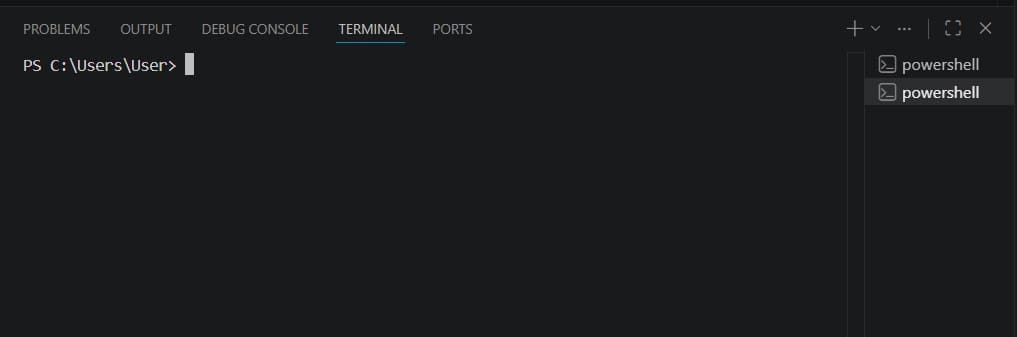
With the new update, GitHub Copilot CLI is now able to launch from any terminal profile; a big step up from failing to launch when choosing it from the profile picker.
In addition, VS Code now offers enhanced shell recognition, giving everything from Copilot CLI to Google Gemini a better workflow efficiency. They will be referred to by their model in the terminal, and no longer listed as simply “node.”
Finally, status notifications for long-running background terminal commands will also show up in chat, saving users the trouble of having to switch to the terminal to monitor their progress.
Better Chats

Chat responses in sessions have been improved with incremental additions being made in a few areas. This includes:
- Incremental rendering – Chats can now be rendered block by block rather than on a timer. It’s a small change, but one that makes responses feel faster.
- Buffering – If incremental rendering is still too slow, you have the option to display responses as they’re being buffered, with the understanding that the rawer side of generation will display in the meantime.
- Animation style – Choose the style of the animation in which rendering takes place. Do you want your code to slide in or fade in?
Improvements to Agents
Even though the VS Code Agents App is only available to Insiders as a preview, there have still been some improvements made. This includes:
- Better sorting – Agent sessions can now be organized by recent activity and dates updated or modified.
- Polish – All-around visual improvements to the look and feel of VS Code Agent.
- Inline Changes – Making changes inline is easier to implement, spot, and compare with a better layout.
Language Improvements
The update also includes TypeScript 6.0.3, which fixes a few bugs and issues surrounding the coding language.
Was this helpful?
Last updated on 06 June, 2026
Read Next
 How to Create a QR Code for a Video
Step 1.
How to Create a QR Code for a Video
Step 1.
 6 Ways to Fix Google Chrome Error Code: Out of Memory on Windows
Basic Fixes Restart PC: Restart your PC to fix temporary bugs and glitches.
6 Ways to Fix Google Chrome Error Code: Out of Memory on Windows
Basic Fixes Restart PC: Restart your PC to fix temporary bugs and glitches.
 Top 4 Ways to Fix Google Not Sending a Security Code
Preliminary Fixes Check the Network Connection: A stable internet connection is essential for receiving security codes via email.
Top 4 Ways to Fix Google Not Sending a Security Code
Preliminary Fixes Check the Network Connection: A stable internet connection is essential for receiving security codes via email.
 How to Use the SEQ Field Code to Number a Word Document
How to Insert an SEQ Field in Microsoft Word In Microsoft Word, starting a simple numbered list requires typing a number, a period, and some text afterward.
How to Use the SEQ Field Code to Number a Word Document
How to Insert an SEQ Field in Microsoft Word In Microsoft Word, starting a simple numbered list requires typing a number, a period, and some text afterward.
 Amazon Prime Video – How to Fix Error Code 5004 or 5005
What Does Amazon Prime Video Error 5004 or 5005 Mean?
Amazon Prime Video – How to Fix Error Code 5004 or 5005
What Does Amazon Prime Video Error 5004 or 5005 Mean?
 8 Best ChatGPT Extensions for VS Code
1.
8 Best ChatGPT Extensions for VS Code
1.
 5 Ways to Fix Roblox Error Code 403
Preliminary Fixes Check internet stability: An unstable or weak connection can interrupt communication between your device and Roblox servers, causing access issues.
5 Ways to Fix Roblox Error Code 403
Preliminary Fixes Check internet stability: An unstable or weak connection can interrupt communication between your device and Roblox servers, causing access issues.
 How to Fix OneNote Error Code 0xE000002E
If you’re receiving the OneNote error code 0xE000002E, it means you’re experiencing a OneNote sync error.
How to Fix OneNote Error Code 0xE000002E
If you’re receiving the OneNote error code 0xE000002E, it means you’re experiencing a OneNote sync error.
The article above may contain affiliate links which help support Guiding Tech. The content remains unbiased and authentic and will never affect our editorial integrity.