How to Sign Out of All Devices on Netflix on the Web
If you can’t identify multiple devices or want to start afresh, consider signing out of all devices. Here’s how to log everyone out of Netflix using the web app.
Step 1: Open the Netflix website on your computer.
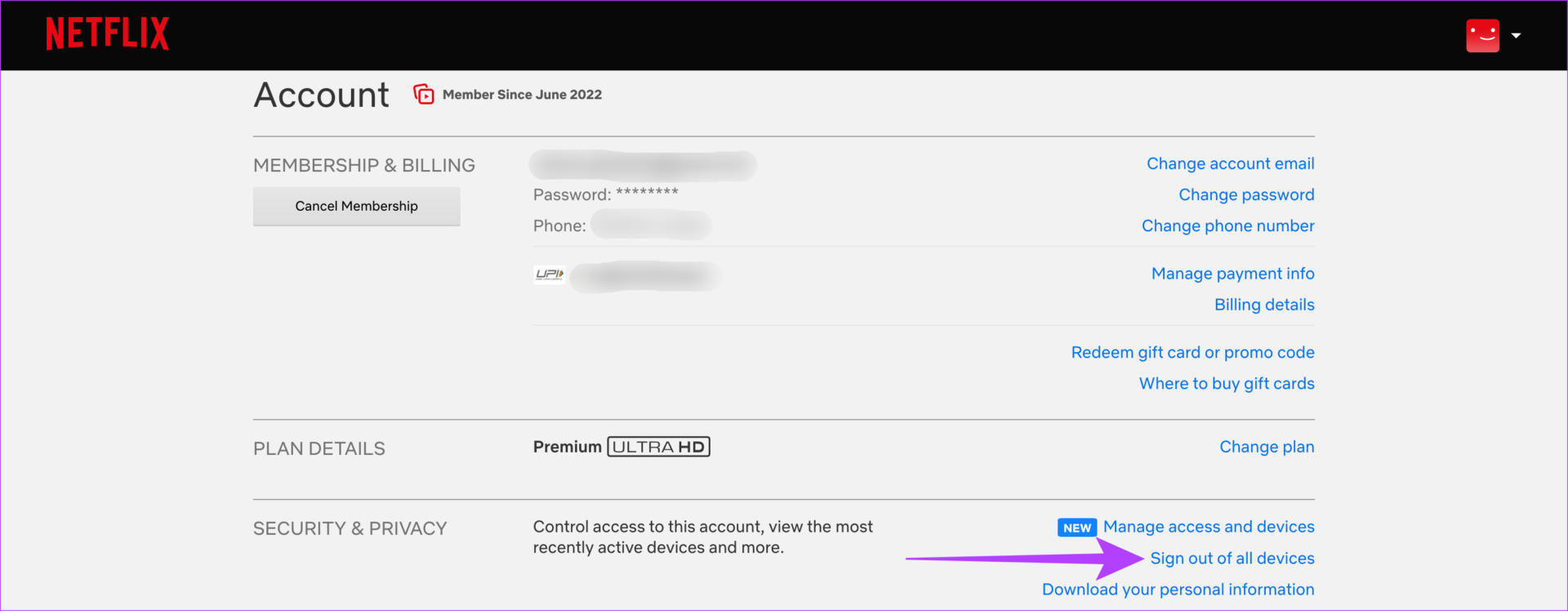
Step 2: Click on your profile at the top-right corner of the website or app > select Account.
Step 3: Tap on Sign out of all devices. Confirm your selection; you will be signed out of all devices, including the one you used to perform the action.
How to Sign Out of All Devices on Netflix Through Smartphone
Step 1: Open the Netflix app on your smartphone > tap on your profile at the top-right corner of the app.
Step 2: Then, select the Account option.
Step 3: Scroll down and select Sign out of all devices.

FAQs
The answer to this question depends on your account tier. The standard tier allows you to stream on up to two devices simultaneously, while the premium tier takes the count up to four. To learn more, you can check our in-depth comparison of the Netflix Standard vs. Premium plan.
The standard plan allows you to download content on two devices. The premium plan, however, lets you do this on six devices.
Netflix is trying to eradicate password sharing, so you may soon be unable to share your account with too many users. In a way, this is safer for you and your account.
Was this helpful?
Last updated on 25 July, 2024
Read Next
 How to Report Someone on Snapchat and What Happens Next
How to Report Someone on Snapchat The Snapchat app offers an identical interface on the iPhone and Android.
How to Report Someone on Snapchat and What Happens Next
How to Report Someone on Snapchat The Snapchat app offers an identical interface on the iPhone and Android.
 What Happens When You Sign out Apple ID on iPhone
What Happens When You Sign out of Apple ID on iPhone You can't view any data linked to your Apple ID - these include: Notes, Mail, Contacts, Calendars.
What Happens When You Sign out Apple ID on iPhone
What Happens When You Sign out of Apple ID on iPhone You can't view any data linked to your Apple ID - these include: Notes, Mail, Contacts, Calendars.
 How to Sign Out of Netflix From TV, Desktop, and Mobile
Are you wondering how to sign out of Netflix from different devices?
How to Sign Out of Netflix From TV, Desktop, and Mobile
Are you wondering how to sign out of Netflix from different devices?
 Netflix Standard vs. Premium: Which Netflix Plan Is Best for You
Netflix Subscription Plans At a Glance While Netflix provides three plans in total, the Standard and Premium plans take the cake.
Netflix Standard vs. Premium: Which Netflix Plan Is Best for You
Netflix Subscription Plans At a Glance While Netflix provides three plans in total, the Standard and Premium plans take the cake.
 5 Fixes for Can’t Sign Into Google Account on Browser
Fix 1: Check Your Internet Connection and Account Credentials When you encounter sign-in issues, it is always a good idea to rule out problems with your internet connection.
5 Fixes for Can’t Sign Into Google Account on Browser
Fix 1: Check Your Internet Connection and Account Credentials When you encounter sign-in issues, it is always a good idea to rule out problems with your internet connection.
 What Happens if You Delete Gmail App From Phone
What Happens to Emails After Deleting Gmail App?
What Happens if You Delete Gmail App From Phone
What Happens to Emails After Deleting Gmail App?
 What Happens to WhatsApp When You Change Phone or SIM Card
What Happens to WhatsApp When You Remove SIM Card?
What Happens to WhatsApp When You Change Phone or SIM Card
What Happens to WhatsApp When You Remove SIM Card?
 What Happens When You Clear Browsing Data in Chrome
What Counts as Browsing Data in Chrome When you browse the web using Google Chrome, the browser collects various types of data related to your internet activities.
What Happens When You Clear Browsing Data in Chrome
What Counts as Browsing Data in Chrome When you browse the web using Google Chrome, the browser collects various types of data related to your internet activities.
The article above may contain affiliate links which help support Guiding Tech. The content remains unbiased and authentic and will never affect our editorial integrity.