Ah, the context menu. A staple of Windows for decades now, but a feature that has seen a rather dramatic change with the shift from Windows 10 to 11. While 10’s might have been clunky and unwieldy, Windows 11’s replacement had a lot of people unhappy for different reasons.
The good news is, though, change may be on the horizon, with an X post teasing some big, customizable changes heading to the right-click menu. In this article, we’ll look at the potential overhaul coming to the Windows 11 context menu.
Why the Windows 11 Context Menu Disappointed
In the shift from Windows 10 to 11, users were promised a revised and streamlined context menu. Which is fair: the previous OS’s menu stretched from the top of the screen to the bottom in some cases, has a slew of functions, features, and third-party software tasks, and a shell extension collapsing under its own weight.
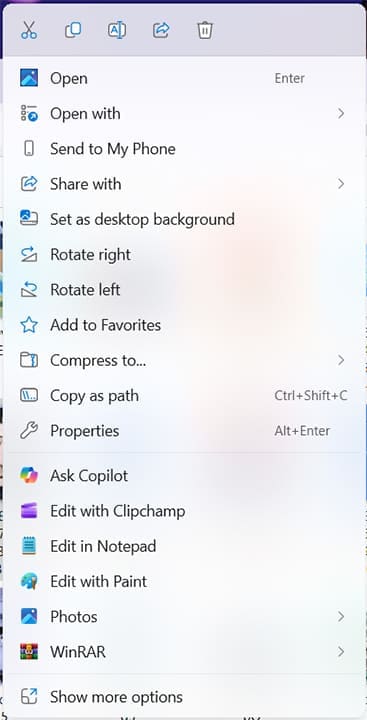
So, why were users unhappy with the replacement? There are a few reasons, actually:
- The simplified context menu left out many crucial functions that users had been hardwired for years to look for. Want to paste a file to the Desktop? The option won’t appear on the initial context menu.
- Most of the advanced features were locked behind “Show more options,” requiring an extra click (not even a hover) and slowing down the process.
- The new context menu brought a lot of visual polish and neatness, but the visual simplicity paradoxically reminds users of what was and what could’ve been.
- The context menu still takes some time, in some instances, to properly start and appear, much like its predecessor.
- The context menu has grown in recent years, so much so that (despite hiding many features) the menu is almost as long as the one in Windows 10, but without the accessibility.
To many users, the context menu remained somewhat inconvenient while making the most often-used aspects harder to reach.
Changes on the Horizon
Microsoft, as part of Project K2, has been focusing on Windows 11’s pain points, aiming to get back to basics and fix the user experience. Many good steps have already been taken, such as additional Taskbar customization options, a new Start Menu, and a cleaner Widget Menu.
The Windows 11 right click menu has also seen some steps taken, such as the reintroduction of the Refresh button and (in the Preview builds at least) the direct Print button.
Earlier this month, Marcus Ash, Microsoft’s Lead for Design and Research on Windows Devices, posted on X that the context menu might be getting some updates, with a focus on simplicity and customization.
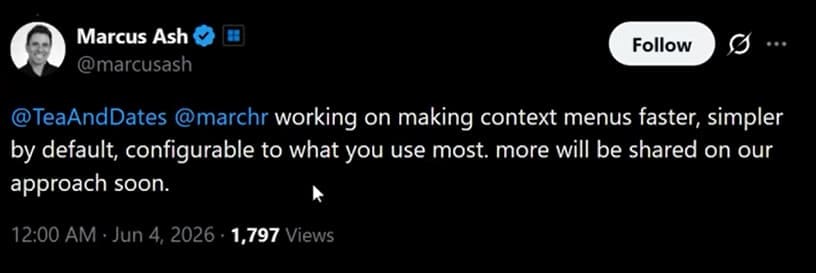
So what does this mean? Beyond the X post, there’s no way of knowing for sure until the changes are made concrete, but it definitely appears that Microsoft will allow users some measure of control over what they have in their context menu.
This might take the form of including frequent user actions in the context menu, custom grouping of functions, or maybe adding or removing functions, much like pinning things to the Taskbar. Whatever the case may be, change is coming, and the focus on agency is a promising one. Watch this space!
Was this helpful?
Last updated on 19 June, 2026
Read Next
 Xbox Mode Is Coming to Your PC – Here’s What to Expect
Let’s be honest, navigating Windows on a controller is a chore.
Xbox Mode Is Coming to Your PC – Here’s What to Expect
Let’s be honest, navigating Windows on a controller is a chore.
 How to Fix a Slow Windows 10 Desktop Right-Click (Context) Menu
The desktop right-click menu, otherwise known as the desktop context menu, provides instant access to numerous useful options ranging from aligning desktop icons to customizing display settings.
How to Fix a Slow Windows 10 Desktop Right-Click (Context) Menu
The desktop right-click menu, otherwise known as the desktop context menu, provides instant access to numerous useful options ranging from aligning desktop icons to customizing display settings.
 2 Ways to Disable the Show More Options Context Menu in Windows 11
Method 1: Revert to Old Context Menu Using Command Prompt Command Prompt is a command-line interpreter that lets you perform various complicated tasks on your PC with a few text
2 Ways to Disable the Show More Options Context Menu in Windows 11
Method 1: Revert to Old Context Menu Using Command Prompt Command Prompt is a command-line interpreter that lets you perform various complicated tasks on your PC with a few text
 11 Steps to Restore the Windows 11 Classic Context Menu (And a Temporary Fix)
How does it always seems like Microsoft manages to break two things every time it fixes one?
11 Steps to Restore the Windows 11 Classic Context Menu (And a Temporary Fix)
How does it always seems like Microsoft manages to break two things every time it fixes one?
 Enabling the Right-Click Context Menu in Windows 11 Terminal
The Windows 11 Terminal allows you to use both the features of the Command Prompt and the PowerShell run dialog in one package.
Enabling the Right-Click Context Menu in Windows 11 Terminal
The Windows 11 Terminal allows you to use both the features of the Command Prompt and the PowerShell run dialog in one package.
 OneDrive Context Menu Missing – Windows 11 Fixes
Windows 11 makes OneDrive integration seamless with the operating system, making sending and retrieving files a breeze.
OneDrive Context Menu Missing – Windows 11 Fixes
Windows 11 makes OneDrive integration seamless with the operating system, making sending and retrieving files a breeze.
 Remove “Ask Copilot” From the Right-Click Context Menu With These Tips
Copilot is a great tool for helping out in a pinch, but sometimes it really does seem that Windows is forcing it upon users at every opportunity.
Remove “Ask Copilot” From the Right-Click Context Menu With These Tips
Copilot is a great tool for helping out in a pinch, but sometimes it really does seem that Windows is forcing it upon users at every opportunity.
 Fix: Microsoft Office Stuck on Getting Things Ready on Windows 11
Basic Fix Close other programs: This may be necessary, especially since other running programs may interfere with installation.
Fix: Microsoft Office Stuck on Getting Things Ready on Windows 11
Basic Fix Close other programs: This may be necessary, especially since other running programs may interfere with installation.
The article above may contain affiliate links which help support Guiding Tech. The content remains unbiased and authentic and will never affect our editorial integrity.